
مقدمة
Thank you for choosing the Gree 4-in-1 Air Cooler and Purifier. This appliance is designed to provide a comfortable indoor environment by offering cooling, heating, humidifying, and air purifying functions. Please read this manual thoroughly before operation to ensure proper use, maintenance, and safety.
تعليمات السلامة
- قم دائمًا بتوصيل الجهاز بمأخذ طاقة مؤرض بالجهد الصحيحtage (220-240V, 60Hz).
- Do not operate the unit with a damaged power cord or plug. Contact qualified service personnel for repairs.
- Keep the unit away from water and other liquids to prevent electric shock.
- تأكد من وضع الوحدة على سطح ثابت ومستوٍ لمنع الانقلاب.
- لا تدخل أشياء في فتحات التهوية.
- Unplug the unit before cleaning, refilling water, or performing any maintenance.
- لا يُقصد استخدام هذا الجهاز من قبل الأشخاص ذوي القدرات البدنية أو الحسية أو العقلية المحدودة، أو الذين يفتقرون إلى الخبرة والمعرفة، ما لم يتم الإشراف عليهم أو إعطائهم تعليمات.
- احتفظ بالأطفال والحيوانات الأليفة بعيدًا عن الوحدة أثناء التشغيل.
محتويات الحزمة
تأكد من وجود جميع العناصر في العبوة:
- Gree 4-in-1 Air Cooler and Purifier Unit (Model KSWD-04S66RDG)
- جهاز التحكم عن بعد
- دليل التعليمات
المنتج انتهىview
Familiarize yourself with the components of your Gree 4-in-1 Air Cooler and Purifier.
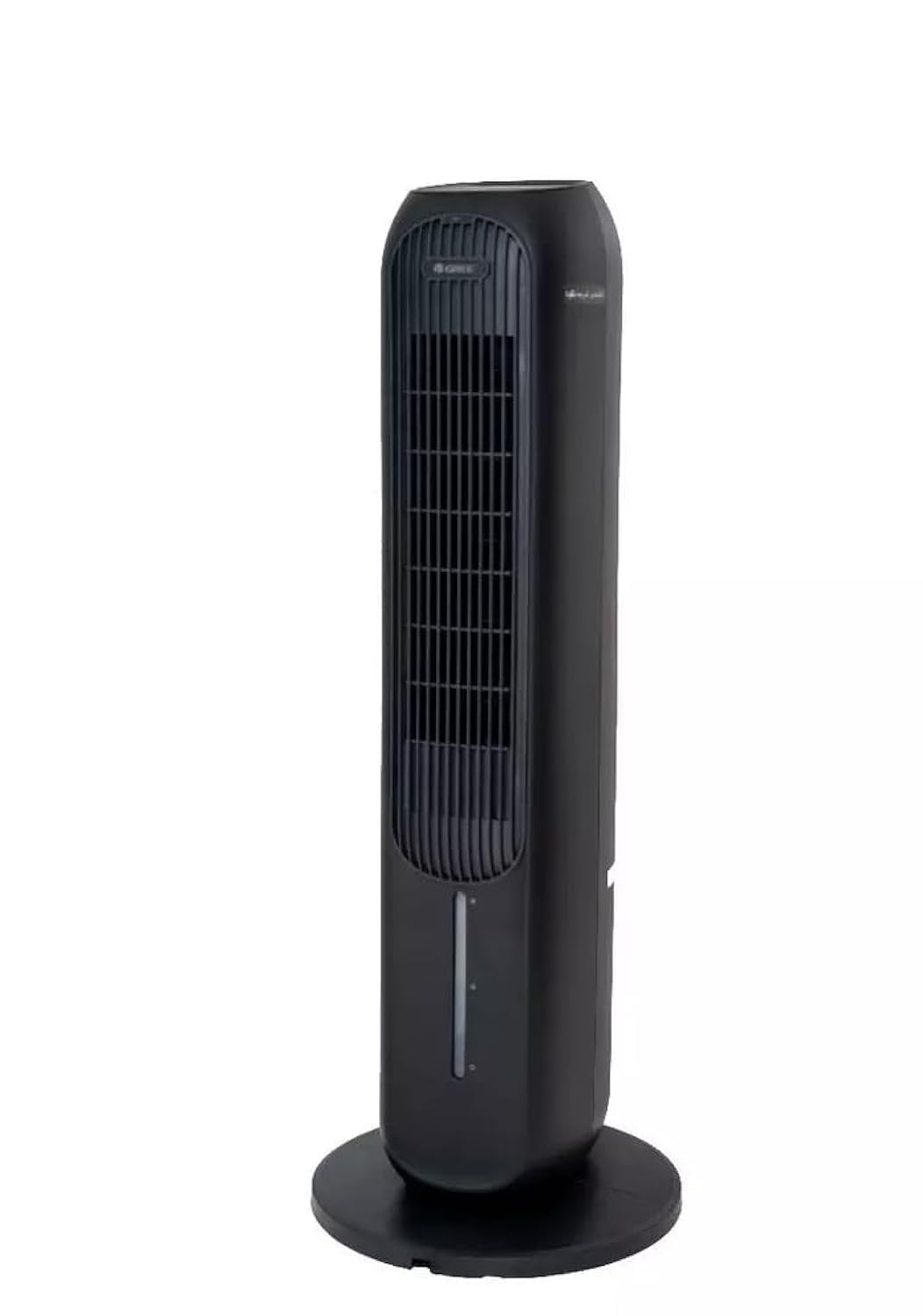
المكونات الرئيسية:
- لوحة التحكم: تقع في الجزء العلوي من الوحدة للتشغيل اليدوي.
- مخرج الهواء: Where treated air is discharged.
- خزان المياه: Removable tank for filling water for cooling and humidifying functions.
- فلتر الغبار: Located at the rear, designed to filter airborne particles.
- مستقبل التحكم عن بعد: For operating the unit with the remote.
- سلك الطاقة: للاتصال بمأخذ كهربائي.
يثبت
- فك التعبئة: أخرج الوحدة من عبوتها بعناية. احتفظ بمواد التغليف للتخزين أو النقل في المستقبل.
- الموقع: Place the air cooler on a firm, level surface. Ensure there is at least 20 cm of clear space around the unit for proper airflow. Do not block the air inlet or outlet.
- Water Tank Filling (for Cooling/Humidifying):
- اسحب خزان المياه من الجزء الخلفي السفلي للوحدة.
- Fill the tank with clean tap water. Do not exceed the 'MAX' fill line.
- For enhanced cooling, you may add ice packs (not included) to the water tank.
- أدخل خزان الماء بحرص في الوحدة حتى تسمع صوت طقطقة عند تثبيته في مكانه.
- توصيل الطاقة: Plug the power cord into a suitable 220-240V, 60Hz electrical outlet.
تعليمات التشغيل
The unit can be operated using the control panel on top or the remote control.
لوحة التحكم / وظائف التحكم عن بعد:
- زر الطاقة: اضغط لتشغيل أو إيقاف تشغيل الوحدة.
- زر السرعة: يتنقل بين 3 سرعات للمروحة: منخفضة، متوسطة، عالية.
- زر الوضع: Selects operating modes: Cooling, Heating, Humidifying, Purifying.
- زر التأرجح: يقوم بتفعيل أو تعطيل وظيفة التذبذب لتوزيع الهواء على نطاق أوسع.
- زر المؤقت: Sets the operating timer (e.g., 1-12 hours).
- Anion/Purify Button: Activates the air purifying function (if applicable).
أوضاع التشغيل:
- وضع التبريد: يستخدم تبخر الماء لتبريد الهواء. تأكد من ملء خزان الماء.
- وضع التدفئة: Provides warm air. Do not block the air outlet during heating.
- وضع الترطيب: Adds moisture to the air. Ensure the water tank is filled.
- Purifying Mode: Activates the air filter and anion function to clean the air.
صيانة
تضمن الصيانة المنتظمة الأداء الأمثل وتطيل عمر وحدتك.
تنظيف مرشح الغبار:
- افصل الوحدة عن مأخذ الطاقة.
- Locate the dust filter cover at the rear of the unit and remove it.
- Gently remove the dust filter.
- Clean the filter with a soft brush or vacuum cleaner. For heavy dust, rinse with water and mild detergent. Ensure it is completely dry before reinserting.
- Reinstall the dust filter and secure the cover.
تنظيف خزان المياه:
- افصل الوحدة عن التيار الكهربائي.
- قم بإزالة خزان المياه وإفراغ أي ماء متبقي.
- نظف الخزان بقطعة قماش ناعمة ومنظف معتدل. اشطفه جيداً لإزالة جميع بقايا الصابون.
- اترك الخزان يجف تماماً في الهواء قبل إعادة إدخاله.
التنظيف الخارجي:
- امسح الجزء الخارجي من الوحدة بقطعة قماش ناعمة دamp قطعة قماش.
- لا تستخدم المنظفات أو المذيبات الكاشطة.
تخزين:
- If storing the unit for an extended period, ensure the water tank is empty and clean, and the dust filter is clean and dry.
- قم بتخزين الوحدة في مكان بارد وجاف، ويفضل أن يكون ذلك في عبوتها الأصلية.
استكشاف الأخطاء وإصلاحها
قبل الاتصال بدعم العملاء، يرجى الرجوع إلى دليل استكشاف الأخطاء وإصلاحها التالي للمشكلات الشائعة.
| مشكلة | السبب المحتمل | حل |
|---|---|---|
| الوحدة لا تعمل | لا يوجد مصدر طاقة؛ سلك الطاقة غير موصول بشكل صحيح؛ عطل في مأخذ الطاقة. | تحقق من توصيل سلك الطاقة؛ جرب منفذًا كهربائيًا مختلفًا؛ تحقق من قاطع الدائرة. |
| ضعف تدفق الهواء | Dust filter clogged; Air inlet/outlet blocked. | Clean the dust filter; Ensure no obstructions around the unit. |
| No cooling/humidifying effect | Water tank empty; Cooling/Humidifying mode not selected. | Fill the water tank; Select the appropriate mode. |
| ضوضاء غير عادية | الوحدة ليست على سطح مستوٍ؛ جسم غريب بالداخل. | Place on a stable, level surface; Unplug and check for obstructions. |
تحديد
| ميزة | التفاصيل |
|---|---|
| رقم الموديل | KSWD-04S66RDG |
| الوظائف | Cooling, Heating, Humidifying, Purifying |
| لون | أسود |
| نوع التحكم | جهاز التحكم عن بعد |
| سرعات المروحة | 3 |
| مزود الطاقة | 220-240 فولت، 60 هرتز |
| واتtage | 45 واط |
| الأبعاد (D x W x H) | 29 × 29 × 103 سم |
| وزن العنصر | 30 كجم |
| مادة | بلاستيك |
| ميزة خاصة | فلتر الغبار |
| نوع التثبيت | قائما بذاته |
| وضع التشغيل | اوتوماتيكي |
الضمان والدعم
This Gree 4-in-1 Air Cooler and Purifier (Model KSWD-04S66RDG) comes with a two-year agent warranty covering manufacturing defects and malfunctions under normal use. Please retain your purchase receipt as proof of purchase for warranty claims.
For Technical Support or Warranty Claims:
Please contact your local authorized Gree service center or the retailer from whom you purchased the product. Refer to your warranty card or the retailer's information for specific contact details.