
مقدمة
This manual provides detailed instructions for the installation, operation, and maintenance of your DELLA 6000 BTU Window Air Conditioner. Please read this manual thoroughly before using the appliance and retain it for future reference.
معلومات السلامة
اتبع دائمًا احتياطات السلامة الأساسية عند استخدام الأجهزة الكهربائية لتقليل خطر الحريق والصدمة الكهربائية وإصابة الأشخاص.
- تأكد من تأريض الوحدة بشكل صحيح.
- لا تقم بتشغيل الوحدة بسلك أو قابس تالف.
- لا تقم بإدخال أصابعك أو أي أجسام غريبة في مدخل/مخرج الهواء.
- افصل الوحدة عن التيار الكهربائي قبل التنظيف أو إجراء أي صيانة.
- احتفظ بالمواد القابلة للاشتعال بعيدًا عن الوحدة.
المنتج انتهىview
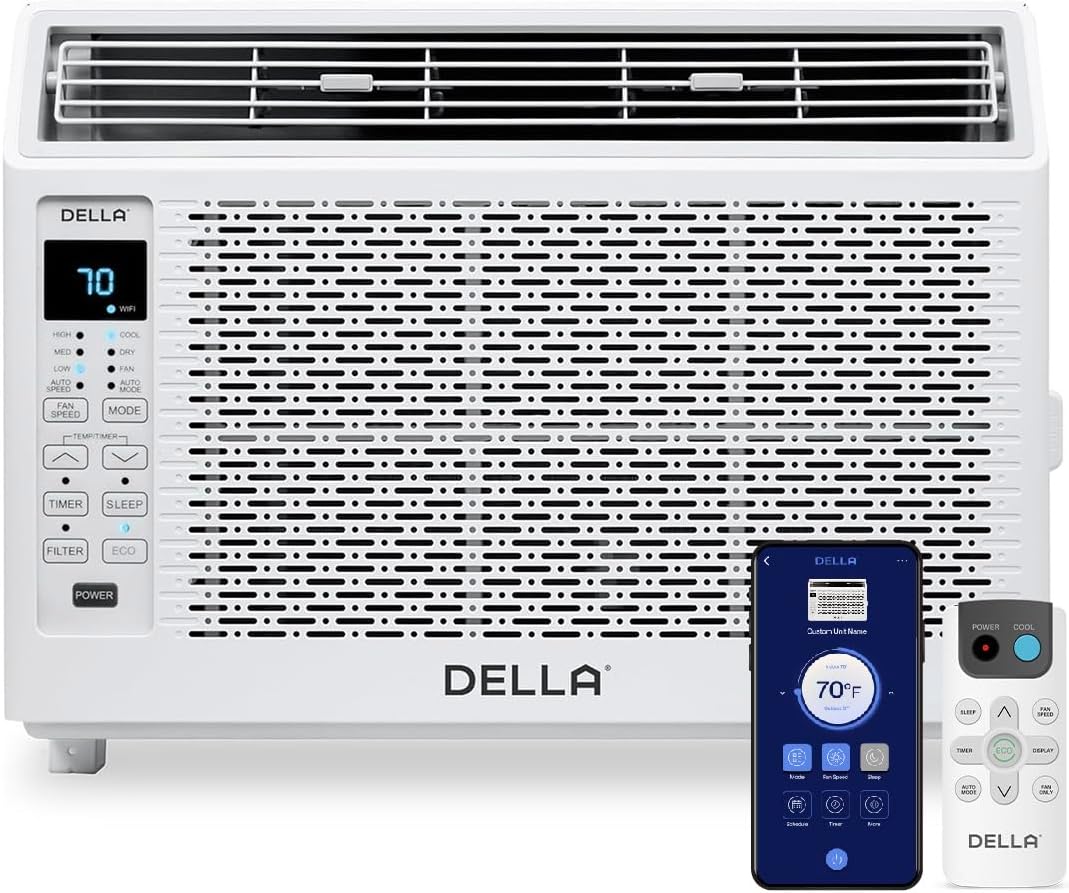
Figure 1: DELLA 6000 BTU Window Air Conditioner Unit, Remote Control, and Smartphone App Interface.
لوحة التحكم
The unit features an intuitive control panel with various buttons and indicator lights for easy operation.
- زر الطاقة: يقوم بتشغيل الوحدة أو إيقاف تشغيلها.
- زر الوضع: Cycles through Cool, Dry (Dehumidifier), Fan, Auto Mode, and ECO Mode.
- زر سرعة المروحة: Adjusts fan speed (High, Med, Low, Auto Speed).
- Temp/Timer Buttons: Adjusts temperature settings or sets timer.
- زر النوم: Activates sleep mode for quiet, energy-efficient operation overnight.
- زر الفلتر: يشير إلى متى يحتاج الفلتر إلى التنظيف.
- مؤشر واي فاي: يظهر حالة الاتصال بشبكة Wi-Fi.
جهاز التحكم عن بعد

Figure 2: Remote Control for the DELLA Air Conditioner.
The remote control allows for convenient operation of all unit functions from a distance. Ensure batteries are correctly installed.
تثبيت
The DELLA 6000 BTU Window Air Conditioner features a T-design for simplified installation.
خطوات التثبيت

Figure 3: T-design installation allows for flexible window opening.

Figure 4: Simplified 3-step installation process.
- Step 1: Secure into window frame. Place the unit into the window opening, ensuring it is securely seated.
- Step 2: Mount with four screws. Fasten the unit to the window frame using the provided screws for stability.
- Step 3: Extend side panels into wall. Extend the accordion side panels to fill the gap between the unit and the window frame, providing insulation and reducing air leaks.
مكونات مجموعة التثبيت

Figure 5: Included installation kit components.
The installation kit includes filler panels, insulation strips, lock frame & sash lock, screws, window sash seal, and a top mounting rail to ensure a secure and efficient installation.
أبعاد المنتج

Figure 6: Unit dimensions and recommended window opening.
The unit dimensions are approximately 15.94"D x 16.02"W x 12.05"H. It is designed for window widths between 23"-34" and requires at least 14.5" vertical clearance.
تعليمات التشغيل
Modes and Fan Speeds

Figure 7: Available operating modes and fan speeds.
The unit offers 5 operating modes (Cool, Auto, Dehumidify, Fan Only, ECO Mode) and 4 fan speeds (Auto, Low, Mid, High) to suit various comfort needs. Use the 'Mode' and 'Fan Speed' buttons on the control panel or remote to select your desired settings.
التحكم في درجة الحرارة
Use the up and down arrow buttons on the control panel or remote to set your desired temperature. The digital display will show the current setting.
Smart Features (Wi-Fi Control)

Figure 8: Control your unit wirelessly with the Della+ APP.

Figure 9: Della+ app supports Google Assistant and Alexa for voice control.
Download the free Della+ app to control your unit from anywhere. The app allows for remote control, scheduling, and integration with smart home systems like Google Assistant and Alexa.
Geo Location Function

Figure 10: Smart Geo Location feature for automatic operation.
The Geo Location feature allows the unit to automatically turn on or off based on your proximity to your home. This feature can be configured via the Della+ app.
Video 1: Demonstration of the Geo Location Function setup and customization within the Della+ app.
وضع السكون

Figure 11: Intelligent sleep mode adjusts temperature for optimal comfort.
Intelligent sleep mode automatically adjusts the temperature overnight to maintain comfort and save energy. Activate it using the 'Sleep' button.
وظيفة المؤقت
The 24-hour auto on/off timer allows you to program the unit to turn on or off at specific times, enhancing convenience and energy efficiency.
صيانة
تنظيف الفلتر القابل لإعادة الاستخدام

Figure 12: The unit features a washable and reusable filter.
The unit is equipped with a washable and reusable filter. A clean filter helps maintain optimal cooling performance and air quality. When the 'Filter' indicator light illuminates, it's time to clean the filter.
- قم بإيقاف تشغيل مكيف الهواء وافصله.
- قم بإزالة اللوحة الأمامية واسحب فلتر الهواء للخارج.
- اغسل الفلتر بالماء الدافئ والصابون، ثم اشطفه جيدًا.
- اترك الفلتر حتى يجف تمامًا قبل إعادة إدخاله.
- أعد تركيب اللوحة الأمامية.
الرعاية العامة
- قم بتنظيف الجزء الخارجي من الوحدة باستخدام فرشاة ناعمة دamp قطعة قماش.
- لا تستخدم كيماويات مركزة أو منظفات كاشطة.
- تأكد من خلو منطقة التصريف من أي عوائق.
استكشاف الأخطاء وإصلاحها
If you experience issues with your air conditioner, refer to the following common problems and solutions:
| مشكلة | السبب المحتمل | حل |
|---|---|---|
| الوحدة لا تعمل | لا يوجد تيار كهربائي؛ تم فصل قاطع الدائرة؛ تم فصل الجهاز عن الكهرباء. | Check power supply; reset circuit breaker; ensure plug is fully inserted. |
| الوحدة لا تبرد بشكل فعال | فلتر هواء متسخ؛ مدخل/مخرج هواء مسدود؛ الغرفة كبيرة جدًا؛ النوافذ/الأبواب مفتوحة. | Clean air filter; clear obstructions; ensure unit is sized correctly for room; close windows/doors. |
| عملية صاخبة | أجزاء مفكوكة؛ الوحدة غير مستوية؛ انسداد المروحة. | Check for loose components; ensure unit is level; remove any fan obstructions. |
| الماء يقطر في الخارج | التشغيل العادي (التكثيف). | This is normal during cooling. Ensure proper drainage. |
تحديد
| ميزة | التفاصيل |
|---|---|
| العلامة التجارية | ديلا |
| معلومات النموذج | 048-TL-W6KWD |
| أبعاد المنتج | 15.94 × 16.02 × 12.05 بوصة |
| رقم موديل السلعة | 048-TL-W6KWD |
| كفاءة | كفاءة الطاقة |
| سعة | 0.5 طن |
| ضوضاء | 51 ديسيبل |
| نوع التثبيت | نافذة |
| رقم القطعة | 048-TL-W6KW_2 |
| عامل الشكل | مكيف هواء النافذة |
| المميزات الخاصة | جهاز التحكم عن بعد |
| المجلدtage | 115 فولت (تيار متردد) |
| واتtage | 517.5 واط |
| البطاريات متضمنة؟ | لا |
| مساحة الأرضية | 250 قدم مربع |
| قوة التبريد | 6000 وحدة حرارية بريطانية |
| تصنيف النجوم BEE | نعم |
| نسبة كفاءة الطاقة الموسمية (SEER) | 11 |
| مصدر الطاقة | كهرباء سلكية |
الضمان والدعم
Your DELLA 6000 BTU Window Air Conditioner comes with a ضمان لمدة سنة واحدة. For any inquiries or technical assistance, Della provides دعم العملاء على مدار الساعة طوال أيام الأسبوع.
يرجى زيارة Della Store on Amazon لمزيد من المعلومات أو للاتصال بالدعم.