
1. المقدمة
Thank you for choosing the AWEI T29 Wireless Earbuds. These earbuds feature Bluetooth 5.2 technology for stable connectivity, Active Noise Cancellation (ANC) for an immersive audio experience, and IPX6 water resistance for durability. This manual provides detailed instructions on how to set up, operate, and maintain your earbuds to ensure optimal performance.
2. محتويات العبوة
يرجى التأكد من وجود جميع العناصر في الحزمة الخاصة بك:
- Wireless Bluetooth Headset (Earbuds)
- Wireless Bluetooth Headset Charging Case
- كابل شحن USB-C
- User Instructions (This Manual)
3. انتهى المنتجview
The AWEI T29 earbuds are designed for comfort and high-quality audio. The compact charging case protects and recharges your earbuds on the go.

Image: AWEI T29 Wireless Earbuds and Charging Case. This image displays the two earbuds placed within their open charging case, showcasinتصميمهم الأنيق.
4. الإعداد
4.1 شحن سماعات الأذن والعلبة
قبل الاستخدام الأول، قم بشحن سماعات الأذن وعلبة الشحن بالكامل.
- قم بتوصيل كابل الشحن USB-C المرفق بمنفذ الشحن الموجود على العلبة وبمصدر الطاقة.
- Place the earbuds into the charging case. Ensure they are properly seated; indicator lights on the earbuds will confirm charging status.
- The charging case takes approximately 1 hour to fully charge.

Image: AWEI T29 Earbuds Charging Indicator. This image illustrates the charging case with earbuds inside, showing a visual representation of battery life and charging time.
4.2 الاقتران الأولي بالجهاز
ستدخل سماعات الأذن تلقائيًا في وضع الاقتران عند إزالتها من علبة الشحن.
- افتح علبة الشحن. سيتم تشغيل سماعات الأذن تلقائيًا.
- على هاتفك الذكي أو جهازك اللوحي أو أي جهاز آخر يدعم تقنية Bluetooth، انتقل إلى إعدادات Bluetooth.
- قم بتشغيل البلوتوث والبحث عن الأجهزة المتاحة.
- Select "AWEI T29" from the list of devices to connect.
- Once connected, the earbuds will automatically reconnect to the last paired device when removed from the case.
5. تعليمات التشغيل
5.1 تشغيل/إيقاف التشغيل
- تشغيل الطاقة: افتح علبة الشحن، وسيتم تشغيل سماعات الأذن تلقائيًا.
- إيقاف التشغيل: أعد وضع سماعات الأذن في علبة الشحن وأغلق الغطاء. سيتم إيقاف تشغيلها تلقائيًا.
5.2 عناصر التحكم باللمس الذكية
The AWEI T29 earbuds feature intuitive touch controls on each earbud:
- تشغيل/إيقاف مؤقت: اضغط مرة واحدة على أي سماعة أذن.
- الأغنية التالية: اضغط مرتين على سماعة الأذن اليمنى.
- الأغنية السابقة: اضغط مرتين على سماعة الأذن اليسرى.
- رفع الصوت: انقر ثلاث مرات على سماعة الأذن اليمنى.
- اخفض الصوت: انقر ثلاث مرات على سماعة الأذن اليسرى.
- الرد/إنهاء المكالمة: Single tap either earbud during an incoming call.
- رفض المكالمة: اضغط لفترة طويلة على أي سماعة أذن أثناء المكالمة الواردة.
- تنشيط مساعد الصوت: اضغط لفترة طويلة على سماعة الأذن اليسرى.
- ANC Mode Cycle (ANC On/Off/Transparency): اضغط لفترة طويلة على سماعة الأذن اليمنى.
5.3 إلغاء الضوضاء النشط (ANC)
The built-in intelligent chip with ANC effectively reduces ambient noise, providing a clearer listening experience for music and calls.

Image: Person wearing AWEI T29 Earbuds with Active Noise Cancellation. This image shows a person wearing the earbuds, illustrating the noise cancellation feature in action.

Image: ANC Effectiveness Graph for AWEI T29 Earbuds. This graph visually represents the reduction of ambient noise before and after activating the Active Noise Cancellation feature.
5.4 جودة صوت عالية الدقة
The AWEI T29 earbuds are equipped with a 13mm speaker, Nano Titanium Diaphragms for clearer treble, and a Pure Copper Voice Coil for vigorous bass, delivering an immersive sound experience.
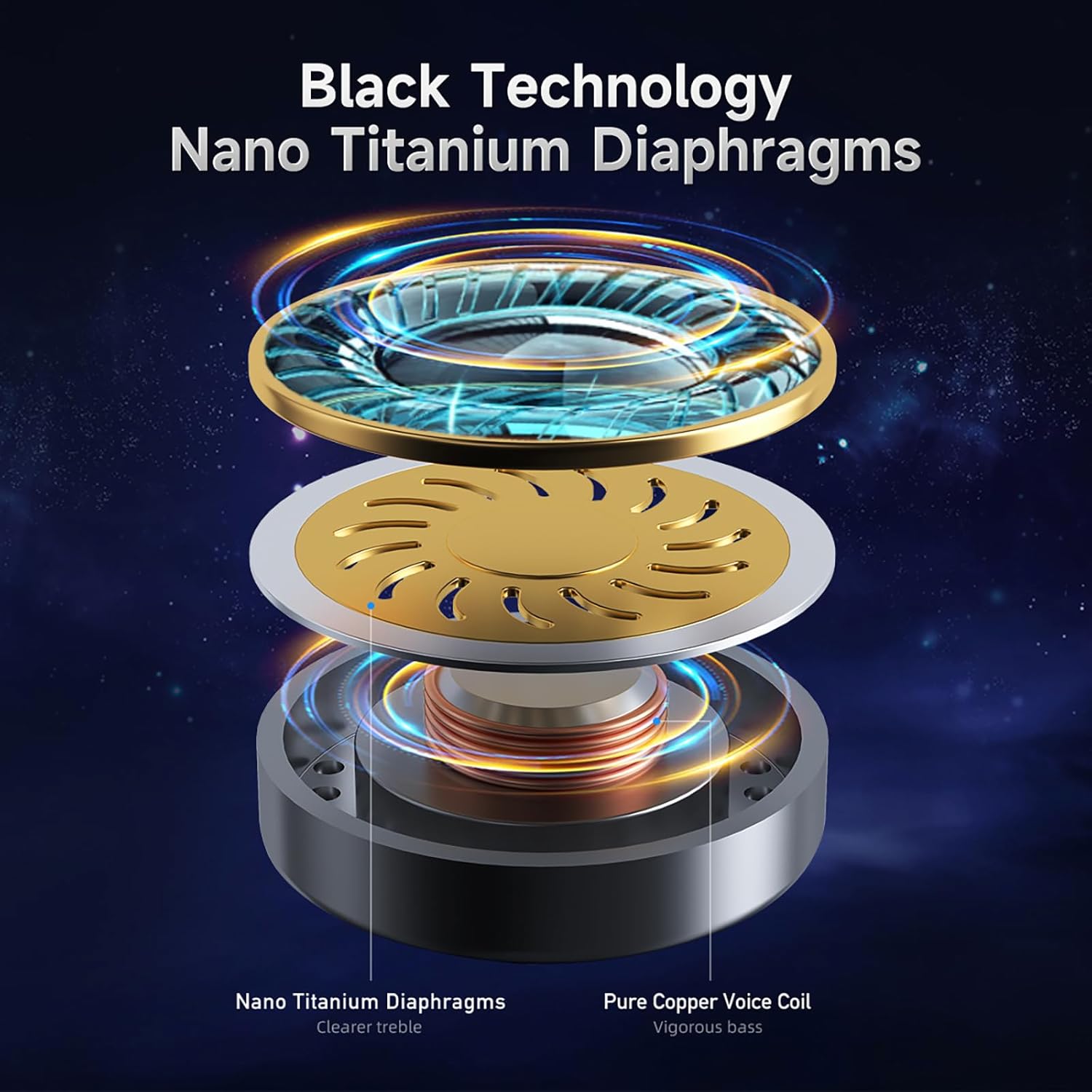
Image: AWEI T29 Earbud Internal Components Diagram. This diagram illustrates the internal structure of the earbud, highlighting the Nano Titanium Diaphragms and Pure Copper Voice Coil.

Image: AWEI T29 Earbud Sound Quality Features. This image shows a cutaway view of an earbud, emphasizing its internal design for high-definition sound quality and reduction of the stethoscope effect.
6. الصيانة
6.1 التنظيف
للحفاظ على الأداء الأمثل والنظافة:
- امسح سماعات الأذن وعلبة الشحن برفق باستخدام قطعة قماش ناعمة وجافة وخالية من الوبر.
- لا تستخدم المنظفات الكاشطة أو المذيبات أو المواد الكيميائية القاسية.
- تأكد من أن نقاط اتصال الشحن نظيفة وخالية من الحطام.
6.2 مقاومة الماء
The AWEI T29 earbuds are rated IPX6 waterproof, meaning they are resistant to strong jets of water. This makes them suitable for workouts and light rain. However, they are not designed for submersion in water or for use during swimming.
7. استكشاف الأخطاء وإصلاحها
If you encounter issues with your AWEI T29 earbuds, please refer to the following common solutions:
- سماعات الأذن غير مقترنة: Ensure both earbuds are charged, Bluetooth is enabled on your device, and the earbuds are in pairing mode. Try resetting the earbuds by placing them back in the case and then removing them.
- لا يوجد صوت من إحدى سماعتي الأذن أو كلتيهما: Check the volume level on your device and ensure the earbuds are properly connected. Try re-pairing the earbuds.
- قضايا الشحن: Verify that the USB-C cable is securely connected to both the charging case and the power source. Ensure the charging contacts on the earbuds and inside the case are clean.
- جودة الصوت سيئة: Ensure the earbuds are properly seated in your ears for a good seal. Clean any debris from the earbud nozzles.
- اتصال متقطع: Ensure your device is within the 10-meter Bluetooth range and there are no significant obstructions between the earbuds and your device.
8. المواصفات
Key technical specifications for the AWEI T29 Wireless Earbuds:
| ميزة | مواصفة |
|---|---|
| نموذج | ت29 |
| نسخة البلوتوث | 5.2 |
| حجم السماعة | 13 ملم |
| تصنيف مقاومة الماء | IPX6 |
| وقت تشغيل سماعات الأذن (شحنة واحدة) | تصل إلى 9 ساعة |
| إجمالي وقت اللعب (مع علبة الشحن) | Up to 30 hours (dual-ear mode), 60 hours (single-ear mode) |
| مدة الشحن (العلبة) | حوالي ساعة واحدة |
| نوع التحكم | التحكم باللمس |
| التحكم في الضوضاء | إلغاء الضوضاء النشط |
| الأجهزة المتوافقة | Smartphones, PCs, Tablets, Laptops, TVs |
| وزن العنصر | 150 غرام (الوزن الإجمالي للعبوة) |
9. الضمان والدعم
For warranty information or technical assistance, please refer to the warranty card included in your package or contact Awei customer support through the retailer where you purchased the product. Please have your product model (T29) and purchase details ready when contacting support.