
1. المقدمة
This manual provides essential information for setting up, operating, maintaining, and troubleshooting your Acer Aspire Lite AL15-41 laptop. Please read this guide thoroughly to ensure proper use and to maximize the lifespan of your device.
2. الإعداد
2.1 فك الصندوق والفحص الأولي
أزل جميع المكونات من العبوة بعناية. تأكد من وجود جميع العناصر المذكورة أدناه وسلامتها.
- Acer Aspire Lite AL15-41 Laptop
- سلك الطاقة
- محول
- دليل المستخدم (هذا المستند)

الشكل 2.1: الجبهة view of the Acer Aspire Lite AL15-41 laptop.
2.2 توصيل محول الطاقة
Connect the power adapter to the laptop's power input port and then plug the power cord into a wall outlet. The laptop can be used while charging.
2.3 التشغيل الأولي وإعداد Windows
اضغط زر التشغيل لتشغيل الكمبيوتر المحمول. اتبع التعليمات التي تظهر على الشاشة لإكمال عملية تثبيت نظام التشغيل Windows 11 Home. يتضمن ذلك اختيار منطقتك ولغتك، والاتصال بشبكة Wi-Fi، وإنشاء حساب مستخدم.
3. تعليمات التشغيل
3.1 لوحة المفاتيح ولوحة اللمس
The laptop features a 100-/101-/104-key keyboard with an independent numeric keypad for efficient data entry. The touchpad supports multi-touch gestures for navigation.

الشكل 3.1: مفصل view من لوحة المفاتيح ولوحة اللمس.
3.2 المنافذ والاتصال
The Acer Aspire Lite AL15-41 offers various ports for connecting external devices:
- 2 × USB 2.0 (النوع A)
- 1 x USB 3.2 Gen 1 (Type A)
- 1 x USB 3.2 Gen 2 (Type C)
- 1 x HDMI port for video output
- مقبس الصوت
For wireless connectivity, the laptop supports Wi-Fi 5 and Bluetooth 5.1.

الشكل 3.2: الجانب view illustrating the available ports.
3.3 ميزات العرض
The laptop features a 15.6-inch Full HD (1920 x 1080) TN display with a 16:9 aspect ratio. The ultra-slim design enhances the viewتجربة رائعة.

الشكل 3.3: شاشة عرض كاملة الوضوح مقاس 15.6 بوصة.
3.4 180-Degree Hinge Mechanism
The screen can be rotated 180 degrees, facilitating collaboration and flexible viewing angles. To activate this feature, press the Function + R key combination.

Figure 3.4: Laptop demonstrating the 180-degree hinge.
3.5 إدارة البطارية
The laptop is equipped with a 3-cell Lithium Ion battery with 36 Watt Hours of energy content, providing up to 7 hours of battery life under normal usage conditions. For optimal battery health, avoid frequent full discharges and keep the laptop in a cool environment.
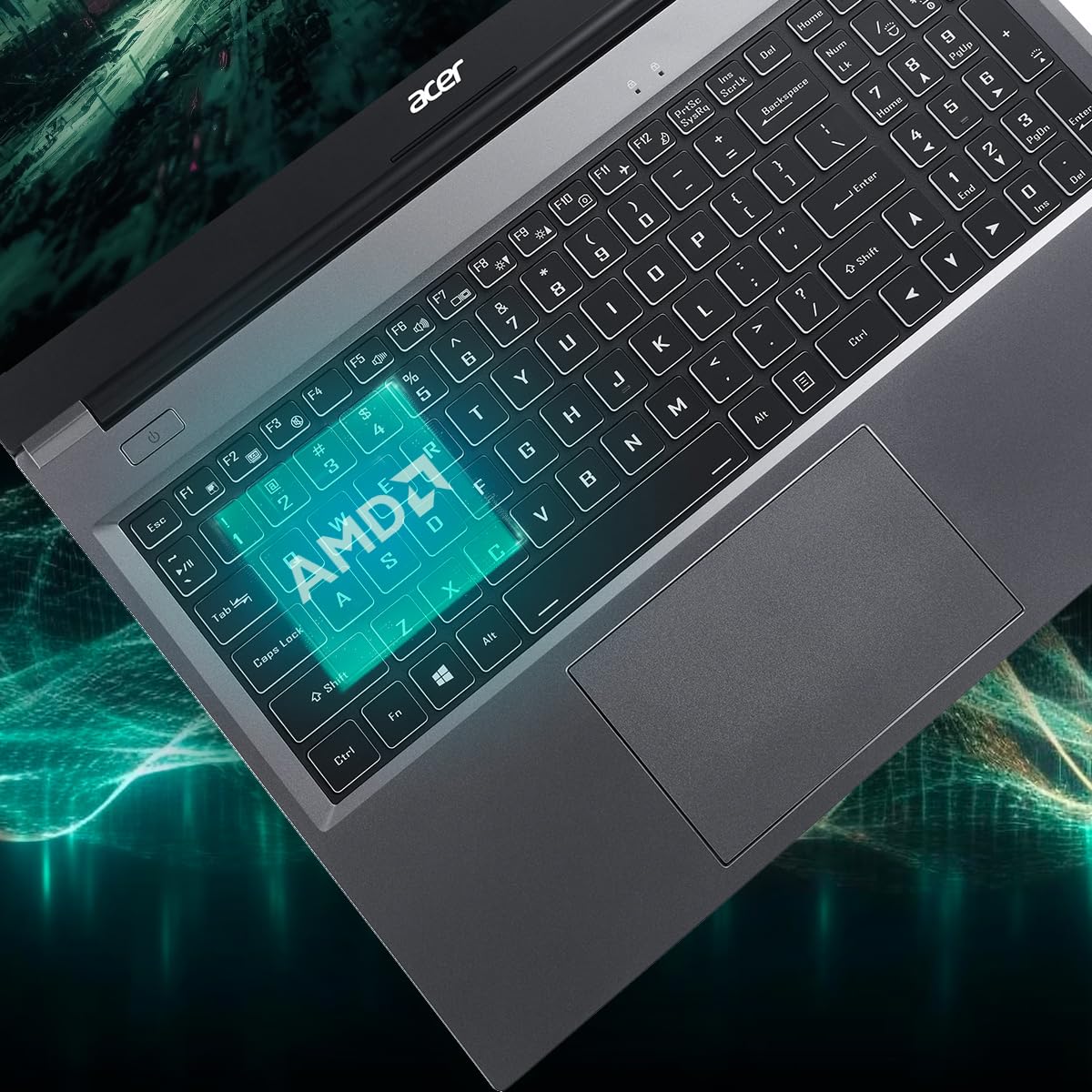
Figure 3.5: Laptop design emphasizing portability and battery life.
4. الصيانة
4.1 تنظيف الكمبيوتر المحمول
استخدم قطعة قماش ناعمة وخالية من الوبر وامسحها برفق.ampened with water or a specialized screen cleaner to clean the display. For the keyboard and chassis, use a soft brush or compressed air to remove dust. Avoid harsh chemicals or abrasive materials.
4.2 تحديثات البرامج
Regularly update your operating system (Windows 11 Home) and drivers to ensure optimal performance and security. Check the Acer support website for the latest driver updates for your AL15-41 model.
4.3 ترقيات التخزين وذاكرة الوصول العشوائي
The laptop's 8 GB DDR4 RAM is upgradable up to 32GB across two SODIMM sockets. The 512 GB PCIe Gen3 NVMe SSD storage is upgradable up to 1 TB. For upgrades, it is recommended to consult a qualified technician or refer to Acer's official service guidelines to avoid voiding your warranty.
5. استكشاف الأخطاء وإصلاحها
إذا واجهت مشكلات مع الكمبيوتر المحمول الخاص بك، ففكر في خطوات استكشاف الأخطاء وإصلاحها الأساسية التالية:
- لا يوجد طاقة: تأكد من توصيل محول الطاقة بإحكام بالكمبيوتر المحمول ومأخذ طاقة يعمل. جرّب مقبسًا آخر.
- مشاكل العرض: If the screen is blank, try connecting an external monitor to determine if the issue is with the laptop's display or graphics output.
- الأداء البطيء: Close unnecessary applications, check for malware, and ensure your operating system and drivers are up to date. Consider the recommended maintenance steps.
- مشاكل الاتصال: For Wi-Fi or Bluetooth issues, try restarting your laptop and your router/Bluetooth device. Check device manager for driver status.
For more complex issues, refer to the online support resources available on the official Acer website or contact Acer customer support.
6. المواصفات
Detailed technical specifications for the Acer Aspire Lite AL15-41 laptop:
| ميزة | مواصفة |
|---|---|
| ماركة | أيسر |
| اسم الموديل | أسباير لايت |
| رقم الموديل | أ15-41 |
| المعالج | AMD Ryzen 3 7330U Processor (2.3 GHz, up to 4.3 GHz) |
| الرسومات | بطاقة رسومات AMD Radeon المتكاملة |
| كبش | 8 GB DDR4 (Upgradable up to 32 GB) |
| تخزين | 512 GB NVMe SSD (Upgradable up to 1 TB) |
| عرض | 15.6 Inches Full HD (1920 x 1080) TN LCD |
| نظام التشغيل | ويندوز 11 هوم |
| لون | رمادي فولاذي |
| وزن | 1.6 كيلوغرام |
| الأبعاد (الطول × العرض × السماكة) | 23.9L x 36W x 2Th Centimeters |
| منافذ USB | 2 x USB 2.0 (Type A), 1 x USB 3.2 Gen 1 (Type A), 1 x USB 3.2 Gen 2 (Type C) |
| منفذ HDMI | 1 |
| الاتصال اللاسلكي | واي فاي 5، بلوتوث 5.1 |
| عمر البطارية | 7 Hours (36 Watt Hours Lithium Ion) |
| لوحة المفاتيح | Chiclet with numeric keypad |
| لوحة اللمس | Clickpad, Multi-touch |
| Webكاميرا | Yes (Front) |
7. الضمان والدعم
7.1 معلومات الضمان
Your Acer Aspire Lite AL15-41 laptop comes with a 1-Year Manufacturer Warranty. Please retain your proof of purchase for warranty claims. The warranty covers manufacturing defects under normal use conditions.
7.2 Manufacturer and Importer Contact
الشركة المصنعة: أيسر
المستورد: شركة أيسر الهند الخاصة المحدودة
Embassy Heights, 6th Floor, No. 13, Magrath Road, Next to HOSMAT Hospital, Bangalore, INDIA – 560025
عامل التعبئة والتغليف: شركة أيسر الهند الخاصة المحدودة
RS No.38/2, Sedarpet Village, Villanur Commune, Poducherry - 605111.
7.3 دعم العملاء
For technical assistance, driver downloads, or service requests, please visit the official Acer support website or contact their customer service directly. You can find contact details and support resources on the Acer India webموقع.