
OMTech SH-G570
دليل تعليمات جهاز النقش بالليزر CO2 من OMTech بقوة 100 واط (موديل SH-G570)
دليل شامل للإعداد والتشغيل والصيانة.
1. المقدمة
This manual provides essential information for the safe and efficient operation of your OMTech 100W CO2 Laser Engraver, Model SH-G570. Please read this manual thoroughly before operating the machine to ensure proper usage and to prevent damage or injury.
The OMTech 100W CO2 Laser Engraver is designed for precision cutting and engraving of various non-metallic materials such as acrylic, wood, and glass. It features a 20x28 inch work area, 4-way pass-through, integrated air assist, and a water pump for cooling.
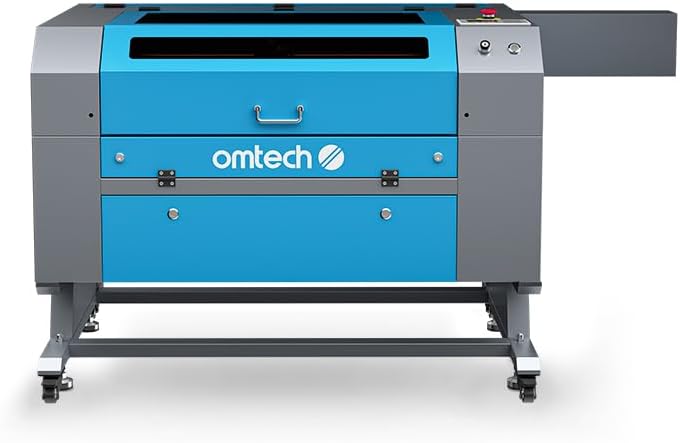
الصورة 1.1: الجبهة view of the OMTech 100W CO2 Laser Engraver.
2. معلومات السلامة
Operating a laser engraver involves inherent risks. Adhere to all safety precautions to prevent accidents and ensure safe operation.
- أشعة الليزر: This is a Class 2 laser product with 0.827 mW output power. Never look directly into the laser beam or its reflection. Always use appropriate laser safety eyewear.
- تهوية: Ensure adequate ventilation to remove smoke and fumes generated during laser processing. The integrated air assist system helps, but additional room ventilation may be required.
- خطر الحريق: Certain materials can ignite during laser processing. Never leave the machine unattended during operation. Keep a fire extinguisher nearby.
- السلامة الكهربائية: Ensure the machine is properly grounded. Do not operate with wet hands or in damp conditions. Disconnect power before performing any maintenance.
- نظام التبريد: The water pump maintains the laser tube's temperature. Ensure the water level is adequate and the pump is functioning correctly before operation.
- Viewنافذة جي: The flame-retardant viewing window allows for safe observation of the engraving process.
- التوقف في حالات الطوارئ: تعرف على موقع وطريقة تشغيل زر التوقف في حالات الطوارئ.
- حماية كلمة المرور: Utilize the machine's password protection feature to prevent unauthorized use.

Image 2.1: The flame-retardant viewing window allows for safe observation of the engraving process.
3. الإعداد
3.1 التفريغ والتنسيب
- Carefully remove the laser engraver from its packaging.
- Place the machine on a stable, level surface capable of supporting its weight (251 lb). Ensure sufficient space around the machine for ventilation and access.
- Install the included wheels for mobility, if desired.
3.2 توصيل المكونات
- توصيل الطاقة: Connect the power cable to a grounded electrical outlet.
- مضخة المياه: Connect the water pump to the laser cooling system as per the diagram provided in the quick start guide. Ensure the water reservoir is filled with distilled water.
- المساعدة الهوائية: Connect the air assist hose. This system helps clear debris and smoke from the engraving area.
- نظام العادم: Connect the exhaust fan and ducts to properly vent fumes outside.
- اتصال البيانات: Connect the machine to your computer using a USB cable or Ethernet cable. Alternatively, use a USB flash drive for offline operation.

الصورة 3.1: انتهىview of included components for setup, such as the exhaust system and cables.
4. تعليمات التشغيل
4.1 Powering On and Initial Checks
- Ensure all connections are secure and the water pump is running.
- قم بتشغيل مفتاح الطاقة الرئيسي.
- The control panel will illuminate. Enter your password if prompted.
4.2 وضع المواد والتركيز عليها
- Place your material on the honeycomb workbed.
- For this manual focus model, adjust the workbed height or laser head manually to achieve the optimal focal distance. Refer to the quick start guide for specific instructions on manual focusing.
- Utilize the 4-way pass-through doors for oversized materials. The front-rear pass-through supports materials up to 31.5" x 3.94", and left-right supports up to 19.69" x 0.79".

Image 4.1: Laser head positioned over material on the honeycomb workbed.
4.3 Software and Job Preparation
The OMTech 100W CO2 Laser Engraver is compatible with various software, including LightBurn, CorelDRAW, and AutoCAD. Prepare your design file في البرنامج الذي تفضله.
- Import your design into the laser control software.
- Set appropriate power and speed settings for your material. The machine supports engraving speeds up to 600 mm/s.
- Use the "Frame" function on the control panel to preview the job area and ensure correct material placement.

Image 4.2: The machine's control panel for operation and settings.
4.4 بدء عملية النقش/القطع
- Once settings are confirmed, send the job to the laser engraver.
- Press the "Start/Pause" button on the control panel to begin the process.
- Monitor the process through the flame-retardant viewجي النافذة.
- In case of an emergency, press the emergency stop button immediately.

Image 4.3: The laser engraver actively processing a design on wood.
5. الصيانة
تضمن الصيانة الدورية الأداء الأمثل وتطيل عمر جهاز النقش بالليزر الخاص بك.
- تنظيف البصريات: Regularly clean the laser lenses and mirrors to maintain engraving quality. Refer to the detailed cleaning instructions in the full manual.
- نظام تبريد بالماء: Check and maintain the water level in the cooling system. Replace the water periodically (e.g., every 1-2 months) with distilled water to prevent algae growth and mineral buildup.
- تنظيف سطح العمل: Clean the honeycomb workbed regularly to remove debris and residue. The anti-scorch plate can be removed for easier cleaning.
- فوهة مساعدة الهواء: Ensure the air assist nozzle is clear of obstructions to maintain effective smoke and debris removal.
- تشحيم: Periodically lubricate the guide rails and moving parts as recommended in the full manual.

Image 5.1: Detail of the laser head and air assist nozzle, which requires regular cleaning.
6. استكشاف الأخطاء وإصلاحها
يتناول هذا القسم المشكلات الشائعة التي قد تواجهها أثناء التشغيل.
| مشكلة | السبب المحتمل | حل |
|---|---|---|
| لا يوجد خرج ليزر | Power not connected, emergency stop engaged, water flow error, laser tube failure. | Check power, release emergency stop, verify water pump operation and flow, contact support if laser tube is suspected. |
| جودة النقش رديئة | Incorrect focus, dirty optics, wrong power/speed settings, material issues. | Adjust focus, clean lenses/mirrors, optimize power/speed settings for material, ensure material is flat. |
| الجهاز غير متصل بالكمبيوتر | Loose USB/Ethernet cable, driver issues, software configuration. | Check cable connections, reinstall drivers, verify software communication settings. |
| تحذير من ارتفاع درجة الحرارة | Insufficient water flow, high ambient temperature, faulty water pump. | Check water level, ensure water pump is running, clean cooling system, operate in a cooler environment. |
For more detailed troubleshooting, refer to the complete user manual or contact OMTech customer support.
7. المواصفات
- نموذج: ش-G570
- قوة الليزر: 100 واط من ثاني أكسيد الكربون
- منطقة العمل: 20 بوصة × 28 بوصة (508 مم × 711 مم)
- Max. Engraving Speed: 600 مم/ثانية
- Max. Cutting Thickness (Acrylic): حتى 0.98 بوصة (25 مم)
- Max. Cutting Thickness (Wood): حتى 0.59 بوصة (15 مم)
- Pass-Through (Front-Rear): 31.5 بوصة × 3.94 بوصة
- Pass-Through (Left-Right): 19.69 بوصة × 0.79 بوصة
- أبعاد الآلة: 64.96 بوصة × 34.25 بوصة × 36.61 بوصة (165 سم × 87 سم × 93 سم)
- وزن السلعة: 251 رطل (113.8 كجم)
- فئة الليزر: 2
- طاقة الإخراج: 0.827 ميغاواط
- نقل البيانات: USB Cable, Ethernet Cable, USB Flash Drive (Offline)
- تبريد: مضخة مياه
- المساعدة الهوائية: مدمج

Image 7.1: Visual representation of the machine's key specifications.
8. الضمان والدعم
OMTech provides comprehensive customer service and support for your laser engraver.
- ضمان: The product comes with 2 years of comprehensive support.
- خدمة العملاء: A 24-hour support team is available across the U.S., the Philippines, and China.
- الدعم الفني: Professional pre-sales and after-sales service, along with technical support, are provided.
- Demo Room Program: Over 60 demo room hosts are available in the U.S. for on-site experiences by appointment.
For assistance, please refer to the contact information provided with your product or visit the official OMTech webموقع.

Image 8.1: Map illustrating the widespread availability of OMTech demo rooms for customer support.
Ask a question about this manual
Ask about setup, troubleshooting, compatibility, parts, safety, or missing instructions. Manuals+ will review the question and use this page’s manual context to help answer it.