
BOXPUT G60S PRO BT
G60S Pro BT Bluetooth Voice Remote with Keyboard User Manual
الموديل: G60S PRO BT
Brand: BOXPUT
مقدمة
This user manual provides detailed instructions for the G60S Pro BT Multi-Function Air Mouse. Please read this manual carefully before using the product to ensure proper operation and to maximize its features.
The G60S Pro BT is a versatile remote control featuring dual connectivity modes (2.4GHz wireless and Bluetooth 5.0), a full QWERTY keyboard with a touchpad, backlight, 6-axis gyroscope, and voice search capabilities. It is designed for use with various devices such as TV boxes, projectors, PCs, and Android TV boxes.
محتويات الحزمة
عند فتح العبوة، يرجى التأكد من تضمين جميع العناصر التالية:
- 1x G60S Pro BT Remote Control
- 1x USB Receiver
- شنومكس أوسب شحن كابل
- 1x دليل المستخدم (هذه الوثيقة)

Image: Contents of the G60S Pro BT package, showing the remote control, USB receiver, USB charging cable, and user manual.
المنتج انتهىview
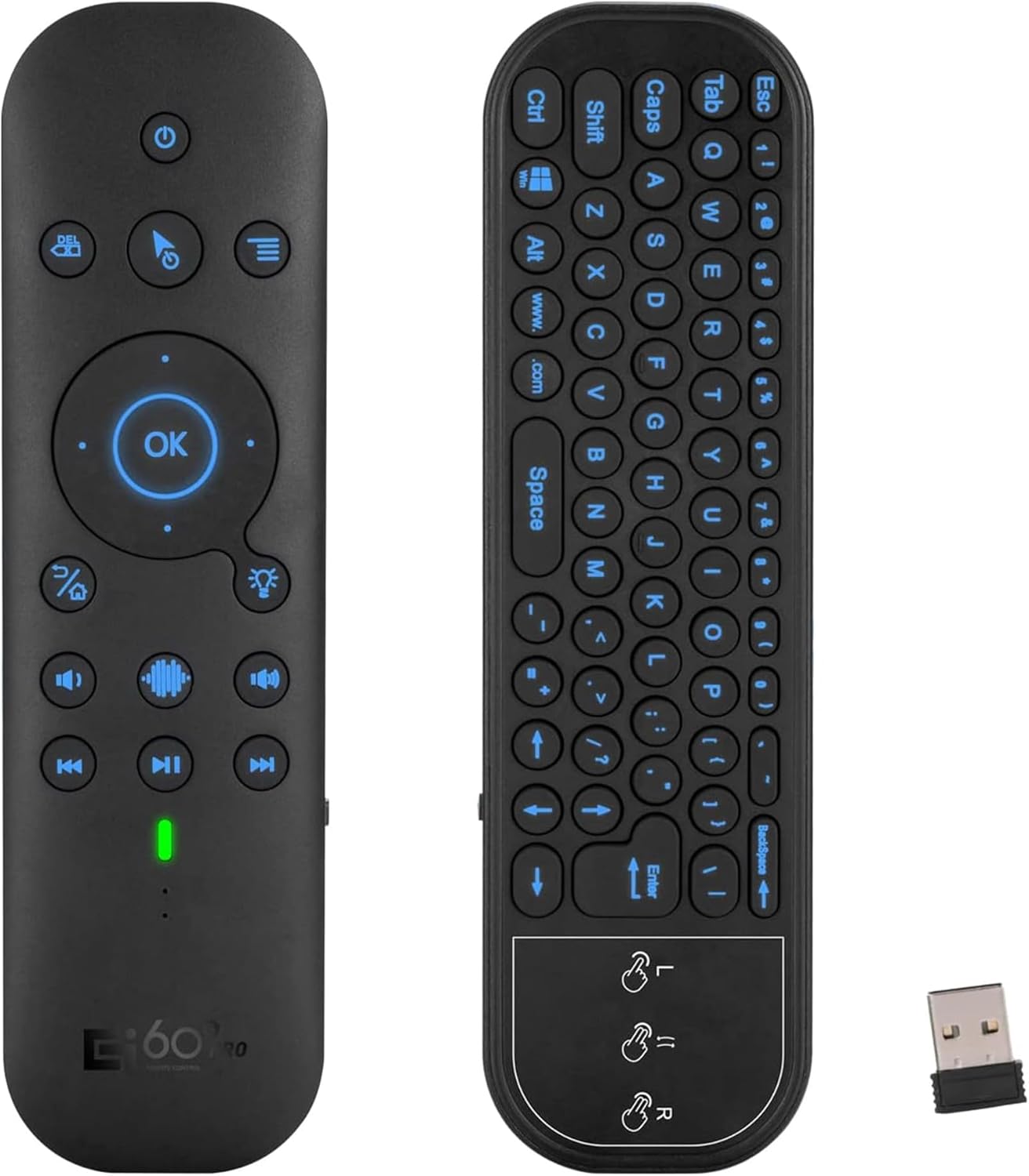
Image: The G60S Pro BT remote control showing both its front (remote) and back (keyboard with touchpad) sides, alongside its USB receiver.
The G60S Pro BT is a multi-functional air mouse remote control designed for versatile use with various smart devices. It features a dual-sided design, with a traditional remote control interface on one side and a full QWERTY keyboard with a touchpad on the other. Key features include:
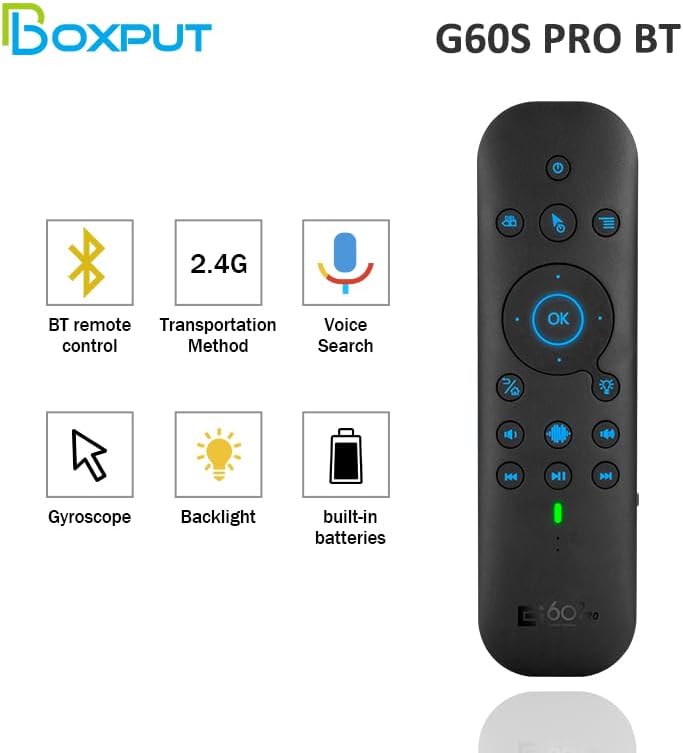
Image: Icons representing the key features of the G60S Pro BT: Bluetooth remote control, 2.4G wireless transmission, Voice Search, Gyroscope, Backlight, and Built-in batteries.
- Dual-mode Connectivity: Supports both 2.4GHz wireless (via USB receiver) and Bluetooth 5.0.
- Full QWERTY Keyboard: Integrated on the back for easy text input.
- Multi-touch Touchpad: For precise cursor control and gesture support.
- الإضاءة الخلفية: Illuminated keys for convenient use in low-light conditions.
- 6-axis Gyroscope: Enables accurate air mouse functionality.
- البحث الصوتي: Allows for voice commands (2.4G mode only).
- بطارية قابلة لإعادة الشحن: Built-in lithium battery, charged via USB-C.
Front Side (Remote Control)
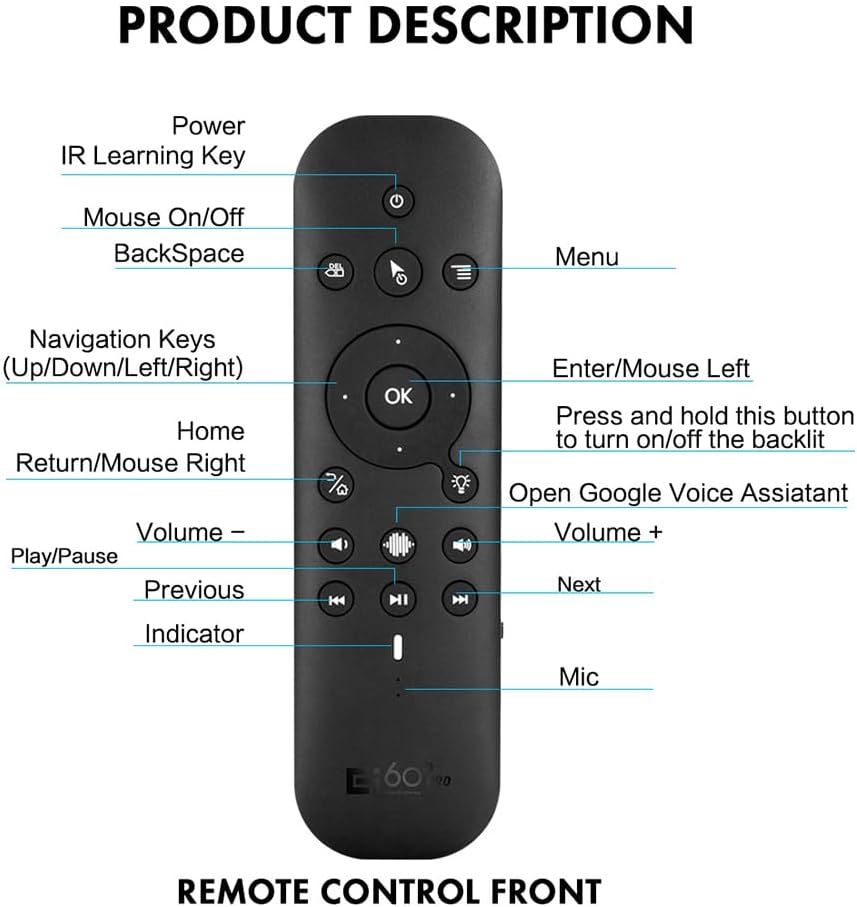
Image: Diagram of the G60S Pro BT remote control's front side, labeling buttons such as Power, IR Learning Key, Mouse On/Off, Backspace, Menu, Navigation Keys, OK, Enter/Mouse Left, Home, Return/Mouse Right, Volume -, Volume +, Play/Pause, Previous, Next, Indicator, and Mic.
- زر الطاقة: يقوم بتشغيل/إيقاف تشغيل الجهاز.
- IR Learning Key: For programming infrared functions.
- تشغيل/إيقاف الماوس: Toggles the air mouse function.
- مسافة خلفية: حذف الأحرف.
- قائمة طعام: الوصول إلى خيارات القائمة.
- مفاتيح التنقل (أعلى/أسفل/يسار/يمين): للتحكم في الاتجاه.
- زر موافق: يؤكد التحديدات.
- Enter/Mouse Left: Acts as Enter key or left mouse click.
- بيت: يعود إلى الشاشة الرئيسية.
- Return/Mouse Right: Acts as Back key or right mouse click.
- خفض مستوى الصوت / رفع مستوى الصوت: ضبط مستوى الصوت.
- تشغيل/إيقاف مؤقت: يتحكم في تشغيل الوسائط.
- السابق التالي: Skips to previous or next media track.
- مؤشر: ضوء الحالة.
- هيئة التصنيع العسكري: ميكروفون لإدخال الصوت.
- زر الإضاءة الخلفية: اضغط لفترة طويلة لتشغيل/إيقاف الإضاءة الخلفية.
- Google Voice Assistant Button: Opens Google Voice Assistant.
Back Side (Keyboard & Touchpad)

Image: Close-up of the G60S Pro BT's keyboard and touchpad, illustrating multi-touch gestures: one-finger for left-click, two-finger drag for slide up and down, and two-finger for right-click.
- لوحة مفاتيح كويرتي: Full keyboard for text input.
- لوحة اللمس: يدعم إيماءات اللمس المتعدد للتنقل.
- Multi-touch Functions:
- One-finger tap: Left-click function.
- Two-finger drag: Slide up and down function (scrolling).
- Two-finger tap: Right-click function.
الإعداد والاتصال
The G60S Pro BT offers two connection methods: 2.4G wireless via USB receiver and Bluetooth 5.0.
2.4G Wireless Connection (Recommended for Voice Functionality)
- Locate the USB receiver included in the package. It is typically stored inside the battery compartment of the remote or in the packaging.
- Insert the USB receiver into an available USB port on your device (e.g., TV Box, PC, Projector).
- The remote control should automatically connect to the receiver. The indicator light on the remote may flash briefly and then turn solid or off, indicating a successful connection.
- Test the remote by moving it to control the cursor or pressing buttons.
ملحوظة: The voice search function only works when connected via 2.4GHz wireless mode. It does not function in Bluetooth mode.
اتصال بلوتوث 5.0
- تأكد من تفعيل خاصية البلوتوث في جهازك.
- On the G60S Pro BT remote, press and hold the OK الزر و الصوت - button simultaneously for a few seconds until the indicator light starts flashing rapidly. This indicates pairing mode.
- On your device, search for Bluetooth devices. You should see "G60S PRO" appear in the list of available devices.
- Select "G60S PRO" to pair. Once paired, the indicator light on the remote will stop flashing.
- اختبر وظائف جهاز التحكم عن بعد.
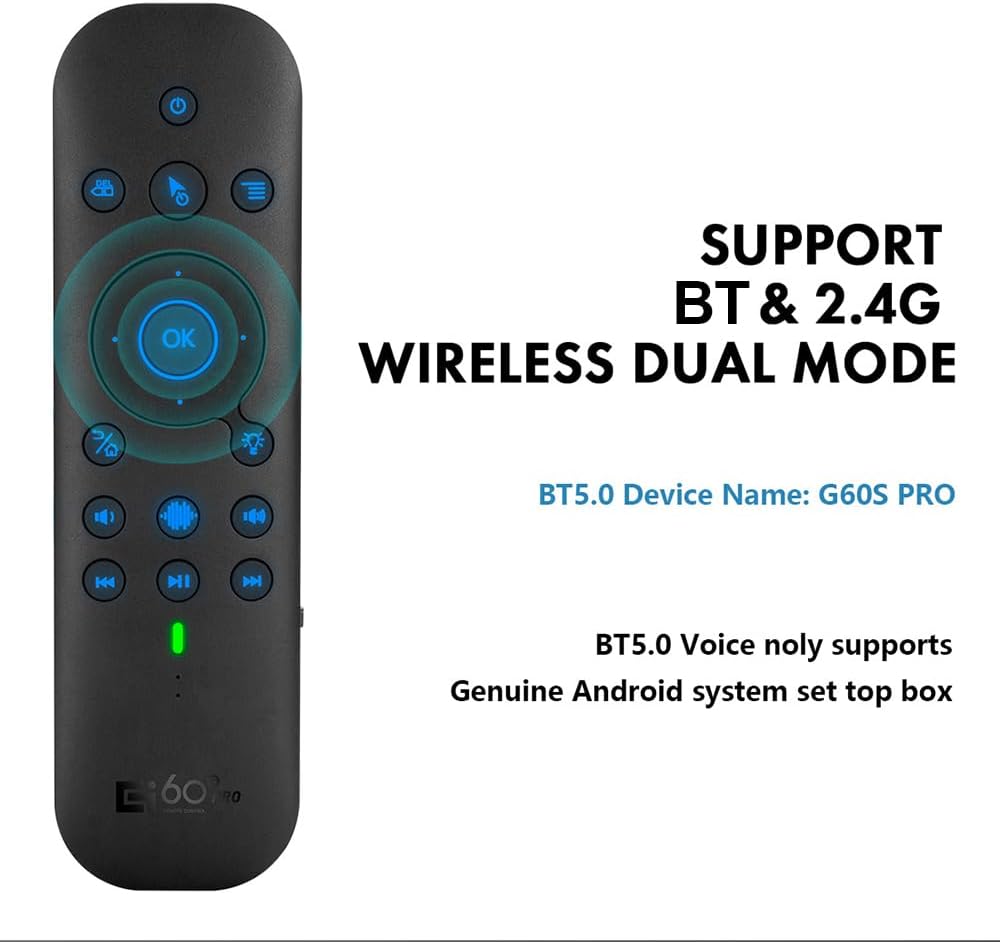
Image: Illustration showing the G60S Pro BT remote supporting both Bluetooth and 2.4G wireless dual modes. It notes that the Bluetooth 5.0 device name is "G60S PRO" and that BT5.0 voice only supports genuine Android system set-top boxes.
ملحوظة: Bluetooth 5.0 voice functionality is primarily supported on genuine Android system set-top boxes.
تعليمات التشغيل
وظيفة الفأرة الهوائية
The G60S Pro BT features a 6-axis gyroscope, allowing for precise air mouse control.
- To activate the air mouse, press the تشغيل/إيقاف الماوس button (usually depicted with a mouse icon).
- Hold the remote in your hand and move it in the air to control the cursor on your screen.
- اضغط على OK button for left-click actions.
- اضغط على Return/Mouse Right button for right-click actions.
- To deactivate the air mouse, press the تشغيل/إيقاف الماوس الزر مرة أخرى.
استخدام لوحة المفاتيح ولوحة اللمس
Flip the remote to access the full QWERTY keyboard and touchpad.
- الكتابة: Use the individual keys for text input.
- الإضاءة الخلفية: Long press the backlight button on the remote side to turn the keyboard backlight on or off for use in dark environments.
- لوحة اللمس: Use the touch panel for cursor control.
- النقر بإصبع واحد: Performs a left-click.
- Two Finger Drag: Scrolls up or down.
- النقر بإصبعين: Performs a right-click.
Voice Search Function
The voice search function allows you to control your device using voice commands. This feature is only available in 2.4GHz wireless mode.
- Ensure the remote is connected via the 2.4G USB receiver.
- اضغط مع الاستمرار على زر الصوت (microphone icon) on the remote.
- Speak clearly into the microphone located on the remote.
- Release the voice button when you are finished speaking. The device will process your command.
ملحوظة: Compatibility with voice search may vary depending on the operating system and applications of your connected device.
IR Learning Function (for Power Button)
The power button on the G60S Pro BT can be programmed to learn the infrared signal from another remote control, such as your TV's power button.
- Place the G60S Pro BT remote and your original remote control head-to-head, about 1-3 cm apart.
- اضغط مع الاستمرار على IR Learning Key (often labeled with an IR icon or a specific learning button) on the G60S Pro BT remote for 3-5 seconds until the indicator light starts flashing slowly.
- Press the power button on your original remote control. The indicator light on the G60S Pro BT remote should flash rapidly, indicating it has received the signal.
- اضغط على زر الطاقة on the G60S Pro BT remote. The indicator light will turn solid, indicating successful learning.
- Test the power button on the G60S Pro BT remote to ensure it now controls your device.
الشحن والبطارية
The G60S Pro BT is equipped with a built-in rechargeable lithium battery.
- To charge the remote, connect the included USB charging cable to the USB-C port on the remote and the other end to a USB power source (e.g., computer USB port, USB wall adapter).
- The indicator light will typically show charging status (e.g., red while charging, off or green when fully charged).
- A full charge usually takes a few hours.
- When the battery is low, the indicator light may flash to alert you to recharge.
التوافق
The G60S Pro BT air mouse remote is compatible with a wide range of operating systems and devices:
- نوافذ
- ماك
- لينكس
- صندوق تلفزيون اندرويد
- أجهزة العرض
- Smart TVs (some models)
- Mobile Phones (some models)
- Tablet Computers
- أجهزة الكمبيوتر المكتبية

Image: Grid of devices illustrating the G60S Pro BT's compatibility, including TV Box, Raspberry Pi, Projector, Smart TV, Cell phone, Tablet, Computer, All-in-one PC, and HTPC.
ملاحظات التوافق الهامة:
- إنها غير متوافق with Amazon Fire TV and Fire TV Stick.
- قد يكون لا تكون متوافقة with some Samsung, LG, Sony, and Mi smart TVs or Mi TV Boxes.
استكشاف الأخطاء وإصلاحها
| مشكلة | السبب المحتمل / الحل |
|---|---|
| Remote not responding (2.4G mode) |
|
| Remote not responding (Bluetooth mode) |
|
| Air mouse cursor is erratic or not moving smoothly |
|
| Voice search not working |
|
| Keyboard backlight not turning on/off |
|
تحديد
| ميزة | التفاصيل |
|---|---|
| رقم الموديل | G60S PRO BT |
| طريقة النقل | لاسلكي بتردد 2.4 جيجا هرتز + بلوتوث 5.0 |
| أجهزة الاستشعار | 6-axis Gyroscope (3-Gyro + 3-Gsensor) |
| مسافة التشغيل | 8-10 متر |
| عدد المفاتيح | 17 (remote side) + 63 (keyboard side) |
| نوع البطارية | Built-in Lithium Battery (Rechargeable via USB-C) |
| مادة | بلاستيك ABS وسيليكون |
| الأبعاد (الطول*العرض*الارتفاع) | 19.6 x 8.9 x 1.9 cm (7.72 x 3.50 x 0.75 inches) |
| وزن | 91 جرام (3.21 أونصات) |
| المميزات الخاصة | Voice Control (2.4G only), Gyroscope, Backlight, Mini Keyboard, Multi-touch Touchpad, IR Learning |
| الشهادات | لجنة الاتصالات الفيدرالية، الاتحاد الأوروبي، حظر المواد الخطرة |

Image: Diagram showing the dimensions of the G60S Pro BT remote control, indicating a length of 178mm (7.01 inches), width of 50mm (1.97 inches), and thickness of 16mm (0.63 inches).
الصيانة والعناية
- Keep the remote control dry. Avoid exposure to water or excessive humidity.
- Do not expose the remote to extreme temperatures (hot or cold).
- نظّف جهاز التحكم عن بُعد بقطعة قماش ناعمة وجافة. لا تستخدم المنظفات الكاشطة أو المذيبات.
- تجنب إسقاط جهاز التحكم عن بعد أو تعريضه لصدمات قوية.
- When not in use for extended periods, ensure the remote is fully charged and stored in a cool, dry place.
الضمان والدعم
For warranty information and technical support, please refer to the official BOXPUT webيمكنك الاطلاع على الموقع الإلكتروني أو الاتصال بخدمة العملاء مباشرةً. عادةً ما تتوفر التفاصيل على عبوة المنتج أو عبر قنوات الشركة المصنعة الرسمية.
Manufacturer: BOXPUT
لمزيد من المساعدة، يرجى زيارة BOXPUT Store on Amazon.
Ask a question about this manual
Ask about setup, troubleshooting, compatibility, parts, safety, or missing instructions. Manuals+ will review the question and use this page’s manual context to help answer it.