
1. المقدمة
This manual provides detailed instructions for the safe and effective operation, setup, and maintenance of your Ortur Laser Master 2 S2 LU2-10A Laser Engraver and Cutter, along with the Ortur Laser Rotary Roller. Please read this manual thoroughly before using the device to ensure proper functionality and safety.
2. معلومات السلامة
WARNING: This product uses a high-power laser. Improper use can cause serious injury, including eye damage and burns. Always wear appropriate laser safety goggles when operating the device. Never look directly at the laser beam.
التزم باحتياطات السلامة التالية:
- حماية العين: Always wear certified laser safety goggles.
- تهوية: Operate in a well-ventilated area to dissipate fumes and smoke generated during engraving/cutting.
- خطر الحريق: Keep a fire extinguisher nearby. Do not leave the machine unattended during operation.
- التوافق المادي: Only engrave or cut materials suitable for laser processing. Avoid reflective, flammable, or PVC materials.
- الأطفال والحيوانات الأليفة: احتفظ بالأطفال والحيوانات الأليفة بعيدًا عن منطقة التشغيل.
- التوقف في حالات الطوارئ: Familiarize yourself with the emergency stop button location.
The Ortur Laser Master 2 S2 LU2-10A includes the following safety protections:
- Exposure Duration Detection
- Laser Beam Safety Guard
- نظام التحكم في الطاقة
- Position Movement Protection
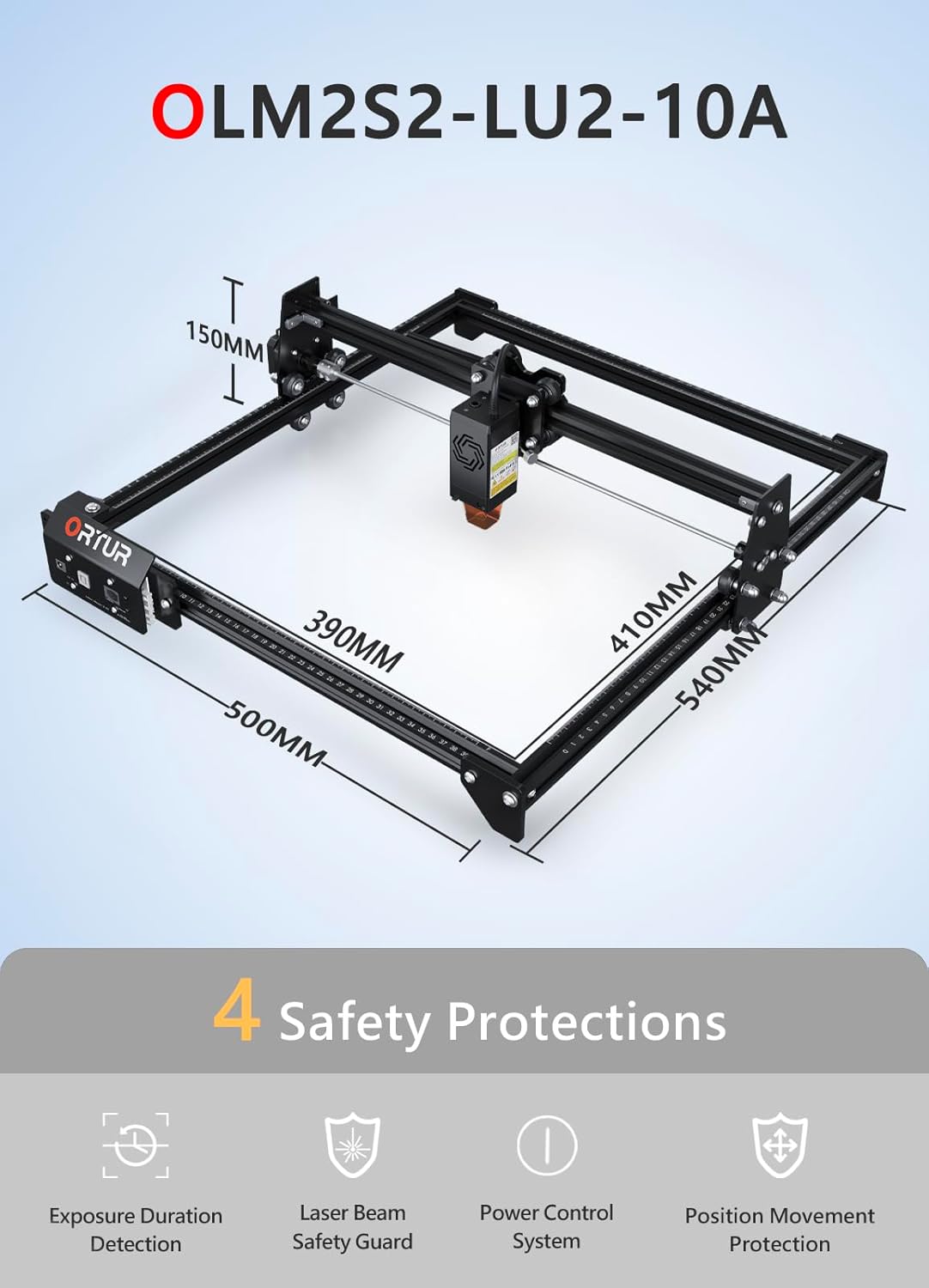
الصورة: أكثر منview of the Ortur Laser Master 2 S2 LU2-10A, showing its dimensions and highlighting its four safety protection features: Exposure Duration Detection, Laser Beam Safety Guard, Power Control System, and Position Movement Protection.
3. محتويات العبوة
Upon unpacking, verify that all components are present. The package typically includes:
- Ortur Laser Master 2 S2 Engraver Frame
- LU2-10A Laser Module (10W Output Power)
- Ortur Laser Rotary Roller (YRR2.0)
- محول الطاقة والكابلات
- كابل يو اس بي
- نظارات السلامة
- أدوات التجميع والمسامير
- Sampمواد للاختبار
- دليل المستخدم (هذا المستند)

Image: The complete Ortur Laser Master 2 S2 LU2-10A laser engraver with the 10W laser module, shown alongside the Ortur Laser Rotary Roller and various engraved sampالعناصر.
4. انتهى المنتجview
4.1 Ortur Laser Master 2 S2 LU2-10A Engraver
The Ortur Laser Master 2 S2 LU2-10A is a high-performance laser engraver and cutter featuring a powerful 10W optical output laser module. It is designed for precision engraving and efficient cutting of various materials.
- وحدة الليزر: LU2-10A, 10W optical power.
- Compressed Spot: 0.05mm x 0.1mm for fine detail.
- قدرة القطع: Can cut up to 30mm acrylic and 20mm wood.
- منطقة النقش: 390 مم × 410 مم.
- واجهة المساعدة الهوائية: مدمج لتحسين أداء القطع.
- بناء: Industrial-grade full metal design for reliability and accuracy.

Image: Close-up of the Ortur LU2-10A laser module, illustrating its higher precision with a smaller compressed spot size (0.05x0.1mm) compared to other modules.

Image: Demonstrates the cutting capability of the Ortur LU2-10A laser module, showing clean cuts through 12mm thick black acrylic and 15mm thick plywood in a single pass.

الصورة: انفجرت view of the Ortur 10W laser module, detailing its internal components including air intake, dual fans, laser diodes, focus gauge, and protective cover.
4.2 Ortur Laser Rotary Roller (YRR2.0)
The Ortur Laser Rotary Roller is an accessory designed for engraving cylindrical or irregularly shaped objects that cannot be processed on a flat bed. It expands the versatility of your laser engraver.
- وظيفة: Enables 360° rotating engraving on cylindrical objects.
- Adjustable Diameters: Features 7 adjustable diameter settings, accommodating objects from 8mm to 110mm.
- التوافق: Suitable for items such as cups, bottles, pipes, and small diameter cylinders.

Image: Close-up of the Ortur Rotary Roller, illustrating its gear mechanism and the 7 adjustable diameter settings for engraving objects of various sizes, from 8mm to 100mm.

Image: The Ortur Rotary Roller in operation, demonstrating 360° rotating engraving on a cylindrical object (a beverage can).

الصورة: عرض الكولاجasing various items that can be engraved using the rotary roller, including wine glasses, bottles, tumblers, rolling pins, rings, and pens.
5. الإعداد
5.1 تجميع الوحدة الرئيسية
The Ortur Laser Master 2 S2 LU2-10A features a modular design for easy assembly. Typically, assembly can be completed within 10-15 minutes by following the included quick start guide or video instructions.
- قم بفك حزمة جميع المكونات وتحقق منها وفقًا لقائمة محتويات الحزمة.
- Assemble the frame according to the provided diagrams, securing all screws.
- Install the LU2-10A laser module onto the gantry.
- قم بتوصيل جميع الكابلات اللازمة (كابلات الطاقة، وكابلات USB، وكابلات المحرك).
- تأكد من وضع الجهاز على سطح مستوٍ وثابت في منطقة جيدة التهوية.
5.2 Rotary Roller Connection
To use the Ortur Laser Rotary Roller, connect it to the engraver's dedicated rotary axis port. Specific connection details can be found in the rotary roller's supplementary guide.
- Ensure the main engraver is powered off.
- Connect the rotary roller's motor cable to the designated port on the engraver's control board.
- Place the rotary roller on a stable surface within the engraver's working area.
- Adjust the height of the engraver's gantry or the rotary roller's support to ensure proper focus on the cylindrical object.
6. تعليمات التشغيل
6.1 توافق البرامج
The Ortur Laser Master 2 S2 LU2-10A is compatible with popular laser engraving software:
- ليزرGRBL: Free software, compatible with Windows 7 / 8 / XP / 10 / 11.
- لايت بيرن: Paid software, compatible with Windows 7 / 8 / XP / 10 / 11 and macOS.
مدعوم file formats include SVG, DXF, JPG, JPEG, PNG, BMP, TIF, CR2, etc.
6.2 Basic Engraving/Cutting Process
- إعداد التصميم: Create or import your design in your chosen software.
- وضع المواد: Place the material securely on the engraving bed.
- ضبط التركيز: Adjust the laser module's focus using the integrated focus gauge.
- إعدادات البرنامج: Configure laser power, speed, and passes based on the material type and desired outcome.
- اختبار الإطار: Use the software's framing function to ensure the design fits within the material.
- بدء العملية: ابدأ عملية النقش أو القطع. راقب الجهاز عن كثب.
6.3 Using the Rotary Roller
When engraving cylindrical objects, the rotary roller replaces the standard flat bed operation.
- Install Rotary Roller: Connect the rotary roller as described in Section 5.2.
- وضع الكائن: Secure the cylindrical object (e.g., cup, bottle) onto the rotary roller.
- Adjust Diameter: Set the rotary roller to the appropriate diameter using its adjustable gears (7 steps, 8mm to 110mm).
- تركيز الليزر: Adjust the laser module height to focus on the surface of the cylindrical object.
- تكوين البرنامج: In your engraving software (e.g., LightBurn), enable the rotary axis and input the correct diameter and steps per rotation settings.
- ابدأ النقش: Proceed with the engraving process, ensuring the object rotates smoothly.
7. الصيانة
تضمن الصيانة الدورية الأداء الأمثل وتطيل عمر جهاز النقش بالليزر الخاص بك.
- عدسة الليزر النظيفة: Periodically clean the laser module's lens with a lint-free cloth and lens cleaning solution.
- تنظيف القضبان والعجلات: Keep the guide rails and wheels free from dust and debris to ensure smooth movement.
- تشحيم الأجزاء المتحركة: Apply a small amount of lubricant to the guide rails and lead screws as needed.
- تحديثات البرامج الثابتة: Check the Ortur official webابحث عن أي تحديثات برامج ثابتة متاحة لجهازك على الموقع.
- فحص الكابلات: Regularly check all cables for wear or damage.
8. استكشاف الأخطاء وإصلاحها
إذا واجهت أي مشكلات، راجع المشكلات والحلول الشائعة التالية:
- لا يوجد خرج ليزر:
- Check power connection and laser module cable.
- Ensure safety features (e.g., tilt sensor) are not triggered.
- Verify software settings for laser power.
- الجهاز لا يتصل بالكمبيوتر:
- تأكد من توصيل كابل USB.
- Install necessary drivers for the engraver.
- حاول استخدام منفذ USB أو كابل مختلف.
- جودة النقش/القطع رديئة:
- Verify laser focus is correctly set.
- Adjust laser power and speed settings for the material.
- نظف عدسة الليزر.
- Ensure the material is flat and securely held.
- Rotary Roller Not Rotating:
- Check the rotary roller's motor cable connection.
- Ensure rotary axis is enabled and configured correctly in software.
- Verify the object is not too heavy or causing friction.
For further assistance, consult the Ortur support webالموقع أو الاتصال بخدمة العملاء.
9. المواصفات
9.1 Ortur Laser Master 2 S2 LU2-10A Engraver
- نموذج: ليزر ماستر 2 إس 2 إل يو 2-10 إيه
- وحدة الليزر: LU2-10A (10W Optical Output Power)
- Compressed Spot Size: 0.05 مم × 0.1 مم
- منطقة النقش: 390 مم × 410 مم
- Machine Dimensions (Approx.): 500 مم (طول) × 540 مم (عرض) × 150 مم (ارتفاع)
- قدرة القطع: Up to 30mm acrylic, 20mm wood
- التوافق: Windows 7/8/XP/10/11, macOS (with LightBurn)
- مدعوم File التنسيقات: SVG, DXF, JPG, JPEG, PNG, BMP, TIF, CR2, etc.
9.2 Ortur Laser Rotary Roller (YRR2.0)
- نموذج: YRR2.0
- Adjustable Engraving Diameter: 8mm to 110mm (7 steps)
- الأبعاد (تقريبًا): 129 مم (طول) × 184 مم (عرض) × 81 مم (ارتفاع)

Image: Technical specifications and dimensions of the Ortur Laser Rotary Roller, showing approximate measurements of 129mm in length, 184mm in width, and 81mm in height.
10. الضمان والدعم
Ortur products come with a standard manufacturer's warranty. Please refer to the warranty card included with your product or visit the official Ortur webالموقع للحصول على شروط وأحكام الضمان التفصيلية.
For technical support, troubleshooting assistance, or spare parts, please contact Ortur customer service through their official website or the retailer where you purchased the product. Provide your product model and serial number for faster service.