
1. المقدمة
Thank you for choosing the Cloudpoem Smartwatch H1. This manual provides essential information for the proper setup, operation, and maintenance of your device. Please read it thoroughly before use to ensure optimal performance and longevity.
The Cloudpoem Smartwatch H1 features a 1.85-inch HD display, Bluetooth 5.4 connectivity for calls, comprehensive health monitoring, and a wide range of sports modes, compatible with both iPhone and Android devices.
2. ما هو المشمول
- Cloudpoem Smartwatch H1 (with watch band)
- كابل الشحن
- دليل المستخدم (هذا المستند)

Image: The Cloudpoem Smartwatch H1, charging cable, and user manual are included in the package.
3. انتهى المنتجview
The Cloudpoem Smartwatch H1 features a sleek design with a 1.85-inch HD display and a durable polycarbonate case. It is equipped with a side button for navigation and control.
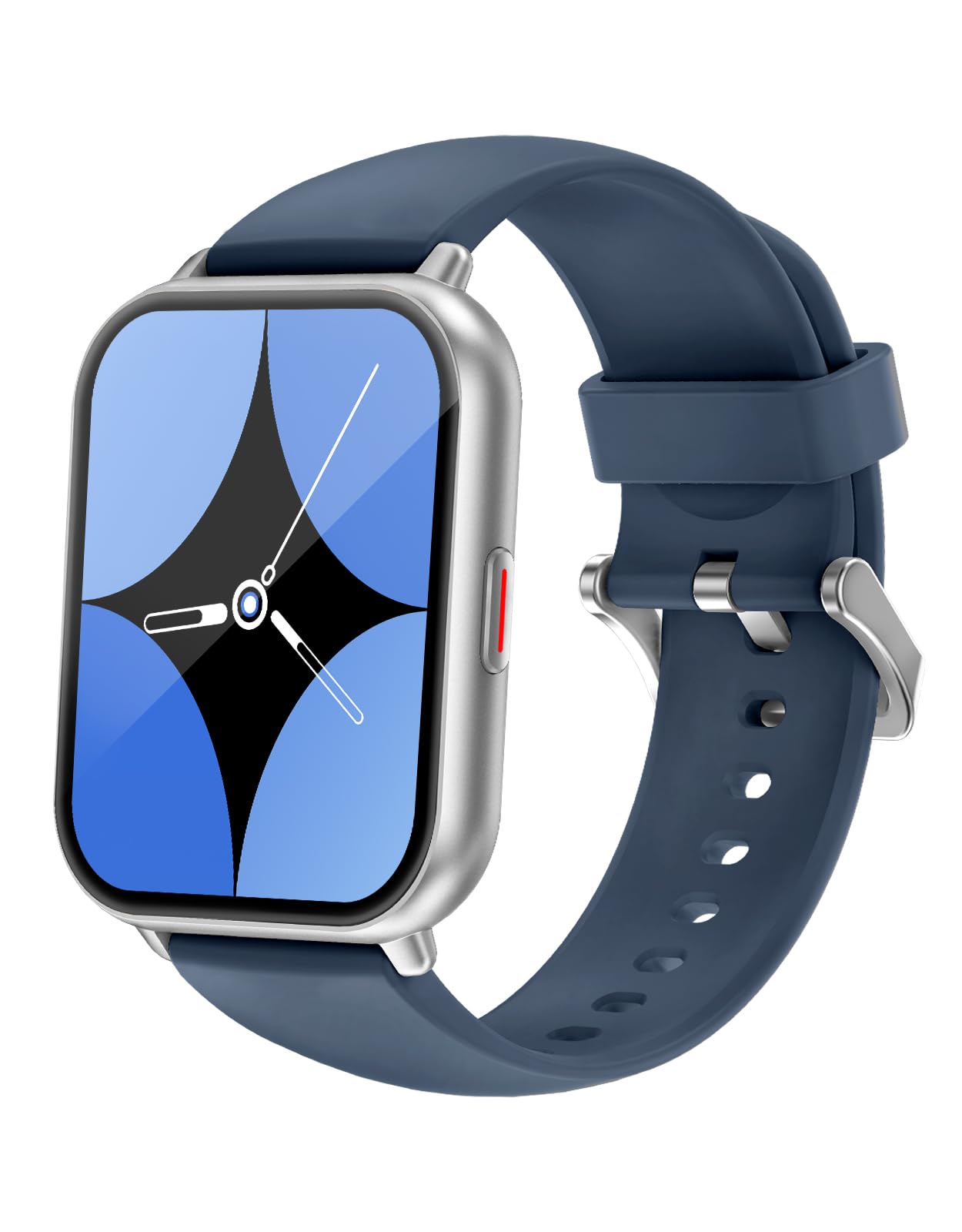
الصورة: الجبهة view of the Cloudpoem Smartwatch H1, showcasinتتميز بشاشتها مقاس 1.85 بوصة.
العرض والواجهة
The 1.85-inch HD display offers a resolution of 320x386 pixels, providing clear and vibrant visuals for notifications and data. The 2.5D curved glass ensures smooth touch operation.

Image: The smartwatch display showing activity data including steps, calories burned, and heart rate.
4. الإعداد
4.1 شحن الجهاز
Before initial use, fully charge your smartwatch. Connect the provided charging cable to the magnetic charging points on the back of the watch and to a USB power source. A full charge typically takes approximately 2.5 hours.

Image: The smartwatch being charged via its magnetic charging cable.
4.2 تثبيت التطبيق وإقرانه
To utilize all features, download and install the dedicated app on your smartphone. بحث عن "GloryFit" or "iGloryFit" in your smartphone's app store. Follow the in-app instructions to pair your smartwatch via Bluetooth.
- Download the "GloryFit" or "iGloryFit" app from your app store.
- تأكد من تمكين Bluetooth على هاتفك الذكي.
- Open the app and follow the prompts to search for and connect to your Cloudpoem Smartwatch H1.
- قم بتأكيد طلب الاقتران على كل من هاتفك الذكي وساعتك الذكية.
ملحوظة: You can only connect to one app ("GloryFit" or "iGloryFit") at a time. Do not attempt to connect to both simultaneously.

Image: Illustration of the smartphone app interface for connecting the smartwatch.
5. تعليمات التشغيل
5.1 الملاحة الأساسية
The smartwatch features a full-touch screen and a side button for navigation. Swipe across the screen to access different functions and menus. Press the side button to return to the home screen or wake the device.
5.2 وظيفة الاتصال
With Bluetooth 5.4, you can make and receive calls directly from your smartwatch. Ensure your watch is paired with your smartphone.
- الرد على المكالمات: When a call comes in, the watch will vibrate and display the caller ID. Tap the green icon to answer.
- اجراء اتصالات: يمكنك الوصول إلى لوحة الاتصال أو قائمة جهات الاتصال على ساعتك لبدء مكالمة.

Image: A user demonstrating the call function of the smartwatch while in a car.
5.3 الإشعارات
Receive notifications for calls, messages, and various apps directly on your wrist. The watch will vibrate to alert you.
- Enable app notifications in the companion app settings on your smartphone.
- Supported apps include LINE, Instagram, Gmail, Messenger, Facebook, and Twitter(X).
- To temporarily stop notifications, activate 'Do Not Disturb' mode on your watch.

Image: The smartwatch screen showing incoming notifications from LINE and Instagالرامات "الذاكرة العشوائية في الهواتف والحواسيب.
5.4 Customization (Watch Faces)
Personalize your smartwatch with over 380 available watch face designs. You can also upload your own photos to create custom watch faces.
- Browse and select watch faces through the companion app.
- Use the app to upload a photo from your gallery and set it as your watch face background.

Image: A selection of diverse watch face designs, including business, sports, and simple styles.
5.5 وضعًا رياضيًا
The smartwatch supports over 100 sports modes, accurately tracking your exercise data. This includes activities like running, cycling, yoga, swimming, and more.
- Select your desired sport mode from the watch's menu before starting your activity.
- The watch will record data such as duration, heart rate, and calories burned.
- Review your activity history in the companion app.

Image: The smartwatch showing real-time running metrics, with illustrations of various sports activities.
5.6 مراقبة الصحة
The Cloudpoem Smartwatch H1 provides 24-hour health monitoring, including heart rate, sleep quality, and menstrual cycle tracking.
- معدل ضربات القلب: Continuous heart rate monitoring helps you understand your cardiovascular health.
- تتبع النوم: Automatically analyzes your sleep patterns, distinguishing between deep, light, and REM sleep.
- الدورة الشهرية: Record and manage your menstrual cycle within the app.
ملاحظة هامة: This product is designed for general wellness and fitness purposes only. It is not a medical device and should not be used for the diagnosis, treatment, or prevention of any disease.

Image: The smartwatch interface showing detailed sleep duration and heart rate graphs.
5.7 ميزات أخرى
تتضمن الساعة الذكية العديد من الوظائف اليومية المريحة:
- النشرة الجوية: View the 7-day weather forecast (requires continuous smartphone connection).
- التحكم بالموسيقى: Play, pause, skip tracks on your smartphone directly from the watch.
- التنبيه: ضبط المنبهات لإيقاظك أو تذكيرك بالأحداث المهمة.
- المؤقت وساعة الإيقاف: Useful for cooking, exercise, or other timed activities.
- مصباح يدوي: مصدر ضوء مناسب على معصمك.
- البحث عن الهاتف: حدد موقع هاتفك الذكي المفقود عن طريق جعله يرن.
- تذكير بالخمول: احصل على تنبيهات للتحرك إذا كنت غير نشط لفترة طويلة.
- ضبط السطوع: اضبط سطوع الشاشة للحصول على رؤية مثالية.
- SOS Emergency Contact: Set up emergency contacts for quick dialing in critical situations.

Image: A visual representation of the smartwatch's utility functions, including weather, music control, and alarm.
5.8 مساعد صوتي
The smartwatch supports AI voice assistants like Siri (for iOS) and Google Assistant (for Android), allowing hands-free control of various functions.
- Activate the voice assistant feature on your watch.
- Speak commands to check weather, play music, set alarms, and more.
6. الصيانة
6.1 مقاومة الماء (IP68)
The Cloudpoem Smartwatch H1 is IP68 waterproof, meaning it is resistant to dust and can withstand immersion in water up to 1 meter for 30 minutes. It is suitable for daily use, such as washing hands or light rain.
حذر: Do not use the watch for diving, hot showers, saunas, or in environments with hot water or steam, as this may compromise its water resistance.

Image: The smartwatch is shown being exposed to water, highlighting its IP68 waterproof rating.
6.2 التنظيف
Wipe the watch and band regularly with a soft, dry cloth to remove sweat, dirt, and oils. Avoid using harsh chemicals or abrasive materials.
6.3 العناية بالبطارية
To prolong battery life, avoid extreme temperatures and fully discharging the battery frequently. Charge the device when the battery level is low.
7. استكشاف الأخطاء وإصلاحها
إذا واجهت مشكلات مع ساعتك الذكية، فراجع الحلول الشائعة التالية:
| مشكلة | حل |
|---|---|
| مشاهدة عدم التشغيل | تأكد من شحن الساعة بالكامل. اضغط باستمرار على الزر الجانبي لعدة ثوانٍ. |
| لا يمكن الاقتران بالهاتف الذكي | Ensure Bluetooth is enabled on your phone. Restart both the watch and phone. Check if the app is installed and permissions are granted. |
| لم يتم تلقي الإخطارات | Check app notification settings on your smartphone and in the companion app. Ensure the watch is connected via Bluetooth and not in 'Do Not Disturb' mode. |
| بيانات صحية غير دقيقة | تأكد من ارتداء الساعة بإحكام على معصمك، على بعد عرض إصبع واحد تقريبًا فوق عظمة المعصم. نظّف المستشعر الموجود في الجزء الخلفي من الساعة. |
| عمر البطارية قصير | Reduce screen brightness, disable continuous heart rate monitoring, or turn off 'raise-to-wake' feature. Ensure no background apps are excessively draining power. |
إذا استمرت المشكلة، يرجى الاتصال بدعم العملاء.
8. المواصفات
| ميزة | التفاصيل |
|---|---|
| نموذج | H1 |
| عرض | 1.85-inch HD AMOLED, 320x386 resolution, 1500 nits max brightness |
| الاتصال | بلوتوث 5.4 |
| سعة البطارية | 300 مللي أمبير ليثيوم بوليمر |
| عمر البطارية | 3-7 أيام (للاستخدام العادي)، حتى 30 يومًا (في وضع الاستعداد) |
| وقت الشحن | حوالي 2.5 ساعات |
| مقاومة الماء | IP68 (حتى 1 متر لمدة 30 دقيقة) |
| أجهزة الاستشعار | Heart rate, steps, calories, sleep time, distance |
| ذاكرة | 128 ميجا بايت |
| مادة العلبة | البولي كربونات (PC) |
| عرض النطاق | 22 ملم |
| وزن المنتج | 60 جرام |
| أبعاد المنتج | 26 × 3.6 × 1 سم |
| نظام التشغيل المتوافق | iOS 9.0 and above, Android (specific models listed in product details) |
| العناصر المضمنة | Smartwatch, charging cable, user manual |

Image: Detailed dimensions of the Cloudpoem Smartwatch H1.
9. الضمان والدعم
9.1 ضمان الشركة المصنعة
The Cloudpoem Smartwatch H1 comes with a 1-year manufacturer's warranty from the date of purchase. This warranty covers defects in materials and workmanship under normal use.
لا يغطي الضمان الأضرار الناجمة عن سوء الاستخدام أو الحوادث أو التعديلات غير المصرح بها أو عدم اتباع التعليمات الواردة في هذا الدليل.
9.2 دعم العملاء
For any questions, technical assistance, or warranty claims, please contact Cloudpoem customer support through the retailer where you purchased the product or visit the official Cloudpoem webموقع لمعلومات الاتصال.