1. انتهى المنتجview
The Generic Wireless Bluetooth Headphones AH-806 are designed to provide a high-fidelity audio experience with the convenience of wireless connectivity. Featuring a foldable design for portability and a built-in microphone for calls, these headphones are suitable for various uses including gaming, music, and sports.
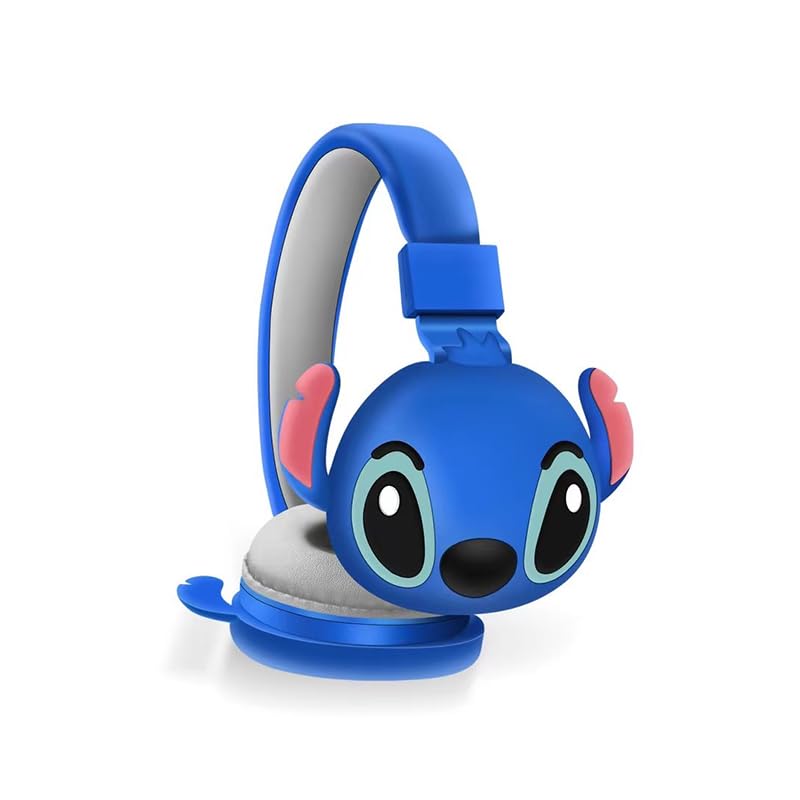
الصورة 1.1: الجبهة view of the AH-806 Wireless Bluetooth Headphones, featuring a blue color and a Stitch character design on the earcups.
المميزات الرئيسية:
- تصميم للطي: Conveniently folds for easy portability and storage in bags or suitcases, making it an ideal companion for travel.
- HIFI Stereo Sound: Equipped with a 13mm driver diameter for high-fidelity stereo sound, suitable for various audio content.
- ميكروفون مدمج: Enables hands-free calling and communication.
- إلغاء الضوضاء السلبية: Oversize earcups provide passive noise reduction for an immersive listening experience.
- استخدامات متعددة: Designed for video games, general audio listening, HiFi audio, and sports activities.
2. محتويات العبوة
يرجى تحديد المربع للعناصر التالية:
- 1 x Wireless Bluetooth Headphones AH-806
- 1 × دليل المستخدم (هذه الوثيقة)
- 1 x Charging Cover
- شنومكس x أوسب من نوع C محول

Image 2.1: Packaging of the AH-806 Headphones, illustrating the product and its accessories.
3. دليل الإعداد
3.1. شحن سماعات الرأس
- Locate the USB Type-C charging port on the headphones.
- Connect the provided USB Type-C adapter to the charging port.
- قم بتوصيل الطرف الآخر من كابل USB بمصدر طاقة USB متوافق (مثل منفذ USB في الكمبيوتر، أو محول الحائط).
- The LED indicator on the headphones will illuminate to show charging status. It will typically turn off or change color once fully charged.
Note: For optimal battery life, fully charge the headphones before first use.
3.2. اقتران بلوتوث
- تأكد من شحن سماعات الرأس بالكامل.
- تشغيل الطاقة: اضغط مع الاستمرار على زر الطاقة الموجود على سماعات الرأس حتى يومض مؤشر LED، مما يشير إلى وضع الاقتران.
- تفعيل البلوتوث: On your device (smartphone, tablet, laptop), go to the Bluetooth settings and ensure Bluetooth is turned on.
- بحث عن الأجهزة: Your device will scan for available Bluetooth devices. Look for "AH-806" or a similar name in the list.
- يتصل: Select "AH-806" from the list to initiate the connection. Once connected, the LED indicator on the headphones may change to a solid light or flash slowly.
- You are now ready to use your headphones.
إذا طُلب منك إدخال كلمة مرور، فأدخل "0000" (أربعة أصفار).
4. تعليمات التشغيل
4.1. تشغيل/إيقاف التشغيل
- تشغيل الطاقة: اضغط مع الاستمرار على زر الطاقة لمدة 3 ثوانٍ تقريبًا حتى يضيء مؤشر LED.
- إيقاف التشغيل: اضغط مع الاستمرار على زر الطاقة لمدة 5 ثوانٍ تقريبًا حتى ينطفئ مؤشر LED.
4.2. تشغيل الموسيقى
- تشغيل/إيقاف مؤقت: Press the Multi-function button (often the Power button or a dedicated Play/Pause button) once.
- المسار التالي: اضغط مع الاستمرار على زر رفع مستوى الصوت أو زر المسار التالي المخصص.
- المسار السابق: اضغط مع الاستمرار على زر خفض مستوى الصوت أو زر المسار السابق المخصص.
- رفع الصوت: اضغط لفترة قصيرة على زر رفع الصوت.
- اخفض الصوت: اضغط لفترة قصيرة على زر خفض الصوت.
4.3. إدارة المكالمات
- الرد/إنهاء المكالمة: Press the Multi-function button once during an incoming call to answer, and once again to end the call.
- رفض المكالمة: Press and hold the Multi-function button for approximately 2 seconds during an incoming call to reject it.
- إعادة الاتصال بالرقم الأخير: اضغط مرتين على الزر متعدد الوظائف.
4.4. Folding Design
The headphones feature a foldable design for enhanced portability. Gently fold the earcups inwards towards the headband until they are compact. This reduces the overall size of the headphones, making them easier to store and carry.
5. الصيانة والعناية
- تنظيف: Use a soft, dry, lint-free cloth to clean the headphones. Do not use abrasive cleaners, alcohol, or chemical solvents, as these may damage the surface.
- تخزين: When not in use, store the headphones in a cool, dry place, away from direct sunlight and extreme temperatures. Utilize the folding feature to save space.
- تجنب الماء: هذه السماعات ليست مقاومة للماء. تجنب تعريضها للماء أو الرطوبة أو الرطوبة الزائدة.
- التعامل معها بحذر: لا تسقط سماعات الرأس، ولا تفككها، ولا تحاول إصلاحها بنفسك. فقد يؤدي ذلك إلى إلغاء الضمان والتسبب في تلفها.
6. استكشاف الأخطاء وإصلاحها
| مشكلة | الحل المحتمل |
|---|---|
| لا يتم تشغيل سماعات الرأس. | Ensure the headphones are fully charged. Connect them to a power source using the provided USB Type-C adapter. |
| لا يمكن الاقتران بجهاز بلوتوث. |
|
| لا يوجد صوت أو مستوى الصوت منخفض. |
|
| الصوت مشوه أو متقطع. |
|
7. المواصفات
| ميزة | التفاصيل |
|---|---|
| اسم الموديل | AH-806 |
| تكنولوجيا الاتصال | لاسلكي |
| تكنولوجيا الاتصالات اللاسلكية | بلوتوث |
| مادة | بلاستيك، قماش |
| استخدامات محددة للمنتج | Gaming, Music, Sport |
| الأجهزة المتوافقة | الهواتف الذكية، والأجهزة اللوحية، وأجهزة الكمبيوتر المحمولة، وأجهزة الكمبيوتر المكتبية، ووحدات التحكم بالألعاب |
| ميزة الكابل | بدون كابل |
| طريقة التحكم | بعيد |
| عدد العناصر | 1 |
| نوع برنامج تشغيل الصوت | محرك ديناميكي (13 مم) |
| شكل سماعة الأذن | فوق الأذن |
| الشركة المصنعة | MOPIKI |
| المميزات الخاصة | Noise Cancellation (Passive) |
| لون | r.blue |
| وضع الأذن | فوق الأذن |
| عامل الشكل | فوق الأذن |
8. الضمان والدعم
This product is manufactured by MOPIKI. For specific warranty information, please refer to the documentation provided at the time of purchase or contact your retailer.
For technical support or inquiries, please contact the retailer or manufacturer directly. Keep your purchase receipt as proof of purchase.
Note: As per the provided product information, specific warranty details are not available in this manual.


