
1. المقدمة
This manual provides instructions for the proper use and maintenance of the SUNMI V2SE Smart Mobile Terminal. The V2SE is a versatile device designed for various business applications, featuring an integrated 58mm thermal printer, 1D/2D barcode recognition, NFC capabilities, and running on Android 12.0.
تتضمن الميزات الرئيسية ما يلي:
- Integrated 58mm thermal printer with 80mm/s print speed.
- 1D/2D Barcode recognition for efficient scanning.
- NFC for contactless transactions.
- Android 12.0 operating system with a Quad Core 2.0 GHz CPU.
- 2 GB RAM and 8 GB ROM for smooth operation.
- Connectivity: 4G/3G/2G, 2.4G/5G Wi-Fi, Bluetooth 2.1/3.0/4.2.
- Removable Lithium Ion battery.
2. مكونات الجهاز
Familiarize yourself with the main components of your SUNMI V2SE terminal.
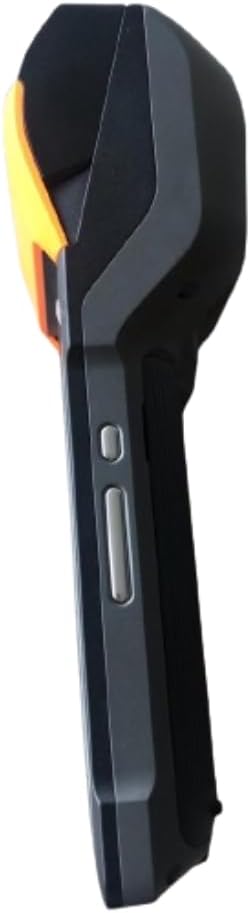
الشكل 2.1: الجبهة والجانب View. This image displays the device's screen, the integrated barcode scanner at the top, and the power and volume buttons located on the side.

الشكل 2.2: جانب Viewتُظهر هذه الصورة الجانب الإيجابيfile of the terminal, including the cover for the SIM card slot and additional buttons.

الشكل 2.3: خلف View. This image illustrates the rear of the device, featuring the thermal printer cover, the 0.3 MP camera, and the charging contact points.
قائمة المكونات:
- شاشة العرض: Touch-sensitive LCD for user interaction.
- ماسح الباركود: Integrated 1D/2D scanner for data capture.
- طابعة حرارية: For printing receipts and other documents.
- زر الطاقة: To turn the device on/off or wake/sleep.
- أزرار التحكم في الصوت: لضبط مستويات الصوت.
- آلة تصوير: 0.3 MP front photo sensor.
- فتحة بطاقة SIM: Supports 1 Nano SIM.
- حجرة البطارية: Houses the removable Lithium Ion battery.
- Charging Port/Contacts: لشحن الجهاز .
3. الإعداد الأولي
3.1. تركيب البطارية
- تأكد من إيقاف تشغيل الجهاز.
- حدد موقع غطاء حجرة البطارية على الجزء الخلفي من الجهاز (راجع الشكل 2.3).
- قم بإزالة الغطاء عن طريق سحبه أو رفعه وفقًا للعلامات.
- Insert the provided Lithium Ion battery, ensuring the contacts align correctly.
- أعد تركيب غطاء حجرة البطارية بشكل آمن.
3.2. تركيب بطاقة SIM
- Ensure the device is powered off and the battery is installed.
- Locate the SIM card slot cover on the side of the device (refer to Figure 2.2).
- افتح الغطاء.
- Insert a Nano SIM card into the designated slot with the gold contacts facing down and the notched corner aligned.
- Close the SIM card slot cover firmly.
3.3. Thermal Paper Loading
- Locate the printer cover release latch, typically on the top or side of the printer compartment (refer to Figure 2.3).
- افتح غطاء الطابعة.
- Insert a 58mm thermal paper roll into the compartment, ensuring the paper feeds from the bottom and the leading edge extends out of the printer slot.
- Close the printer cover firmly until it clicks into place. Ensure there is no slack in the paper roll.
3.4. الشحن الأولي والتشغيل
- Connect the provided power adapter to the device's charging port.
- Plug the adapter into a power outlet. Allow the device to charge fully before first use.
- To power on, press and hold the Power button (refer to Figure 2.1) until the SUNMI logo appears on the screen.
4. تعليمات التشغيل
4.1. تشغيل/إيقاف التشغيل ووضع السكون
- تشغيل الطاقة: Press and hold the Power button until the device vibrates and the screen lights up.
- إيقاف التشغيل: Press and hold the Power button until a power menu appears. Select "Power Off" and confirm.
- النوم/الاستيقاظ: Briefly press the Power button to put the device into sleep mode or wake it up.
4.2. Using the Thermal Printer
The integrated 58mm thermal printer can be used to print receipts, tickets, and other documents.
- Ensure thermal paper is correctly loaded (refer to Section 3.3).
- Open the application that requires printing (e.g., POS software).
- Initiate the print command within the application. The device will automatically print the content.
- Tear off the printed paper against the serrated edge.
4.3. مسح الباركود
The V2SE supports 1D and 2D barcode recognition.
- Open an application that requires barcode input.
- Point the scanner window (located at the top of the device, refer to Figure 2.1) at the barcode.
- Press the dedicated scan button (if available) or trigger the scan function within the application.
- تأكد من أن الرمز الشريطي يقع ضمن مجال الماسح الضوئي view and well-lit for optimal performance.
4.4. وظيفة NFC
The device supports Near Field Communication (NFC) for contactless operations.
- Ensure NFC is enabled in the device settings (Settings > Connected devices > NFC).
- Open an application that utilizes NFC (e.g., payment app, data transfer app).
- Hold the NFC-enabled card or device close to the NFC detection area on your terminal (typically near the top or back of the device).
- Follow the on-screen prompts to complete the transaction or data transfer.
4.5. الاتصال بالشبكة
- واي فاي: انتقل إلى الإعدادات > الشبكة والإنترنت > Wi-Fi للاتصال بالشبكات اللاسلكية المتاحة.
- بيانات الهاتف المحمول (4G/3G/2G): Ensure a valid SIM card is installed and mobile data is enabled in Settings > Network & internet > Mobile network.
- بلوتوث: انتقل إلى الإعدادات > الأجهزة المتصلة > بلوتوث للاقتران بأجهزة بلوتوث أخرى.
5. الصيانة
5.1. تنظيف الجهاز
- أوقف تشغيل الجهاز قبل التنظيف.
- استخدم قطعة قماش ناعمة وخالية من الوبر وامسحها برفق.ampيُنظف بالماء أو بمنظف خفيف غير كاشط لمسح السطح الخارجي.
- بالنسبة للشاشة، استخدم منظفًا خاصًا بالشاشات وقطعة قماش من الألياف الدقيقة.
- Do not use harsh chemicals, solvents, or abrasive materials. Avoid spraying liquids directly onto the device.
5.2. العناية بالبطارية
- Charge the battery regularly, avoiding complete discharge whenever possible.
- لا تعرض البطارية لدرجات الحرارة القصوى.
- إذا لم يتم استخدام الجهاز لفترة طويلة، اشحن البطارية إلى حوالي 50% وخزنها في مكان بارد وجاف.
- Use only the original or approved charger and battery.
5.3. Printer Head Cleaning
Regular cleaning of the printer head can prevent print quality issues.
- Power off the device and open the printer cover.
- استخدمي قطعة قطنية برفقampened with isopropyl alcohol to gently wipe the thermal print head.
- Allow the print head to dry completely before closing the cover and powering on the device.
6. استكشاف الأخطاء وإصلاحها
| مشكلة | السبب المحتمل | حل |
|---|---|---|
| الجهاز لا يعمل | Low battery; Faulty battery; Power button issue | Charge the device for at least 30 minutes. Ensure battery is correctly installed. Try a different charger. |
| الطابعة لا تطبع | No paper; Paper jammed; Printer head dirty; Application error | Check and load paper. Clear any paper jams. Clean the printer head (Section 5.3). Restart the application or device. |
| Barcode scanner not working | Scanner window obstructed; Barcode damaged; Application error | Ensure scanner window is clean. Try scanning a different barcode. Restart the application or device. |
| لا يوجد اتصال واي فاي | Wi-Fi off; Incorrect password; Out of range | Enable Wi-Fi in settings. Re-enter password. Move closer to the Wi-Fi router. |
| No mobile data | SIM card not installed; Mobile data off; No network coverage | Check SIM card installation. Enable mobile data in settings. Check for network coverage in your area. |
7. المواصفات
| ميزة | التفاصيل |
|---|---|
| نموذج | V2SE |
| نظام التشغيل | أندرويد 12.0 |
| وحدة المعالجة المركزية | رباعي النواة 2.0 جيجاهرتز |
| كبش | 2 جيجا بايت |
| ذاكرة للقراءة فقط | 8 جيجا بايت |
| عرض | LCD, 1920 x 1080 resolution, 16:9 Aspect Ratio |
| الطابعة | 58 mm thermal printer, 80 mm/s print speed |
| Barcode Recognition | 1D / 2D Barcode recognition |
| آلة تصوير | 0.3 MP Front Photo Sensor |
| فتحة سيم | 1 Nano SIM (Dual SIM support) |
| الاتصال | 4G/3G/2G Cellular, Wi-Fi (2.4G/5G), Bluetooth 2.1/3.0/4.2, NFC |
| نظام تحديد المواقع العالمي (جي بي اس) | True, Supports GPS satellite navigation system |
| بطارية | 1 Lithium Ion battery (removable, included) |
| أبعاد | 22 × 9 × 9 سم |
| وزن | 400 جرام |
| الشركة المصنعة | سونمي |
8. الضمان والدعم
For warranty information and technical support, please refer to the documentation provided with your purchase or contact your vendor. Keep your proof of purchase for warranty claims.