
1. المقدمة
This manual provides essential information for the safe and efficient operation of your Sharp GX-BT190 Portable Bluetooth Speaker. Please read it thoroughly before using the device and retain it for future reference.
2. معلومات السلامة
- لا تعرض مكبر الصوت لدرجات حرارة عالية أو أشعة الشمس المباشرة أو الرطوبة العالية.
- لا تقم بتفكيك السماعة أو إصلاحها أو تعديلها. قد يؤدي ذلك إلى إلغاء الضمان ويشكل مخاطر على السلامة.
- Ensure the charging port cover is securely closed when using the speaker near water to maintain its IP67 rating.
- استخدم فقط كابل الشحن المقدم أو ما يعادله المعتمد.
- احفظ السماعة بعيدًا عن متناول الأطفال والحيوانات الأليفة.
- تجنب الاستماع إلى مستويات صوت عالية لفترات طويلة لمنع تلف السمع.
3. محتويات العبوة
- Sharp GX-BT190 Portable Bluetooth Speaker
- كابل شحن USB
- حبل العنق
- دليل التعليمات
4. انتهى المنتجview

أمام view of the Sharp GX-BT190 speaker, showing the central speaker grille with the Sharp logo and the LED light ring.

جانب view of the Sharp GX-BT190 speaker, highlighting the textured speaker grille and the integrated lanyard.
مؤخرة view of the Sharp GX-BT190 speaker, showing the control buttons and the sealed charging port cover.
الضوابط والمؤشرات:
- زر الطاقة: اضغط مع الاستمرار للتشغيل/الإيقاف.
- زر رفع مستوى الصوت / زر المسار التالي (+): اضغط لفترة قصيرة لرفع مستوى الصوت، واضغط لفترة طويلة للانتقال إلى المسار التالي.
- زر خفض مستوى الصوت / زر المسار السابق (-): اضغط لفترة قصيرة لخفض مستوى الصوت، واضغط لفترة طويلة للانتقال إلى المسار السابق.
- Play/Pause / Call Button (►||): Short press to play/pause, answer/end calls. Long press to reject calls.
- Mode / Light Button (M): Short press to cycle through LED light modes. Long press to turn off LED lights.
- منفذ شحن USB-C: For charging the speaker. Ensure the rubber cover is sealed when not charging.
- مؤشر LED: يعرض حالة الشحن وحالة اقتران البلوتوث.
5. الإعداد
5.1 شحن السماعة
- Open the rubber cover on the back of the speaker to access the USB-C charging port.
- Connect the provided USB charging cable to the speaker's USB-C port.
- قم بتوصيل الطرف الآخر من كابل USB بمحول طاقة USB (غير متضمن) أو بمنفذ USB الخاص بالكمبيوتر.
- The LED indicator will illuminate during charging and turn off once fully charged.
- Close the rubber cover securely after charging to maintain the speaker's waterproof rating.
5.2 تشغيل/إيقاف التشغيل
- لتشغيل: Press and hold the Power button for approximately 3 seconds. You will hear an audible prompt, and the LED indicator will flash.
- لإيقاف التشغيل: اضغط مع الاستمرار على زر التشغيل لمدة 3 ثوانٍ تقريبًا. ستسمع تنبيهًا صوتيًا، وسينطفئ مؤشر LED.
5.3 اقتران بلوتوث
- Ensure the speaker is powered on and the LED indicator is flashing, indicating it is in pairing mode.
- على جهازك المحمول، قم بتمكين Bluetooth وابحث عن الأجهزة المتاحة.
- Select "GX-BT190" from the list of devices.
- بمجرد الاقتران، سيتوقف مؤشر LED عن الوميض وسيظل ثابتًا، وستسمع نغمة تأكيد.
- سيتم إعادة توصيل مكبر الصوت تلقائيًا بالجهاز المقترن الأخير عند تشغيله، إذا كان الجهاز ضمن النطاق وتم تمكين البلوتوث.
5.4 إقران ستيريو لاسلكي حقيقي (TWS)
TWS allows you to pair two GX-BT190 speakers together for a stereo audio experience.

Two Sharp GX-BT190 speakers, one red and one blue, positioned together, illustrating the True Wireless Stereo (TWS) pairing feature.
- Ensure both GX-BT190 speakers are powered on and not connected to any Bluetooth device.
- اضغط مرتين على زر التشغيل في أحد مكبري الصوت (الرئيسي). سيدخل مكبر الصوت في وضع اقتران TWS.
- The two speakers will automatically search for and connect to each other. You will hear a confirmation tone once TWS pairing is successful.
- Once TWS paired, connect your mobile device to the primary speaker via Bluetooth as described in section 5.3.
- To disconnect TWS, double-press the Power button on either speaker.
6. التشغيل
6.1 تشغيل الصوت
- تشغيل/إيقاف مؤقت: اضغط قصيرًا على زر التشغيل / الإيقاف المؤقت.
- رفع الصوت: اضغط لفترة قصيرة على زر "+".
- اخفض الصوت: اضغط لفترة قصيرة على الزر '-'.
- المسار التالي: اضغط لفترة طويلة على زر "+".
- المسار السابق: اضغط لفترة طويلة على الزر '-'.
6.2 الاتصال بدون استخدام اليدين
- الرد على المكالمة: اضغط ضغطة قصيرة على زر التشغيل/الإيقاف المؤقت عند رنين مكالمة واردة.
- إنهاء المكالمة: اضغط لفترة قصيرة على زر التشغيل/الإيقاف المؤقت أثناء المكالمة.
- رفض المكالمة: اضغط مطولاً على زر التشغيل/الإيقاف المؤقت عند رنين مكالمة واردة.
6.3 LED Mood Lights
- Short press the 'M' (Mode/Light) button to cycle through the 6 available LED mood light modes.
- Long press the 'M' button to turn off the LED lights.
6.4 Waterproof and Dustproof Usage (IP67)

The Sharp GX-BT190 speaker partially submerged in water, demonstrating its IP67 waterproof and dustproof capabilities.
The GX-BT190 speaker is rated IP67, meaning it is protected from dust ingress and can withstand immersion in water up to 1 meter for 30 minutes. To ensure this protection:
- Always ensure the rubber cover for the charging port is fully and securely sealed before exposing the speaker to water or dust.
- لا تقم بغمر مكبر الصوت عمدًا لفترات طويلة أو إلى عمق يتجاوز العمق المحدد.
- بعد تعرض السماعة للماء، امسحها بقطعة قماش ناعمة حتى تجف قبل شحنها.
7. الصيانة
7.1 التنظيف
- امسح السماعة بقطعة ناعمة ، دamp قطعة قماش.
- لا تستخدم المنظفات الكاشطة أو الكحول أو المذيبات الكيميائية.
- Ensure the speaker is dry before charging or storing.
7.2 التخزين
- قم بتخزين مكبر الصوت في مكان بارد وجاف بعيدًا عن أشعة الشمس المباشرة ودرجات الحرارة القصوى.
- في حالة التخزين لفترة طويلة، اشحن البطارية بشكل دوري (على سبيل المثال، كل 3 أشهر) للحفاظ على صحة البطارية.
8. استكشاف الأخطاء وإصلاحها
| مشكلة | حل |
|---|---|
| لا يتم تشغيل مكبر الصوت. | تأكد من شحن البطارية. وصّل السماعة بمصدر طاقة باستخدام كابل USB. |
| لا يمكن الاقتران عبر البلوتوث. | Ensure the speaker is in pairing mode (LED flashing). Turn off and on Bluetooth on your device. Move the speaker closer to your device. Clear previous Bluetooth connections on your device. |
| لا يوجد صوت أو مستوى الصوت منخفض. | ارفع مستوى الصوت في كل من السماعة والجهاز المتصل. تأكد من إقران السماعة بشكل صحيح. |
| جودة الصوت رديئة. | Move the speaker closer to your device. Ensure there are no obstructions between the speaker and your device. Try playing a different audio source. |
| فشل اقتران TWS. | Ensure both speakers are GX-BT190 models and are not connected to any other Bluetooth device. Try powering both speakers off and on, then re-attempt TWS pairing. |
9. المواصفات

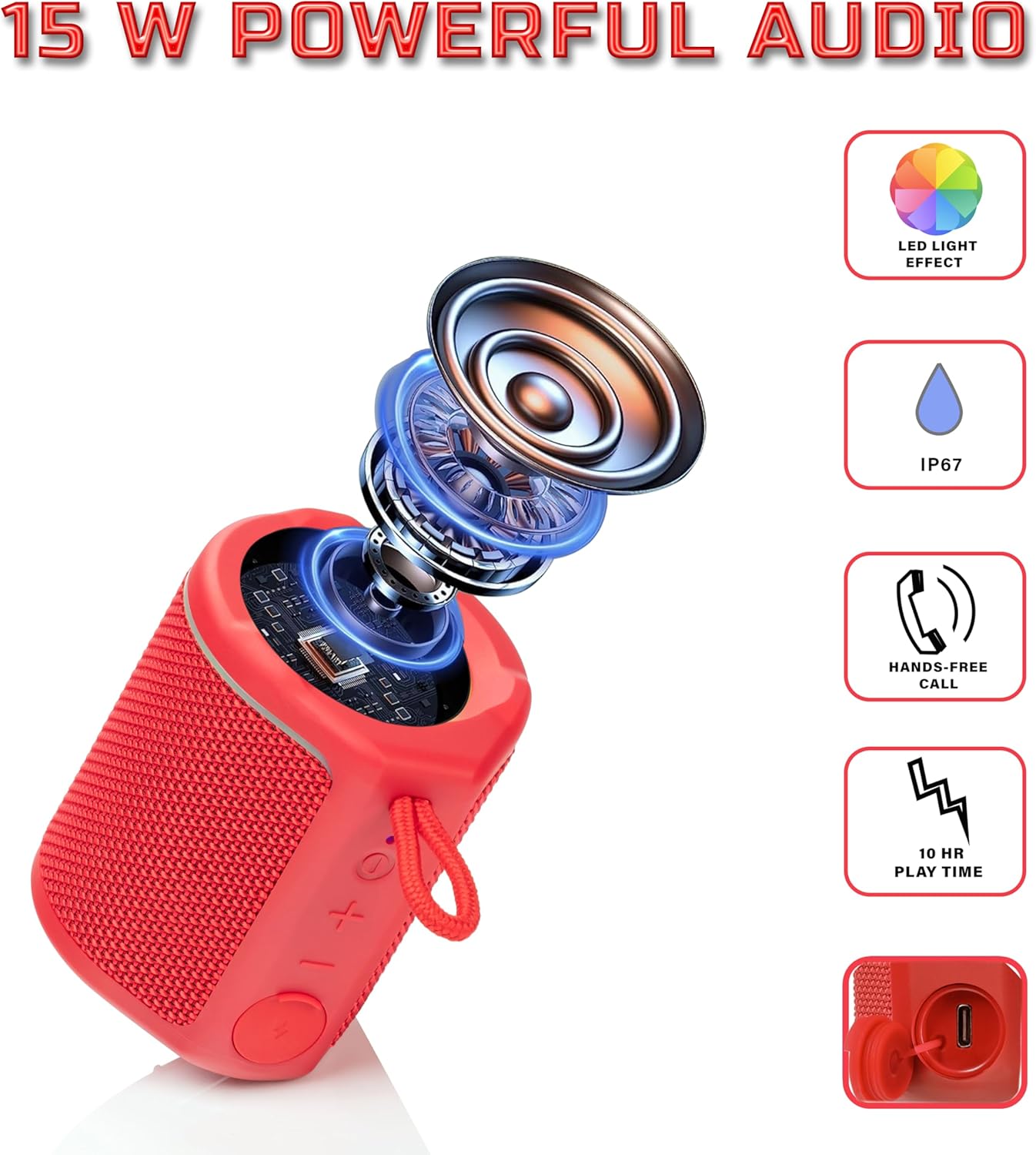
Diagram illustrating the internal components of the Sharp GX-BT190 speaker, including the speaker driver, and highlighting features like LED light effect, IP67 rating, hands-free call function, and battery life.
| ميزة | التفاصيل |
|---|---|
| رقم الموديل | جي اكس-BT190 |
| تكنولوجيا الاتصال | بلوتوث |
| الحد الأقصى لقوة خرج السماعة | 10 واط |
| تصنيف مقاومة الماء | IP67 |
| عمر البطارية | حتى ساعتين |
| نوع البطارية | 1 ليثيوم أيون (متضمنة) |
| سعة البطارية | 1200 مللي أمبير |
| أبعاد المنتج (العمق × العرض × الارتفاع) | 7.5 × 7.5 × 7.5 سم (تقريبًا) |
| وزن العنصر | 226.8 جرام (8 أونصة) |
| لاسلكي المدى | حتى 33 قدم |
| مميزات اضافية | LED Light, True Wireless Stereo (TWS), Hands-Free Calling |
10. الضمان
The Sharp GX-BT190 Portable Bluetooth Speaker comes with a 1-Year Limited Warranty from the date of purchase. This warranty covers manufacturing defects under normal use. It does not cover damage caused by misuse, accidents, unauthorized modifications, or normal wear and tear. Please retain your proof of purchase for warranty claims.
11. الدعم
For technical assistance, warranty inquiries, or further information regarding your Sharp GX-BT190 speaker, please contact Sharp Inc. customer support:
- جهة اتصال الشركة المصنعة: Sharp Inc
- هاتف: 1-800-BE-SHARP