
1. المقدمة
The XHDATA D608WB is a versatile portable emergency radio designed for various situations, from daily use to outdoor adventures and critical emergencies. It integrates multiple functions including FM/MW/SW radio reception, a powerful 3000mAh rechargeable battery for charging mobile devices, Bluetooth connectivity, TF card playback, a multi-mode flashlight, a reading lamp, and an SOS alarm.
This manual provides detailed instructions on how to set up, operate, and maintain your XHDATA D608WB radio to ensure optimal performance and longevity.
2. معلومات السلامة
- لا تعرض الجهاز لدرجات حرارة عالية، أو أشعة الشمس المباشرة، أو الرطوبة العالية.
- تجنب إسقاط الراديو أو تعريضه لصدمات قوية.
- احتفظ بالجهاز بعيدًا عن الماء والسوائل الأخرى.
- لا تحاول تفكيك الراديو أو تعديله. سيؤدي ذلك إلى إلغاء الضمان.
- استخدم فقط كابل الشحن المقدم أو ما يعادله المعتمد.
- When using the SOS alarm, be aware of its powerful sound output.
3. محتويات العبوة
يرجى التحقق من الحزمة للعناصر التالية:
- 1 x XHDATA D608WB Multifunction Radio
- بطارية قابلة للشحن واحدة (3000 مللي أمبير/ساعة)
- كابل شحن USB واحد (80 سم)
- 1 × دليل المستخدم (هذه الوثيقة)
- 1 × حبل

الشكل 3.1: الملحقات المرفقة وأبعاد المنتج.
4. انتهى المنتجview
Familiarize yourself with the main components and controls of your XHDATA D608WB radio.

الشكل 4.1: الجبهة view of the XHDATA D608WB radio with key features indicated.
- شاشة العرض: Shows frequency, time, battery level, and mode.
- أزرار التحكم: Power, Mode, Volume, Tuning, Play/Pause, Menu, SOS.
- هوائي تلسكوبي: لتحسين استقبال الراديو.
- مصباح يدوي: تقع على الجانب.
- القراءة لamp: Integrated into the solar panel cover.
- لوحة الطاقة الشمسية: For emergency charging.
- كرنك اليد: لتوليد الطاقة يدوياً.
- منفذ إخراج USB: لشحن الأجهزة الخارجية.
- منفذ إدخال USB-C: لشحن الراديو.
- فتحة بطاقة TF: For MP3/WMA/WAV/FLAC playback.
- مقبس سماعة رأس مقاس 3.5 ملم: للاستماع الخاص.
- ميكروفون: For hands-free Bluetooth calls.
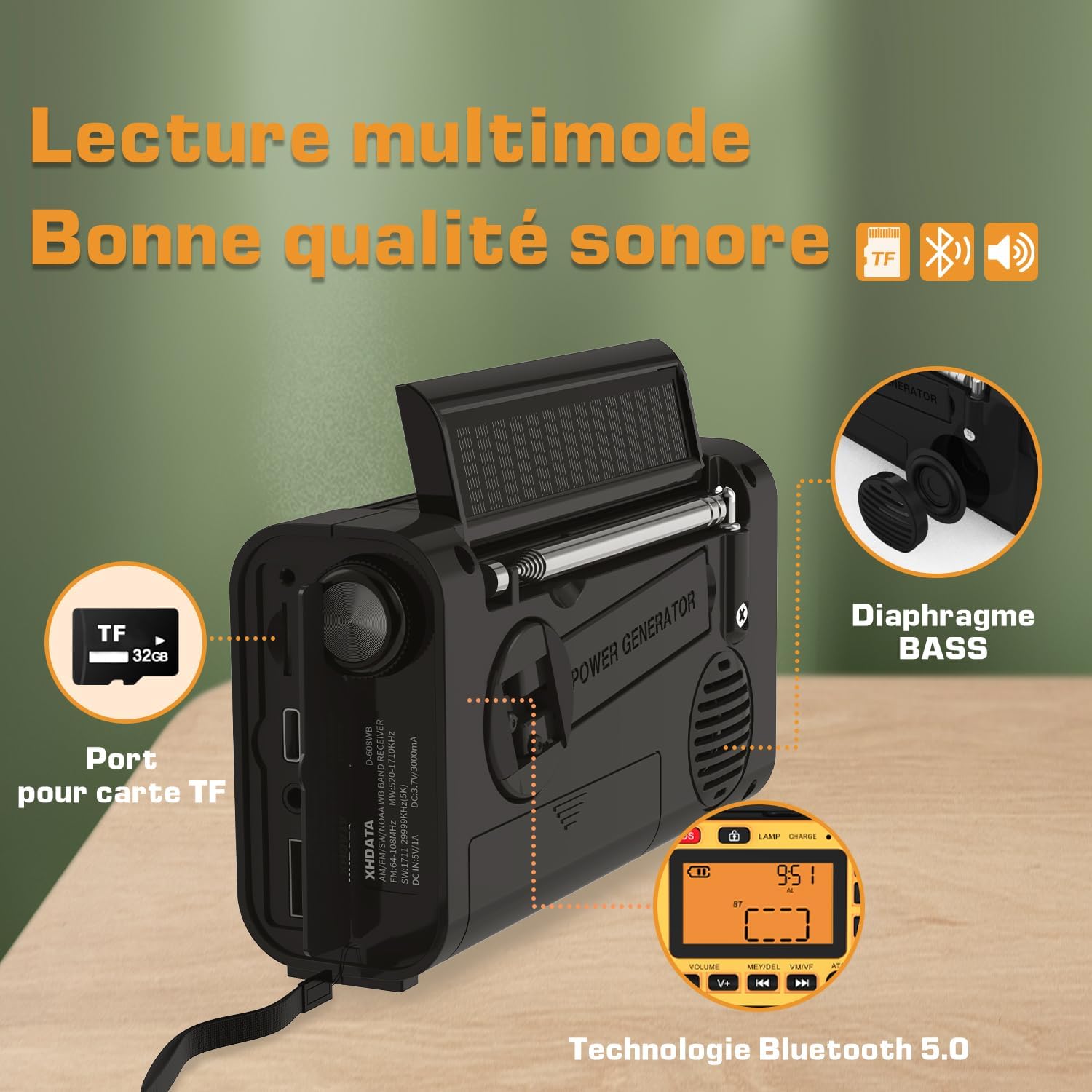
الشكل 4.2: الخلف والجانب view showing ports and hand crank.
5. إعداد الجهاز وتزويده بالطاقة
5.1 تركيب البطارية الأولي
The XHDATA D608WB comes with a removable 3000mAh 18650 rechargeable battery. Ensure it is correctly installed before first use. Open the battery compartment cover, insert the battery according to the polarity markings, and close the cover securely.
5.2 طرق الشحن
The radio offers four ways to charge its internal battery:
- الشحن عبر USB: Connect the provided USB-C cable to the radio's USB-C input port and the other end to a USB power adapter (not included) or a computer's USB port. The charging indicator will illuminate.
- الشحن بالطاقة الشمسية: Place the radio with the solar panel facing direct sunlight. This method is primarily for maintaining charge or emergency power and may take longer to fully charge the battery.
- الشحن باستخدام كرنك اليد: Extend the hand crank from the back of the radio and rotate it clockwise or counter-clockwise at a steady pace. This method generates power for emergency use.
- البطارية الداخلية: For daily use, the built-in 3000mAh rechargeable battery provides power.

Figure 5.1: Radio with solar panel and flashlight activated.
6. تعليمات التشغيل
6.1 تشغيل/إيقاف التشغيل
اضغط مع الاستمرار على قوة زر لتشغيل الراديو أو إيقافه.
6.2 Radio Function (FM/MW/SW)
- اختر الفرقة: اضغط على وضع button to cycle through FM, MW (AM), and SW bands.
- المسح التلقائي (ATS): في وضع الراديو، اضغط مع الاستمرار على تشغيل/إيقاف مؤقت button (often labeled 'ATS' or 'Scan') to automatically scan and save available stations. The radio can store up to 500 stations.
- ضبط يدوي: استخدم الضبط لأعلى/لأسفل buttons (often labeled 'V+'/'V-' or '▲'/'▼') to manually adjust the frequency.
- استدعاء المحطات المحفوظة: استخدم التالي/السابق buttons (often labeled '◀◀'/'▶▶') to navigate through saved stations.
- تمديد الهوائي: For optimal FM and SW reception, fully extend the telescopic antenna.
6.3 اتصال البلوتوث
- الدخول إلى وضع البلوتوث: اضغط على وضع button until "BT" appears on the display. The radio will enter pairing mode.
- الاقتران: On your mobile device, enable Bluetooth and search for "XHDATA D608WB". Select it to pair.
- تشغيل الموسيقى: Once paired, you can stream audio from your device to the radio. Use the radio's control buttons for play/pause, next/previous track, and volume adjustment.
- مكالمات بدون استخدام اليدين: When connected via Bluetooth, you can answer or end calls using the radio's controls. The built-in microphone allows for hands-free communication.
6.4 تشغيل بطاقة TF
- أدخل بطاقة الذاكرة الخارجية (TF): Insert a TF (MicroSD) card (up to 32GB) with MP3/WMA/WAV/FLAC audio fileفي فتحة بطاقة TF.
- Enter TF Mode: اضغط على وضع button until the display indicates TF card playback.
- التحكم في التشغيل: Use the play/pause, next/previous track, and volume buttons to control audio playback.
6.5 مصباح يدوي وقارئamp
The radio features a flashlight and a reading lamp, both with three adjustable brightness levels.

Figure 6.1: Using the reading lamp and flashlight in low-light conditions.
- مصباح يدوي: اضغط على مصباح يدوي button (often labeled 'TORCH') to turn it on. Press again to cycle through brightness levels (Low, Medium, High) and off.
- القراءة لamp: Lift the solar panel cover to reveal the reading lamp. اضغط على Lamp button to turn it on. Press again to cycle through brightness levels (Low, Medium, High) and off.
6.6 إنذار SOS
In an emergency, activate the SOS alarm to emit a loud siren and flash a red light.
- تفعيل SOS: اضغط على نداء استغاثة button. The radio will emit a powerful siren and flash a red light.
- إلغاء تفعيل نظام الطوارئ (SOS): اضغط على نداء استغاثة button again to turn off the alarm.
6.7 شحن الأجهزة الخارجية
The radio can act as a power bank to charge your mobile phone or other small USB-powered devices.
- توصيل الجهاز: Connect your device's USB charging cable to the radio's standard USB output port.
- بدء الشحن: The radio will automatically begin charging the connected device.
7. الصيانة
- تنظيف: امسح الراديو بقطعة قماش ناعمة وجافة. لا تستخدم المنظفات الكاشطة أو المذيبات.
- العناية بالبطارية: For optimal battery life, avoid fully discharging the battery frequently. If storing the radio for an extended period, charge the battery to about 50% and recharge every few months.
- تخزين: قم بتخزين الراديو في مكان بارد وجاف بعيدًا عن أشعة الشمس المباشرة ودرجات الحرارة القصوى.
8. استكشاف الأخطاء وإصلاحها
| مشكلة | السبب المحتمل | حل |
|---|---|---|
| الراديو لا يعمل. | بطارية منخفضة أو تركيب بطارية غير صحيح. | Charge the battery using USB, solar, or hand crank. Check battery polarity. |
| استقبال راديو ضعيف. | الهوائي غير ممتد، أو الإشارة ضعيفة، أو يوجد تداخل. | Fully extend the telescopic antenna. Try moving to an open area. |
| البلوتوث غير قادر على الاتصال. | Radio not in pairing mode, device too far, or already connected to another device. | Ensure radio is in Bluetooth pairing mode. Keep devices within 10 meters. Disconnect from other devices. |
| الجهاز الخارجي لا يتم شحنه. | بطارية الراديو منخفضة أو الكابل معطل. | تأكد من أن الراديو مشحون بشكل كافٍ. جرب كابل USB آخر. |
9. المواصفات
| ميزة | التفاصيل |
|---|---|
| ماركة | XHDATA |
| رقم الموديل | D-608WB |
| لون | أسود |
| تكنولوجيا الاتصال | بلوتوث |
| ميزة خاصة | قابلة لإعادة الشحن |
| الأجهزة المتوافقة | Headphones, Smartphone |
| نوع البطارية | ليثيوم أيون |
| بطارية قابلة لإعادة الشحن | نعم (3000 مللي أمبير/ساعة) |
| أبعاد المنتج | 16.2 طول × 5.3 عرض × 9 ارتفاع سم |
| تقنية الموالف | AM، FM، SW |
| مصدر الطاقة | Solar Powered, Battery Powered, Hand Crank |
| نطاقات الراديو المدعومة | FM: 64-108 MHz / 76-108 MHz / 87-108 MHz / 87.5-108 MHz MW: 522-1620 KHz / 520-1710 KHz SW: 1711-29999 KHz |
| المكونات المضمنة | دليل المستخدم |
10. الضمان والدعم
10.1 ضمان الشركة المصنعة
The XHDATA D608WB radio comes with a ضمان الشركة المصنعة لمدة سنة واحدة يسري هذا الضمان من تاريخ الشراء. ويغطي عيوب المواد والتصنيع في ظل الاستخدام العادي. ولا يغطي الأضرار الناجمة عن سوء الاستخدام أو الحوادث أو التعديلات غير المصرح بها أو الكوارث الطبيعية.
10.2 دعم العملاء
For any questions, technical assistance, or warranty claims, please contact XHDATA customer support through the retailer where you purchased the product or visit the official XHDATA webموقع لمعلومات الاتصال.