
1. المقدمة
The HIKMICRO ECO-V Handheld Thermography Camera is a versatile thermal imaging device designed for various professional applications. It offers thermal, bi-spectrum image fusion, and visible light modes to meet diverse business needs. This manual provides essential information for the safe and effective operation of your ECO-V camera.
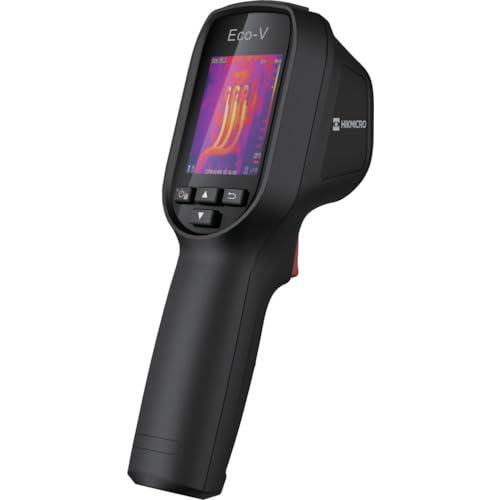
Figure 1: HIKMICRO ECO-V Handheld Thermography Camera
2. معلومات السلامة
يرجى قراءة جميع تحذيرات السلامة والتعليمات وفهمها جيداً قبل استخدام هذا المنتج. قد يؤدي عدم اتباع هذه التعليمات إلى حدوث صدمة كهربائية أو حريق أو إصابة خطيرة.
احتياطات السلامة العامة
- لا تقم بتشغيل الجهاز في الأجواء القابلة للاشتعال، مثل وجود سوائل أو غازات أو غبار قابل للاشتعال.
- احتفظ بالجهاز بعيدًا عن الماء والسوائل الأخرى.
- لا تحاول فتح الجهاز أو تعديله. أحل جميع أعمال الصيانة إلى فنيين مؤهلين.
- Use only HIKMICRO-approved accessories.
- Avoid direct exposure of the thermal lens to strong light sources (e.g., sun, laser) as this may damage the detector.
سلامة البطارية
- The device contains a built-in Lithium-ion battery. Do not expose the battery to excessive heat, direct sunlight, or fire.
- لا تقم بثقب البطارية أو فتحها أو تفكيكها.
- Charge the battery only with the provided USB cable and a compatible power adapter.
- التخلص من البطاريات وفقا للقوانين المحلية.
3. محتويات العبوة
The HIKMICRO ECO-V package includes the following items:
- HIKMICRO Handheld Thermography Camera ECO-V
- كابل USB Type-C
- دليل البدء السريع (غير مذكور صراحةً ولكنه قياسي)
- Calibration Certificate (not explicitly mentioned but standard)
Video 3.1: Unboxing the HIKMICRO M-Series (similar to ECO-V, showing typical package contents and device appearance).
4. انتهى الجهازview
Familiarize yourself with the physical components and interface of your HIKMICRO ECO-V camera.
المظهر والواجهة
The ECO-V features a compact, ergonomic design for comfortable handheld use. Key components include the thermal lens, optical lens, laser indicator, white light, trigger button, navigation buttons, and a 2.4-inch display.
Video 4.1: This video demonstrates the physical appearance and interface of a HIKMICRO M-Series camera, which shares similar design elements and interface components with the ECO-V.
5. الإعداد
5.1 شحن الجهاز
Before initial use, fully charge the device's built-in Lithium-ion battery.
- Connect the provided USB Type-C cable to the device's USB port.
- Connect the other end of the USB cable to a compatible power adapter (5V2A recommended) and plug it into a power outlet.
- The charging indicator will show red during charging and turn green when fully charged.
Video 5.1: This HIKMICRO ECO operation video demonstrates the charging process for the device.
5.2 تشغيل/إيقاف التشغيل
To power on the device, press and hold the power button for more than 6 seconds. To power off, press and hold the power button again until the device shuts down.
Video 5.2: This HIKMICRO ECO operation video demonstrates how to power on the device.
6. تعليمات التشغيل
This section covers the basic and advanced operational features of your ECO-V camera.
6.1 Image Capture and Display
To capture a thermal image, aim the camera at the target and press the trigger button. The captured image will be saved to the internal EMMC storage. To view saved images, navigate to the 'Albums' section in the menu.
Video 6.1: This HIKMICRO ECO operation video demonstrates image capture and viewing saved snapshots.
6.2 أدوات القياس
The ECO-V provides various measurement tools to analyze thermal images:
- نقطة ساخنة: Automatically identifies and displays the highest temperature point.
- منطقة باردة: Automatically identifies and displays the lowest temperature point.
- بقعة المركز: يعرض درجة الحرارة في منتصف الشاشة.
Video 6.2: This HIKMICRO ECO operation video demonstrates the use of measurement tools like hot, cold, and center spots.
6.3 SuperIR Image Enhancement
SuperIR technology enhances the thermal image resolution, providing more detail for analysis. You can enable or disable this feature in the settings menu.
Video 6.3: This HIKMICRO ECO operation video demonstrates how to enable and use the SuperIR image enhancement feature.
6.4 أوضاع للصورة
The ECO-V supports multiple image modes for different inspection needs:
- حراري: Displays only the thermal image.
- الاندماج: Blends the thermal and visible light images for enhanced detail.
- PIP (صورة داخل صورة): يقوم بتراكب صورة حرارية أصغر على صورة ضوئية مرئية.
- بصري: يعرض صورة الضوء المرئي فقط.
Video 6.4: This HIKMICRO B10S product video demonstrates switching between different image modes, including Thermal, Fusion, PIP, and Optical.
6.5 Parallax Correction
When using fusion modes, adjust the parallax correction based on the distance to the target to ensure accurate alignment between thermal and visible images.
Video 6.5: This HIKMICRO B10S product video demonstrates how to adjust parallax correction for accurate image fusion.
6.6 Palette Adjustment
Select from various color palettes (e.g., White Hot, Black Hot, Rainbow, Ironbow) to visualize temperature differences more effectively. This can be adjusted in the settings menu.
Video 6.6: This HIKMICRO B10S product video demonstrates how to adjust color palettes.
6.7 Emissivity and Distance Settings
For accurate temperature measurements, it is crucial to set the correct emissivity value for the target material and the distance to the target. Refer to the general emissivity reference table in the specifications section.
Video 6.7: This HIKMICRO ECO operation video demonstrates setting emissivity and distance for accurate temperature readings.
6.8 مؤشر الليزر
The built-in laser pointer helps to precisely identify the measurement target. It can be enabled or disabled in the settings menu.
Video 6.8: This HIKMICRO ECO operation video demonstrates how to enable and use the laser pointer.
6.9 إنذار لارتفاع درجة الحرارة
Set a high temperature alarm threshold to be notified when temperatures exceed a predefined limit. This feature is useful for identifying potential overheating issues.
Video 6.9: This HIKMICRO B10S product video demonstrates how to set a high temperature alarm.
6.10 اتصال نقطة اتصال
The ECO-V can connect to a mobile device via Wi-Fi hotspot for live viewing and data transfer. Enable the Wi-Fi hotspot function in the device settings and connect your mobile device.
Video 6.10: This HIKMICRO M-Series video demonstrates how to establish a hotspot connection with a mobile device.
6.11 هيكميكرو Viewer App Connection
قم بتنزيل HIKMICRO Viewer app on your mobile device to access live view, manage images and videos, and generate reports. Connect the device to your phone via Wi-Fi.
Video 6.11: This HIKMICRO Pocket series video demonstrates connecting the device to the HIKMICRO Viewer app for various functions.
7. الصيانة
7.1 التنظيف
- امسح جسم الجهاز بقطعة قماش ناعمة و...amp القماش. لا تستخدم المنظفات أو المذيبات الكاشطة.
- Gently clean the lenses with a lens cleaning cloth. Avoid touching the lens surface with bare hands.
7.2 التخزين
- قم بتخزين الجهاز في مكان بارد وجاف، بعيدًا عن أشعة الشمس المباشرة ودرجات الحرارة القصوى.
- في حالة التخزين لفترة طويلة، تأكد من شحن البطارية جزئيًا (حوالي 50٪) وأعد شحنها كل بضعة أشهر للحفاظ على صحة البطارية.
8. استكشاف الأخطاء وإصلاحها
If you encounter issues with your HIKMICRO ECO-V, refer to the following common problems and solutions:
| مشكلة | السبب المحتمل | حل |
|---|---|---|
| الجهاز لا يعمل | انخفاض مستوى البطارية؛ عطل في الجهاز | Charge the battery; Contact support |
| قراءات غير دقيقة لدرجة الحرارة | Incorrect emissivity/distance settings; Dirty lens | Adjust emissivity/distance; Clean the lens |
| Cannot connect to Wi-Fi hotspot | Incorrect password; Hotspot not enabled | Verify password; Enable hotspot in settings |
9. المواصفات
Detailed technical specifications for the HIKMICRO ECO-V camera:
| ميزة | مواصفة |
|---|---|
| نموذج | ايكو-V |
| Measurement Temperature Range | -20 درجة مئوية إلى 550 درجة مئوية |
| Minimum Temperature Display | 0.1 درجة مئوية |
| مجال View (فوف) | 50 درجة × 50 درجة |
| الدقة المكانية (IFOV) | 8.89 مراد |
| نطاق درجة حرارة التشغيل | -10 درجة مئوية إلى 50 درجة مئوية |
| نطاق درجة حرارة التخزين | -40 درجة مئوية إلى 70 درجة مئوية |
| حجم العرض | 2.4 بوصة |
| مصدر الطاقة | بطارية ليثيوم أيون مدمجة |
| مدة تشغيل البطارية | 8 ساعات |
| واي فاي | غير متاح |
| مستوى الحماية | IP54 |
| الواجهة | يو إس بي من النوع سي |
| درجة البكسل | 12μm |
| Measuring Wavelength | 7.5-14μm |
| NETD | < 40 ملي كلفن (@ 25 درجة مئوية، F#=1.0) |
| البعد البؤري | 1.35 ملم |
| فتحة | ف1.0 |
| التركيز الأدنى المسافة | 0.1م (0.33 قدم) |
| معدل الإطارات | 25 هرتز |
| نظام التركيز | خالي من التركيز |
| وسائط التسجيل | EMMC (4GB) |
| سعة تخزين الصور | 30,000 صورة |
| صورة File شكل | BMP (includes measurement data) |
| دقة الصورة الحرارية | 96×96 (9,216 pixels) |
| Visible Image Resolution | 640×480 |
| دقة | ±2°C or ±2% (whichever is greater), when ambient temperature is 15°C to 35°C and target temperature is 0°C or above. |
| مواد | بولي كربونات، راتينج ABS |
| وزن | 360 جرام |
General Emissivity Reference
| مادة | الانبعاثية |
|---|---|
| جلد الإنسان | 0.98 |
| ثنائي الفينيل متعدد الكلور | 0.91 |
| الخرسانة المسلحة | 0.95 |
| السيراميك | 0.92 |
| ممحاة | 0.95 |
| طلاء | 0.93 |
| خشب | 0.85 |
| طوب | 0.96 |
| رمل | 0.90 |
| تربة | 0.92 |
| القطن | 0.98 |
| كرتون | 0.90 |
| الكتاب الأبيض | 0.96 |
| ماء | 0.96 |
10. الضمان والدعم
HIKMICRO products are covered by a limited warranty. For detailed warranty terms and conditions, please refer to the official HIKMICRO webالموقع أو اتصل بالموزع المحلي لديك.
دعم العملاء
If you require technical assistance, troubleshooting, or have questions about your ECO-V camera, please contact HIKMICRO customer support through their official webالموقع أو معلومات الاتصال المقدمة في عبوة المنتج الخاص بك.