
1. المقدمة
This manual provides detailed instructions for the installation, operation, and maintenance of your ABSOSO Single Din Car Radio Receiver. Please read this manual thoroughly before using the product to ensure proper function and to prevent damage. Keep this manual for future reference.
2. ماذا يوجد في الصندوق
- Single Din Car Audio Unit
- Wireless IR Remote Control
- Mounting Kits & Harness
- دليل المستخدم (هذا المستند)
3. مواصفات المنتج
The ABSOSO Single Din Car Radio Receiver offers a range of features designed to enhance your in-car audio experience:
- Bluetooth Audio & Calling: Connect your smartphone for hands-free calls and music streaming from apps like Spotify and Pandora.
- راديو AM/FM: Tune into 30 preset AM/FM radio stations with automatic and manual search options for news, weather, and music.
- انتاج طاقة عالية: Delivers 4 channels x 75 watts (300W total) built-in power audio amplifier for robust sound.
- LCD Display & Physical Buttons: Features an HD digital LCD screen and illuminated buttons/knob for comfortable viewing and easy control.
- Multiple Music Modes Input: Supports 3.5mm AUX-input, SD card, and dual USB ports (one for up to 64GB flash drive, the other for 2.1A quick charge).
- دعم تنسيق الصوت: Compatible with MP3, WAV, and WMA music formats.
- معرف 3 Tag عرض: Shows additional data like title and artist for audio files.
- Preset EQ Configuration: Access various music styles such as Rock, POP, and Jazz for high-quality sound.
4. الإعداد والتثبيت
يُعدّ التركيب الصحيح أمراً بالغ الأهمية للحصول على أفضل أداء. يُنصح بتركيب هذه الوحدة بواسطة فنيّ مؤهل.
4.1. مخطط الأسلاك
Refer to the diagram below for correct power and speaker connections. Ensure all connections are secure to prevent short circuits or damage to the unit and vehicle's electrical system.

Figure 4.1: Wire Connection Diagram. This diagram illustrates the power cable connections (A) including +12V Constant Power Supply, Ground Wire, +12V Ignition Switch, and Antenna. It also shows the speaker cable connections (B) for 4-channel speaker output, including Rear Right, Front Right, Front Left, and Rear Left speakers. The rear panel of the unit is shown with Radio Antenna, SUB, Audio RCA, External Mic, Fuse (15A), and Power port.
4.2. التركيب
The unit is designed for a standard single DIN opening. Secure the unit using the provided mounting kits. Ensure adequate ventilation around the unit to prevent overheating.

Figure 4.2: Rear Panel with RCA Outputs. This image displays the rear of the car radio, showing the various ports including RCA outputs for subwoofer (SUB-1, SUB-2), rear left (R-L), rear right (R-R), front left (F-L), and front right (F-R) channels, indicating its 300W high power and pre-amp القدرات.
5. تعليمات التشغيل
5.1. الضوابط العامة
The front panel features an LCD display, a rotary knob, and various buttons for control. The rotary knob typically controls volume and can be pressed for menu selections. Buttons are illuminated for visibility.

Figure 5.1: LCD Display and Rotary Knob. This image highlights the digital LCD screen and the central rotary knob, which features dynamic color-changing illumination, providing a comfortable viewing experience and matching various car interior styles.
5.2. اقتران بلوتوث
لتوصيل جهازك المحمول عبر البلوتوث:
- تأكد من تمكين Bluetooth على جهازك المحمول.
- Select the Bluetooth source on the car radio. The display will show 'BT'.
- بحث عن available devices on your mobile phone and select 'ABSOSO Car Audio' (or similar name).
- بمجرد الاقتران، يمكنك إجراء مكالمات بدون استخدام اليدين وبث الصوت.

Figure 5.2: Hands-Free Calling & Wireless Streaming. This image shows the car radio installed in a dashboard, with a smartphone displaying music playback, illustrating the seamless Bluetooth connectivity for hands-free calls and wireless music streaming.
5.3. تشغيل راديو AM/FM
Press the 'BAND' button to switch between AM and FM bands. Use the seek buttons to automatically search for stations or manually tune using the rotary knob.
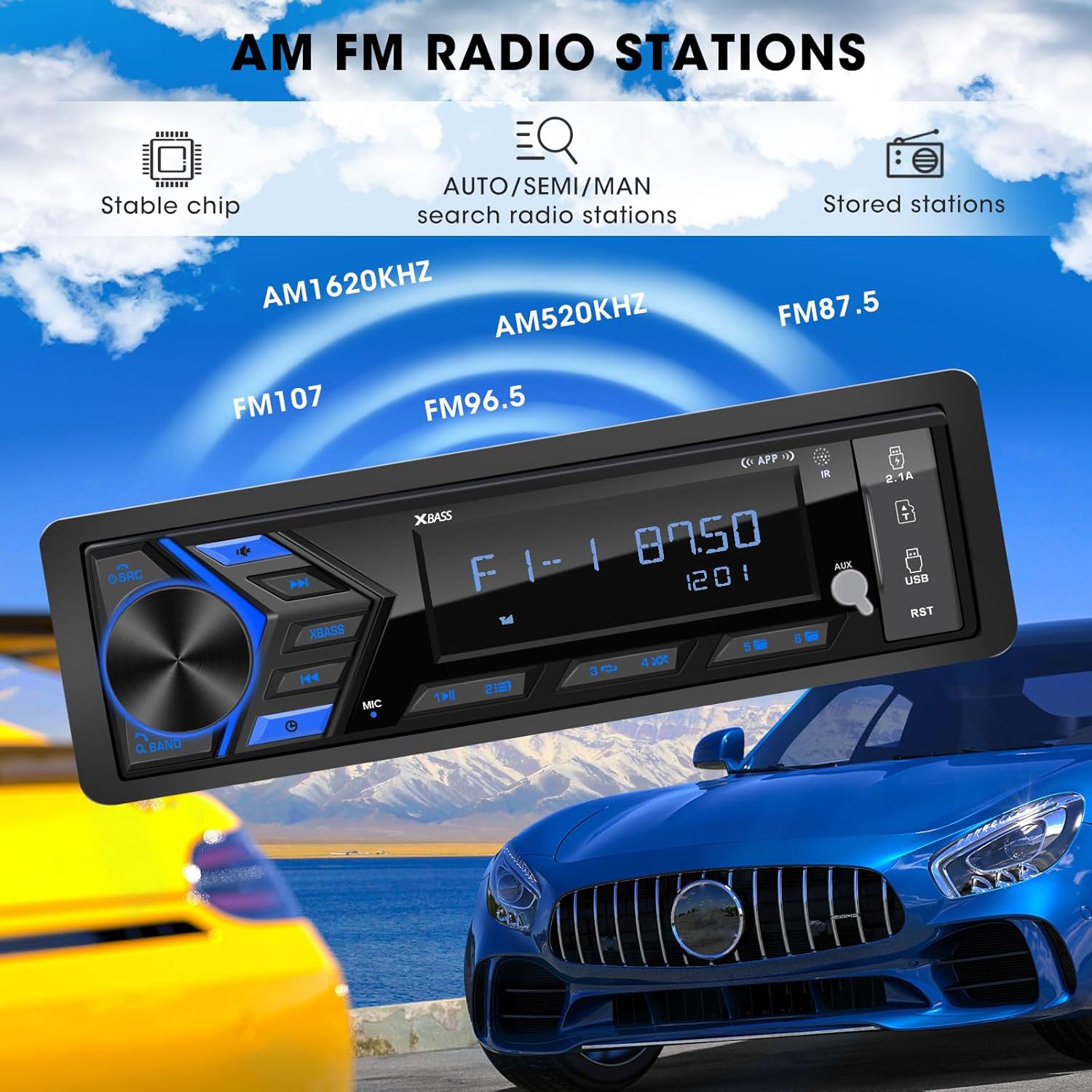
Figure 5.3: AM/FM Radio Stations. This image shows the car radio displaying a radio frequency (FM 87.50), with visual cues indicating its capability to receive AM (520KHz, 1620KHz) and FM (96.5, 107) radio stations, supported by a stable chip for auto/semi/manual search and stored stations.
5.4. تشغيل الوسائط (USB، SD، AUX)
Insert a USB flash drive or SD card into the respective ports. The unit will automatically switch to the corresponding mode and begin playback. Connect external audio devices via the 3.5mm AUX-input.

Figure 5.4: SD USB AUX-IN for Media Play. This image focuses on the front panel of the car radio, clearly labeling the 3.5mm Aux-in, 32GB SD Port, 64GB USB Flash Drive port, and a 2.1A Fast Charge USB port, indicating support for MP3/WAV/WMA music formats.
5.5. Sound Settings (EQ)
Access the equalizer settings through the menu to adjust audio output. Choose from preset EQ modes (Rock, POP, Jazz) or customize bass and treble levels to your preference.

Figure 5.5: Customizable EQ. This image shows the car radio's display with 'X-BASS ON' and 'BASS' settings, accompanied by a vibrant graphic of equalizer bars, illustrating the customizable sound settings available.
6. الصيانة
لضمان طول العمر والأداء الأمثل لجهاز راديو سيارتك، اتبع إرشادات الصيانة التالية:
- تنظيف: استخدم قطعة قماش ناعمة وجافة لتنظيف سطح الجهاز. بالنسبة للأوساخ المستعصية، افركها برفقampاشطف قطعة القماش بالماء. تجنب استخدام المواد الكيميائية القاسية أو المذيبات أو المنظفات الكاشطة.
- الوقاية من الغبار: Keep the unit free from dust and debris, especially around the ports and ventilation areas.
- درجة حرارة: تجنب تعريض الوحدة لدرجات حرارة عالية، أو أشعة الشمس المباشرة لفترات طويلة، أو الرطوبة العالية.
- الاتصالات: قم بفحص جميع توصيلات الأسلاك بشكل دوري للتأكد من أنها آمنة وخالية من التآكل.
7. استكشاف الأخطاء وإصلاحها
If you encounter issues with your ABSOSO Car Radio Receiver, refer to the table below for common problems and their solutions:
| مشكلة | السبب المحتمل | حل |
|---|---|---|
| لا يوجد طاقة | فيوز محترق؛ توصيلات كهربائية غير صحيحة؛ وصلة طاقة غير محكمة. | Check and replace fuse (15A); Verify wiring according to diagram; Secure power connections. |
| لا يوجد صوت | مستوى الصوت منخفض جدًا؛ وظيفة كتم الصوت مفعلة؛ توصيلات السماعات غير صحيحة؛ سماعات معيبة. | Increase volume; Deactivate mute; Check speaker connections; Test with different speakers. |
| البلوتوث غير متصل | البلوتوث غير مفعل على الجهاز؛ الوحدة ليست في وضع الاقتران؛ تداخل. | Ensure Bluetooth is on; Put unit in pairing mode; Move closer to unit; Restart both devices. |
| استقبال الراديو ضعيف | الهوائي غير متصل؛ منطقة إشارة ضعيفة؛ تداخل. | Check antenna connection; Try in a different location; Avoid strong electromagnetic fields. |
| لا يعمل منفذ USB/SD | غير مدعوم file تنسيق غير صحيح؛ وسائط تالفة؛ تم إدخالها بشكل غير صحيح. | يضمن files are MP3/WAV/WMA; Try different media; Reinsert or reformat media. |
8. المواصفات
| ميزة | مواصفة |
|---|---|
| أبعاد المنتج | 1.9 بوصة عمق × 7.4 بوصة عرض × 4.5 بوصة ارتفاع (4.8 × 18.8 × 11.4 سم) |
| وزن العنصر | 1.28 رطل (0.58 كجم) |
| طاقة الإخراج | 300 Watts (الحد الأقصى) |
| تكوين قناة الصوت المحيطي | 4 قنوات |
| وضع إخراج الصوت | ستيريو |
| تكنولوجيا الاتصال | مساعد، بلوتوث، USB |
| الأجهزة المتوافقة | Amplifier, MP3, Smartphone, Speaker |
| رقم موديل العنصر | Single Din Car Radio Receiver |
| الشركة المصنعة | أبسوسو |
9. الضمان والدعم
For warranty information and technical support, please refer to the documentation included with your purchase or contact ABSOSO customer service through the retailer where the product was purchased. Keep your proof of purchase for warranty claims.