
مقدمة
Thank you for choosing the Celly FLOWBEATBK Bluetooth Headphones. This manual provides essential information for the proper setup, operation, and maintenance of your new headphones. Please read this guide thoroughly before using the product to ensure optimal performance and longevity.
محتويات الحزمة
تأكد من وجود جميع العناصر المدرجة أدناه في الحزمة الخاصة بك:
- Celly FLOWBEATBK Bluetooth Headphones
- كابل شحن USB-C
المنتج انتهىview
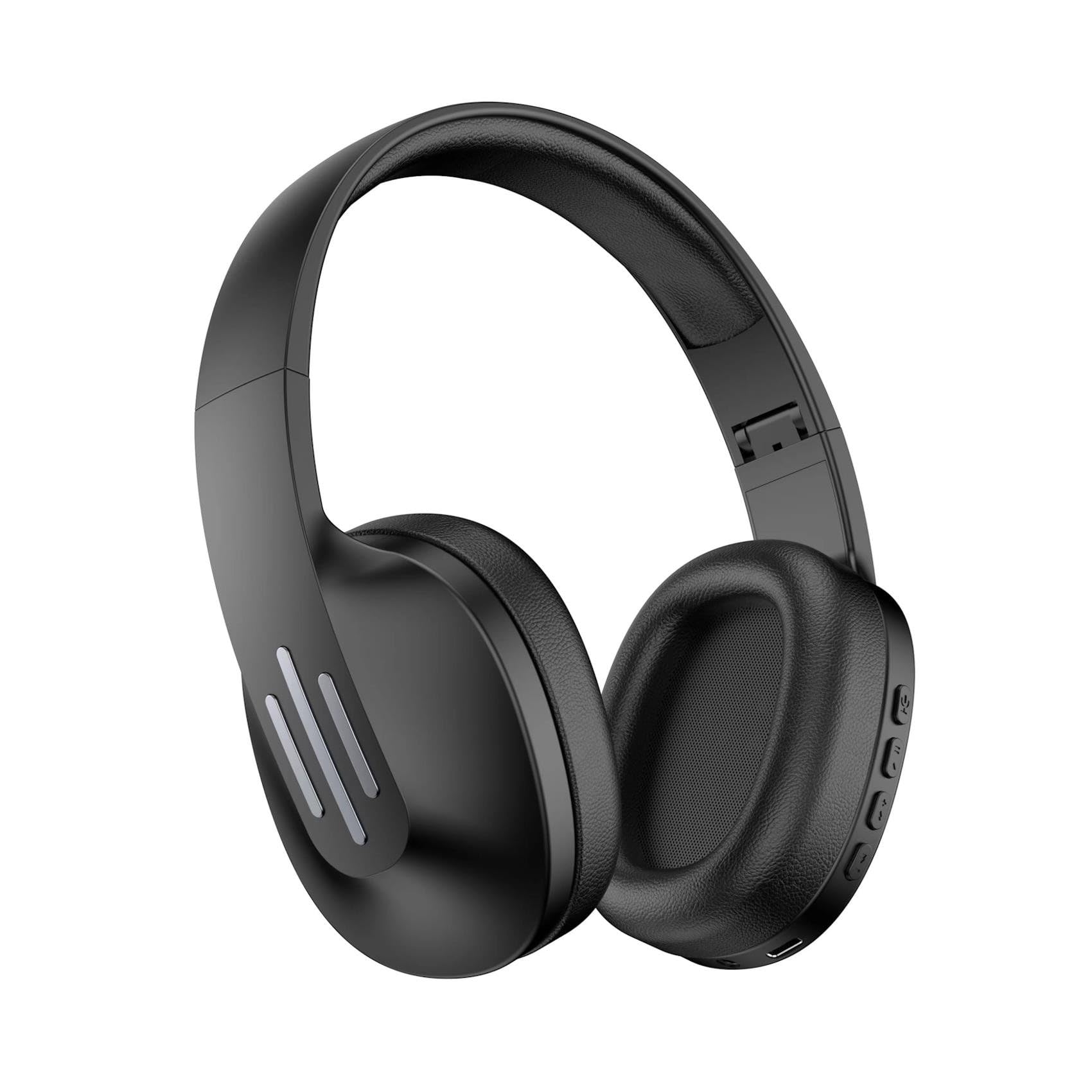
This image displays the Celly FLOWBEATBK Bluetooth Headphones in black. The design features over-ear earcups and an adjustable headband. Control buttons are visible on one earcup.
The Celly FLOWBEATBK are wireless Bluetooth headphones designed for comfortable audio listening. They feature on-ear earcups, an adjustable headband, and integrated controls for media and call management. The headphones are charged via a USB-C port.
يثبت
الاقتران بجهاز بلوتوث
- تشغيل الطاقة: اضغط مع الاستمرار على زر الطاقة الموجود على سماعات الرأس حتى يومض ضوء المؤشر، مما يشير إلى وضع الاقتران.
- تفعيل البلوتوث: On your device (smartphone, tablet, laptop), enable Bluetooth functionality.
- اختر جهاز: بحث عن available Bluetooth devices and select "Celly FLOWBEATBK" from the list.
- تأكيد الاتصال: Once paired, the indicator light on the headphones will change (e.g., solid blue) and your device may confirm the connection.
إذا طُلب منك إدخال كلمة مرور، فأدخل "0000" (أربعة أصفار).
تعليمات التشغيل
تشغيل/إيقاف الطاقة
- لتشغيل: اضغط مع الاستمرار على زر الطاقة لمدة 3 ثوانٍ تقريبًا.
- لإيقاف التشغيل: اضغط مع الاستمرار على زر الطاقة لمدة 5 ثوانٍ تقريبًا.
تشغيل الوسائط
- تشغيل/إيقاف مؤقت: اضغط على الزر متعدد الوظائف مرة واحدة.
- رفع الصوت: اضغط على زر "+".
- اخفض الصوت: اضغط على زر '-'.
- المسار التالي: اضغط مع الاستمرار على زر "+".
- المسار السابق: اضغط مع الاستمرار على الزر '-'.
استدعاء إدارة
- الرد/إنهاء المكالمة: اضغط على الزر متعدد الوظائف مرة واحدة.
- رفض المكالمة: اضغط مع الاستمرار على الزر متعدد الوظائف لمدة ثانيتين.
الشحن
To charge your Celly FLOWBEATBK headphones:
- Connect the supplied USB-C cable to the charging port on the headphones.
- قم بتوصيل الطرف الآخر من كابل USB-C بمصدر طاقة USB متوافق (مثل منفذ USB في الكمبيوتر، أو محول USB الجداري).
- سيضيء مؤشر الضوء أثناء الشحن، وسينطفئ أو يتغير لونه بمجرد اكتمال الشحن.
A full charge typically takes approximately 2-3 hours. Avoid using the headphones while charging for optimal battery life.
صيانة
- تنظيف: استخدم قطعة قماش ناعمة وجافة لتنظيف سماعات الرأس. لا تستخدم منظفات أو مذيبات كاشطة.
- تخزين: قم بتخزين سماعات الرأس في مكان بارد وجاف بعيدًا عن أشعة الشمس المباشرة ودرجات الحرارة القصوى.
- التعرض للماء: Although the headphones are rated as waterproof, avoid prolonged exposure to water or submerging them. Ensure the USB-C port cover is securely closed.
- العناية بالبطارية: To preserve battery life, charge the headphones regularly, even if not in frequent use. Avoid fully discharging the battery for extended periods.
استكشاف الأخطاء وإصلاحها
| مشكلة | الحل المحتمل |
|---|---|
| لا يتم تشغيل سماعات الرأس. | Ensure the headphones are fully charged. Press and hold the Power button for a longer duration. |
| لا يمكن الاقتران بجهاز. | Ensure Bluetooth is enabled on your device and the headphones are in pairing mode. Move the headphones closer to your device. Try unpairing and re-pairing. |
| لا يوجد صوت أو مستوى الصوت منخفض. | تحقق من مستوى الصوت في كلٍّ من سماعات الرأس والجهاز المتصل. تأكد من إقران سماعات الرأس بشكل صحيح. |
| مشكلة في الشحن. | Verify the USB-C cable is securely connected to both the headphones and the power source. Try a different USB-C cable or power adapter. |
| اتصال متقطع. | Reduce the distance between the headphones and your device. Avoid obstacles that may interfere with the Bluetooth signal. |
تحديد
| اسم الموديل | FLOWBEATBK |
| رقم الموديل | س77175741 |
| ماركة | Celly |
| الأبعاد (الطول × العرض × الارتفاع) | 22 × 19 × 8 سم |
| وزن | 155 جرام |
| لون | متعدد الألوان |
| وضع الأذن | On-Ear (Supra-aural) |
| عامل الشكل | على الأذن |
| تكنولوجيا الاتصال | لاسلكي |
| التكنولوجيا اللاسلكية | بلوتوث 5.0 |
| مقبس سماعة الرأس | يو اس بي-سي |
| التحكم في الضوضاء | لا أحد |
| نوع برنامج تشغيل الصوت | متحرك |
| نطاق التردد | 20 هرتز - 20,000 هرتز |
| الأجهزة المتوافقة | Laptop, Mobile Phone |
| مستوى مقاومة الماء | ضد للماء |
| بلد المنشأ | إسبانيا |
الضمان والدعم
For warranty information and customer support, please refer to the official Celly webقم بزيارة الموقع الإلكتروني أو اتصل ببائع التجزئة المحلي. احتفظ بإثبات الشراء لأي مطالبات تتعلق بالضمان.