
1. المقدمة
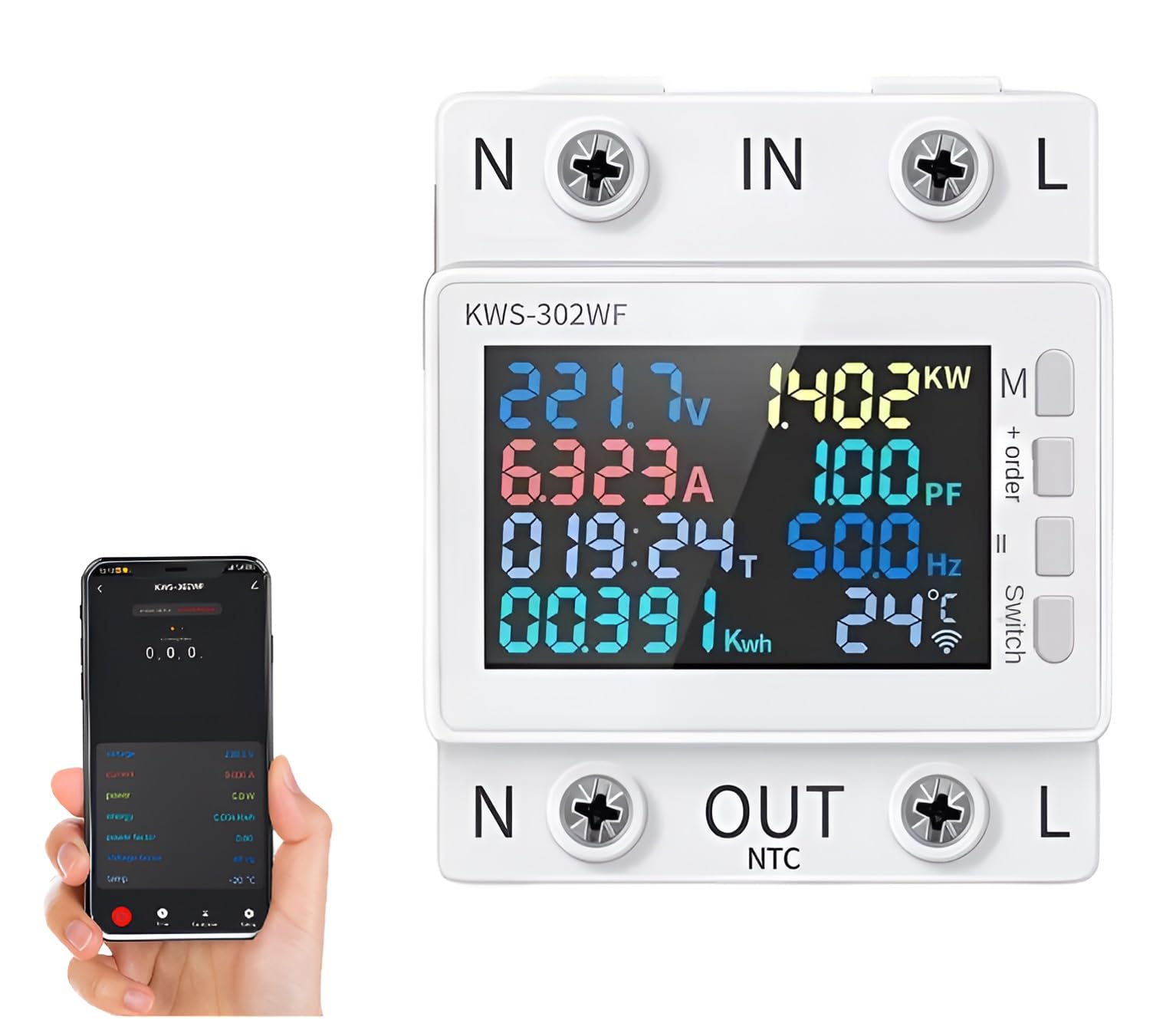
The XPR3SS KWS-302WF is an advanced 8-in-1 parameter display smart switch circuit breaker and energy meter. It integrates multiple functions including voltage, current, power, timing, electric energy, temperature, frequency, and power factor display. With Wi-Fi connectivity, it allows for remote control and monitoring via the Smart Life or Tuya app, providing comprehensive protection against over-voltagه ، تحت المجلدtage, over-current, and power surges.
2. مواصفات المنتج
- 8-in-1 Parameter Display: شاشات حجمtagهـ، التيار، القدرة، التوقيت، الطاقة الكهربائية (كيلوواط ساعة)، درجة الحرارة، التردد، ومعامل القدرة.
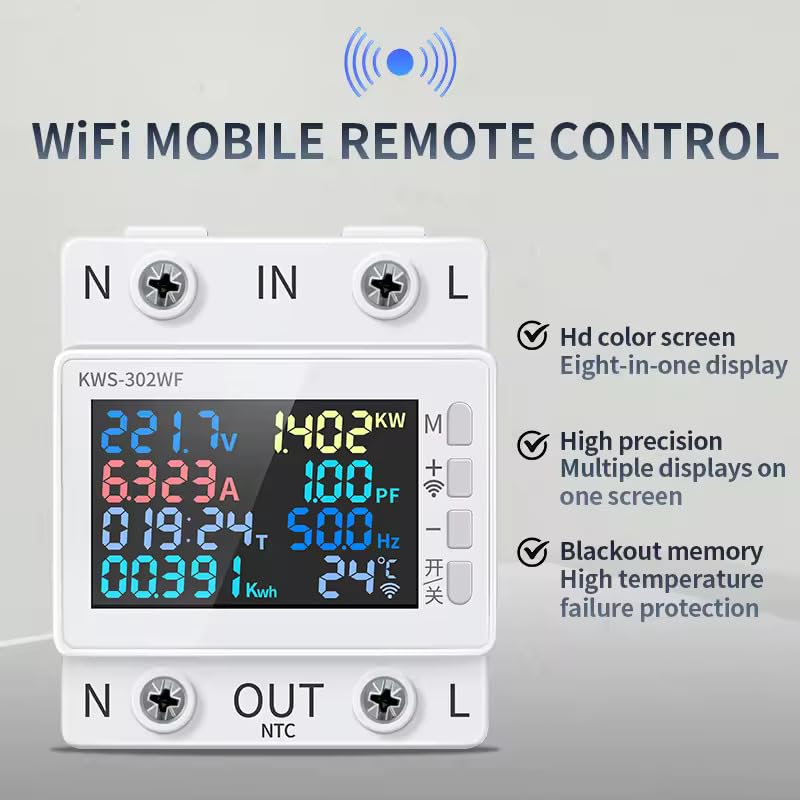
- Wi-Fi Enabled Remote Control: Manage and monitor the device from anywhere using the Smart Life or Tuya mobile application.
- Advanced Digital Design: Ensures accurate and reliable readings for all electrical parameters.
- الحماية الشاملة: Includes Over-voltagه ، تحت المجلدtage, Over-current, Overload, and Overtemperature protection.
- Timed Power Off Settings: Configure schedules for automatic power control.
- Screen Hibernation Setting: Adjust display behavior for energy saving.
- شاشة LED واضحة: Easy-to-read display for quick assessment of electrical parameters.
- حجم واسعtagالنطاق الإلكتروني: Designed to operate within 170-300V.
- ذاكرة انقطاع التيار الكهربائي: Retains settings and data after a power interruption.
- Automatic Fault Response: Instantly powers off on fault and restarts once parameters are within set limits.
3. الإعداد والتثبيت
تحذير السلامة: Installation should only be performed by a qualified electrician to ensure safety and proper functionality. Incorrect wiring can lead to electrical hazards, device damage, or fire.
- التركيب: The KWS-302WF is designed for wall mount installation. Secure it in a suitable electrical enclosure or panel.
- التوصيلات الكهربائية: Connect the incoming neutral (N IN) and live (L IN) wires to the respective input terminals. Connect the outgoing neutral (N OUT) and live (L OUT) wires to the load terminals.
- NTC Connection: If temperature monitoring is desired, connect the NTC sensor to the designated NTC terminal.
- تشغيل الطاقة: Once all connections are secure, restore power to the circuit. The device display should illuminate.
4. تعليمات التشغيل
4.1. عرض أكثرview
The KWS-302WF features an HD color screen that simultaneously displays up to eight parameters, including voltage, current, power, timing, electric energy, temperature, frequency, and power factor. The display also indicates Wi-Fi connectivity status and protection alerts.
4.2. Wi-Fi Connectivity and Remote Control
The device is Wi-Fi enabled, allowing for remote control and monitoring via a smartphone application. Download the الحياة الذكية or تويا قم بتنزيل التطبيق من متجر التطبيقات الخاص بجهازك.
- Ensure your KWS-302WF device is powered on and within range of your Wi-Fi network.
- Open the Smart Life or Tuya app and follow the in-app instructions to add a new device.
- Once paired, you can remotely monitor parameters, control the power switch, set timers, and adjust protection settings from your smartphone.
4.3. Multi-Person Control
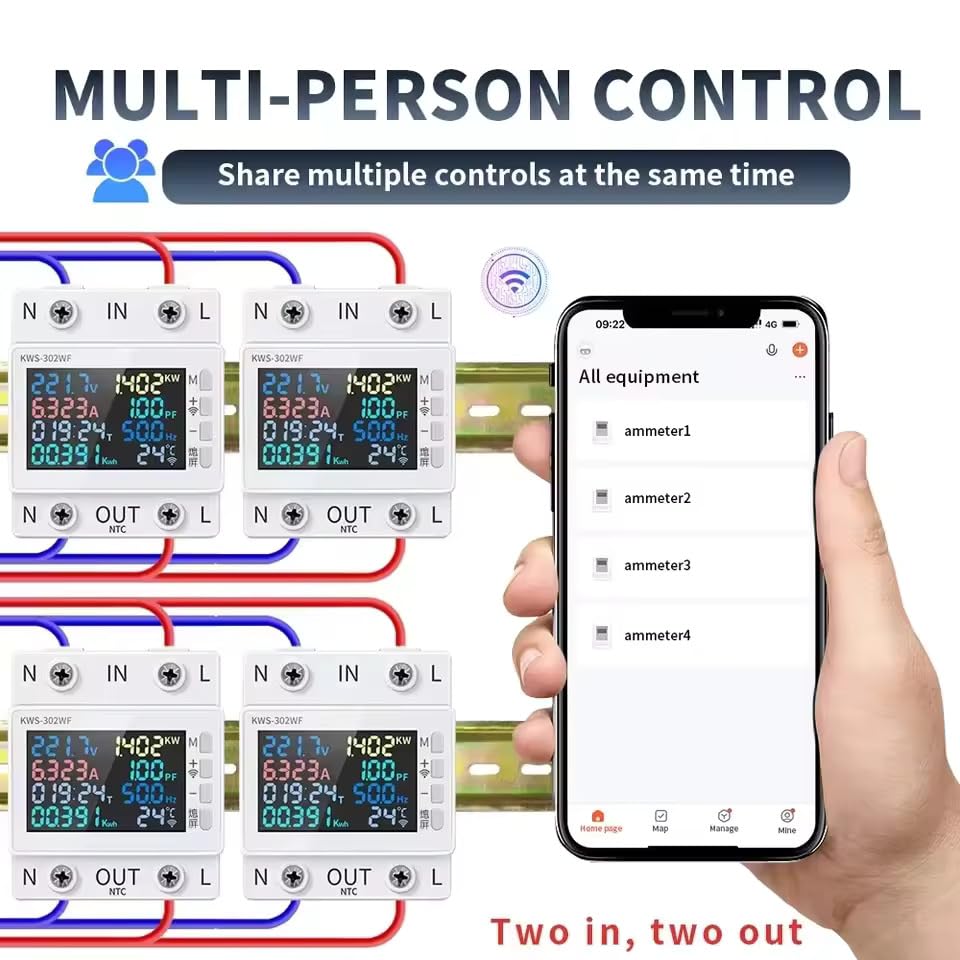
The device supports sharing control with multiple users through the mobile application. This feature is useful for household members or team environments where several individuals need access to monitor and manage the device.
5. إعدادات المعلمة
To enter the settings display, hold down the SET button for 3 seconds. Use the '+' and '-' buttons to adjust values. A short press typically adjusts by a small increment, while a long press allows for quicker adjustments.
5.1. إعدادات الحماية
- أوفرفولtagحماية إيقاف التشغيل:
عرض: 270.0V HI
Adjustment: Press '+' or '-' to adjust by 1V. Long press for quick adjustment.
الافتراضي: 270.0 فولت - أندرفولtagحماية إيقاف التشغيل:
عرض: 170.0V LO
Adjustment: Press '+' or '-' to adjust by 1V. Long press for quick adjustment.
الافتراضي: 170.0 فولت - التيار الزائدtagهـ- الحماية:
عرض: 0.000 أمبير
Adjustment: Press '+' or '-' to adjust by 0.001A. Long press for quick adjustment.
الافتراضي: 0 (معطل) - حماية إيقاف التشغيل المؤقت:
عرض: 000:00T
Adjustment: Press '+' or '-' to adjust by 30 minutes. Long press for quick adjustment.
الافتراضي: 0 (معطل) - حماية من انقطاع الطاقة عند التحميل الزائد:
عرض: 00000 كيلو وات في الساعة
Adjustment: Press '+' or '-' to adjust by 0.001KWH. Long press for quick adjustment.
Default: 0 KWH (Off) - Power Off Settings (Wattagهـ):
عرض: 0W
Adjustment: Press '+' or '-' to adjust by 0.1W. Long press for quick adjustment.
Default: 0W - حماية من ارتفاع درجة الحرارة عند إيقاف التشغيل:
عرض: 50 درجة مئوية
Adjustment: Press '+' or '-' to adjust by 1°C. Long press for quick adjustment.
الافتراضي: 50 درجة مئوية


5.2. Screen Sleep Setting
- إعداد وضع السكون للشاشة:
عرض: ح0
Adjustment: Press '+' or '-' to adjust by 1 minute. Long press for quick adjustment.
Default: 0 (for 1-60 minutes)
Note: All data and parameters displayed are for reference only.
6. المواصفات
| ماركة | XPR3SS |
| رقم الموديل | KWS-302WF |
| التقييم الحالي | 63 Amps |
| حجم الإدخالtage | 170-300 فولت |
| تكرار | 50 هرتز/60 هرتز |
| أبعاد المنتج | 65 عمق × 49 عرض × 35 ارتفاع مليمتر |
| نوع قواطع دوائر | معيار |
| نوع التركيب | حامل الحائط |
| عدد الاقطاب | 2 |
| وزن العنصر | 350 جرام |
| المكونات المضمنة | قاطع الدائرة |
7. استكشاف الأخطاء وإصلاحها
If the device is not functioning as expected, consider the following troubleshooting steps:
- لا يوجد عرض/طاقة: Check the main power supply and all electrical connections for proper installation and tightness.
- مشكلات الاتصال بشبكة Wi-Fi: Ensure the device is within range of your Wi-Fi router. Verify your Wi-Fi network is stable and the password entered in the app is correct. Try restarting your router and the KWS-302WF device.
- انقطاع الطاقة بشكل غير متوقع: Review إعدادات الحماية (زيادة مستوى الصوتtagه ، تحت المجلدtage, over-current, overload, overtemperature) in the device or app. The device may be triggering a protection mechanism due to parameters exceeding set limits. Adjust thresholds if necessary and safe to do so.
- التطبيق لا يستجيب: Ensure your Smart Life or Tuya app is updated to the latest version. Try force-closing and reopening the app. If the issue persists, unpair and re-pair the device with the app.
- قراءات غير دقيقة: Verify that the wiring connections are correct and secure.
- عطل عام: A power cycle (turning off and on the main power to the device) can often resolve minor software glitches.
8. الصيانة
To ensure the longevity and optimal performance of your XPR3SS KWS-302WF, follow these maintenance guidelines:
- تنظيف: Keep the device clean and free from dust and debris. Use a soft, dry cloth for cleaning. Do not use liquid cleaners or solvents.
- تهوية: تأكد من تركيب الجهاز في مكان ذي تهوية كافية لمنع ارتفاع درجة حرارته.
- فحوصات الاتصال: Periodically inspect electrical connections for tightness and signs of wear or corrosion.
- تحديثات البرامج الثابتة: Check the Smart Life or Tuya app for any available firmware updates for your device to ensure you have the latest features and bug fixes.
- خدمة احترافية: Do not attempt to open, modify, or repair the device yourself. Refer all servicing to qualified service personnel.
9. الضمان والدعم
For detailed warranty information, terms, and conditions, please refer to the documentation included with your product packaging or visit the official XPR3SS website. In case of technical issues or support inquiries, please contact XPR3SS customer service. Keep your purchase receipt as proof of purchase for any warranty claims.