
symcode 1D Laser Blue white
Symcode 1D Barcode Scanner User Manual
Model: 1D Laser Blue white
1. المقدمة
Thank you for choosing the Symcode USB 1D Barcode Scanner. This handheld wired CCD laser barcode reader is designed for efficient and accurate scanning of 1D barcodes from both printed materials and digital screens. It is an ideal solution for various applications including warehouses, libraries, supermarkets, and point-of-sale (POS) systems.
This manual provides comprehensive instructions on setting up, operating, and maintaining your scanner to ensure optimal performance and longevity.

إجمالي view of the Symcode 1D Barcode Scanner with its USB cable.
2. الميزات الرئيسية
- 1D CCD Image Scanning Technology: Equipped with an advanced CCD sensor for quick and accurate capture of 1D codes from paper and screens, including deformed, smudged, damaged, fuzzy, or reflective barcodes.
- أوضاع المسح المتنوعة: Features Key Trigger mode, Auto-induction mode, and Continuous Mode for flexible operation.
- بناء متين: Ergonomic design with high-quality ABS material ensures resistance to drops from 2m high, providing long service life.
- Extensive 1D Barcode Support: Compatible with UPC/EAN, UCC/EAN 128, Code 39, Code 93, Code 128, Codabar, Interleaved 2 of 5, Discrete 2 of 5, MSI, Code 11, RSS variants, Chinese 2 of 5, and more.
- مخرجات قابلة للتخصيص: Offers 180 configurable options for prefix, suffix, and termination strings.
- نطاق واسع للتطبيق: Suitable for use in supermarkets, convenience stores, warehouses, libraries, bookstores, drugstores, and retail shops for various management tasks.
3. محتويات العبوة
يرجى التأكد من وجود جميع العناصر في الحزمة الخاصة بك:
- 1 x Symcode CCD Barcode Scanner
- 1 × دليل المستخدم (هذه الوثيقة)
- 1 × كابل يو اس بي
4. الإعداد
4.1 توصيل الماسح الضوئي
The Symcode 1D Barcode Scanner is a plug-and-play device. No drivers are typically required for most operating systems.
- Locate an available USB port on your computer (Desktop, Laptop) or compatible device.
- Insert the USB connector of the scanner's cable into the USB port.
- The scanner will typically emit a short beep and/or a light indicator will turn on, signifying successful connection and readiness for use.

The scanner connects to a laptop via its 1.6m (5.2ft) USB cable, compatible with Linux, Windows, iOS, and Android operating systems.
5. تشغيل الماسح الضوئي
5.1 المسح الأساسي
To scan a barcode, point the scanner's laser beam at the barcode you wish to read and press the trigger button (if in Key Trigger mode). The scanner will emit a successful scan beep and the data will be transmitted to your connected device as if typed by a keyboard.

The scanner can read 1D barcodes from both printed labels and digital screens, such as a smartphone display.
5.2 أوضاع المسح
يدعم الماسح الضوئي ثلاثة أوضاع مسح أساسية:
- وضع الزناد الرئيسي: Press the trigger to activate the scan. Release to stop.
- وضع الحث التلقائي: يكتشف الماسح الضوئي تلقائيًا الرمز الشريطي ضمن نطاقه view and scans it without needing to press the trigger.
- الوضع المستمر: The scanner continuously emits the laser beam, scanning any barcode that passes through its field.
Refer to the included configuration guide (often a set of barcodes) to switch between these modes. If auto-sensing is inactive, scan the appropriate configuration barcode to enable it.
5.3 إعدادات الصوت
The scanner provides audible feedback for successful scans. You can turn this sound on or off according to your preference by scanning specific configuration barcodes.
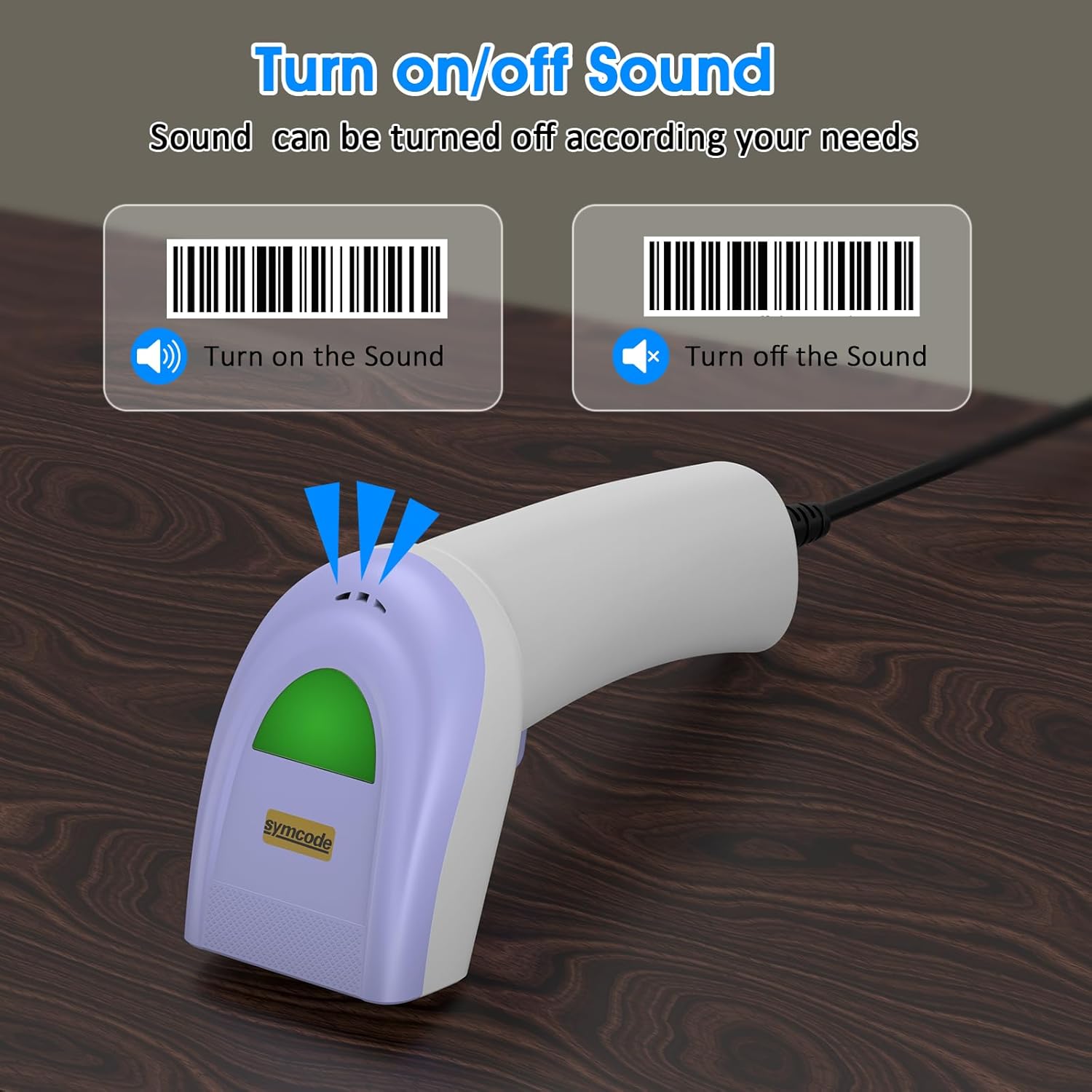
Scan specific barcodes to enable or disable the scanner's sound feedback.
5.4 Customizing Data Output (Prefix/Suffix)
The scanner allows you to add custom prefixes or suffixes to the scanned barcode data. This feature is useful for integrating scanned data into specific software or databases that require additional identifiers.

The scanner can customize scanned data by adding prefixes or suffixes. Exampليه: RL123456789 (with prefix), 12345RL6789 (with middle text), 123456789RL (with suffix).
5.5 أنواع الباركود المدعومة
The Symcode 1D Barcode Scanner has excellent decoding ability for a wide range of common 1D barcodes.

The scanner supports various 1D barcode types, including CODE 128 (1234567890), UPC A (123456789012), Frauded Barcode (1234567890135), Profiled Barcode (4603146002134), Industrial 2 of 5 (987612), ITF, Folded Barcode, and Color Barcode.
6. الصيانة
To ensure the longevity and optimal performance of your barcode scanner, follow these simple maintenance guidelines:
- تنظيف: Use a soft, dry cloth to clean the scanner's exterior. For the scanning window, use a lens cleaning cloth or a soft cloth lightly dampاستخدم منظفًا لطيفًا وغير كاشط. تجنب المواد الكيميائية القاسية أو المواد الكاشطة.
- تخزين: قم بتخزين الماسح الضوئي في مكان بارد وجاف بعيدًا عن أشعة الشمس المباشرة ودرجات الحرارة القصوى.
- التعامل: While the scanner is designed to be durable, avoid unnecessary drops or impacts. Do not pull the cable excessively or bend it sharply.
7. استكشاف الأخطاء وإصلاحها
If you encounter issues with your Symcode barcode scanner, please refer to the following common problems and solutions:
| مشكلة | السبب المحتمل | حل |
|---|---|---|
| الماسح الضوئي لا يعمل أو لا يستجيب. | كابل USB غير متصل بشكل صحيح أو منفذ USB معيب. | تأكد من توصيل كابل USB بإحكام بكل من الماسح الضوئي والكمبيوتر. جرب منفذ USB آخر. |
| يصدر الماسح الضوئي صوت تنبيه ولكن لا يتم إرسال أي بيانات. | Incorrect output mode or software not ready to receive input. | Ensure your cursor is in a text field or application ready to receive input. Check scanner configuration for output mode (e.g., HID Keyboard Emulation). |
| Scanner does not read certain barcodes. | Barcode type not enabled, damaged barcode, or insufficient lighting. | Refer to the configuration guide to enable all necessary barcode types. Ensure the barcode is clear and well-lit. Try scanning from a different angle or distance. |
| Scanner reads slowly or intermittently. | Dirty scanning window or interference. | Clean the scanning window as described in the Maintenance section. Ensure no obstructions are blocking the laser. |
If the problem persists after trying these solutions, please contact Symcode customer support for further assistance.
8. المواصفات
| ميزة | مواصفة |
|---|---|
| أبعاد | 165 × 63 × 87 ملم (6.5 × 2.48 × 3.43 بوصة) |
| وزن | 156 جرام (5.5 أونصة) |
| مصدر الضوء | 650nm~670nm visible laser |
| سرعة المسح | 100 مسح/ثانية |
| Read Preciseness | 0.1 مم (4 مل) |
| تباين الطباعة | 30% الحد الأدنى |
| عمق المجال | 0~600mm (0.33mm, PCS 90%) |
| Scan Scope | 10 مم ~ 250 مم |
| مسافة القراءة | 2.5~600mm (100% UPC/EAN) |
| فك القدرة | EAN-8/13, UPC-A/E, Code 39/93/128, EAN-128, Codabar, Industrial 2 of 5, Interleave 2 of 5, Matrix 2 of 5, MSI etc. |
| معدل خطأ البت | 1 / 5 مليون |
| الاستهلاك الحالي | 85mA (working), 36mA (storage) |
| الواجهة | USB |
| درجة حرارة التشغيل | 0 درجة مئوية ~ 45 درجة مئوية (32 درجة فهرنهايت ~ 113 درجة فهرنهايت) |
| درجة حرارة التخزين | -20 درجة فهرنهايت ~ 60 درجة فهرنهايت (-4 درجة فهرنهايت ~ 140 درجة فهرنهايت) |
| رطوبة | 5%~95% بدون تكاثف |
| مادة | ABS+PC |
| الأجهزة المتوافقة | سطح المكتب، الكمبيوتر المحمول |
| مصدر الطاقة | كهرباء سلكية |

The scanner is compact, with dimensions of 1.97in/5cm width, 2.76in/7cm depth, and 5.5in/14cm height, and weighs only 181g (excluding cable).

The compact and streamlined design of the Symcode scanner (left) offers a more comfortable and practical user experience compared to larger, heavier alternatives (right).
9. الضمان والدعم
Symcode products are manufactured to high-quality standards. This product comes with a standard manufacturer's warranty against defects in materials and workmanship. Please refer to the warranty card included in your package or visit the official Symcode webالموقع للحصول على شروط وأحكام الضمان التفصيلية.
For technical support, troubleshooting assistance, or any inquiries regarding your Symcode 1D Barcode Scanner, please contact Symcode customer service through the contact information provided on the product packaging or the official Symcode webيرجى تجهيز طراز المنتج وتفاصيل الشراء عند التواصل مع فريق الدعم.
Ask a question about this manual
Ask about setup, troubleshooting, compatibility, parts, safety, or missing instructions. Manuals+ will review the question and use this page’s manual context to help answer it.