
symcode 2D QR Orange (B0CS6M178X)
Symcode Bluetooth 2D Barcode Scanner Instruction Manual
Model: 2D QR Orange (B0CS6M178X)
مقدمة
This manual provides comprehensive instructions for the setup, operation, and maintenance of your Symcode Bluetooth 2D Barcode Scanner. This portable scanner offers versatile 3-in-1 connectivity (Bluetooth, 2.4G Wireless, USB Wired) and is designed for efficient scanning of both 1D and 2D barcodes across various platforms.
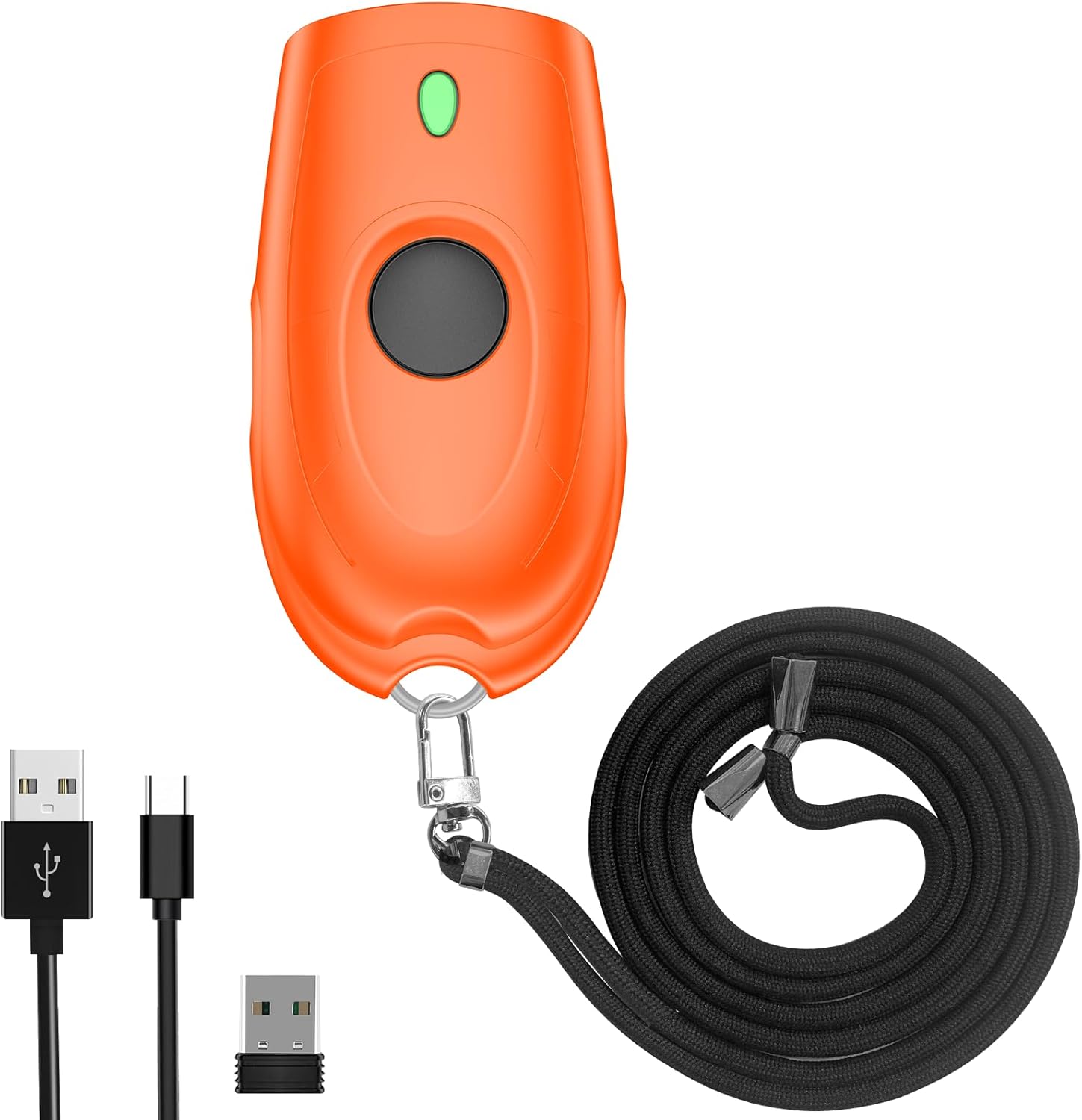
Image: The Symcode Bluetooth 2D Barcode Scanner in orange, shown with its accessories: USB charging cable, 2.4G USB dongle, and a black lanyard.
المنتج انتهىview ومحتويات العبوة
Before using your scanner, please ensure all components are present in the package.

Image: A visual representation of the package contents, including the scanner, 2.4GHz wireless dongle, user manual, USB cable, and sling.
تتضمن الحزمة:
- 1x Symcode 2D Barcode Scanner
- شنومكس أوسب شحن كابل
- 1 × 2.4 جيجاهرتز USB دونجل
- 1 × دليل المستخدم
- حمالة واحدة
تحديد
| ميزة | وصف |
|---|---|
| أبعاد | 5.43 × 4.21 × 2.13 بوصة (الحزمة) |
| وزن | 4.2 أونصة (العنصر) |
| بطارية | بطارية ليثيوم بوليمر 650 مللي أمبير (قابلة لإعادة الشحن، مرفقة) |
| وقت الشحن | حوالي 2 ساعات |
| وقت المسح المستمر | تصل إلى 5 ساعة |
| وقت الاستعداد | حتى 30 يومًا (720 ساعة) |
| الاتصال | بلوتوث، 2.4G لاسلكي، USB سلكي |
| Transmission Distance (2.4G Wireless) | 150m/492ft (barrier-free), 15m/49ft (with obstacles) |
| Transmission Distance (Bluetooth) | 50m/164ft (barrier-free), 20m/66ft (with obstacles) |
| سعة التخزين | 16MB (stores over 100,000 barcodes in offline mode) |
| Decoding Ability (2D) | QR Code, Data Matrix, PDF417, Aztec code, Maxicode |
| Decoding Ability (1D) | JAN/EAN-13, JAN/EAN-8, UPC-A, UPC-E, Code11, Code32, Code39, Code 39 Full ASCII, Code93, Code128, Codabar (NW-7), Interleaved 2 of 5, Matrix 2 of 5, Industrial 2 of 5, Standard 2 of 5, PLESSEY, MSI, ITF14, ISBN, ISSN, GS1 Databar, GS1-128 (UCC/EAN128), ISBT-128 |
| نظام التشغيل المتوافق | ويندوز XP/7/8/10، ماك أو إس، لينكس، أندرويد، آي أو إس |

Image: Detailed battery specifications and internal components of the scanner, highlighting its 650mAh battery and long standby time.

Image: Transmission range capabilities of the scanner in different environments for both 2.4G wireless and Bluetooth connections.

Image: Visual representation of the scanner's mini portable design and dimensions, demonstrating its ease of carrying.
يثبت
1. شحن الماسح الضوئي
Before first use, fully charge the scanner. Connect the provided USB charging cable to the scanner's charging port and to a USB power source (e.g., computer USB port, USB wall adapter). The charging indicator light will show the charging status. A full charge takes approximately 2 hours.
2. أوضاع الاتصال
The Symcode scanner supports three connection modes: USB Wired, 2.4G Wireless, and Bluetooth Wireless.

Image: Illustration of the three versatile connection options: USB wired, 2.4G wireless via dongle, and Bluetooth wireless.
وضع سلكي USB:
- قم بتوصيل الماسح الضوئي مباشرة بجهاز الكمبيوتر الخاص بك باستخدام كابل USB المرفق.
- The scanner will be recognized as a keyboard device, and scanned data will appear wherever your cursor is placed.
- No drivers are required for this mode.
وضع 2.4G اللاسلكي:
- قم بتوصيل محول USB 2.4G بمنفذ USB المتاح على جهاز الكمبيوتر الخاص بك.
- Turn on the scanner. It should automatically pair with the dongle.
- This mode offers a transmission distance of up to 150m (492ft) in barrier-free environments.
وضع Bluetooth اللاسلكي:
- تأكد من تفعيل تقنية البلوتوث على جهازك (الهاتف الذكي، الجهاز اللوحي، الكمبيوتر المحمول).
- Turn on the scanner and put it into Bluetooth pairing mode (refer to the specific steps in the included user manual for pairing instructions, as this typically involves scanning a specific configuration barcode).
- On your device, search for Bluetooth devices and select "Symcode Scanner" or similar from the list.
- This mode supports Bluetooth HID, SPP, and BLE protocols and offers a transmission distance of up to 50m (164ft) in barrier-free environments.
3. توافق النظام
The scanner is highly compatible with a wide range of operating systems and devices.

Image: The scanner's broad compatibility with various operating systems including iOS, Android, Windows, Mac OS, and Linux, connecting to devices like PCs, POS systems, laptops, tablets, and smartphones.
- أنظمة التشغيل: Windows XP, Win7, Win8, Win10, Mac OS, Linux
- الأجهزة: PC, Laptop, POS systems, Smartphones (Android, iOS), Tablets
تعليمات التشغيل
1. المسح الأساسي
To scan a barcode, point the scanner's window at the barcode and press the trigger button. A successful scan will typically be indicated by a beep and/or vibration.

Image: The scanner in action, demonstrating its ability to decode various 1D and 2D barcodes, even if they are blurred or incomplete. Examples of scannable codes are shown, including QR Code, Data Matrix, and PDF417.
The scanner can decode a wide range of 1D and 2D symbologies, including:
- 2D: QR Code, Data Matrix, PDF417, Aztec code, Maxicode
- 1D: JAN/EAN-13, JAN/EAN-8, UPC-A, UPC-E, Code11, Code32, Code39, Code 39 Full ASCII, Code93, Code128, Codabar (NW-7), Interleaved 2 of 5, Matrix 2 of 5, Industrial 2 of 5, Standard 2 of 5, PLESSEY, MSI, ITF14, ISBN, ISSN, GS1 Databar, GS1-128 (UCC/EAN128), ISBT-128
Example Barcodes from image:
- Data Matrix: 2125551212
- رمز الاستجابة السريعة: 20123456789
- PDF417: 00614141999996
- ITF: 1234567890135
- محترفfiled Barcode: 4603146002134
2. Sound and Vibration Control
The scanner allows you to turn off the sound and vibration feedback according to your preference or work environment. Refer to the detailed instructions in the included user manual for the specific configuration barcodes to enable or disable these features.

Image: Options for controlling the scanner's sound and vibration feedback, allowing for quiet operation when needed.
3. أوضاع تحميل البيانات
يدعم الماسح الضوئي وضعين أساسيين لتحميل البيانات:
- وضع التحميل الفوري: Scanned barcodes are immediately transmitted to the connected device. This is the default mode.
- Storage Mode (Offline Scanning): Barcodes are stored in the scanner's internal memory (16MB, capable of storing over 100,000 barcodes) and can be uploaded later when connected. This is useful for inventory tasks where real-time connection is not always available. To switch to storage mode and upload data, refer to the specific configuration barcodes in the included user manual.
4. خيارات التخصيص
The scanner offers various customization options to tailor its output to your needs:
- Hide/Add custom prefix/suffix digits.
- حذف الأحرف من البيانات الممسوحة ضوئياً.
- أضف مفاتيح لوحة المفاتيح (مثل TAB و CR&LF) إلى عملية المسح الضوئي لإدخال البيانات تلقائيًا.
Detailed instructions and configuration barcodes for these options are provided in the comprehensive user manual included with your product.
صيانة
العناية بالبطارية:
- لإطالة عمر البطارية، تجنب تفريغ البطارية بالكامل بشكل متكرر.
- Charge the scanner regularly, even if not in constant use.
- قم بتخزين الماسح الضوئي في مكان بارد وجاف عندما لا يكون قيد الاستخدام لفترات طويلة.
تنظيف:
- استخدم قطعة قماش ناعمة وجافة وخالية من الوبر لتنظيف الجزء الخارجي من الماسح الضوئي.
- For the scanning window, use a soft cloth slightly dampاستخدم منظفًا لطيفًا وغير كاشط. تجنب المواد الكيميائية القاسية أو المواد الكاشطة.
- Do not immerse the scanner in water or any other liquid.
استكشاف الأخطاء وإصلاحها
If you encounter issues with your Symcode barcode scanner, please refer to the following common problems and solutions:
| مشكلة | الحل المحتمل |
|---|---|
| الماسح الضوئي لا يعمل. | تأكد من شحن البطارية. قم بتوصيل الماسح الضوئي بمصدر طاقة باستخدام كابل USB واتركه يشحن لمدة 30 دقيقة على الأقل قبل محاولة تشغيله مرة أخرى. |
| لا يقوم الماسح الضوئي بمسح الباركود. |
|
| لا تظهر البيانات الممسوحة ضوئياً على الشاشة. |
|
| مشاكل الاتصال بالبلوتوث. |
|
| الزر عالق أو لا يستجيب. | Gently check for any physical obstruction around the button. If the issue persists, contact customer support. Avoid forcing the button. |
الضمان والدعم
Your Symcode barcode scanner comes with a standard manufacturer's warranty. For specific warranty terms and conditions, please refer to the documentation included in your product packaging or contact Symcode customer support.
For any technical assistance, troubleshooting not covered in this manual, or warranty inquiries, please contact Symcode customer service.
Symcode Customer Service: Please refer to the contact information provided in your product's original packaging or visit the official Symcode webموقع للحصول على تفاصيل الدعم.
The seller, Symcode, offers 24/7 pre-sale and after-sales service. If you experience a problem with your Symcode scanner, please contact the seller directly for assistance.
Ask a question about this manual
Ask about setup, troubleshooting, compatibility, parts, safety, or missing instructions. Manuals+ will review the question and use this page’s manual context to help answer it.