
Liiiyuan M1 white
Liiiyuan M1 White Windshield Projection Heads Up Display User Manual
Model: M1 white
1. المقدمة
The Liiiyuan M1 is a GPS-enabled Head-Up Display (HUD) designed to project essential driving information, primarily speed, directly onto your vehicle's windshield. This device enhances driving safety by allowing drivers to view critical data without diverting their eyes from the road. Its simple, plug-and-play design makes it compatible with all vehicles.

Figure 1: Liiiyuan M1 Heads Up Display unit.
2. مواصفات المنتج
- GPS Mode HUD: Utilizes GPS for accurate speed display, projected onto the windshield for easy viewعمل.
- Simple Display: Designed to show only essential data like speed, minimizing driver distraction.
- الوظائف الرئيسية: Displays speed (MPH/KM/H adjustable), includes overspeed alarm, fatigue driving warning, and GPS compass for direction.
- Automated Brightness: Features advanced light-sensitive elements that automatically adjust display brightness based on ambient light conditions. Manual brightness adjustment is also available.
- التوصيل والتشغيل: Easy installation via USB connection to the car.
- التوافق العالمي: Suitable for all vehicles.

الشكل 2: انتهىview of M1 GPS Speedometer functions.

الشكل 3: مفصل view of the M1 HUD projection display on a windshield.
3. ماذا يوجد في الصندوق
The Liiiyuan M1 package includes the following components:
- M1 HUD Unit
- كابل يو اس بي
- فيلم عاكس
- دليل المستخدم
- مكافحة زلة حصيرة

Figure 4: All accessories included with the M1 HUD.
Video 1: M1 unboxing video, showing the contents of the package and initial look at the device.
4. الإعداد والتثبيت
The M1 HUD is designed for easy installation. Follow these steps to set up your device:
- توصيل الطاقة: Use the provided USB cable to connect the M1 HUD to a USB port in your car. Ensure the working voltage هو 5 فولت.
- الموقع: Place the M1 HUD unit on your dashboard, ideally under the windshield, where the projection will be visible. Use the anti-slip mat to secure the device.
- تشغيل الطاقة: Start your car engine. The M1 HUD will automatically power on.
- الحصول على بيانات الأقمار الصناعية: A small icon on the display will flash constantly while the device is acquiring satellite signals. The speed will be displayed once sufficient satellites are found.
- Apply Reflective Film (Optional but Recommended): For optimal visibility, especially in bright daylight, apply the reflective film to the windshield where the HUD projects.
- Clean the glass in the projection area thoroughly.
- Paste the film vertically onto the glass.
- Remove any air bubbles using a soft cloth or card.
- Carefully peel off the protective film.

Figure 5: Instructions for applying the reflective film.
Video 2: Demonstration of M1 HUD installation and operation in a vehicle, showing both day and night visibility.
5. التشغيل
The M1 HUD provides real-time speed and direction information. Here's how to operate and adjust its settings:
5.1 عرض السرعة
Once the device acquires satellite signals, your current speed will be displayed. You can switch between MPH and KM/H units in the settings.
5.2 الإنذارات
- إنذار السرعة الزائدة: The device will emit a beeping sound if you exceed a preset speed limit.
- تحذير من القيادة بسبب الإرهاق: The device will alert you if you have been driving continuously for an extended period, reminding you to take a break.
5.3 Adjusting Speed Accuracy
If the speed displayed by the M1 HUD differs from your vehicle's speedometer, you can adjust the speed parameter. This adjustment compensates for discrepancies between the GPS speed and your car's instrument speed.
لضبط السرعة:
- Press and hold the "M" button on the product for three seconds to enter the settings menu. The screen will display "1".
- Press the "M" button again. The screen will display "107" (default parameter value).
- Use the "+" or "-" buttons to adjust this parameter.
- If your vehicle's instrument speed is أعلى than the HUD, increase the parameter value.
- If your vehicle's instrument speed is أدنى than the HUD, decrease the parameter value.
- Once adjusted, the setting will be saved automatically.

Figure 6: Guide to adjusting speed accuracy on the M1 HUD.
6. استكشاف الأخطاء وإصلاحها
If you encounter issues with your M1 HUD, refer to the following common problems and solutions:
| مشكلة | السبب المحتمل | حل |
|---|---|---|
| Slow Satellite Search / No Speed Display |
|
|
| لا يتم تشغيل العرض | لا يوجد مصدر طاقة أو وصلة USB معيبة. | Check USB cable connection. Ensure the car's USB port is supplying power. Try a different USB port or power source. |
| Inaccurate Speed Reading | مطلوب معايرة. | Follow the "Adjusting Speed Accuracy" instructions in Section 5.3. |
| الشاشة ساطعة/خافتة للغاية | Automatic brightness adjustment not optimal for current conditions. | Manually adjust the brightness setting on the device. |
7. المواصفات
| يصف | التفاصيل |
|---|---|
| أبعاد المنتج | 3.38 × 0.63 × 1.46 بوصة |
| وزن العنصر | 1.28 أونصة (0.08 رطل) |
| رقم الموديل | M1 white |
| مادة | بلاستيك |
| الشركة المصنعة | ليييوان |
| أول تاريخ متاح | 12 يناير 2024 |
| حجم الشاشة | 3.38 بوصة |
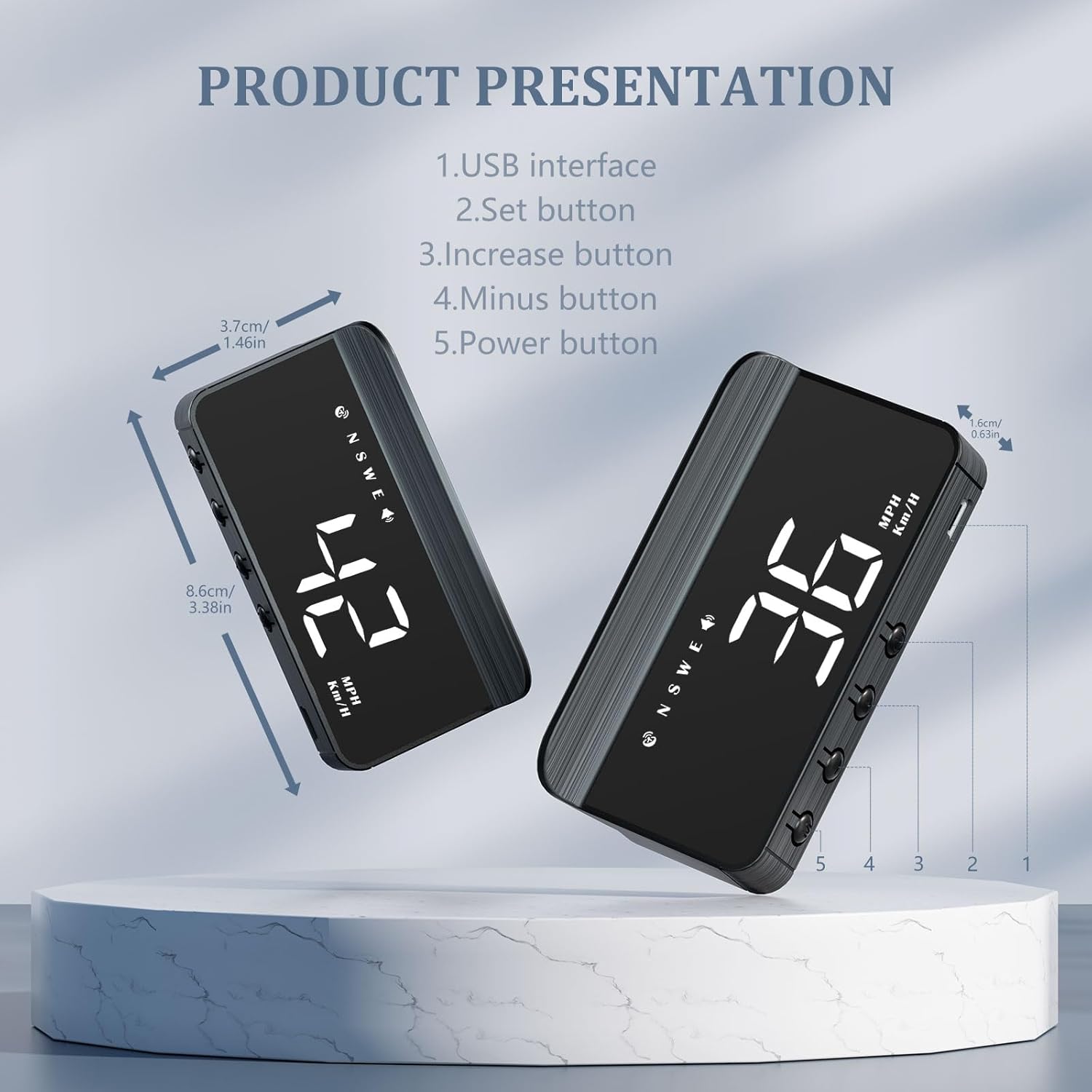
Figure 7: M1 HUD dimensions and button layout.
8. الضمان والدعم
Liiiyuan products undergo two inspections by the quality inspection department before leaving the factory. For any unresolved issues or questions regarding your M1 HUD within one year of purchase, please contact Liiiyuan directly for after-sales service.
For further assistance, you may visit the official Liiiyuan store on Amazon: Liiiyuan Store.
Ask a question about this manual
Ask about setup, troubleshooting, compatibility, parts, safety, or missing instructions. Manuals+ will review the question and use this page’s manual context to help answer it.