
1. المقدمة
Thank you for choosing the WORKPRO 7.2V Cordless Rotary Tool. This manual provides essential information for the safe and effective operation, maintenance, and troubleshooting of your tool. Please read it thoroughly before use and retain it for future reference.
The WORKPRO 7.2V Cordless Rotary Tool is a versatile and compact device designed for various DIY and craft projects. Its lightweight design and variable speed settings make it suitable for tasks such as sanding, engraving, cutting, drilling, grinding, and polishing.

Figure 1: WORKPRO 7.2V Cordless Rotary Tool with included accessories and storage bag.
2. معلومات السلامة
اتبع دائمًا احتياطات السلامة الأساسية لتقليل خطر نشوب حريق أو التعرض لصدمة كهربائية أو الإصابة الشخصية عند تشغيل أدوات الطاقة.
- اقرأ جميع التعليمات: تعرّف على كيفية تشغيل الأداة وإرشادات السلامة الخاصة بها.
- ارتداء حماية العين: احرص دائمًا على ارتداء نظارات واقية أو نظارات أمان مع واقيات جانبية.
- تأمين قطعة العمل: دائما كلamp أو تأمين قطعة العمل بطريقة أخرى لمنع الحركة أثناء التشغيل.
- حافظ على منطقة عمل نظيفة: المناطق المزدحمة تستدعي الحوادث.
- تجنب البيئات الخطرة: لا تستخدم أدوات كهربائية فيamp أو الأماكن الرطبة ، أو تعرضها للمطر. حافظ على إضاءة منطقة العمل جيدًا.
- إبعاد الأطفال عن: يجب إبقاء جميع الزوار على مسافة آمنة من منطقة العمل.
- ارتدِ ملابس مناسبة: Do not wear loose clothing or jewelry. They can be caught in moving parts. Non-skid footwear is recommended. Wear protective hair covering to contain long hair.
- استخدم الأداة الصحيحة: لا تجبر الأداة أو المرفق على القيام بعمل لم يتم تصميمه من أجله.
- فصل الطاقة: Disconnect the tool from its power source before making adjustments, changing accessories, or storing it.
- لا تتجاوز: حافظ على قدميك وتوازنك في جميع الأوقات.
- صيانة الأدوات بعناية: حافظ على الأدوات حادة ونظيفة للحصول على أداء أفضل وأكثر أمانًا. اتبع تعليمات التشحيم وتغيير الاكسسوارات.
- التحقق من الأجزاء التالفة: قبل استخدام الأداة مرة أخرى ، يجب فحص واقي أو جزء آخر تالف بعناية لتحديد أنه سيعمل بشكل صحيح ويؤدي وظيفته المقصودة.
- Do Not Operate While Charging: For safety reasons, do not use the tool while it is being charged.
3. انتهى المنتجview
The WORKPRO 7.2V Cordless Rotary Tool is designed for precision work. Understanding its components is key to effective operation.
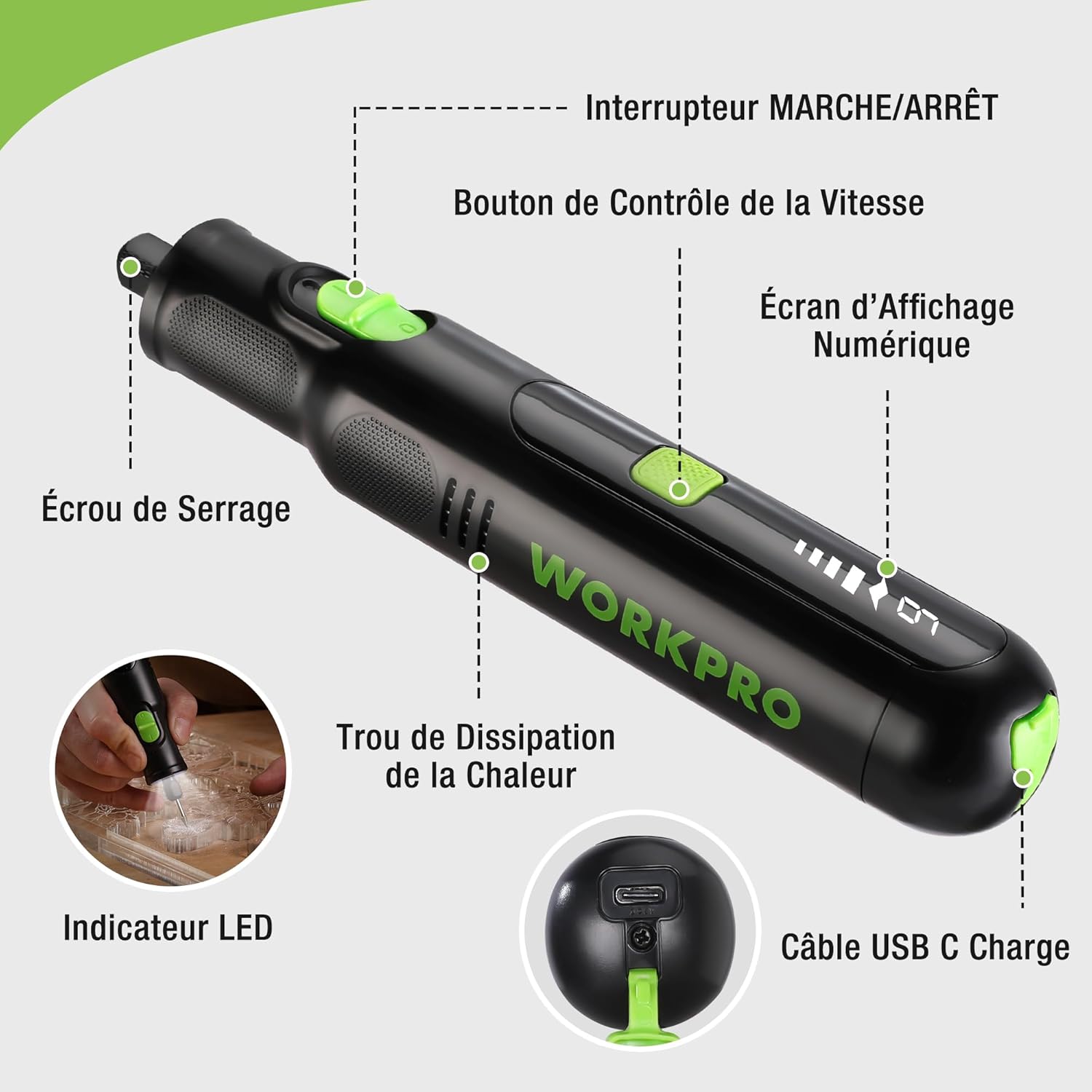
Figure 2: Key components of the rotary tool.
عناصر:
- مفتاح تشغيل / إيقاف: يقوم بتنشيط الأداة وإلغاء تنشيطها.
- زر التحكم بالسرعة: Adjusts the rotational speed of the tool.
- شاشة العرض الرقمية: Shows the current speed setting.
- صمولة الطوق: Secures the accessory bits in place.
- ثقب تبديد الحرارة: Ensures proper cooling of the motor during operation.
- مؤشر LED: Provides illumination for the work area.
- منفذ شحن USB-C: لإعادة شحن البطارية الداخلية.
الملحقات المتضمنة:
Your WORKPRO rotary tool comes with 117 diverse accessories, enabling a wide range of applications. These include:

الشكل 3: انتهىview of the 117 included accessories.
- الطحن/الشحذ: Grinding stones and wheels for material shaping and sharpening.
- نحت: Diamond bits for detailed carving and engraving.
- تلميع: Wool felt wheels, felt wheels, screw mandrels, and metal brushes for achieving smooth, shiny finishes.
- الطحن: Milling bits for precise material removal.
- القطع: Cutting discs and saw blades for various cutting tasks, along with a cutting disc holder.
- السنفرة: Sandpaper, rubber sanding drums, and sanding bands for surface preparation and finishing.
- كوليتس: 2.35mm and 3.2mm collets to accommodate different shank sizes.
- حفر: 2.35mm and 3.2mm drill bits for small-scale drilling.
- وجع: For securing and loosening collet nuts.
4. الإعداد
4.1 شحن الأداة
The tool is equipped with a 7.2V 1100mAh Lithium-ion rechargeable battery. Before first use, fully charge the tool.
- Connect the provided USB-C charging cable to the tool's USB-C charging port.
- قم بتوصيل الطرف الآخر من كابل USB بمصدر طاقة USB متوافق (مثل الكمبيوتر أو محول الحائط USB).
- The digital display will indicate charging status. A full charge typically takes approximately 2 hours.
- بمجرد الشحن بالكامل ، افصل كابل الشحن.
Note: For optimal battery life, it is recommended to store the tool with the battery charged between 50% and 75%. Recharge the tool at least once every 3 to 6 months if not used regularly.

Figure 4: Charging the rotary tool via USB-C.
4.2 تركيب الملحقات
The WORKPRO rotary tool features an automatic spindle lock design for easy and secure accessory changes.
- Ensure the tool is turned OFF.
- Unscrew the collet nut at the front of the tool.
- Select the appropriate collet size for your desired accessory (2.35mm or 3.2mm). Insert the collet into the tool if not already present.
- Insert the shank of the accessory bit into the center of the collet nut. Ensure the bit is fully seated.
- Hand-tighten the collet nut. For a secure fit, use the included wrench to tighten the collet nut firmly. Do not overtighten.

Figure 5: Two-step accessory replacement process.

Figure 6: Detailed installation steps for various accessories.
Note: The automatic spindle lock engages when the tool is off, allowing for accessory changes without needing to press a separate button. A slight clicking sound when the tool stops is normal due to this mechanism.
5. تعليمات التشغيل
5.1 تشغيل/إيقاف التشغيل
To turn the tool ON, slide the ON/OFF switch to the 'ON' position. To turn it OFF, slide the switch to the 'OFF' position.
5.2 ضبط السرعة
The tool features 6 variable speed settings, ranging from 5000 RPM to 30000 RPM. Press the Speed Control Button to cycle through the speeds. The current speed setting will be displayed on the digital screen.
- Speed I: 5000 RPM
- Speed II: 10000 RPM
- Speed III: 15000 RPM
- Speed IV: 20000 RPM
- Speed V: 25000 RPM
- Speed VI: 30000 RPM
Choose the appropriate speed for your task and material. Lower speeds are generally suitable for polishing, delicate work, and softer materials, while higher speeds are for cutting, grinding, and harder materials.

Figure 7: Variable speed settings and powerful motor.
5.3 إضاءة LED مدمجة
The tool includes an integrated LED light that illuminates the work area, improving visibility in dimly lit spaces and for detailed tasks.

Figure 8: Using the LED light for precision engraving.
5.4 تطبيقات
The WORKPRO rotary tool is highly versatile and can be used for:
- القطع: Use appropriate cutting discs for various materials.
- النقش/الحفر: Utilize diamond bits for intricate designs on wood, plastic, or soft metals.
- تلميع: Apply felt wheels and polishing compounds to restore shine to surfaces.
- السنفرة: Use sanding bands and drums for smoothing rough edges or preparing surfaces.
- حفر: Employ small drill bits for precision holes.

الشكل 9: مثالamples of versatile applications.
6. الصيانة
6.1 التنظيف
- افصل دائمًا الأداة عن أي مصدر للطاقة قبل التنظيف.
- استخدمي قطعة قماش ناعمةamp استخدم قطعة قماش لمسح الجزء الخارجي من الأداة. لا تستخدم مواد كيميائية قاسية أو منظفات كاشطة.
- Use a small brush or compressed air to clear dust and debris from the heat dissipation holes and around the collet area.
6.2 العناية بالبطارية وتخزينها
- To prolong battery life, avoid completely discharging the battery regularly.
- For long-term storage, ensure the battery is charged to approximately 50-75%. Recharge the tool every 3 to 6 months to prevent deep discharge and maintain battery health.
- Store the tool in a cool, dry place, away from direct sunlight and extreme temperatures.
6.3 تخزين الملحقات
Keep all accessories organized in the provided storage bag or a suitable container to prevent loss and damage.
7. استكشاف الأخطاء وإصلاحها
This section addresses common issues you might encounter with your WORKPRO rotary tool.
| مشكلة | السبب المحتمل | حل |
|---|---|---|
| الأداة لا تعمل. | تم تفريغ البطارية. | Charge the tool fully using the USB-C cable. |
| Tool stops unexpectedly during use. | البطارية منخفضة أو الأداة محملة بشكل زائد. | Recharge the battery. Reduce pressure on the tool or use a lower speed setting for the task. |
| Clicking sound when turning off. | Normal operation of the automatic spindle lock. | This is a normal function and does not indicate a fault. |
| Accessory bit is loose or wobbles. | Collet nut not tightened sufficiently or incorrect collet size. | Ensure the correct collet size is used for the accessory. Tighten the collet nut firmly with the included wrench. |
| Reduced performance or short runtime. | Battery degradation or improper charging/storage. | Ensure proper charging and storage practices are followed (refer to Section 6.2). If the issue persists, the battery may need replacement. |
8. المواصفات
Below are the technical specifications for the WORKPRO 7.2V Cordless Rotary Tool (Model W123024A).
| ميزة | مواصفة |
|---|---|
| ماركة | ووركبرو |
| رقم الموديل | W123024A |
| المجلدtage | 7.2 فولت |
| نوع البطارية | ليثيوم أيون (1 متضمنة) |
| سعة البطارية | 1100 مللي أمبير |
| سرعة الدوران القصوى | 30000 دورة في الدقيقة |
| سرعات متغيرة | 6 (5000-30000 دورة في الدقيقة) |
| وقت الشحن | حوالي 2 ساعات |
| Runtime (Max Speed) | حوالي 45 دقيقة |
| وزن | 227 جرام |
| الأبعاد (الطول × العرض × الارتفاع) | 25.2 × 16.8 × 5.5 سم |
| ميزة خاصة | Cordless, Integrated LED Light, Automatic Spindle Lock |
| المكونات المضمنة | 117 الملحقات |
| الشركة المصنعة | شركة هانغتشو غريت ستار الصناعية المحدودة |
9. الضمان والدعم
For warranty information, please refer to the documentation provided at the time of purchase or contact your retailer. WORKPRO is committed to providing quality products and customer satisfaction.
If you encounter any issues or have questions regarding your WORKPRO 7.2V Cordless Rotary Tool, please contact the seller or WORKPRO customer support through their official website or contact channels. Please have your model number (W123024A) and purchase details ready when seeking support.