
مقدمة
Welcome to the user manual for your new Infinix Smart 8 smartphone. This guide provides essential information on setting up, operating, maintaining, and troubleshooting your device. The Infinix Smart 8 is designed for efficient performance, featuring a G36 processor, 4GB RAM, 64GB internal storage, a 50MP main camera, and a long-lasting 5000 mAh battery. Please read this manual thoroughly to ensure optimal use of your device.
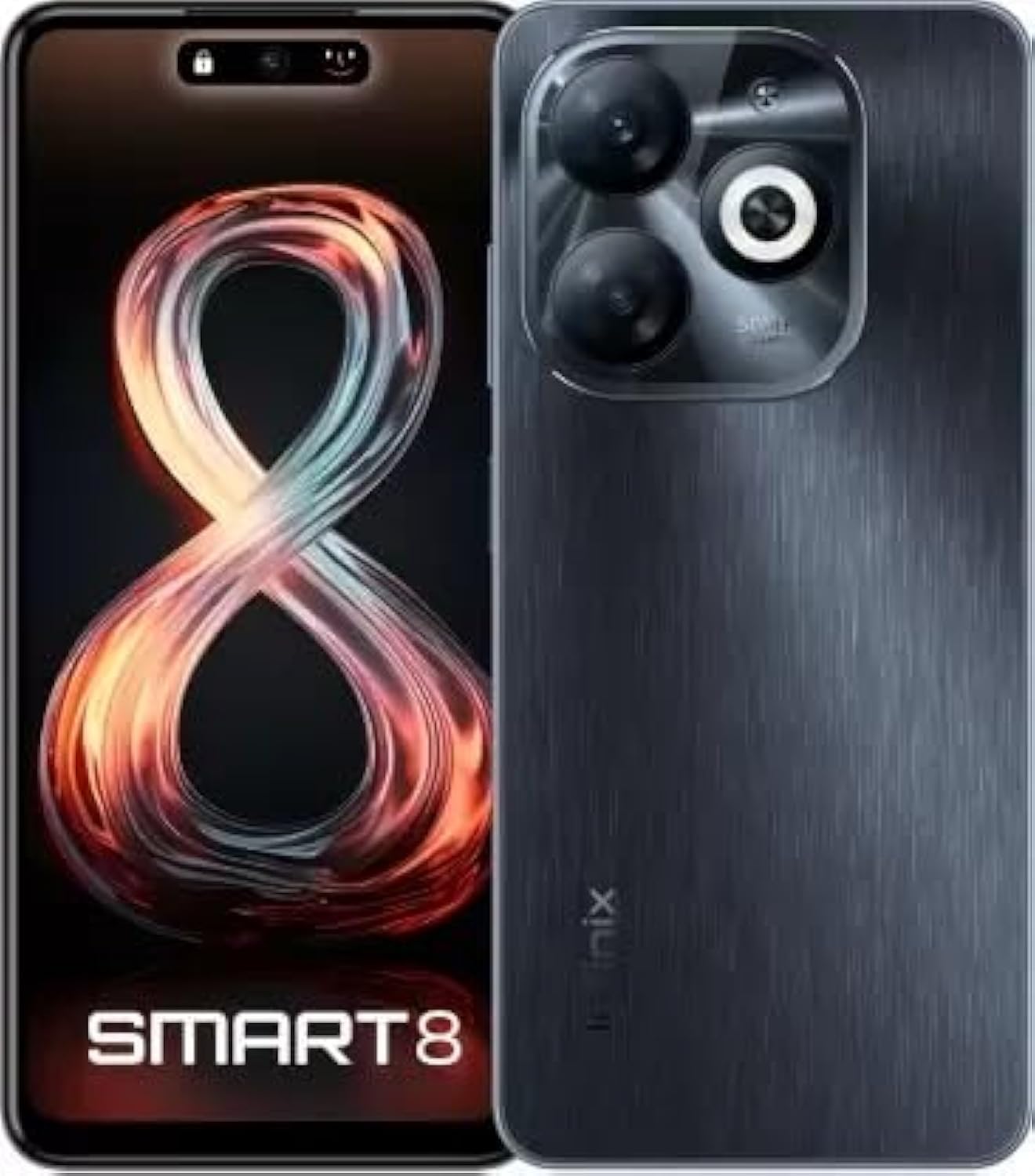
Image: Infinix Smart 8 smartphone in Timber Black, showcasinيتميز بتصميمه الأنيق ووحدة الكاميرا.
ماذا يوجد في الصندوق
Upon unboxing your Infinix Smart 8, please verify that all the following items are included:
- سماعة الهاتف
- محول
- كابل USB Type-C
- حافظة TPU
- دبوس قاذف SIM
- دليل البدء السريع
- بطاقة الضمان
- بطاقة إكس كلوب
دليل الإعداد
1. إدخال بطاقة SIM وبطاقة الذاكرة
Locate the SIM card tray on the side of your device. Use the provided SIM ejector pin to open the tray. Insert your Nano-SIM card(s) and/or a microSD card (for expandable storage up to 1 TB) into the designated slots. Ensure the cards are correctly oriented as shown in the diagram in the Quick Start Guide. Gently push the tray back into the device until it clicks into place.
2. تشغيل / إيقاف التشغيل
- لتشغيل: اضغط مع الاستمرار على زر الطاقة (عادةً على الجانب الأيمن) حتى يظهر شعار Infinix.
- لإيقاف التشغيل: اضغط مع الاستمرار على زر الطاقة، ثم حدد "إيقاف التشغيل" من الخيارات التي تظهر على الشاشة.
- لإعادة التشغيل: اضغط مع الاستمرار على زر الطاقة، ثم حدد "إعادة التشغيل" من الخيارات.
3. الإعداد الأولي
The first time you power on your device, you will be guided through an initial setup process. This includes selecting your language, connecting to a Wi-Fi network, setting up your Google account, and configuring security features like fingerprint unlock. Follow the on-screen prompts to complete the setup.
تعليمات التشغيل
الملاحة الأساسية
- يلمس: اضغط على أيقونة لفتح تطبيق أو تحديد عنصر.
- انتقاد: اسحب إصبعك عبر الشاشة للتمرير أو التنقل بين الشاشات.
- قرصة: استخدم إصبعين للتكبير أو التصغير في الصور web الصفحات.
- ضغطة طويلة: اضغط مع الاستمرار على أحد العناصر للحصول على المزيد من الخيارات أو لنقله.
إجراء المكالمات وإرسال الرسائل
To make a call, open the Phone app, enter the number, and tap the call icon. To send a message, open the Messages app, tap the new message icon, enter the recipient's number or select from contacts, type your message, and tap send.
الاتصال بالشبكات
- واي فاي: Go to Settings > Network & internet > Wi-Fi. Turn Wi-Fi on, select your desired network, and enter the password if required.
- بلوتوث: انتقل إلى الإعدادات > الأجهزة المتصلة > البلوتوث. قم بتشغيل البلوتوث، ثم قم بإقرانه بالأجهزة المتاحة.
- بيانات الجوال: Ensure your SIM card is active. Go to Settings > Network & internet > Mobile network to manage data usage and settings.
الميزات الرئيسية
The Infinix Smart 8 offers a range of features designed to enhance your mobile experience:
- تخزين الذاكرة: Equipped with 4 GB RAM and 64 GB internal storage, expandable up to 1 TB via microSD card.
- عرض: Features a 16.76 cm (6.6 inch) HD+ Display with a 90 Hz refresh rate and 5000 Nits brightness for clear and vibrant visuals.
- نظام الكاميرا: A powerful 50MP main camera with AI Lens and a 5MP front camera for high-quality photos and selfies.
- بطارية: A large 5000 mAh battery ensures extended usage on a single charge.
- المعالج: Powered by a G36 Processor for smooth performance and multitasking.
- الاتصال: Supports 4G cellular networks, Bluetooth, USB, and Wi-Fi.
- حماية: Includes a fingerprint sensor for secure and convenient unlocking.
استخدام الكاميرا
Your Infinix Smart 8 comes with an advanced camera system to capture your moments.
الكاميرا الخلفية
The main rear camera is 50 Megapixels, complemented by an AI Lens for enhanced image processing. It features a Quad-LED Flashlight for improved low-light photography.
الكاميرا الأمامية
The front camera is 5 Megapixels, perfect for clear selfies and video calls.

الصورة: مفصلة view of the Infinix Smart 8's rear camera setup, highlighting the 50MP dual camera and Quad-LED flashlight.
To access the camera, tap the Camera app icon. You can switch between photo, video, and other modes. Tap the shutter button to take a picture or start/stop recording a video.
عرض المعلومات
The Infinix Smart 8 features a vibrant 6.6-inch HD+ display.
- مقاس: 16.76 سم (6.6 بوصة)
- دقة: 1600 × 720 بكسل
- معدل التحديث: 90 Hz for smoother scrolling and gaming.
- سطوع: Up to 5000 Nits, ensuring visibility even in bright sunlight.
- يكتب: Punch-Hole Display design.

Image: The Infinix Smart 8's 6.6-inch HD+ display, illustrating its punch-hole design and high brightness.
المواصفات الفنية
Below are the detailed technical specifications for the Infinix Smart 8:
| ميزة | مواصفة |
|---|---|
| نظام التشغيل | أندرويد |
| كبش | 4 جيجا بايت |
| التخزين الداخلي | 64 جيجا بايت |
| تخزين قابل للتوسيع | حتى 1 تيرابايت |
| المعالج | معالج G36 |
| حجم العرض | 16.76 سم (6.6 بوصة) HD+ |
| دقة العرض | 1600 × 720 بكسل |
| الكاميرا الخلفية | عدسة بدقة 50 ميجابكسل + عدسة ذكاء اصطناعي |
| الكاميرا الأمامية | 5 ميجا بكسل |
| سعة البطارية | 5000 مللي أمبير |
| وقت التحدث عبر الهاتف | 25 ساعة |
| الاتصالات اللاسلكية | Cellular (4G Ready) |
| تقنيات الاتصال | بلوتوث، يو اس بي، واي فاي |
| نظام تحديد المواقع العالمي (جي بي اس) | جلوناس |
| مقبس الصوت | نعم |
| وزن العنصر | 350 جرام |
| رقم موديل العنصر | smart 8 |

Image: A visual summary of the Infinix Smart 8's technical specifications, including RAM, storage, battery, and processor details.
معلومات البطارية
The Infinix Smart 8 is equipped with a 5000 mAh battery, providing ampالطاقة للاستخدام اليومي.
- سعة: 5000 مليamp ساعات
- وقت التحدث: ما يصل إلى 25 ساعة بشحن كامل.
- الشحن: Use the provided Adaptor and USB Type-C Cable for optimal charging.
For best battery life, avoid fully discharging the battery frequently and use the original charger.
استكشاف الأخطاء وإصلاحها
If you encounter issues with your Infinix Smart 8, refer to the following common solutions:
- الجهاز لا يتم تشغيله: Ensure the battery is charged. Connect the charger and wait a few minutes before attempting to power on again. If unresponsive, try a forced restart by holding the power button for 10-15 seconds.
- تعطل التطبيقات/تجميدها: Close the problematic app and reopen it. If the issue persists, clear the app's cache (Settings > Apps > [App Name] > Storage & cache > Clear cache). Consider updating the app or the phone's software.
- إشارة الشبكة ضعيفة: تأكد من إدخال شريحة SIM بشكل صحيح. حاول إعادة تشغيل الجهاز. تأكد من وجودك في منطقة تغطية الشبكة.
- استنزاف البطارية بسرعة: قم بتقليل سطوع الشاشة، وأغلق التطبيقات غير المستخدمة التي تعمل في الخلفية، وقم بتعطيل الإشعارات غير الضرورية، وقم بإيقاف تشغيل Wi-Fi/Bluetooth عند عدم استخدامها.
- شاشة اللمس لا تستجيب: Restart the device. If the issue continues, ensure the screen is clean and free of moisture.
For more complex issues, refer to the official Infinix support webالموقع أو الاتصال بخدمة العملاء.
الصيانة والعناية
To ensure the longevity and optimal performance of your Infinix Smart 8, follow these maintenance guidelines:
- تنظيف: استخدم قطعة قماش ناعمة وخالية من الوبر لتنظيف الشاشة وجسم الجهاز. تجنب المواد الكيميائية القاسية أو المواد الكاشطة.
- درجة حرارة: لا تعرض الجهاز لدرجات حرارة عالية (ساخنة أو باردة) أو لأشعة الشمس المباشرة لفترات طويلة.
- التعرض للماء: The device is not waterproof. Avoid contact with water or other liquids.
- تحديثات البرامج: Regularly check for and install software updates to benefit from performance improvements and security patches.
- تخزين: Avoid overfilling your device's storage. Regularly clear unnecessary files and app caches.
الضمان والدعم
Your Infinix Smart 8 is covered by a 7-day service center replacement/repair policy from the date of purchase. Please retain your purchase receipt and the warranty card for service claims.
- الشركة المصنعة: Infinix (G mobile devices private ltd)
- الدعم المجاني: 18004190525
- الدعم عبر الإنترنت: قم بزيارة موقع Infinix الرسمي webالموقع الخاص بالأسئلة الشائعة وموارد الدعم ومعلومات الاتصال.
For any issues or queries, please contact the manufacturer's support team.
معلومات هامة حول السلامة
يرجى قراءة معلومات السلامة التالية بعناية لمنع الإصابة أو التلف لجهازك:
- Do not attempt to disassemble, repair, or modify the device yourself. This can cause damage, fire, or electric shock.
- استخدم فقط الشواحن والملحقات الأصلية أو المتوافقة المعتمدة.
- Avoid exposing the device to open flames or extreme heat.
- لا تتخلص من الجهاز في النار أو الماء.
- Keep the device and its accessories out of reach of children and pets.
- التزم بجميع القوانين واللوائح المحلية المتعلقة باستخدام الهاتف المحمول، وخاصة أثناء القيادة.
المنتج انتهىview فيديو
شاهد الفيديو الرسمي لهذا المنتج للحصول على نظرة عامة مرئيةview of the Infinix Smart 8's features and capabilities.
فيديو: مسؤول فوقview of the Infinix Smart 8 smartphone, detailing its technical specifications, key features, camera, and display.