
1. المقدمة
This manual provides detailed instructions for the VOLT PLUS TECH F9 Wireless Bluetooth 5.3 Earbuds. Please read this manual carefully before using the product to ensure proper operation and to maximize your user experience. Keep this manual for future reference.
2. محتويات العبوة
Upon opening your VOLT PLUS TECH F9 Earbuds package, please verify that all the following items are included:
- Two (2) F9 Wireless Earbuds
- One (1) 2000mAh Charging Case with Power Bank Functionality
- One (1) USB-C Charging Cable
- Three (3) Pairs of Ear Adapters (Small, Medium, Large)
- دليل مستخدم واحد (1).

Image: Contents of the VOLT PLUS TECH F9 Earbuds package, including earbuds, charging case, USB-C cable, ear tips, and user manual.
3. الإعداد والاستخدام الأولي
3.1 شحن سماعات الأذن والعلبة
Before first use, fully charge the charging case and earbuds. Place the earbuds into the charging case. Connect the USB-C charging cable to the charging port on the case and plug the other end into a USB power adapter (not included).
- ستعرض شاشة LED الموجودة على علبة الشحن نسبة شحن البطاريةtage.
- The earbuds will show a red indicator light while charging, which turns off when fully charged.
- A full charge typically takes approximately 30 minutes for the earbuds and longer for the case.
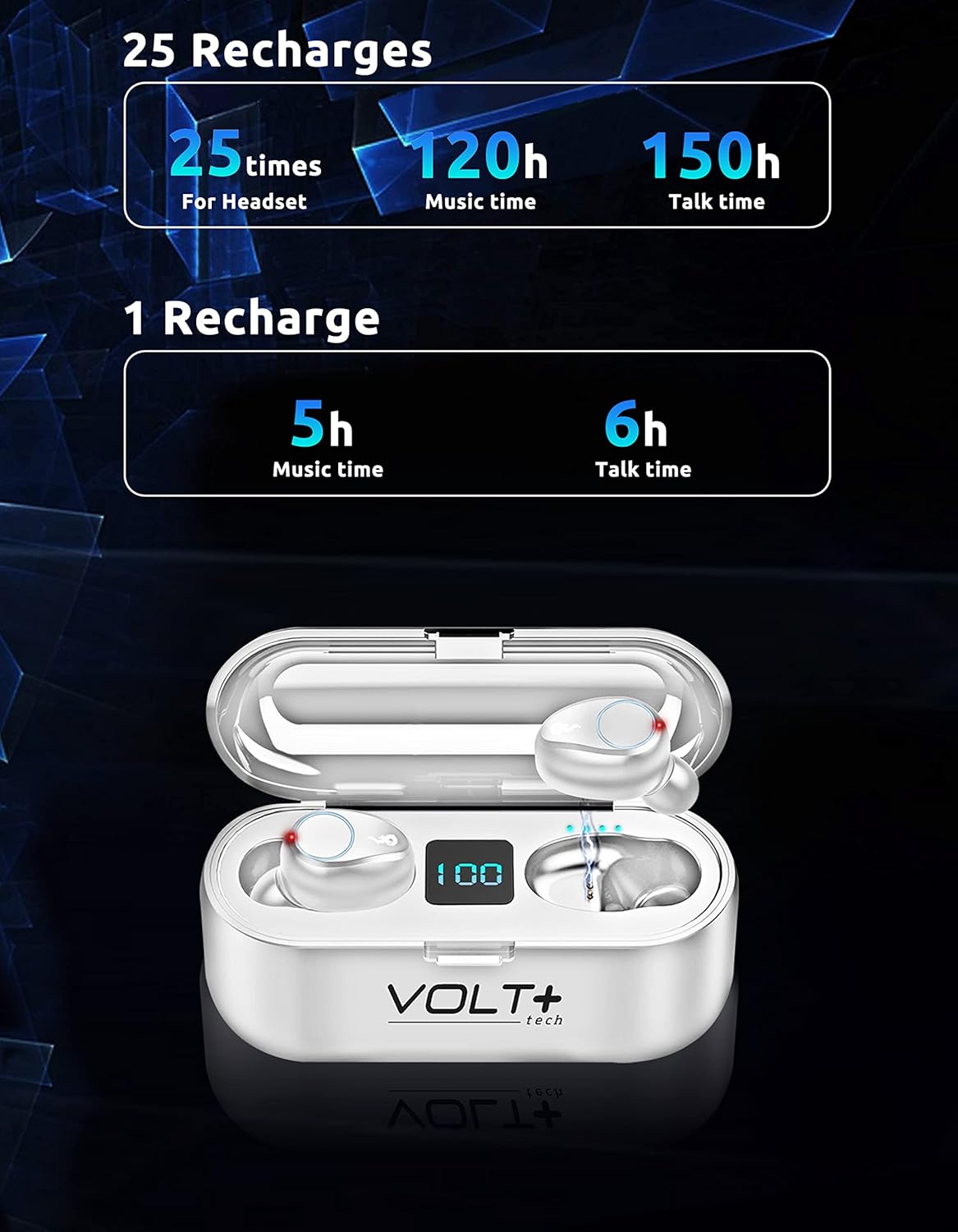
Image: White VOLT PLUS TECH F9 Earbuds inside their charging case, displaying '100' on the LED screen, indicating a full charge.
3.2 تشغيل/إيقاف التشغيل
- تشغيل الطاقة: يتم تشغيل سماعات الأذن تلقائيًا عند إزالتها من علبة الشحن.
- إيقاف التشغيل: تنطفئ سماعات الأذن تلقائيًا وتبدأ الشحن عند إعادتها إلى علبة الشحن.
3.3 اقتران بلوتوث
اتبع هذه الخطوات لربط سماعات الأذن بجهاز يدعم تقنية البلوتوث:
- تأكد من شحن سماعات الأذن بالكامل.
- Remove both earbuds from the charging case. They will automatically enter pairing mode, indicated by flashing lights (typically blue and red).
- على جهازك (على سبيل المثال، الهاتف الذكي أو الجهاز اللوحي)، قم بتمكين Bluetooth وابحث عن الأجهزة المتاحة.
- Select "F9" from the list of available devices.
- بمجرد الاتصال، ستتوقف أضواء مؤشر سماعة الأذن عن الوميض.
سيتم إعادة توصيل سماعات الأذن تلقائيًا بالجهاز المقترن الأخير عند إزالتها من العلبة، إذا تم تمكين البلوتوث على الجهاز.

Image: White VOLT PLUS TECH F9 Earbuds positioned near a smartphone, illustrating the pairing process.
4. التشغيل
4.1 ارتداء سماعات الأذن
Select the ear tips that provide the most comfortable and secure fit for your ears. Insert the earbuds gently into your ear canal and rotate them slightly to ensure a snug fit. A proper fit enhances sound quality and noise isolation.

Image: A woman wearing an earbud, highlighting the ergonomic and secure-fit design for comfortable, all-day use.
4.2 الضوابط التي تعمل باللمس
The F9 earbuds feature smart touch controls on each earbud. The functions are as follows:
| فعل | سماعة الأذن اليسرى (L) | سماعة الأذن اليمنى (R) |
|---|---|---|
| تشغيل/إيقاف الموسيقى مؤقتًا | اضغط مرة واحدة | اضغط مرة واحدة |
| الأغنية التالية | اضغط مرتين بسرعة | غير متاح |
| الأغنية السابقة | غير متاح | اضغط مرتين بسرعة |
| رفع الصوت | غير متاح | اضغط ثلاث مرات |
| خفض الصوت | اضغط ثلاث مرات | غير متاح |
| الرد على المكالمة/إنهائها | اضغط مرة واحدة | اضغط مرة واحدة |
| رفض المكالمة | اضغط مع الاستمرار لمدة ثانيتين | اضغط مع الاستمرار لمدة ثانيتين |
| Activate Voice Assistant (Siri/Android) | اضغط مع الاستمرار لمدة ثانيتين | اضغط مع الاستمرار لمدة ثانيتين |

Image: Visual guide illustrating the touch control functions on the VOLT PLUS TECH F9 Earbuds, showing actions for calls, music playback, volume, and voice assistant activation.
4.3 وظيفة بنك الطاقة
The charging case for your F9 earbuds doubles as a 2000mAh power bank, capable of charging your smartphone or other small devices. To use this feature:
- Connect your device's charging cable to the USB output port on the charging case.
- The charging case will begin to supply power to your connected device.

Image: The VOLT PLUS TECH F9 Earbuds charging case connected via a cable to a smartphone, demonstrating its power bank capability.
5. الصيانة والعناية
5.1 التنظيف
- قم بتنظيف سماعات الأذن وعلبة الشحن بانتظام باستخدام قطعة قماش ناعمة وجافة وخالية من الوبر.
- قم بإزالة أطراف الأذن ونظفها بالصابون المعتدل والماء، ثم جففها جيدًا قبل إعادة تركيبها.
- تجنب استخدام المنظفات الكاشطة أو المذيبات أو البخاخات الهوائية.
5.2 مقاومة الماء (IPX7)
The F9 earbuds are rated IPX7 waterproof, meaning they can withstand immersion in water up to 1 meter for 30 minutes. This makes them suitable for sports and outdoor activities where they might be exposed to sweat or rain.
- Do not intentionally submerge the earbuds for extended periods or beyond the specified depth.
- The charging case is not waterproof. Avoid exposing it to water.
- تأكد من جفاف سماعات الأذن تمامًا قبل وضعها مرة أخرى في علبة الشحن لمنع تلفها.

Image: Two white VOLT PLUS TECH F9 Earbuds submerged in water with splashes, illustrating their IPX7 waterproof capability.
5.3 التخزين
When not in use, store the earbuds in their charging case to protect them and keep them charged. Store the product in a cool, dry place away from extreme temperatures and direct sunlight.
6. استكشاف الأخطاء وإصلاحها
If you encounter issues with your VOLT PLUS TECH F9 Earbuds, please refer to the following common solutions:
- سماعات الأذن غير مقترنة: Ensure both earbuds are removed from the case and are in pairing mode. Turn off and on your device's Bluetooth. Forget the device in your Bluetooth settings and try pairing again.
- سماعة أذن واحدة فقط تعمل: Place both earbuds back into the charging case, close the lid, then remove them again. Ensure both are fully charged.
- لا يوجد صوت: تحقق من مستوى الصوت في جهازك وسماعات الأذن. تأكد من توصيل سماعات الأذن بجهازك بشكل صحيح.
- قضايا الشحن: تأكد من توصيل كابل الشحن بإحكام بكل من علبة الشحن ومصدر الطاقة. تأكد من نظافة نقاط التلامس الخاصة بالشحن على سماعات الأذن وداخل علبة الشحن وخلوها من أي شوائب.
- جودة الصوت سيئة: Ensure the earbuds are properly seated in your ears with the correct size ear tips. Move closer to your connected device to avoid interference.
If the issue persists, try resetting the earbuds by placing them in the charging case, then performing a factory reset if available (refer to specific instructions if provided with the product, as this model does not detail a specific reset procedure in the provided data).
7. مواصفات المنتج
Below are the technical specifications for the VOLT PLUS TECH F9 Wireless Bluetooth 5.3 Earbuds:
| ميزة | مواصفة |
|---|---|
| اسم الموديل | F9 |
| نسخة البلوتوث | 5.3 |
| مدى البلوتوث | 33 قدمًا (حوالي 10 أمتار) |
| سعة بطارية علبة الشحن | 2000 مللي أمبير |
| Earbud Battery Life (Music) | ما يصل إلى 5 ساعات لكل تهمة |
| Earbud Battery Life (Talk) | ما يصل إلى 6 ساعات لكل تهمة |
| إجمالي وقت اللعب مع علبة الشحن | 24-26 ساعات |
| وقت الشحن | حوالي 30 دقيقة (سماعات الأذن) |
| تصنيف مقاومة الماء | IPX7 |
| التحكم في الضوضاء | Active Noise Cancellation, Passive Noise Cancellation, Sound Isolation (CVC 8.0) |
| نوع برنامج تشغيل الصوت | سائق ديناميكي |
| حجم برنامج تشغيل الصوت | 26 مليمتر |
| مقاومة | 25.94 أوم |
| حساسية | 103 ديسيبل |
| طريقة التحكم | يلمس |
| الأجهزة المتوافقة | Android, iOS, Mac, Vivo V23e 5G, Windows |
| وزن السلعة (سماعات الأذن) | Approx. 4 Ounces (total) |
| أبعاد المنتج | 1 × 1.7 × 1.5 بوصة |

Image: Diagram showing the dimensions of the VOLT PLUS TECH F9 Earbuds and their charging case.
8. الضمان والدعم
VOLT PLUS TECH products are designed for reliability and performance. For warranty information, please refer to the documentation included with your purchase or contact VOLT PLUS TECH customer support directly.
If you require further assistance or have questions not covered in this manual, please contact our customer support team through the retailer's platform or the official VOLT PLUS TECH webموقع.