
VOLT PLUS TECH F9
VOLT PLUS TECH F9 Wireless V5.3 Bluetooth Earbuds User Manual
الموديل: F9
1. المقدمة
Thank you for choosing the VOLT PLUS TECH F9 Wireless V5.3 Bluetooth Earbuds. This manual provides essential information for setting up, operating, and maintaining your new earbuds. Please read it carefully before use.
محتويات الحزمة
- 2 × سماعات أذن لاسلكية
- 1 x 2000mAh Power Bank Charging Case
- كابل شحن 1 x USB-C
- 3 x Pairs of Ear Adapters (Small, Medium, Large)
- 1 × دليل المستخدم

Image 1.1: Contents included in the VOLT PLUS TECH F9 Earbuds package.
2. انتهى المنتجview
The VOLT PLUS TECH F9 earbuds feature a compact design with a multi-functional charging case that also serves as a power bank. The case includes an LED display to show battery levels.
مميزات سماعة الأذن
- التحكم باللمس الذكي: لإدارة الموسيقى والمكالمات والمساعد الصوتي.
- ميكروفون: Built-in for calls.
- مؤشر LED: On each earbud for status.
ميزات علبة الشحن
- بنك طاقة بسعة 2000 مللي أمبير: Charges earbuds and can provide emergency charge for mobile devices.
- شاشة رقمية LED: يظهر البطارية percentage of the charging case and charging status of individual earbuds.
- مدخل USB-C: لشحن العلبة.

الصورة 2.1: انتهىview of the earbuds and charging case with LED display.

Image 2.2: The bright LED display on the charging case indicates battery levels.
3. الإعداد والاقتران
الشحن الأولي
- قبل الاستخدام الأول، قم بشحن علبة الشحن وسماعات الأذن بالكامل.
- Connect the USB-C charging cable to the charging case and a power source. The LED display will show the charging progress.
- Place the earbuds into the charging case. They will begin charging automatically. The LED indicators on the earbuds will light up, and the case display will show their charging status.
بلوتوث الاقتران
- التشغيل التلقائي: افتح علبة الشحن، وسيتم تشغيل سماعات الأذن تلقائيًا والدخول في وضع الاقتران.
- تمكين البلوتوث: On your device (e.g., smartphone), go to Bluetooth settings and enable Bluetooth.
- اختر جهاز: Look for "F9" or similar in the list of available devices and select it to connect.
- تأكيد: Once connected, you will hear a confirmation tone, and the earbud LED indicators will change.
The earbuds feature Bluetooth V5.3 for a stable and efficient connection. They will automatically reconnect to the last paired device when taken out of the case.

Image 3.1: Fast Bluetooth auto-pairing process.
4. تعليمات التشغيل
The F9 earbuds utilize smart touch controls for various functions.
وظائف التحكم باللمس
| فعل | سماعة الأذن اليسرى (L) | سماعة الأذن اليمنى (R) |
|---|---|---|
| تشغيل/إيقاف الموسيقى مؤقتًا | اضغط مرة واحدة | |
| الأغنية التالية | اضغط مرتين بسرعة | غير متاح |
| الأغنية السابقة | غير متاح | اضغط مرتين بسرعة |
| رفع الصوت | غير متاح | اضغط ثلاث مرات |
| خفض الصوت | اضغط ثلاث مرات | غير متاح |
| الرد على المكالمة/إنهائها | Click/Double click | |
| رفض المكالمة | اضغط مع الاستمرار لمدة ثانيتين | |
| تفعيل المساعد الصوتي (Siri/Google Assistant) | اضغط مرتين بسرعة | |

Image 4.1: Smart touch control guide for earbud functions.
5. الشحن
شحن سماعات الأذن
Place the earbuds into the charging case. They will automatically begin charging. The LED display on the case will show the charging status for each earbud.
Charging the Case (Power Bank)
Connect the provided USB-C cable to the charging port on the case and to a USB power adapter. The LED display will show the battery percentage of the case as it charges.
Using the Case as a Power Bank
The 2000mAh charging case can also be used to provide an emergency charge to your mobile phone or other small devices. Connect your device's charging cable to the USB output port on the charging case.

Image 5.1: Charging your phone using the earbud charging case.
عمر البطارية
A full charge provides approximately 5 hours of music time and 6 hours of talk time for the earbuds. The 2000mAh charging case can recharge the earbuds multiple times, extending total usage to over 24 hours.
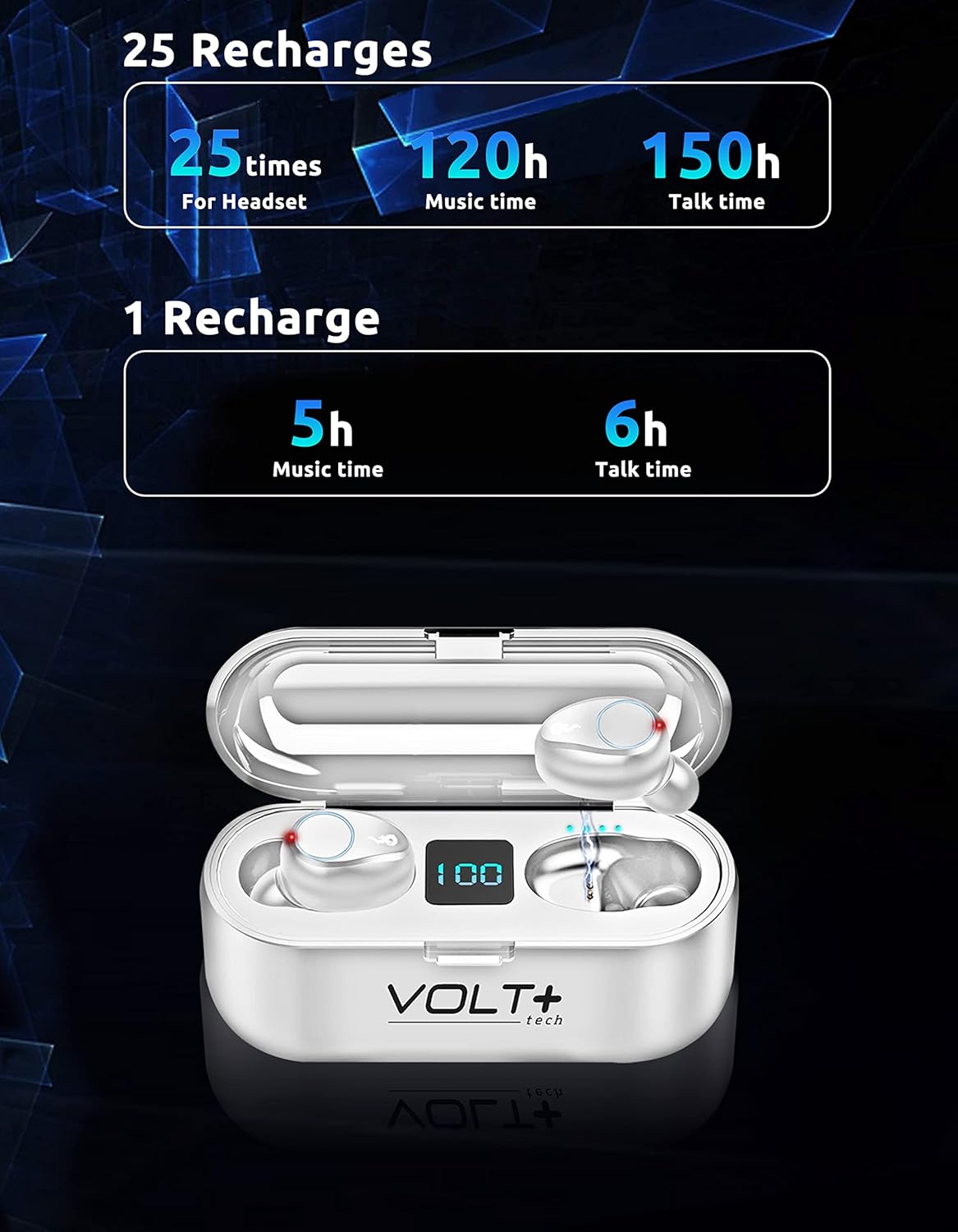
Image 5.2: Battery life and recharge capabilities.
6. الصيانة والعناية
تنظيف
- قم بتنظيف سماعات الأذن وعلبة الشحن بانتظام باستخدام قطعة قماش ناعمة وجافة وخالية من الوبر.
- قم بإزالة أطراف الأذن ونظفها بالصابون المعتدل والماء، ثم جففها جيدًا قبل إعادة تركيبها.
- تأكد من أن نقاط التلامس الخاصة بالشحن على كل من سماعات الأذن والعلبة نظيفة وخالية من أي شوائب.
مقاومة الماء (IPX7)
The earbuds are IPX7 waterproof, meaning they can withstand immersion in water up to 1 meter for 30 minutes. This makes them suitable for rainy outdoor sports and sweating during workouts. However, the charging case is not waterproof. Do not immerse the charging case in water.

Image 6.1: IPX7 waterproof rating of the earbuds.
تخزين
Store the earbuds in their charging case when not in use to protect them and keep them charged. Avoid extreme temperatures and direct sunlight.
7. استكشاف الأخطاء وإصلاحها
سماعات الأذن لا تقترن
- تأكد من شحن كلا سماعات الأذن.
- قم بإيقاف تشغيل البلوتوث على جهازك، ثم قم بتشغيله مرة أخرى.
- Forget the "F9" device in your device's Bluetooth settings and try pairing again.
- أعد وضع سماعات الأذن في العلبة، وأغلق الغطاء، وانتظر بضع ثوانٍ، ثم افتحه لإعادة بدء وضع الاقتران.
Only One Earbud Working
- تأكد من شحن كلا سماعات الأذن.
- Try placing both earbuds back into the charging case, close the lid, and then take them out again to allow them to re-sync with each other.
- If the issue persists, try resetting the earbuds (refer to specific reset instructions if available in a full manual, or try forgetting the device and re-pairing).
علبة الشحن لا تشحن
- افحص كابل USB-C ومحول الطاقة بحثًا عن أي تلف.
- تأكد من توصيل الكابل بإحكام بكل من الهيكل ومصدر الطاقة.
- جرّب كابل USB-C أو محول طاقة مختلفًا.
جودة الصوت رديئة
- تأكد من تثبيت سماعات الأذن بشكل صحيح في أذنيك. جرب أحجامًا مختلفة من أطراف الأذن.
- نظف شبكة سماعة الأذن لإزالة أي شمع أو شوائب.
- Ensure your device is within the Bluetooth range (up to 33 feet/10 meters) and there are no significant obstructions.
8. المواصفات
| ميزة | التفاصيل |
|---|---|
| اسم الموديل | F9 |
| نسخة البلوتوث | 5.3 |
| مدى البلوتوث | 33 قدم (10 متر) |
| سعة بطارية علبة الشحن | 2000 مللي أمبير |
| عمر بطارية سماعة الأذن (شحنة واحدة) | Approx. 5 hours music, 6 hours talk time |
| إجمالي عمر البطارية (مع العلبة) | أكثر من 24 ساعة |
| وقت الشحن | حوالي 30 دقيقة (سماعات الأذن) |
| مستوى مقاومة الماء | IPX7 (سماعات الأذن فقط) |
| التحكم في الضوضاء | Active Noise Cancellation, Passive Noise Cancellation, Sound Isolation (CVC 8.0) |
| نوع برنامج تشغيل الصوت | سائق ديناميكي |
| حجم برنامج تشغيل الصوت | 26 مليمتر |
| حساسية | 103 ديسيبل |
| مقاومة | 25.94 أوم |
| طريقة التحكم | يلمس |
| الأجهزة المتوافقة | Android, iOS, Mac, Windows, Nubia Red Magic 5G |
| أبعاد سماعة الأذن | تقريبًا 0.9 × 0.5 بوصة |
| أبعاد العلبة | تقريبا. 2.7 × 1.3 × 1.2 بوصة |
| وزن العنصر | 4 أونصة (إجمالي) |

Image 8.1: Physical dimensions of the earbuds and charging case.
9. معلومات الضمان
VOLT PLUS TECH products are designed and manufactured to the highest quality standards. This product is covered by a limited warranty from the date of purchase. Please retain your proof of purchase for warranty claims. The warranty covers manufacturing defects but does not cover damage caused by misuse, accidents, unauthorized modifications, or normal wear and tear.
10. دعم العملاء
If you encounter any issues or have questions regarding your VOLT PLUS TECH F9 Wireless Bluetooth Earbuds, please contact our customer support team. Refer to the contact information provided on the product packaging or our official webموقع للحصول على المساعدة.
Ask a question about this manual
Ask about setup, troubleshooting, compatibility, parts, safety, or missing instructions. Manuals+ will review the question and use this page’s manual context to help answer it.