
مقدمة
Welcome to your XPR3SS IK10PW Smart WiFi Automatic Irrigation Water Timer. This device is designed to simplify your garden and agriculture watering needs through intelligent scheduling and remote control. Please read this manual carefully to ensure proper installation, operation, and maintenance of your device.
المنتج انتهىview
المكونات المتضمنة:
- مؤقت المياه
- الموصلات
- 10m Pipe
- Drop Emitter
- فلتر
- Barb Fitting
المميزات الرئيسية:
- اتصال واي فاي: Control your irrigation system from anywhere using the Tuya Smart Life App.
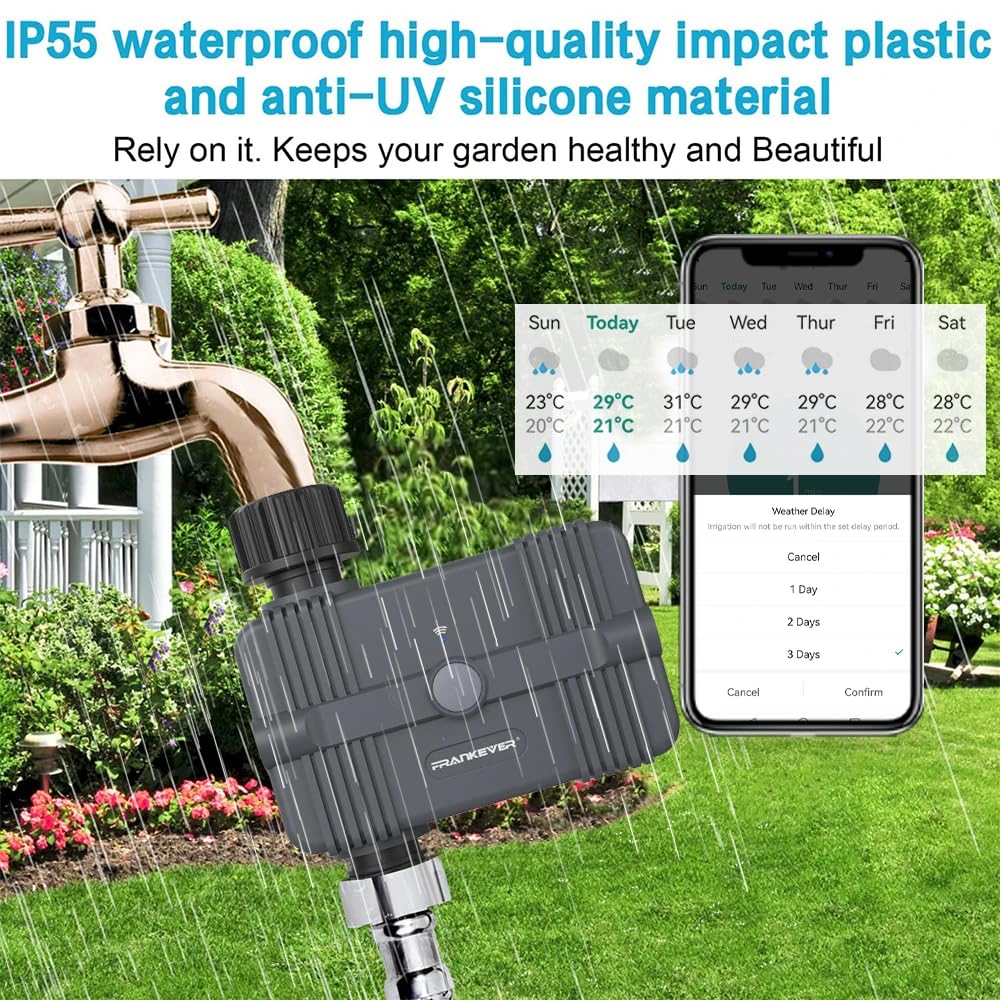
- تأخير الطقس: Postpone watering schedules for 24, 48, or 72 hours in anticipation of rain.
- تنبيهات البطارية المنخفضة: Receive notifications when battery levels drop below 5%, with automatic shutdown to prevent over-watering.
- Multi-function Scheduling: Set watering durations as short as 1 minute, ideal for drip irrigation. Supports both timing and cycle timing options.
- التحكم الصوتي: Seamlessly integrate with Amazon Alexa and Google Assistant for hands-free operation.
- جودة موثوقة: Features a magnetic valve for superior sealing performance, ensuring no water leakage and stable operation.


دليل الإعداد
1. تركيب البطارية
- The XPR3SS IK10PW requires four (4) AA batteries (not included).
- حدد مكان حجرة البطارية في الجزء الخلفي من الجهاز.
- Insert the batteries, ensuring correct polarity as indicated inside the compartment.
- أغلق غطاء البطارية بشكل آمن للحفاظ على ختم مقاومة الماء.
2. التثبيت المادي
- Attach the water timer to your outdoor faucet or hose connection. Ensure the connection is hand-tight to prevent leaks.
- Connect your irrigation system (e.g., 10m pipe, drop emitters, filter, barb fittings) to the water outlet of the timer.
3. تثبيت التطبيق والاتصال بشبكة الواي فاي
- Download the "Tuya Smart Life" app from your smartphone's app store (available on iOS and Android).
- Register or log in to your existing Tuya Smart Life account.
- In the app, tap "Add Device" or the "+" icon to begin the pairing process.
- Press and hold the WiFi Connect Button on the timer until the indicator light flashes rapidly, indicating it is in pairing mode.
- Follow the on-screen instructions in the app to connect the timer to your 2.4GHz WiFi network.

تعليمات التشغيل
1. جدولة الري
Open the Tuya Smart Life app and select your XPR3SS IK10PW device to access scheduling options.
- الجدول العادي: Set specific start times and durations for watering on selected days of the week.
- دورة ونقع: Configure advanced watering cycles with intermittent soak times to allow for better water absorption and reduce runoff.
- Adjust watering duration as needed, with options down to 1 minute, suitable for precise drip irrigation.
2. التشغيل اليدوي
- On-Device: Press the Manual Start Button on the timer for immediate watering. Press again to stop.
- عبر التطبيق: Use the app to manually start or stop watering at any time, overriding the set schedule temporarily.
3. Weather Delay Function
- In the Tuya Smart Life app, locate the Weather Delay option.
- Select to delay your watering schedule for 24, 48, or 72 hours if rain is expected or if your garden has received sufficient natural watering.
- The set schedule will automatically resume after the chosen delay period expires.
4. التحكم الصوتي
- Integrate the Tuya Smart Life app with your Amazon Alexa or Google Assistant device.
- Once linked, you can use voice commands to control your water timer (e.g., "Alexa, start watering the garden for 10 minutes" or "Hey Google, turn off the garden timer").

صيانة
استبدال البطارية
- When the app indicates a low battery alert (below 5%), replace all four (4) AA batteries promptly to ensure continuous operation.
- Ensure the battery compartment is sealed tightly after replacement to maintain the IP67 waterproof rating.
تنظيف
- Periodically inspect and clean the internal filter to prevent blockages and ensure optimal water flow.
- امسح الجزء الخارجي من الجهاز بالإعلانamp استخدم قطعة قماش لإزالة الأوساخ والشوائب. لا تستخدم مواد كيميائية قاسية.
الشتاء
- Before the onset of freezing temperatures, disconnect the timer from the faucet.
- Drain any remaining water from the device to prevent damage from freezing.
- Store the timer indoors in a dry, frost-free location until the next watering season.
استكشاف الأخطاء وإصلاحها
- لا تدفق المياه:
• Check battery level and replace if low.
• Ensure the outdoor faucet is fully open.
• Inspect the internal filter for any blockages and clean if necessary.
• Verify that the timer is securely attached to the faucet and irrigation system, with no leaks. - مشكلات اتصال التطبيق:
• Confirm your home WiFi network is active and providing a strong 2.4GHz signal at the timer's location.
• Restart the timer by temporarily removing and reinserting the batteries.
• If connection is lost, attempt to re-pair the device with the Tuya Smart Life app following the setup instructions. - Inaccurate Watering Times:
• Double-check your schedule settings within the Tuya Smart Life app for any incorrect configurations.
• Verify if the Weather Delay function is currently active, which would temporarily pause scheduled watering. - تسرب المياه:
• Ensure all connections (faucet to timer, timer to irrigation system) are tight and properly sealed. Use thread tape if necessary.
• Inspect rubber washers for any signs of damage or wear and replace them if needed.
تحديد
| ميزة | مواصفة |
|---|---|
| مادة | بلاستيك ايه بي اس |
| تصنيف مقاومة الماء | IP67 |
| مزود الطاقة | 4 x AA batteries (NOT INCLUDED) |
| حجم العمل | 500-1700 لتر/ساعة |
| درجة حرارة العمل | 0-60 درجة مئوية |
| التيار الاحتياطي | 30 ميكرو أمبير |
| وضع الاتصال | واي فاي |
| الأبعاد (الطول × العرض × الارتفاع) | 7.6 × 7.2 × 6.6 سنتيمتر |
| وزن العنصر | 450 جرام |
| رقم الموديل | IK10PW |
الضمان والدعم
For product support, troubleshooting assistance, or warranty inquiries, please contact XPR3SS customer service. Refer to your purchase documentation or the XPR3SS official webالموقع للحصول على شروط الضمان المحددة ومعلومات الاتصال.