
مقدمة
شكرا لك على الشراءasing the GoolRC 4K Dual Camera Foldable Drone. This manual provides essential information for the safe operation, setup, and maintenance of your drone. Please read it thoroughly before first use to ensure proper functionality and to prevent damage or injury. Keep this manual for future reference.

Image: The GoolRC DRONEmax drone, featuring dual cameras and obstacle avoidance capabilities, shown in flight over a mountainous landscape.
إرشادات السلامة الهامة
Operating a drone requires responsibility. Adhere to the following safety precautions:
- فحص ما قبل الرحلة: Always inspect the drone, remote control, and batteries for any damage before each flight. Ensure propellers are securely attached and free from obstructions.
- الظروف البيئية: Fly in open areas, away from people, animals, buildings, and trees. Avoid flying in strong winds, rain, snow, or fog.
- خط البصر: حافظ على خط الرؤية البصري مع الطائرة بدون طيار في جميع الأوقات.
- سلامة البطارية: Use only the provided or approved batteries and charging cables. Do not overcharge or puncture batteries. Discontinue use if batteries show signs of swelling or damage.
- توصية العمر: This product is recommended for adults (16 years and older).
- اللوائح المحلية: Be aware of and comply with all local laws and regulations regarding drone operation.
محتويات الحزمة
تأكد من وجود جميع العناصر في الحزمة الخاصة بك:
- 1 x GoolRC Drone
- 1 × جهاز التحكم عن بعد
- 3 x 3.7V 1800mAh Drone Battery
- 4 x Wind Blades (Spare Propellers)
- 4 x Protective Frames
- 1 × كابل شحن USB
- 1 × مفك براغي
- 1 × صندوق تخزين
دليل الإعداد
1. Charge Drone Batteries
Connect the 3.7V 1800mAh drone battery to the USB charging cable, then plug the cable into a USB power adapter (not included). The charging time is approximately 100 minutes. The indicator light will show charging status.
2. Install Remote Control Batteries
Open the battery compartment on the back of the remote control and insert 3 x AA batteries (not included), ensuring correct polarity.
3. Attach Propellers and Protective Frames
Carefully attach the propellers to the motor shafts. Ensure each propeller is correctly oriented (A and B types). Then, snap the protective frames onto the drone's arms to shield the propellers from impact.
4. Unfold the Drone
Gently unfold the drone's arms until they lock into position. The drone is now ready for flight.

Image: The GoolRC drone in its unfolded state, highlighting its design for stable and easy flight, suitable for beginners.
5. تنزيل التطبيق والاتصال
Download the dedicated drone control app from your device's app store. The app is compatible with Android 5.0 or above and iOS 9.0 or above. Power on the drone, then connect your smartphone to the drone's Wi-Fi network (2.4G WiFi signal) as displayed in your phone's Wi-Fi settings. Open the app to establish a connection for real-time image transmission and advanced controls.
تعليمات التشغيل
1. تشغيل/إيقاف التشغيل والإقران
- تشغيل الطاقة: Place the drone on a flat surface. Press and hold the power button on the drone until the indicator lights turn on. Turn on the remote control.
- الاقتران: Push the left joystick on the remote control up then down. The drone's lights will stop flashing and become solid, indicating successful pairing.
- إيقاف التشغيل: Press and hold the power button on the drone and remote control until they turn off.
2. المعايرة
After pairing, perform a gyroscope calibration. Push both joysticks on the remote control to the bottom-right corner simultaneously. The drone's lights will flash rapidly and then become solid, indicating successful calibration. This ensures stable flight.
3. الإقلاع والهبوط
- الإقلاع اليدوي: Push both joysticks to the bottom-left corner simultaneously to unlock the motors. Then, slowly push the left joystick (throttle) upwards to take off.
- الإقلاع/الهبوط بمفتاح واحد: Press the dedicated one-key take-off/landing button on the remote control for automatic take-off or landing.
4. أدوات التحكم الأساسية في الطيران
- عصا التحكم اليسرى (الخانق/الانحراف): Up/Down for altitude, Left/Right for rotation.
- عصا التحكم اليمنى (الميل/الدوران): Up/Down for forward/backward flight, Left/Right for left/right sideward flight.
- الوضع بدون رأس: Press the headless mode button. In this mode, the drone's orientation is relative to the pilot, regardless of its actual front.
- تحديد موضع التدفق البصري: The drone utilizes optical flow sensors for stable hovering and precise positioning, especially indoors or at low altitudes.

Image: A visual representation of the drone's optical flow hovering for stability, four-way obstacle avoidance, and upgraded high-brightness LED color lights.
5. الميزات المتقدمة
- Four-directional Obstacle Avoidance: The drone is equipped with sensors to detect and avoid obstacles from four directions, enhancing flight safety.
- Gesture Shooting: While in the air, perform specific hand gestures (refer to app instructions for details) to trigger photo or video recording.
- متابعة ذكية: Activate this feature via the app, and the drone will automatically follow a designated subject, capturing dynamic footage.
- مسار الرحلة: Draw a flight path on your smartphone screen within the app, and the drone will automatically follow the specified route.

Image: The GoolRC drone following a pre-drawn trajectory path over a river landscape, demonstrating its autonomous flight capability.
- 360 درجة لفة: Press the dedicated button on the remote control to perform an aerial 360-degree flip. Ensure sufficient altitude before attempting this maneuver.
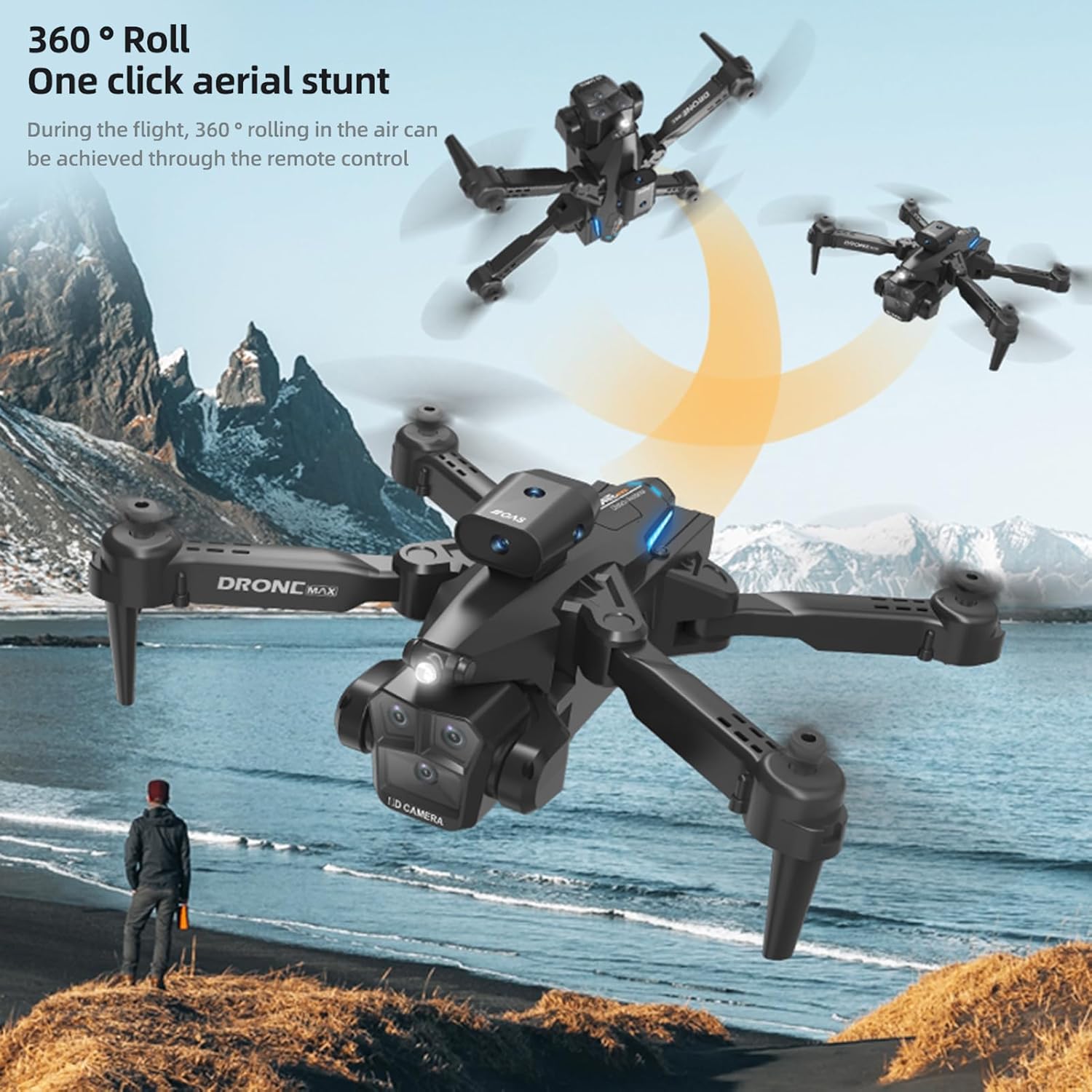
Image: The GoolRC drone executing a 360-degree roll in the air, illustrating its one-click aerial stunt capability.
6. 4K Dual Camera Operation and Real-Time Transmission
- الصورة / الفيديو: Use the dedicated buttons on the remote control or the app interface to capture 4K photos and videos. The drone features both a front and bottom camera.
- Electric Tuning Lens: Adjust the camera angle dynamically via the remote control or app for optimal shots.
- Real-Time Image Transmission: View يعيش فوtage from the drone's camera directly on your connected smartphone via the app, with high-definition transmission.

Image: A GoolRC drone flying over mountains, with a remote control and smartphone in the foreground displaying the drone's real-time camera view.

الصورة: تفصيلية view of the GoolRC drone's 4K dual camera system, emphasizing its capability for high-quality aerial photography and videography.
- Beauty Filter Shooting: The app may offer beauty filters and post-production options for enhancing captured images.

Image: A comparison showing the effect of a beauty filter on a photograph, illustrating the drone's potential for enhanced image capture and post-processing.
صيانة
- تنظيف: استخدم قطعة قماش ناعمة وجافة لتنظيف الطائرة بدون طيار وجهاز التحكم عن بعد. تجنب استخدام الماء أو المذيبات.
- استبدال المروحة: If propellers are damaged, use the provided screwdriver to replace them with spare parts. Ensure correct A/B propeller types are installed in their respective positions.
- العناية بالبطارية: Store batteries in a cool, dry place. Do not store fully charged or completely depleted batteries for extended periods. Charge them to about 50% for long-term storage.
- تخزين: When not in use, fold the drone and store it in the provided storage box to protect it from dust and damage.
استكشاف الأخطاء وإصلاحها
| مشكلة | السبب المحتمل | حل |
|---|---|---|
| الطائرة بدون طيار لا تستجيب للتحكم عن بعد. | غير مقترن، البطارية منخفضة، تداخل. | Ensure drone and remote are powered on and paired correctly. Charge batteries. Fly in an open area away from other wireless devices. |
| الطائرة بدون طيار تحلق بشكل غير مستقر أو تنحرف. | غير معايرة، مراوح تالفة، رياح قوية. | Perform gyroscope calibration. Check and replace damaged propellers. Avoid flying in windy conditions. |
| No real-time image on smartphone. | Not connected to drone's Wi-Fi, app not open, weak signal. | Ensure phone is connected to the drone's Wi-Fi. Open the control app. Move closer to the drone for a stronger signal. |
| وقت الرحلة قصير. | البطارية غير مشحونة بالكامل، بطارية قديمة، قيادة متسرعة. | تأكد من شحن البطارية بالكامل. فكّر في استبدال البطاريات القديمة. سافر بحذر أكبر. |
| نظام تجنب العوائق لا يعمل. | Sensors obstructed, flying too fast, specific lighting conditions. | Ensure sensors are clean and unobstructed. Fly at moderate speeds. Obstacle avoidance may be less effective in certain lighting or with very thin objects. |
تحديد
| ميزة | التفاصيل |
|---|---|
| اسم العنصر | طائرة بدون طيار للتحكم عن بعد |
| المادة الرئيسية | بلاستيك |
| المحرك | 816 brush motor |
| بطارية بدون طيار | 3.7 فولت 1800 مللي أمبير |
| بطارية جهاز التحكم عن بعد | 3*بطارية AA (غير متضمنة) |
| وقت الشحن | حوالي 100 دقيقة |
| Flight Time (Single Battery) | 15-18 دقائق |
| إشارة نقل الصورة | واي فاي 2.4 جيجا |
| مسافة التحكم عن بعد | 100 متر |
| مسافة نقل الصورة | 100 متر |
| آلة تصوير | 4K Dual Camera (Front & Bottom) |
| دقة الصورة | 4096*2160ب |
| دقة الفيديو | 4096*2160ب |
| النظام المتوافق | الروبوت شنومكس أو أعلى، دائرة الرقابة الداخلية شنومك أو أعلى |
| لون | أسود |
| الحجم المطوي | 13.5*8.5*7سم |
| الحجم غير المطوي | 26*26*7سم |
| رقم قطعة الشركة المصنعة | ZDC6494289347415LT |
الضمان والدعم
For warranty information and customer support, please refer to the documentation provided with your purchase or visit the official GoolRC website. You may also contact the retailer from whom you purchased the product for assistance.
الشركة المصنعة: GoolRC