
1. المقدمة
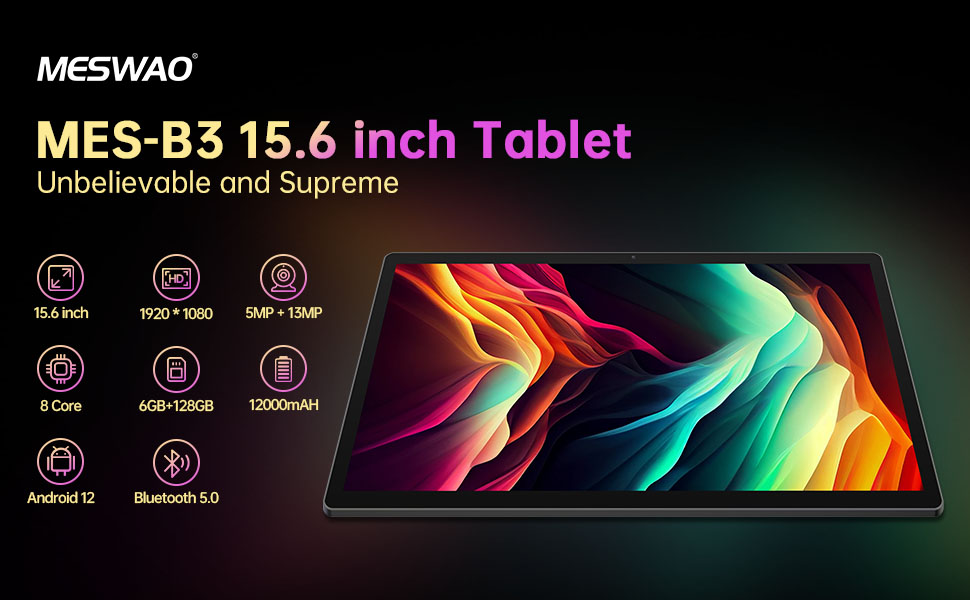
Welcome to the user manual for your MESWAO MES-B3 15.6-inch Android 13 Tablet. This document provides essential information for setting up, operating, maintaining, and troubleshooting your device. The MES-B3 tablet features a large 15.6-inch IPS HD display, an Octa-Core processor, 6GB RAM, 128GB internal storage (expandable), and a 12000mAh battery, designed for a versatile user experience.

Figure 1: MESWAO MES-B3 Tablet Overview
2. معلومات السلامة
Please read all safety instructions carefully before using your tablet to prevent injury or damage to the device. Keep this manual for future reference.
- سلامة البطارية: Do not attempt to replace the battery yourself. Do not expose the tablet to extreme temperatures, direct sunlight, or fire. Do not puncture, drop, or disassemble the battery.
- الماء والرطوبة: This tablet is not waterproof. Avoid exposing it to water, rain, or high humidity.
- تنظيف: Use a soft, dry cloth to clean the tablet. Do not use liquid cleaners or aerosols.
- التعامل: Avoid dropping the tablet or subjecting it to strong impacts.
- حماية السمع: When using headphones, set the volume to a moderate level to avoid hearing damage.
3. محتويات العبوة
تأكد من وجود جميع العناصر في العبوة:
- MESWAO MES-B3 15.6-inch Android 13 Tablet
- محول الطاقة
- كابل USB-C
- دليل المستخدم (هذا المستند)
4. انتهى الجهازview
Familiarize yourself with the physical components of your MESWAO MES-B3 tablet.

Figure 2: Buttons and Connectors
- زر الطاقة: Press and hold to turn the tablet on or off. Press briefly to turn the screen on or off.
- أزرار التحكم في الصوت: ضبط مستوى الصوت.
- الكاميرا الأمامية: لإجراء مكالمات الفيديو والتقاط صور السيلفي (5 ميجابكسل).
- كاميرا خلفية مزودة بفلاش: لالتقاط الصور والفيديوهات (13 ميجابكسل).
- ميناء من النوع C: لشحن الجهاز اللوحي وتوصيله بجهاز الكمبيوتر.
- فتحة بطاقة TF: Insert a MicroSD card to expand storage.
- مكبرات صوت ستيريو: توفير إخراج الصوت.
5. الإعداد
5.1 شحن الجهاز اللوحي
Before first use, fully charge your tablet. Connect the USB-C cable to the tablet's Type-C port and the other end to the power adapter. Plug the adapter into a wall outlet. The battery indicator on the screen will show charging status.
5.2 تشغيل/إيقاف التشغيل
- لتشغيل: Press and hold the Power Button until the MESWAO logo appears.
- لإيقاف التشغيل: Press and hold the Power Button until the power options appear, then select 'Power off'.
- لإعادة التشغيل: اضغط مع الاستمرار على زر الطاقة حتى تظهر خيارات الطاقة، ثم حدد "إعادة التشغيل".
5.3 معالج الإعداد الأولي
Upon first power-on, the tablet will guide you through an initial setup process:
- اختر اللغة المفضلة لديك.
- الاتصال بشبكة Wi-Fi.
- قم بتسجيل الدخول باستخدام حساب Google الخاص بك أو قم بإنشاء حساب جديد.
- Review وقبول الشروط والأحكام.
- إعداد قفل الشاشة (رقم التعريف الشخصي، النمط، كلمة المرور).
5.4 إدخال بطاقة MicroSD
To expand the tablet's storage, you can insert a MicroSD card (up to 256GB, as per some product information, though 1TB is also mentioned in images, please verify with product packaging for exact maximum). Locate the TF card slot on the side of the tablet. Gently insert the MicroSD card with the gold contacts facing down until it clicks into place.

Figure 3: Storage Expansion with MicroSD Card
6. تشغيل جهازك اللوحي
6.1 الملاحة الأساسية
The MESWAO MES-B3 runs on Android 13, offering an intuitive touch interface.
- مقبض: حدد عنصرًا أو افتح تطبيقًا.
- انتقاد: Navigate through screens, scroll lists, or dismiss notifications.
- التكبير والتصغير: تكبير أو تصغير المحتوى على الشاشة.
- الشاشة الرئيسية: Access your apps and widgets. Swipe down from the top for notifications and quick settings.
الشكل 4: واجهة أندرويد 13
6.2 اتصال واي فاي
- اذهب الى إعدادات > الشبكات والانترنت > إنترنت.
- قم بتشغيل Wi-Fi.
- حدد الشبكة المطلوبة من القائمة وأدخل كلمة المرور إذا طُلب منك ذلك.
6.3 اقتران بلوتوث
يدعم الجهاز اللوحي تقنية بلوتوث 5.0 لتوصيل الملحقات اللاسلكية.
- اذهب الى إعدادات > الأجهزة المتصلة > تفضيلات الاتصال > بلوتوث.
- قم بتشغيل البلوتوث.
- تأكد من أن جهاز البلوتوث الخاص بك في وضع الاقتران.
- Select your device from the 'Available devices' list and follow on-screen prompts to pair.
6.4 إدارة التطبيقات
- تثبيت التطبيقات: افتح تطبيق متجر جوجل بلاي، وابحث عن التطبيق الذي تريده، ثم انقر على "تثبيت".
- إلغاء تثبيت التطبيقات: اضغط مع الاستمرار على أيقونة التطبيق على الشاشة الرئيسية أو درج التطبيقات، ثم اسحبها إلى "إلغاء التثبيت" أو حدد "معلومات التطبيق" واختر "إلغاء التثبيت".
- إدارة التطبيقات: اذهب الى إعدادات > التطبيقات ل view, force stop, or clear data for installed applications.
6.5 إعدادات العرض
قم بتخصيص viewالخبرة:
- اذهب الى إعدادات > عرض.
- يُعدِّل مستوى السطوع.
- تعيين مهلة الشاشة (sleep duration).
- يتغير حجم الخط و حجم العرض.
- يُمكَِن المظهر الداكن لتقليل إجهاد العين.
6.6 إدارة البطارية
The MES-B3 features a 12000mAh battery for extended use.

الشكل 5: عمر البطارية الممتد
- اذهب الى إعدادات > بطارية ل view usage and optimize settings.
- يُمكَِن توفير البطارية وضع لتمديد عمر البطارية عند الحاجة.
- أغلق التطبيقات غير المستخدمة التي تعمل في الخلفية.
- تقليل سطوع الشاشة.
7. الصيانة
7.1 التنظيف
- استخدم قطعة قماش ناعمة وخالية من الوبر لمسح الشاشة والجسم برفق.
- بالنسبة للبقع العنيدة، استخدمي القليل منampبلل قطعة القماش بالماء أو بمنظف الشاشة المصمم خصيصًا للإلكترونيات.
- Avoid using abrasive materials, alcohol, or chemical solvents.
7.2 التخزين
- يُحفظ الجهاز اللوحي في مكان بارد وجاف بعيداً عن أشعة الشمس المباشرة ودرجات الحرارة القصوى.
- If storing for an extended period, ensure the battery is charged to about 50% to prolong its lifespan.
7.3 تحديثات البرامج
تحقق بانتظام من وجود تحديثات للبرامج لضمان الأداء الأمثل والأمان.
- اذهب الى إعدادات > نظام > تحديث النظام.
- The tablet will check for available updates. Follow the on-screen instructions to download and install any updates.
8. استكشاف الأخطاء وإصلاحها
فيما يلي حلول للمشاكل الشائعة التي قد تواجهها:
| مشكلة | حل |
|---|---|
| الجهاز اللوحي لا يعمل | تأكد من شحن الجهاز اللوحي. قم بتوصيله بالشاحن لمدة 30 دقيقة على الأقل، ثم حاول تشغيله مرة أخرى. |
| مشاكل اتصال Wi-Fi | Restart your Wi-Fi router and the tablet. Go to Settings > Network & internet > Internet, forget the network, and reconnect. |
| الأداء البطيء | Close unused apps. Clear cache for frequently used apps (Settings > Apps > [App Name] > Storage & cache > Clear cache). Restart the tablet. |
| تستنزف البطارية بسرعة | Reduce screen brightness. Disable Wi-Fi/Bluetooth when not in use. Close background apps. Check battery usage in Settings > Battery to identify power-hungry apps. |
| تعطل التطبيقات أو تجميدها | Force stop the app (Settings > Apps > [App Name] > Force stop). Clear the app's cache. If the problem persists, uninstall and reinstall the app. |
9. المواصفات
Detailed technical specifications for the MESWAO MES-B3 tablet:

الشكل 6: الميزات والمواصفات الرئيسية
| ميزة | مواصفة |
|---|---|
| ماركة | ميسواو |
| رقم الموديل | ام اي اس-B3 |
| نظام التشغيل | أندرويد 13 |
| المعالج | MediaTek Octa-Core (MTK6789) |
| كبش | 6 جيجا بايت |
| التخزين الداخلي | 128 جيجا بايت |
| تخزين قابل للتوسيع | Up to 256 GB (via TF/MicroSD card) |
| حجم الشاشة | 15.6 بوصة |
| دقة الشاشة | 1920 × 1080 بكسل (IPS HD) |
| الكاميرا الأمامية | 5 ميجا بكسل |
| الكاميرا الخلفية | 13 ميجا بكسل |
| سعة البطارية | 12000 مللي أمبير |
| عمر البطارية | حوالي 10 ساعات (حسب الاستخدام) |
| الاتصال | Bluetooth 5.0, Wi-Fi (802.11ac, 2.4G/5G) |
| الموانئ | USB Type-C, TF Card Slot |
| لون | رمادي |
| الأبعاد (الطول × العرض × الارتفاع) | 36.85 × 22.25 × 0.93 سم |
| وزن | 1.1 كيلوغرام |
10. الضمان والدعم
Your MESWAO MES-B3 tablet is covered by a standard manufacturer's warranty. Please refer to the warranty card included in your package for specific terms and conditions, including warranty duration and coverage details.
For technical support, troubleshooting assistance beyond this manual, or warranty claims, please contact MESWAO customer service through the retailer where you purchased the product or visit the official MESWAO webموقع لمعلومات الاتصال.