
1. المقدمة
This manual provides detailed instructions for the installation, operation, and maintenance of your EVTSCAN Digital Thermoregulator. This device is designed to precisely control heating equipment, such as wall-mounted boilers and gas boilers, ensuring a stable and energy-efficient temperature environment. Please read this manual thoroughly before installation and use to ensure proper function and safety.
2. معلومات السلامة
Always observe the following safety precautions to prevent damage to the device or personal injury:
- تأكد من فصل مصدر الطاقة قبل التثبيت أو الصيانة.
- ينبغي أن يتم التركيب بواسطة فني متخصص مؤهل إذا كنت غير متأكد من الأسلاك الكهربائية.
- لا تعرض الجهاز للماء أو الرطوبة الزائدة.
- Use only the specified battery type (2 AA batteries) and ensure correct polarity.
- احفظ الجهاز بعيدًا عن المواد القابلة للاشتعال.
3. انتهى المنتجview
The EVTSCAN Digital Thermoregulator features a clear LCD display for easy monitoring and a simple interface for temperature control. Its compact design allows for discreet integration into your living space.

الشكل 3.1: الجبهة view of the Digital Thermoregulator. The LCD screen displays current settings and room temperature, with a rotary knob below for adjustments.
المكونات الرئيسية:
- شاشة LCD: Shows set temperature, room temperature, time, and operational icons.
- مقبض/زر التحكم: يتم استخدامه للتنقل بين القوائم وضبط الإعدادات.
- حجرة البطارية: Located on the rear or side for 2 AA batteries.
- محطات الأسلاك: For connection to the heating system.
4. المواصفات
| ميزة | مواصفة |
|---|---|
| نموذج | EVTSCANok0g9ct2zq |
| وضع الطاقة | 2 بطاريات AA (غير متضمنة) |
| Screen Accuracy | 0.5 درجة مئوية |
| مستشعر المجس | NTC (10 آلاف) 1٪ |
| قدرة الاتصال | Greater than 30-230 V DC working voltage, lower current. Reference: 5 A 30 V (HF relay) or 2 A 30 V (NEC relay) |
| نطاق عرض درجة الحرارة | 1 إلى 40 درجة مئوية |
| Default Temperature Adjustment Range | 5 إلى 35 درجة مئوية |
| نطاق درجة حرارة التشغيل | 0 إلى 50 درجة مئوية |
| برنامج التشغيل | Set once a week |
| الناتج | مرحل التبديل |
| مادة | البولي كربونات مثبطات اللهب |
| وزن | 170 جرام |
5. الإعداد والتثبيت
The EVTSCAN Digital Thermoregulator is designed for simple installation. Follow these steps carefully:
5.1. التفريغ والتفتيش
أزل جميع المكونات من العبوة بعناية. تأكد من وجود جميع العناصر المدرجة في محتويات العبوة وأنها سليمة.
- 1 Digital Temperature Controller
- 2 مسامير
5.2. تركيب البطارية
The device requires 2 AA batteries for operation. These are not included in the package.
- Locate the battery compartment on the back of the thermoregulator.
- افتح غطاء حجرة البطارية.
- قم بإدخال بطاريتين AA، مع التأكد من القطبية الصحيحة (+/-).
- أغلق غطاء حجرة البطارية جيدًا.

الشكل 5.1: بزاوية view of the thermoregulator, illustrating its compact size and potential location for battery access or mounting points.
5.3. التركيب والأسلاك
The thermoregulator is designed for wall mounting. Ensure the power to your heating system is turned off before proceeding with wiring.
- اختر مكانًا مناسبًا على الحائط الداخلي، بعيدًا عن أشعة الشمس المباشرة، أو التيارات الهوائية، أو مصادر الحرارة التي قد تؤثر على قراءات درجة الحرارة.
- Mount the backplate (if detachable) to the wall using the provided screws.
- Connect the thermoregulator to your boiler or heating system according to the wiring diagram provided with your boiler and the thermoregulator's terminal markings. This typically involves connecting the switching relay output to the boiler's control input.
- Secure the thermoregulator onto the mounted backplate.
ملحوظة: For wiring, consult a qualified electrician if you are unfamiliar with electrical installations.
6. تعليمات التشغيل
The EVTSCAN Digital Thermoregulator uses a microcomputer control technology to maintain your desired temperature efficiently.
6.1. Powering On and Initial Display
Once batteries are installed, the LCD display will illuminate, showing the current room temperature, set temperature, and time.
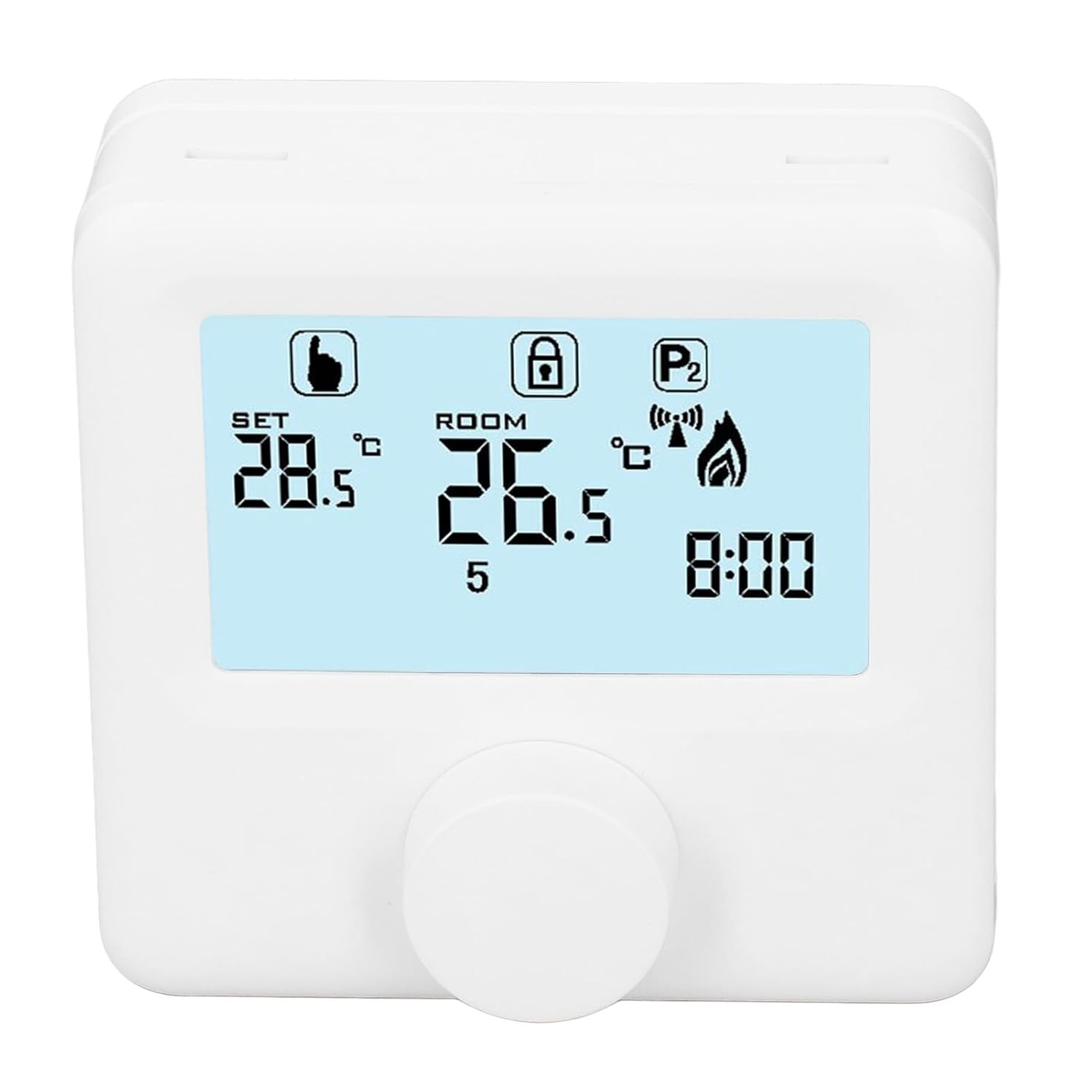
الشكل 6.1: مفصل view of the LCD display. It shows the set temperature (SET), room temperature (ROOM), a lock icon, a program icon (P2), a signal icon, a flame icon indicating heating, and the current time.
6.2. ضبط درجة الحرارة
لضبط درجة الحرارة المطلوبة:
- Rotate the control knob to increase or decrease the set temperature. The "SET" value on the display will change accordingly.
- The device will automatically activate or deactivate the heating system to maintain the set temperature within the range of 1 to 40 ℃. The default adjustment range is 5 to 35 ℃.
6.3. جدول البرامج الأسبوعي
The thermoregulator supports a weekly programming schedule. This allows you to set different temperatures for various times of the day across the week.
- Press and hold the control knob (or a designated button, if available) to enter programming mode.
- Use the control knob to navigate through days of the week and time slots.
- Adjust the desired temperature for each programmed period.
- Confirm your settings to save the weekly program. The device will then operate according to this schedule.
6.4. Understanding Display Icons
- جلس: Indicates the target temperature you have set.
- غرفة: يعرض درجة حرارة الغرفة المحيطة الحالية.
- رمز اللهب: يضيء عند تنشيط نظام التدفئة.
- رمز القفل: May indicate a keypad lock feature to prevent accidental changes.
- P1/P2 Icon: Indicates the current program mode (e.g., P1 for comfort, P2 for economy, or specific weekly program segments).
- أيقونة الإشارة: May indicate wireless communication status if applicable.
7. الصيانة
Regular maintenance ensures the longevity and optimal performance of your thermoregulator.
- تنظيف: امسح الجهاز بقطعة قماش ناعمة وجافة. لا تستخدم منظفات أو مذيبات كاشطة.
- استبدال البطارية: Replace batteries when the low battery indicator appears on the display. Always replace both batteries simultaneously with new AA batteries.
- منطقة الاستشعار: Ensure the temperature sensor area (usually a small vent on the device) is free from dust and obstructions for accurate readings.
8. استكشاف الأخطاء وإصلاحها
If you encounter issues with your EVTSCAN Digital Thermoregulator, refer to the following common problems and solutions:
- العرض فارغ:
- تأكد من تركيب البطاريات بشكل صحيح.
- استبدل البطاريات القديمة بأخرى جديدة.
- أنظمة التدفئة لا تستجيب:
- Ensure the thermoregulator is powered on and the flame icon is displayed when heating is expected.
- Verify wiring connections to the boiler are secure and correct.
- Check the boiler's power supply and status.
- تأكد من أن درجة الحرارة المضبوطة أعلى من درجة حرارة الغرفة الحالية.
- قراءات درجة حرارة غير دقيقة:
- Ensure the device is not exposed to direct sunlight, drafts, or heat sources.
- Clean any dust or debris from the sensor area.
- لا يمكن تغيير الإعدادات:
- Check if the lock icon is displayed. If so, refer to the operating instructions to unlock the keypad.
إذا استمرت المشكلة، اتصل بدعم العملاء.
9. الضمان والدعم
Specific warranty information for this product is not provided in the available data. Please refer to the product packaging or the retailer's webموقع للحصول على تفاصيل الضمان.
For technical support or further assistance, please contact EVTSCAN customer service through their official channels or the retailer from whom you purchased the product.
You can visit the EVTSCAN store on Amazon for more information: EVTSCAN Store