
VOLT PLUS TECH YD03
VOLT PLUS TECH Pro Earbuds Wireless V5.3 User Manual
الموديل: YD03
مقدمة
Thank you for choosing the VOLT PLUS TECH Pro Earbuds Wireless V5.3. These earbuds are designed to provide a superior audio experience with advanced features such as Bluetooth 5.3 connectivity, active noise cancellation, and a long-lasting battery. This manual will guide you through the setup, operation, and maintenance of your new earbuds.

Image: The VOLT PLUS TECH Pro Earbuds, black in color, are shown alongside their sleek black charging case. The charging case features a prominent green LED digital display indicating battery levels for both the case and individual earbuds.
محتويات الحزمة
يرجى التأكد من وجود جميع العناصر في الحزمة الخاصة بك:
- VOLT PLUS TECH Pro Earbuds (Left and Right)
- Portable Charging Case with Digital LED Display
- كابل شحن USB-C
- دليل المستخدم
- أطراف الأذن (صغيرة، متوسطة، كبيرة)
دليل الإعداد
الشحن الأولي
Before first use, fully charge the earbuds and the charging case. The charging case features a digital LED display that shows the battery percentage for the case and individual earbuds (L for left, R for right).
- قم بتوصيل كابل USB-C المرفق بمنفذ الشحن الموجود على العلبة وبمصدر طاقة USB.
- The LED display will illuminate, showing the charging status.
- بمجرد اكتمال الشحن، ستظهر الشاشة نسبة 100%.

Image: A close-up of the black earbud charging case with its green LED display showing battery levels. A USB-C cable is plugged into the charging port at the bottom, indicating the charging process.
تشغيل/إيقاف التشغيل
- التشغيل التلقائي: Remove the earbuds from the charging case. They will automatically power on, and a blue indicator light will confirm.
- التشغيل اليدوي: If the earbuds do not power on automatically, press and hold the touch area on each earbud for 3-5 seconds until the blue indicator light flashes.
- إيقاف التشغيل: أعد وضع سماعات الأذن في علبة الشحن. ستتوقف تلقائيًا ويبدأ الشحن.
بلوتوث الاقتران
- Ensure the earbuds are powered on and out of the charging case. They will enter pairing mode automatically.
- على جهازك (الهاتف الذكي، الجهاز اللوحي، إلخ)، انتقل إلى إعدادات البلوتوث وقم بتشغيل البلوتوث.
- بحث عن available devices. Select "YD03" from the list.
- Once connected, the earbuds will provide a voice prompt stating "Connected".
- The earbuds support "Inaural Separation Design," allowing them to be used individually (single earbud mode) or together (dual earbud mode).
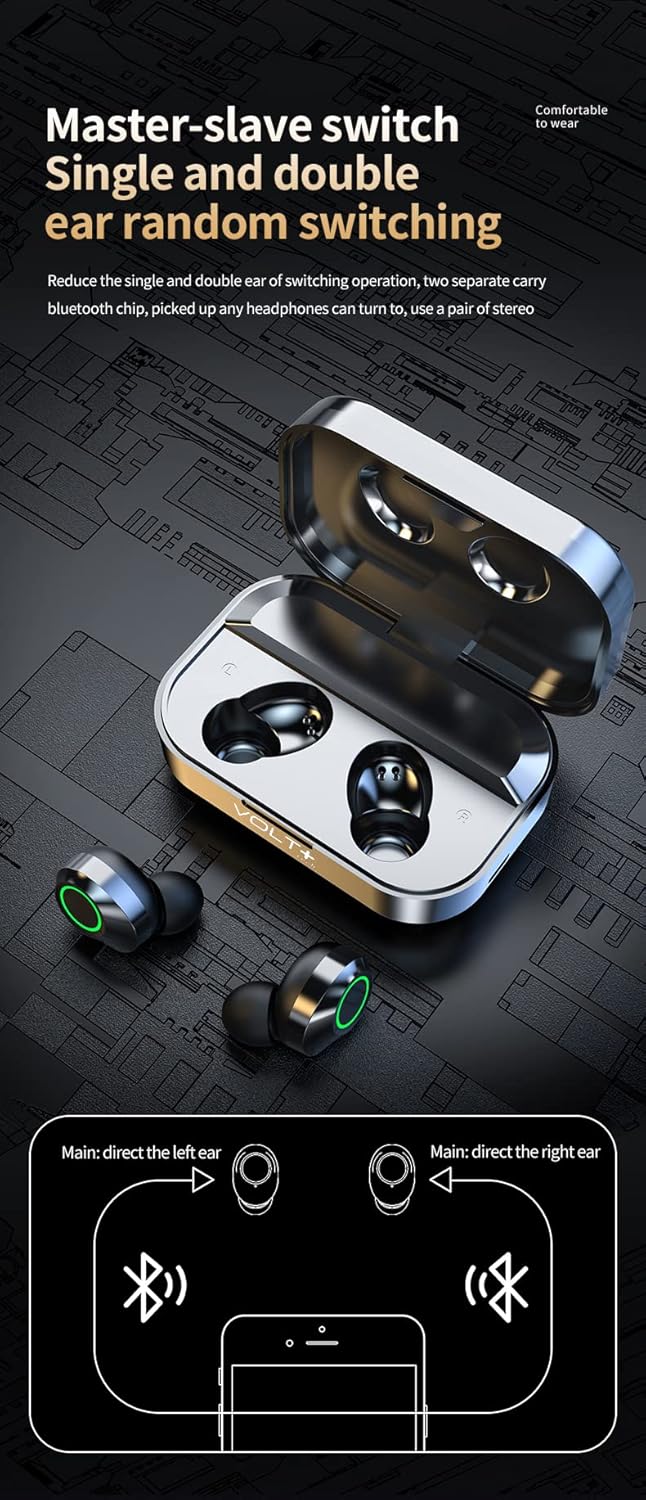
Image: A diagram illustrating the "Master-slave switch" functionality, showing how either the left or right earbud can act as the main connection, allowing for single or dual earbud use. The earbuds are shown inside their open charging case.
تعليمات التشغيل
عناصر التحكم باللمس
The VOLT PLUS TECH Pro Earbuds feature intuitive touch controls on each earbud. Refer to the diagram below for specific functions:

Image: A visual guide to the touch controls on the earbuds. It shows the left earbud's functions (double-click for previous song, three strikes for volume down) and the right earbud's functions (double-click for next song, three strikes for volume up). Common functions like play/pause (short press), answer/reject calls (short/long press), and activating voice assistant (long press 1.5 seconds) are also depicted.
- تشغيل/إيقاف مؤقت: Short press either earbud once.
- الأغنية السابقة: انقر نقرا مزدوجا فوق غادر ياربود.
- الأغنية التالية: انقر نقرا مزدوجا فوق يمين ياربود.
- اخفض الصوت: انقر ثلاث مرات على غادر ياربود.
- رفع الصوت: انقر ثلاث مرات على يمين ياربود.
- الرد/إنهاء المكالمة: Short press either earbud once.
- رفض المكالمة: اضغط مع الاستمرار على أي من سماعات الأذن لمدة ثانيتين.
- Activate Voice Assistant (e.g., Siri): Press and hold either earbud for 1.5 seconds (after rejecting a call or during standby).
- Game/Video/Music Mode: Touch the switch under 4 (referring to the touch sensor area) to cycle through modes.
إلغاء الضوضاء
The earbuds feature CVC 8.1 intelligent noise reduction technology with quad microphones (two per earbud) to reduce ambient noise by up to 30 dB, ensuring clear calls and immersive audio.
صيانة
تنظيف
Regular cleaning helps maintain optimal performance and hygiene:
- استخدم قطعة قماش ناعمة وجافة وخالية من الوبر لمسح سماعات الأذن وعلبة الشحن.
- بالنسبة للأوساخ العنيدة، قم بإزالة الأوساخ برفق.ampاغمر قطعة القماش بالماء أو بمنظف معتدل غير كاشط.
- لا تستخدم مواد كيميائية قاسية أو مواد كاشطة.
- تأكد من أن نقاط التلامس الخاصة بالشحن في كل من سماعات الأذن والعلبة نظيفة وخالية من أي شوائب.
مقاومة الماء
The earbuds are IPX3 water-resistant, meaning they are protected against spraying water. This makes them suitable for light rain, sweat during workouts, etc. Important: The charging case is NOT waterproof. Avoid exposing the charging case to water or excessive moisture.
استكشاف الأخطاء وإصلاحها
| مشكلة | السبب المحتمل | حل |
|---|---|---|
| سماعات الأذن لا تعمل. | Low battery; not removed from case correctly. | Charge the earbuds and case. Ensure earbuds are fully removed from the case. Manually power on by pressing the touch area for 3-5 seconds. |
| لا يمكن الاقتران بالجهاز. | سماعات الأذن ليست في وضع الاقتران؛ البلوتوث معطل على الجهاز؛ بعيدة جدًا عن الجهاز. | Ensure earbuds are out of case and indicator light is flashing. Turn Bluetooth off and on again on your device. Move earbuds closer to your device. Forget "YD03" from your device's Bluetooth list and re-pair. |
| لا يوجد صوت أو مستوى الصوت منخفض. | Volume too low on device/earbuds; earbuds not properly connected. | Increase volume on both your device and the earbuds using touch controls. Reconnect the earbuds to your device. Check if ear tips are properly sealed in your ear. |
| Charging case LED not working. | Charging cable issue; case fully charged. | Try a different USB-C cable and power adapter. If the case is fully charged, the display may turn off to save power. |
تحديد
| ميزة | التفاصيل |
|---|---|
| اسم الموديل | ي د 03 |
| تكنولوجيا الاتصال | لاسلكي (بلوتوث 5.3) |
| مقبس سماعات الرأس | منفذ USB-C (لعلبة الشحن) |
| التحكم في الضوضاء | إلغاء الضوضاء النشط (CVC 8.1) |
| عمر البطارية (الإجمالي) | Up to 25+ Hours (with charging case) |
| مقاومة الماء | IPX3 (سماعات الأذن فقط) |
| طريقة التحكم | يلمس |
| مادة | Stainless Steel, Titanium, ABS, Hi-Impact Plastic |
| أبعاد المنتج | 1.5 × 1 × 1.5 بوصة |
| وزن العنصر | 4 أونصة |
| الشركة المصنعة | فولت بلس تك |
| لون | أسود |
| استجابة التردد | 48000 كيلو هرتز |

Image: An infographic highlighting key features of the earbuds, including Game/video/music modes, Chip 5.3 Updated version, Type-C Quick charge interface, Intelligent three true digital display screen, HiFi Stereo sound, Earphone Smart noise reduction, Emergency charging treasure function, Double host single and double ear random switching, and Carving breathing lamp تأثير الضوء.
الضمان والدعم
For warranty information and technical support, please contact VOLT PLUS TECH directly through their official channels or the retailer from whom you purchased the product. Please retain your proof of purchase for warranty claims.
للحصول على مزيد من المساعدة، يمكنك زيارة صفحة المنتج على أمازون: صفحة منتج أمازون
Ask a question about this manual
Ask about setup, troubleshooting, compatibility, parts, safety, or missing instructions. Manuals+ will review the question and use this page’s manual context to help answer it.