
1. ماذا يوجد في الصندوق
تأكد من وجود جميع المكونات في العبوة:
- حافظة الشحن اللاسلكي
- وسادات الأذن (اليسار واليمين)
- كابل شحن USB-C
- دليل المستخدم
- Ear Cushions (Multiple Sizes: S, M, L)

Image 1.1: Contents of the VOLT PLUS TECH YD03 package, including earbuds, charging case, and accessories.
2. انتهى المنتجview
The VOLT PLUS TECH YD03 Wireless Earbuds feature Bluetooth 5.3 connectivity, an LED digital display on the charging case, and touch controls for various functions. They are designed for comfort and offer noise reduction capabilities.
- بلوتوث شنومكس: يضمن اتصالاً لاسلكياً مستقراً وفعالاً.
- شاشة رقمية LED: يعرض مستويات البطارية لكل من سماعات الأذن وعلبة الشحن.
- تقليل الضوضاء: Equipped with CVC 8.1 technology and quad microphones for clear calls.
- مقاومة الماء IPX4: Protects against splashes and sweat (earbuds only, charging case is not waterproof).
- عمر بطارية طويل: Up to 5+ hours of playback per charge, with an additional 20+ hours from the charging case.

الصورة 2.1: انتهىview of key features including Bluetooth 5.3, Type-C charging, intelligent digital display, HiFi stereo sound, smart noise reduction, and emergency charging function.
الصورة 2.2: تفصيلية view of the LED digital display on the charging case, indicating battery levels for the left earbud, charging case, and right earbud.
3. الإعداد
3.1 الاقتران الأولي
- شحن سماعات الأذن: Before first use, ensure both earbuds and the charging case are fully charged. Place the earbuds into the charging case and connect the case to a USB power source using the provided USB-C cable.
- تشغيل الطاقة: Open the charging case. The earbuds will automatically power on. A blue indicator light will confirm they are on. If they do not power on automatically, press and hold the touch area on each earbud for 3-5 seconds until the blue indicator light flashes.
- تفعيل البلوتوث: على جهازك (الهاتف الذكي، الجهاز اللوحي، إلخ)، انتقل إلى إعدادات البلوتوث وقم بتشغيل البلوتوث.
- بحث عن جهاز: In the list of available Bluetooth devices, search for "YD03".
- يتصل: Select "YD03" to pair. The earbuds will provide a voice prompt "Connected" once pairing is successful.

Image 3.1: Earbuds placed inside the charging case, ready for initial setup or charging.
3.2 Re-pairing and Single Earbud Mode
- Once paired, the earbuds will automatically connect to the last paired device when removed from the case and Bluetooth is active on the device.
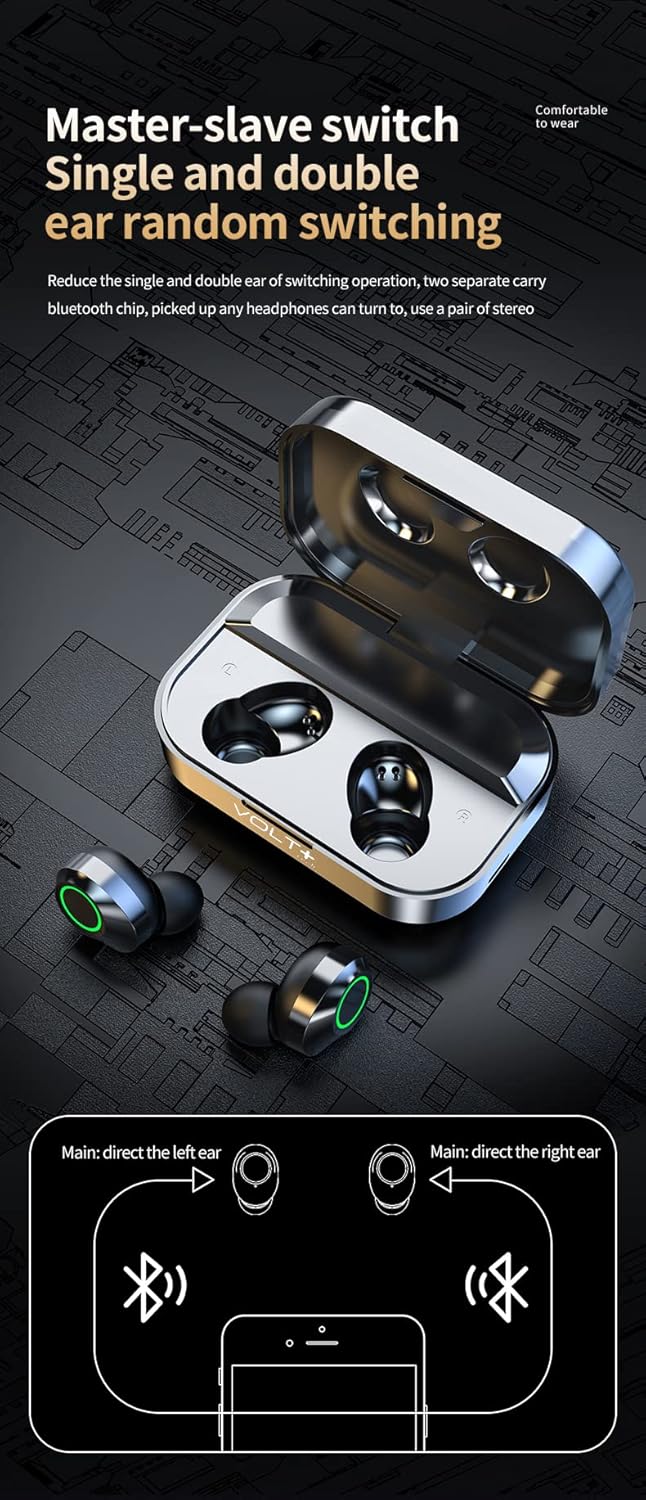
- The earbuds support independent use. Either the left or right earbud can be used alone. Simply remove one earbud from the case, and it will connect as a single unit.

Image 3.2: Diagram illustrating the flexible master-slave switching, allowing either earbud to function independently or together for stereo sound.
4. تعليمات التشغيل
4.1 الضوابط التي تعمل باللمس
The earbuds feature touch-sensitive controls on their outer surface. Refer to the diagram below for specific functions:

Image 4.1: Visual guide to the touch controls on the left and right earbuds for music playback, volume adjustment, call management, and voice assistant activation.
- تشغيل/إيقاف مؤقت: Single-tap on either earbud.
- الأغنية التالية: Double-tap on the يمين ياربود.
- الأغنية السابقة: Double-tap on the غادر ياربود.
- رفع الصوت: Triple-tap on the يمين ياربود.
- اخفض الصوت: Triple-tap on the غادر ياربود.
- الرد/إنهاء المكالمة: Single-tap on either earbud.
- رفض المكالمة: اضغط مع الاستمرار على أي من سماعات الأذن لمدة ثانيتين.
- تفعيل المساعد الصوتي (Siri/Google Assistant): Press and hold either earbud for 1.5 seconds (after rejecting a call, or when not on a call).
- Game/Music/Video Mode: Four taps on either earbud to switch between modes.
4.2 مراقبة مستوى البطارية
تحتوي علبة الشحن على شاشة عرض رقمية LED تُظهر نسبة شحن البطاريةtage of the case and the individual charge status of the left and right earbuds.

Image 4.2: The LED display on the charging case indicating the battery percentage of the case (center) and the charging status of the left (L) and right (R) earbuds.
5. الشحن والبطارية
5.1 شحن سماعات الأذن
Place the earbuds into the charging case. They will automatically begin charging. The LED display on the case will show their charging status.
5.2 شحن العلبة
Connect the provided USB-C cable to the charging port on the case and plug the other end into a USB power adapter (not included) or a computer USB port. The LED display will show the charging progress of the case.

Image 5.1: The charging case connected via a USB-C cable, illustrating the charging process.
5.3 عمر البطارية
- Earbuds provide over 5 hours of continuous playback on a single charge.
- The charging case provides an additional 20+ hours of charge, totaling over 25 hours of use.
- Full charging time for the case is approximately 2 hours.
6. الرعاية والصيانة
- تنظيف: Use a soft, dry cloth to clean the earbuds and charging case. Avoid using harsh chemicals or abrasive materials.
- مقاومة الماء: The earbuds are IPX4 water-resistant, meaning they are protected from splashing water from any direction. They are suitable for exercise and light rain. The charging case is NOT waterproof. لا تغمر سماعات الأذن أو العلبة في الماء.
- تخزين: قم بتخزين سماعات الأذن في علبة الشحن الخاصة بها عند عدم استخدامها لحمايتها وإبقائها مشحونة.
- درجة حرارة: تجنب تعريض سماعات الأذن لدرجات حرارة قصوى (ساخنة أو باردة) أو رطوبة عالية.
7. استكشاف الأخطاء وإصلاحها
- سماعات الأذن غير مقترنة بالجهاز:
- تأكد من شحن سماعات الأذن وتشغيلها.
- قم بإيقاف تشغيل البلوتوث على جهازك وتشغيله مرة أخرى.
- Forget "YD03" from your device's Bluetooth list and attempt to re-pair.
- Place earbuds back in the case, close it, wait a few seconds, then open and try again.
- سماعة أذن واحدة فقط تعمل:
- تأكد من شحن كلا سماعات الأذن.
- Place both earbuds back in the charging case, close the lid, then open it again to reset their connection.
- If the issue persists, try re-pairing both earbuds with your device.
- سماعات الأذن لا يتم شحنها:
- Ensure the charging case has power (check its LED display).
- تأكد من توصيل كابل USB-C بشكل آمن بكل من العلبة ومصدر الطاقة.
- قم بتنظيف نقاط اتصال الشحن الموجودة على سماعات الأذن وداخل العلبة باستخدام قطعة قطن جافة.
- جودة الصوت سيئة:
- Ensure earbuds are properly seated in your ears. Try different size ear cushions.
- Check the audio source device's volume and sound settings.
- اقترب من جهازك المتصل لتجنب التداخل.
8. المواصفات
| اسم الموديل | ي د 03 |
| ماركة | فولت بلس تك |
| تكنولوجيا الاتصال | لاسلكي (بلوتوث 5.3) |
| نسخة البلوتوث | 5.3 |
| مدى البلوتوث | 33 قدم (10 متر) |
| التحكم في الضوضاء | Active Noise Cancellation, Passive Noise Cancellation, Sound Isolation |
| مستوى مقاومة الماء | IPX4 (سماعات الأذن فقط) |
| عمر البطارية (سماعات الأذن) | 5+ ساعات |
| إجمالي عمر البطارية (مع العلبة) | 25+ ساعات |
| مدة الشحن (العلبة) | 2 ساعة |
| مقبس سماعات الرأس | يو اس بي-سي |
| طريقة التحكم | يلمس |
| وزن العنصر | 4 Ounces (Earbuds + Case) |
| أبعاد المنتج | 1.5 × 1 × 1.5 بوصة |
| الأجهزة المتوافقة | Android, iOS, Mac, Windows, ZTE nubia Z50 Ultra |

Image 8.1: Illustration highlighting the Bluetooth 5.3 chip, emphasizing stable and upgraded connectivity.
9. الضمان والدعم
For warranty information or technical support, please refer to the contact details provided with your purchase documentation or visit the official VOLT PLUS TECH webالموقع. احتفظ بإثبات الشراء الخاص بك لاستخدامه في أي مطالبات بالضمان.
الشركة المصنعة: فولت بلس تك
تاريخ التوفر الأول: 4 ديسمبر 2023