
مقدمة
Welcome to the user manual for your VOLT PLUS TECH Pro Wireless Earbuds, Model YD03. These earbuds feature advanced Bluetooth 5.3 connectivity, an intuitive LED digital display, IPX3 water and sweat resistance, noise reduction technology, and quad microphones for clear communication. This manual provides detailed instructions for setup, operation, maintenance, and troubleshooting to ensure optimal performance and longevity of your device.

Image: The VOLT PLUS TECH Pro Wireless Earbuds YD03, showing both earbuds and the charging case with its LED display.
ماذا يوجد في الصندوق
Upon unboxing your VOLT PLUS TECH Pro Wireless Earbuds YD03, please ensure all the following components are present:
- VOLT PLUS TECH Pro Wireless Earbuds (Left and Right)
- علبة شحن مزودة بشاشة LED رقمية
- كابل شحن USB-C
- دليل المستخدم
- أطراف الأذن (صغيرة، متوسطة، كبيرة)
يثبت
1. الشحن الأولي
قبل الاستخدام الأول، قم بشحن سماعات الأذن وعلبة الشحن بالكامل.
- ضع كلتا سمّاعات الأذن في علبة الشحن.
- قم بتوصيل كابل الشحن USB-C بمنفذ الشحن الموجود على العلبة وبمصدر الطاقة.
- The LED digital display on the case will show the charging status. Ensure both earbuds and the case are fully charged for optimal battery life.

Image: The charging case of the VOLT PLUS TECH Pro Wireless Earbuds YD03 connected to a USB-C charging cable, illustrating the charging process.
2. تشغيل الطاقة
The earbuds will automatically power on when removed from the charging case. A blue indicator light will confirm they are on. If they do not power on automatically, press and hold the touch area on each earbud for 3-5 seconds until the blue indicator light flashes.
3. اقتران بلوتوث
اتبع هذه الخطوات لربط سماعات الأذن بجهازك:
- Ensure the earbuds are powered on and in pairing mode (indicator lights flashing).
- على هاتفك الذكي أو جهازك المزود بتقنية Bluetooth، انتقل إلى إعدادات Bluetooth.
- قم بتشغيل البلوتوث.
- بحث عن available devices and select "YD03" from the list.
- Once connected, the earbuds will provide a voice prompt stating "Connected".
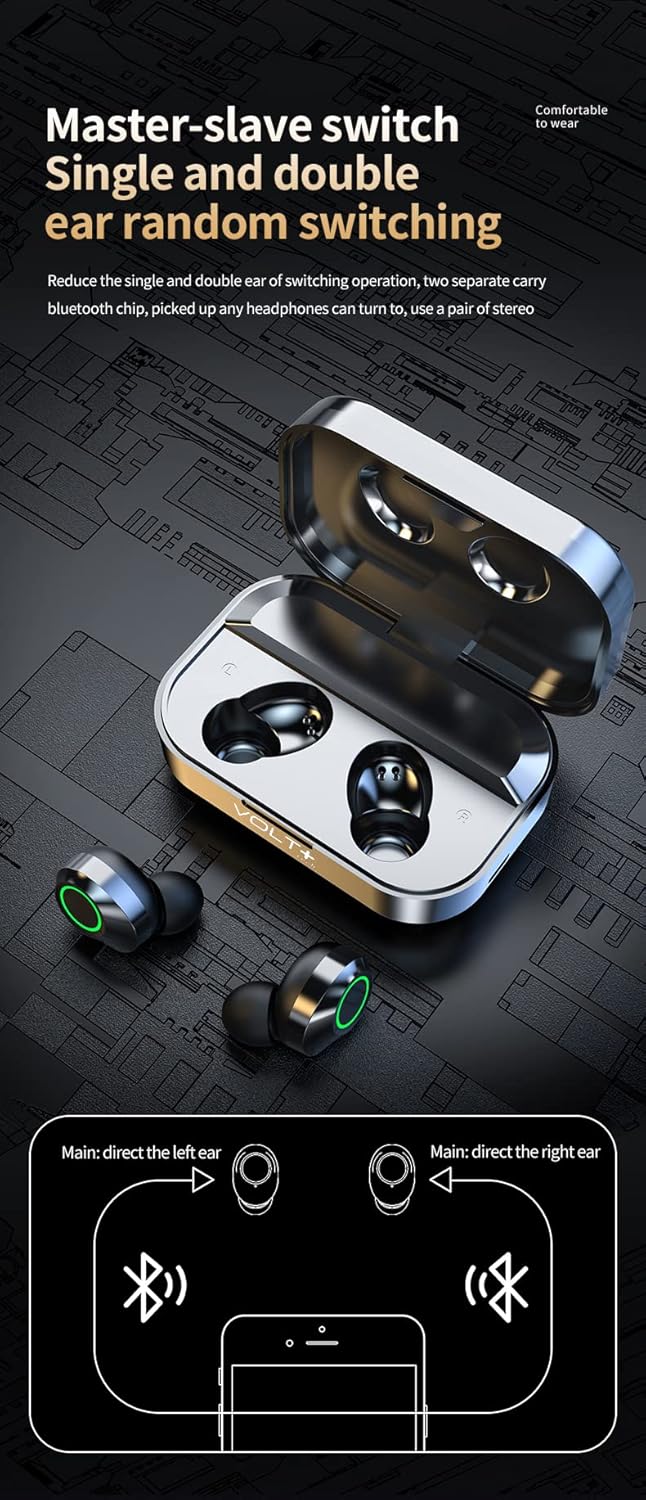
Image: Diagram illustrating the "Master-slave switch" functionality, showing how the VOLT PLUS TECH Pro Wireless Earbuds YD03 can be used individually or as a pair, and the Bluetooth pairing process.
4. استخدام سماعة أذن واحدة
The earbuds support independent use. You can use either the left or right earbud individually. Simply remove one earbud from the case, and it will automatically connect to your previously paired device.
تعليمات التشغيل
عناصر التحكم باللمس
The VOLT PLUS TECH Pro Wireless Earbuds feature intuitive touch controls on each earbud. The touch-sensitive area is located on the outer surface of each earbud.
- تشغيل/إيقاف مؤقت: ضغطة واحدة على أي سماعة أذن.
- الأغنية التالية: اضغط مرتين على سماعة الأذن اليمنى.
- الأغنية السابقة: اضغط مرتين على سماعة الأذن اليسرى.
- رفع الصوت: اضغط ثلاث مرات على سماعة الأذن اليمنى.
- اخفض الصوت: اضغط ثلاث مرات على سماعة الأذن اليسرى.
- الرد/إنهاء المكالمة: اضغط مرة واحدة على أي سماعة أذن أثناء المكالمة الواردة.
- رفض المكالمة: اضغط مع الاستمرار على أي سماعة أذن لمدة ثانيتين أثناء المكالمة الواردة.
- تفعيل المساعد الصوتي (Siri/Google Assistant): اضغط مع الاستمرار على أي من سماعات الأذن لمدة ثانيتين (بعد رفض مكالمة أو عندما لا تكون في مكالمة).
- Game/Video/Music Mode: Touch switch under 4 (This instruction is unclear from the source, assuming it refers to a specific touch gesture or mode selection not fully detailed).

Image: Visual guide detailing the touch controls for the VOLT PLUS TECH Pro Wireless Earbuds YD03, showing gestures for music playback, volume adjustment, and call management.
شاشة عرض رقمية LED
The charging case features an intelligent digital LED display that shows the battery level of the charging case and each individual earbud (Left 'L' and Right 'R'). This allows you to monitor power levels accurately.

Image: An illustration explaining the "AI light intelligent digital display" on the VOLT PLUS TECH Pro Wireless Earbuds YD03 charging case, indicating battery levels for the case and individual earbuds.
صيانة
تضمن الصيانة المناسبة طول عمر سماعات الأذن والأداء الأمثل لها.
- تنظيف: نظّف سماعات الأذن وعلبة الشحن بانتظام بقطعة قماش ناعمة وجافة وخالية من الوبر. تجنّب استخدام المواد الكاشطة أو المواد الكيميائية القاسية.
- مقاومة الماء: The earbuds are IPX3 water-resistant, meaning they are protected against spraying water. They are suitable for light rain, sweat, and splashes. ملاحظة: علبة الشحن ليست مقاومة للماء. لا تغمر سماعات الأذن أو علبة الشحن في الماء.
- تخزين: عند عدم الاستخدام، ضع سماعات الأذن في علبة الشحن لحمايتها والحفاظ على شحنها. خزّنها في مكان بارد وجاف بعيدًا عن درجات الحرارة العالية.
- الشحن: Use only the provided USB-C cable for charging. Avoid using damaged cables or chargers.
استكشاف الأخطاء وإصلاحها
إذا واجهت مشكلات مع سماعات الأذن الخاصة بك، فراجع الحلول الشائعة التالية:
- سماعات الأذن لا تقترن:
- تأكد من شحن سماعتي الأذن بالكامل.
- تأكد من تمكين البلوتوث على جهازك.
- قم بإيقاف تشغيل البلوتوث على جهازك، ثم قم بتشغيله مرة أخرى.
- Forget "YD03" from your device's Bluetooth list and attempt to pair again.
- تأكد من عدم وجود أي أجهزة بلوتوث أخرى تتداخل.
- لا يوجد صوت أو مستوى الصوت منخفض:
- تحقق من مستوى الصوت في كل من سماعات الأذن (عبر عناصر التحكم باللمس) والجهاز المتصل.
- تأكد من تثبيت سماعات الأذن بشكل صحيح في أذنيك.
- قم بتنظيف أي حطام من مكبرات صوت سماعات الأذن.
- أعد توصيل سماعات الأذن بجهازك.
- سماعات الأذن لا تشحن:
- تأكد من توصيل كابل الشحن بشكل آمن بكل من العلبة ومصدر الطاقة.
- Verify that the charging case has power (check its LED display).
- Make sure the earbuds are correctly placed in the charging case, and the charging contacts are clean.
- جرّب كابل USB-C أو محول طاقة مختلفًا.
- سماعة أذن واحدة لا تعمل:
- قم بوضع سماعتي الأذن مرة أخرى في علبة الشحن، وأغلق الغطاء، وانتظر لبضع ثوانٍ، ثم أخرجهما مرة أخرى.
- تأكد من شحن كلا سماعات الأذن.
- حاول إعادة ضبط سماعات الأذن (راجع دليل الشركة المصنعة). website if a specific reset procedure is available, as it's not detailed in the provided description).
تحديد
| ميزة | التفاصيل |
|---|---|
| اسم الموديل | ي د 03 |
| تكنولوجيا الاتصال | لاسلكي (بلوتوث) |
| الاتصالات اللاسلكية | بلوتوث 5.3 |
| مقبس سماعات الرأس | منفذ USB-C (لعلبة الشحن) |
| طريقة التحكم | اللمس، التحكم في الوسائط |
| التحكم في الضوضاء | إلغاء الضوضاء النشط (CVC 8.1) |
| تصنيف مقاومة الماء | IPX3 (سماعات الأذن فقط) |
| عمر البطارية (سماعات الأذن) | 5+ hours (single charge) |
| إجمالي وقت اللعب (مع العلبة) | ما يصل إلى 25 + ساعة |
| علبة شحن البطارية | 2,000 مللي أمبير |
| مادة | ABS, Hi-Impact Plastic, Stainless Steel, Titanium |
| وزن العنصر | 4 أونصة |
| أبعاد المنتج | 1.5 × 1 × 1.5 بوصة |
| استجابة التردد | 48000 كيلو هرتز |
الضمان والدعم
Information regarding product warranty and customer support was not provided in the product details. For any warranty claims or technical assistance, please refer to the contact information provided with your purchase or visit the official VOLT PLUS TECH webموقع.