
واي ميوس P63
دليل مستخدم جهاز العرض WiMiUS P63
الموديل: P63
العلامة التجارية: WiMiUS
1. انتهى المنتجview
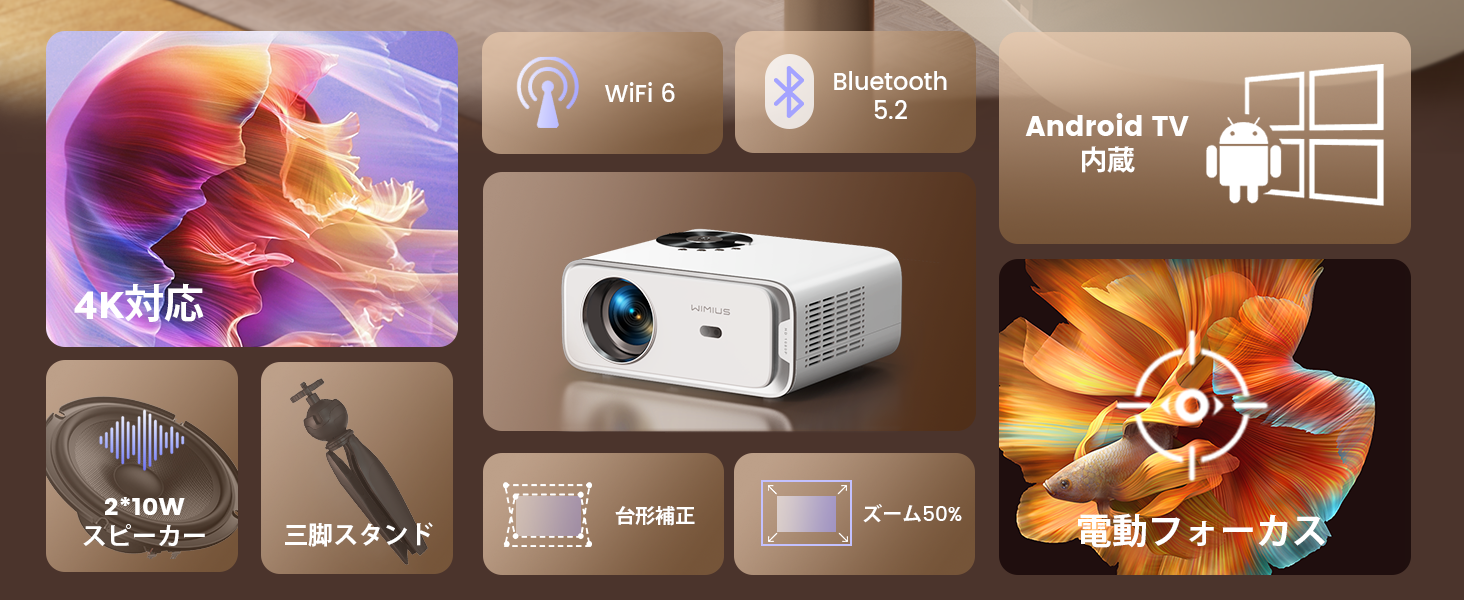
The WiMiUS P63 projector is a compact and versatile device designed for home entertainment and presentations. It integrates Android TV OS, providing access to a wide range of streaming applications directly from the projector. With native 1080P resolution, 4K support, and 750 ANSI lumens brightness, it delivers clear and vibrant images. Advanced features like electric focus, automatic keystone correction, and digital zoom enhance user convenience and picture quality.

Image 1.1: The WiMiUS P63 Projector, a compact and powerful device for home entertainment.

Image 1.2: The WiMiUS P63 Projector shown with its remote control and included tripod, highlighting its portability and ease of setup.
2. تعليمات الإعداد
2.1 فك الصندوق والفحص الأولي
Carefully remove all components from the packaging. Verify that all accessories are present according to the packing list. Inspect the projector for any signs of damage.
Video 2.1: An unboxing demonstration for a similar projector model (GC357B), showing the contents of the package including the projector unit, power cable, AV cable, HDMI cable, dust removal tools, filter, and remote control. This video provides a general idea of what to expect when unboxing your WiMiUS P63 projector.
2.2 توصيل الطاقة
Connect the power cable to the projector's power input port and then plug it into a power outlet. The projector will typically power on or enter standby mode.
2.3 الاقتران بوحدة التحكم عن بعد
To ensure full functionality, pair the remote control with the projector. Follow the on-screen instructions or the steps outlined in the video below.
Video 2.2: A demonstration of how to pair the remote control with the projector. This process typically involves pressing specific buttons on the remote simultaneously until a pairing confirmation appears on the screen.
2.4 الوضع الأولي والتعديل
Place the projector on a stable surface or mount it using a compatible tripod or ceiling mount. The WiMiUS P63 features automatic keystone correction and electric focus for quick image setup.
Video 2.3: A general setup video for a similar projector model (GC357B) showing installation in a car, demonstrating its compact size and ease of setup for various environments. This video illustrates the projector's versatility in different mounting scenarios.

Image 2.1: The projector shown mounted on a ceiling, illustrating flexible installation options for optimal viewزوايا متعددة.
3. تعليمات التشغيل
3.1 Navigating Android TV OS
The WiMiUS P63 comes with Android TV OS pre-installed, offering a user-friendly interface to access various applications. Use the remote control to navigate through menus, select apps, and adjust settings.

Image 3.1: The projector displaying the Android TV interface with various streaming apps like Netflix, YouTube, and Prime Video, ready for selection.
الصورة 3.2: تفصيلية view of the Android TV interface, showcasing the wide array of applications available for streaming and entertainment.
3.2 Image Adjustment (Focus, Keystone, Zoom)
The projector features one-key electric focus and automatic keystone correction. You can also adjust the screen size from 50% to 100% using the zoom function without moving the projector.

Image 3.3: A visual representation of the automatic keystone correction and electric focus features, ensuring a perfectly rectangular and sharp image.

Image 3.4: This image highlights the one-key electric focus, automatic keystone correction, and zoom capabilities, allowing for flexible image adjustments.
3.3 خيارات الاتصال
The P63 projector offers multiple connectivity options including HDMI, USB, AV, and 3.5mm audio. It also supports high-speed WIFI 6 and Bluetooth 5.2 for wireless connections.

Image 3.5: An illustration of the various input and output ports on the projector, including HDMI, USB, and audio jacks, for connecting external devices.
Video 3.1: A demonstration of connecting a mobile phone via Bluetooth to a similar projector model. This process allows the projector to act as a Bluetooth speaker or to stream audio from your phone.
4. الصيانة
4.1 Cleaning the Filter and Internal Lens
Regular cleaning of the air filter and internal lens is crucial for maintaining optimal performance and image quality. The filter should be cleaned monthly or as needed. The internal lens can be gently cleaned with a dry cotton swab or one moistened with alcohol.
Video 4.1: A guide on how to remove and clean the internal lens and dust filter of a similar projector model (P65). This maintenance step helps prevent dust accumulation and ensures clear projection.
5. استكشاف الأخطاء وإصلاحها
If you encounter any issues with your WiMiUS P63 projector, please refer to the following common troubleshooting tips:
- لا يوجد طاقة: Ensure the power cable is securely connected to both the projector and the power outlet. Try a different outlet.
- لا توجد صورة: Check the input source. Make sure the correct HDMI or other input is selected. Verify that the lens cap is removed.
- صورة ضبابية: Use the electric focus function on the remote control to adjust the image sharpness. Ensure the projector is placed at an appropriate distance from the screen.
- Image Distorted (Trapezoid Shape): The projector features automatic keystone correction. If the image is still distorted, manually adjust the keystone settings in the projector menu.
- لا يوجد صوت: Check the volume settings on both the projector and the connected device. Ensure that the audio output is correctly configured. If using Bluetooth, verify the connection.
- مشاكل الاتصال بشبكة الواي فاي/البلوتوث: Ensure the projector is within range of your Wi-Fi router or Bluetooth device. Restart both the projector and the device you are trying to connect.
لمزيد من التفاصيل حول استكشاف الأخطاء وإصلاحها أو المشكلات المستمرة، يرجى الاتصال بدعم العملاء.
6. المواصفات
| ميزة | مواصفة |
|---|---|
| ماركة | WiMiUS |
| رقم الموديل | ص63 |
| نظام التشغيل | تلفزيون أندرويد |
| سطوع | شموم شمعة أنسي |
| الدقة الأصلية | 1280 × 800 |
| أقصى دقة للعرض | 3840 x 2160 pixels (4K Supported) |
| تكنولوجيا الاتصال | WIFI6, Bluetooth 5.2, HDMI, USB |
| منافذ HDMI | 2 |
| عامل الشكل | جيب |
| أبعاد المنتج | 24.5 × 20 × 11 سم |
| وزن المنتج | 2.76 كيلوغرام |
| المميزات الخاصة | Android TV, Tripod Included, Electric Focus, Auto Keystone, Zoom, Built-in 2*10W HiFi Speakers |
7. الضمان والدعم
WiMiUS provides dedicated customer service and technical support for the P63 projector. In the event of initial defects or natural failures, refunds or exchanges are available (free exchange/refund guarantee).
للاستفسارات المتعلقة بالدعم، يرجى الاتصال بما يلي: support01@wimius.com
Ask a question about this manual
Ask about setup, troubleshooting, compatibility, parts, safety, or missing instructions. Manuals+ will review the question and use this page’s manual context to help answer it.