
NBD NBD-EU-S110-QT
NBD 4K 48MP Digital Vlogging Camera User Manual
Model: NBD-EU-S110-QT
1. المقدمة
شكرا لك على الشراءasing the NBD 4K 48MP Digital Vlogging Camera. This manual provides essential information for setting up, operating, and maintaining your camera. Please read it thoroughly before use to ensure optimal performance and longevity of your device.
2. محتويات العبوة
تأكد من تضمين جميع العناصر المدرجة أدناه في الحزمة الخاصة بك:
- NBD 4K Camera x 1
- ميكروفون × 1
- ترايبود × 1
- Wide-Angle Lens x 1
- Macro Lens x 1
- طقم التنظيف × 1
- Additional Light x 1
- 32GB SD Card x 1
- قارئ البطاقات × 1
- البطارية x شنومكس
- شاحن x شنومكس
- حقيبة الكاميرا × 1
- الحبل × 1
- جهاز التحكم عن بعد × 1
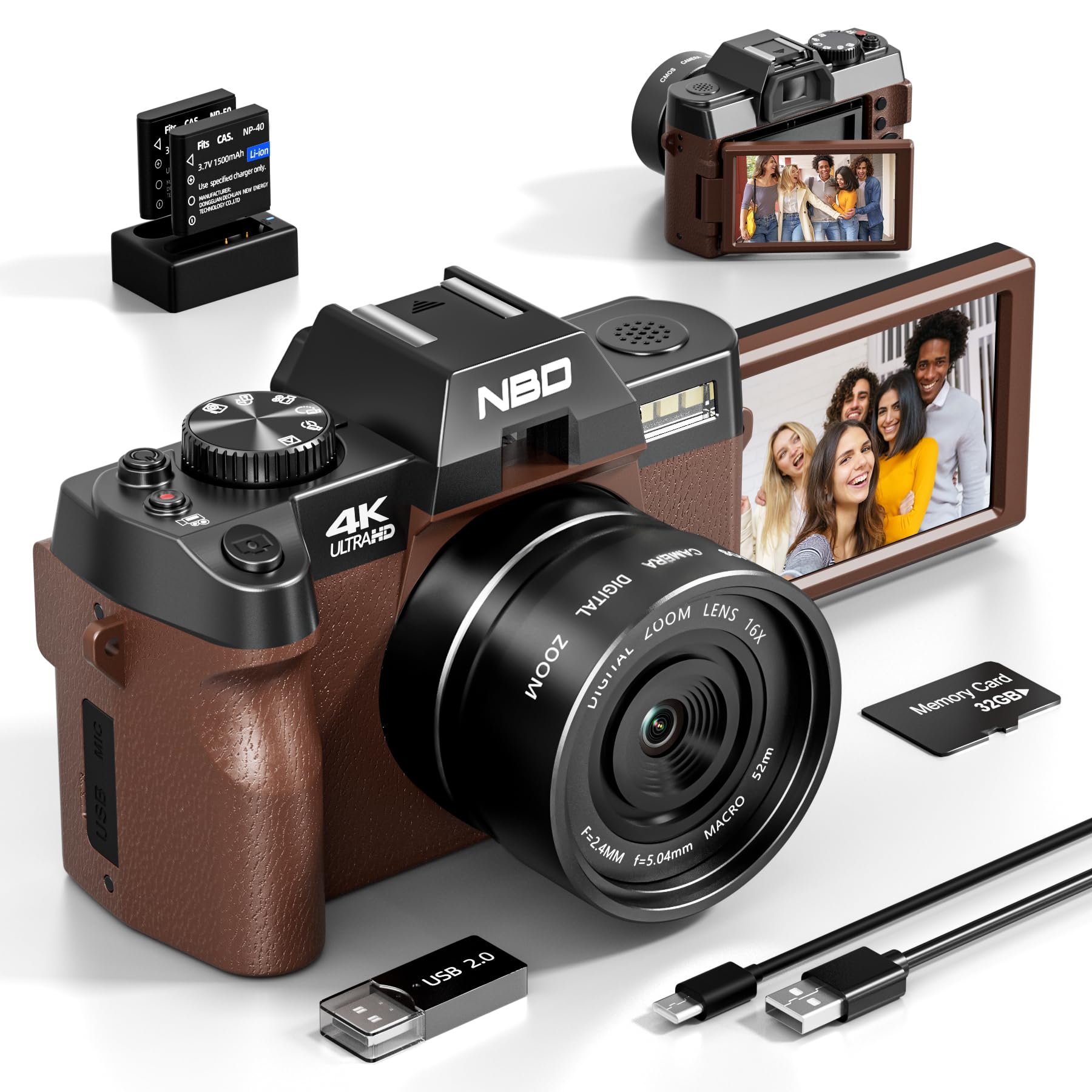
Image: NBD 4K Digital Camera with its complete set of accessories, including microphone, tripod, lenses, and other components.
3. انتهى المنتجview
3.1 مكونات الكاميرا
Familiarize yourself with the main parts of your NBD camera.
- عدسة: Main optical component for capturing images.
- شاشة LCD: 3-inch OLED display for viewing and navigating.
- زر الطاقة: يقوم بتشغيل/إيقاف الكاميرا.
- زر المصراع: يلتقط الصور أو يبدأ/يوقف تسجيل الفيديو.
- عناصر التحكم في التكبير: Adjusts digital zoom (up to 16x).
- قرص الوضع/الأزرار: Selects different shooting modes (photo, video, playback).
- مدخل الميكروفون: لتوصيل ميكروفون خارجي.
- منفذ USB: لنقل البيانات وتحصيل الرسوم.
- فتحة بطاقة SD: لإدخال بطاقة الذاكرة.
- حجرة البطارية: يحتوي على بطارية قابلة لإعادة الشحن.
4. الإعداد
4.1 شحن البطارية
- Insert the provided battery into the charger.
- قم بتوصيل الشاحن بمصدر الطاقة.
- The indicator light on the charger will show charging status. Charge fully before first use.
4.2 إدخال بطاقة SD
- حدد موقع فتحة بطاقة SD على الكاميرا.
- Insert the 32GB SD card with the metal contacts facing the correct direction until it clicks into place.
- لإزالتها، ادفع البطاقة برفق حتى تخرج.
4.3 Attaching Lenses and Accessories
- عدسة واسعة الزاوية: Screw the wide-angle lens onto the front of the camera's main lens. This expands the field of view بنسبة 45%.
- عدسة ماكرو: The macro lens is typically integrated with the wide-angle lens or can be used separately for close-up shots. Refer to the lens markings for separation if applicable.
- ميكروفون: Connect the external microphone to the camera's microphone input port.
- ترايبود: Screw the camera onto the tripod mount for stable shooting.
5. تعليمات التشغيل
5.1 تشغيل/إيقاف التشغيل
اضغط مع الاستمرار على زر الطاقة لتشغيل الكاميرا أو إيقاف تشغيلها.
5.2 التقاط الصور
- قم بتشغيل الكاميرا.
- Select Photo mode using the mode dial or button.
- قم بتأطير اللقطة باستخدام شاشة LCD.
- Press the Shutter button halfway to activate autofocus.
- Press the Shutter button fully to capture the photo.
5.3 تسجيل مقاطع الفيديو
- قم بتشغيل الكاميرا.
- Select Video mode.
- Press the Shutter button to start recording. A red indicator will usually appear on the screen.
- اضغط على زر الغالق مرة أخرى لإيقاف التسجيل.
5.4 وظيفة التكبير
Use the zoom controls (usually a rocker switch) to digitally zoom in or out. The camera supports up to 16x digital zoom.
5.5 Autofocus and Night Vision
- ضبط تلقائي للصورة: The camera features autofocus for sharper images. Half-press the shutter button to engage.
- الرؤية الليلية: Activate night vision mode for improved performance in low-light conditions. Refer to the camera's menu for this setting.
5.6 الموقت الذاتي
The self-timer function allows for a delay before taking a photo. Access this setting through the camera's menu. Options include 2-second and 10-second delays.
5.7 اتصال Wi-Fi
The camera supports Wi-Fi connectivity for transferring photos and videos to compatible devices. Consult the camera's on-screen menu for Wi-Fi setup and connection instructions.
5.8 الاستخدام كـ Webكاميرا
Connect the camera to your computer via USB to use it as a webcam for vlogging, video calls, or live streaming. Select the webcam mode on the camera when prompted.
6. الصيانة
- تنظيف: Use the provided cleaning kit to gently clean the lens and screen. Avoid abrasive materials.
- تخزين: Store the camera in its bag in a cool, dry place when not in use. Remove the battery if storing for extended periods.
- العناية بالبطارية: Do not expose batteries to extreme temperatures. Dispose of depleted batteries according to local regulations.
7. استكشاف الأخطاء وإصلاحها
| مشكلة | السبب المحتمل | حل |
|---|---|---|
| الكاميرا لا تعمل. | تم استنزاف البطارية أو إدخالها بشكل غير صحيح. | اشحن البطارية بالكامل. تأكد من تركيبها بشكل صحيح. |
| لا يمكن التقاط الصور/تسجيل مقاطع الفيديو. | بطاقة الذاكرة SD ممتلئة أو مقفلة أو غير مُدخلة. | Check SD card capacity. Unlock the SD card. Reinsert the SD card. |
| الصور ضبابية. | Autofocus not engaged, lens dirty, or insufficient light. | Half-press shutter to focus. Clean the lens. Use additional light or night vision mode. |
| مشاكل في الاتصال بشبكة Wi-Fi. | كلمة مرور غير صحيحة أو خارج النطاق. | Verify Wi-Fi password. Move closer to the Wi-Fi source. |
| الميكروفون لا يسجل الصوت. | Microphone not properly connected or settings incorrect. | Ensure microphone is securely plugged in. Check camera audio settings. |
| تتجمد الكاميرا أو تصبح غير مستجيبة. | خلل مؤقت في البرنامج. | قم بإزالة البطارية ثم أعد إدخالها لإعادة ضبط الكاميرا. |
8. المواصفات
| ماركة: | بنك دبي الوطني |
| اسم الموديل: | NBD-EU-S110-QT |
| Effective Photo Resolution: | 48 ميجا بكسل |
| دقة التقاط الفيديو: | 4K |
| التكبير الرقمي: | 16x |
| حجم الشاشة: | 3 بوصة |
| نوع العرض: | شاشة OLED |
| Image Sensor Technology: | سيموس |
| Max Aperture: | ف/1.8 |
| تقنية الاتصال: | واي فاي |
| تثبيت الصورة: | نعم |
| ضبط تلقائي للصورة: | نعم |
| الرؤية الليلية: | نعم |
| مؤقت ذاتي: | Yes (2s, 10s) |
| نوع البطارية: | ليثيوم أيون |
| Included Memory Card Size: | 32GB (SD Card) |
9. الضمان والدعم
For warranty information and technical support, please refer to the documentation provided with your purchase or visit the official NBD webالموقع. احتفظ بإثبات الشراء الخاص بك لتقديم مطالبات الضمان.
ملاحظة: هذا الدليل لأغراض إعلامية فقط. المواصفات قابلة للتغيير دون إشعار مسبق.
Ask a question about this manual
Ask about setup, troubleshooting, compatibility, parts, safety, or missing instructions. Manuals+ will review the question and use this page’s manual context to help answer it.