
1. المقدمة
This manual provides essential information for the safe and efficient operation of your TuTu TUB32HN1N 32-inch HD Ready TV. Please read it thoroughly before using the television and retain it for future reference.

أمام view of the TuTu TUB32HN1N 32-inch HD Ready TV, highlighting its borderless design and key features like HD Ready, Dolby Audio, USB, HDMI, Hotel Mode, CI+, and DVB-S2/T2/C tuners.
2. معلومات السلامة
اتبع دائمًا احتياطات السلامة الأساسية عند استخدام هذا التلفزيون لتقليل خطر الحريق والصدمة الكهربائية والإصابة.
- لا تعرض التلفزيون للمطر أو الرطوبة.
- لا تفتح الخزانة؛ قم بإحالة جميع أعمال الصيانة إلى موظفين مؤهلين.
- تأكد من التهوية المناسبة حول التلفزيون.
- افصل التلفاز أثناء العواصف الرعدية أو عند عدم استخدامه لفترات طويلة.
- احتفظ بالتلفزيون بعيدًا عن أشعة الشمس المباشرة ومصادر الحرارة.
3. محتويات العبوة
تأكد من وجود جميع العناصر في الصندوق:
- 1x TuTu TUB32HN1N 32-inch HD Ready TV
- 1 × دليل المستخدم
- 1 × جهاز التحكم عن بعد
- 1x TV Stand (base)
Note: 2x AA batteries for the remote control are not included.
4. انتهى المنتجview
4.1. أبعاد
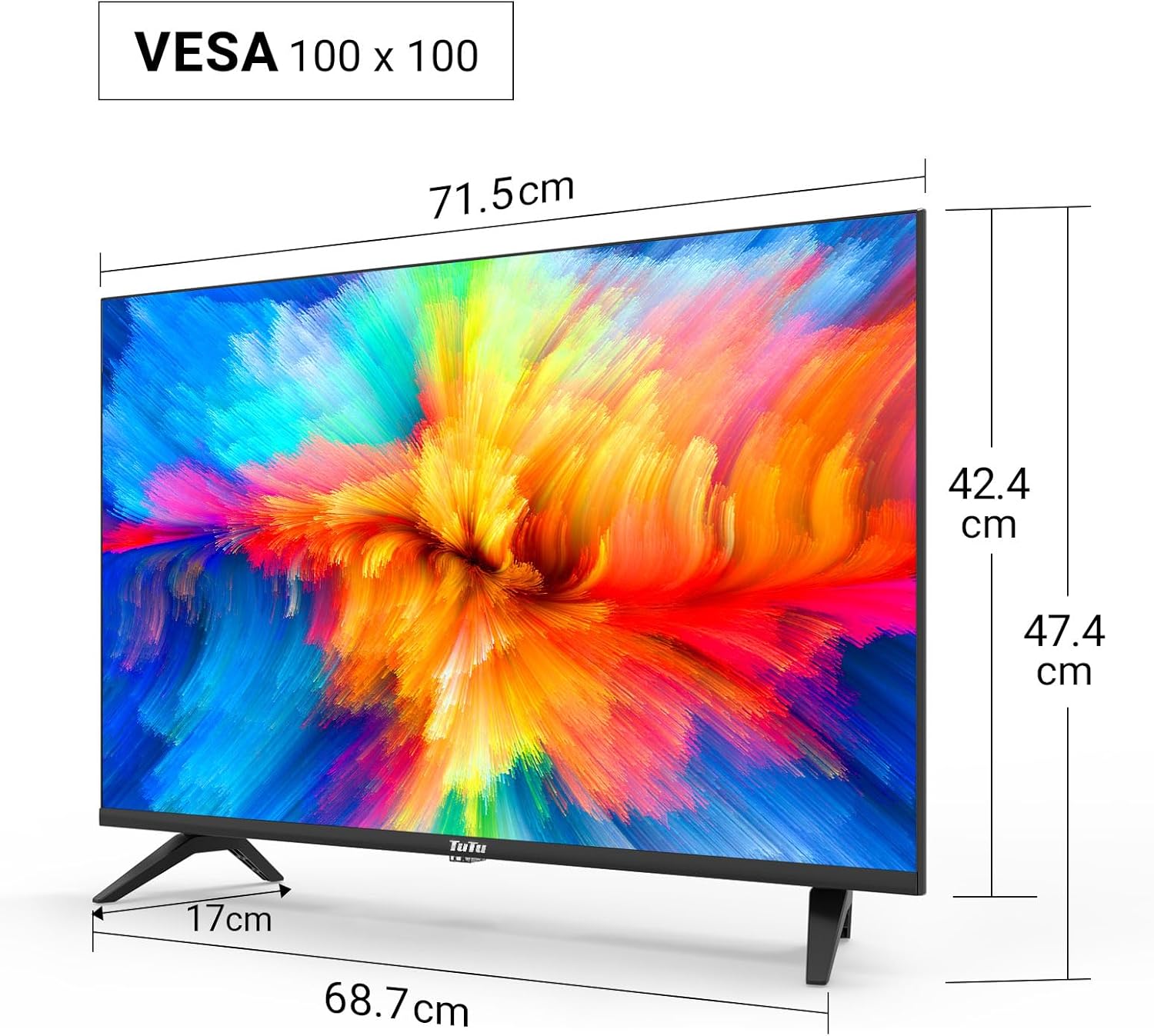
Technical drawing displaying the dimensions of the 32-inch TV, including screen width (71.5cm), height with stand (47.4cm), height without stand (42.4cm), and stand depth (17cm). VESA 100x100 compatibility is also indicated.
4.2. منافذ التوصيل

مفصل view of the TV's input/output ports, including SCART, Coaxial Out, LNB In, RF (Antenna), 2x HDMI, USB, CI+ Common Interface, Mini AV, Mini YPbPr, and Earphone Out.
The TV features a variety of ports for connecting external devices:
- HDMI (x2): For connecting high-definition devices like Blu-ray players, game consoles, or external streaming devices.
- يو اس بي 2.0 (×1): For media playback and recording from USB storage devices.
- CI/CI+ Slot (x1): For inserting a Common Interface module to access encrypted digital channels.
- الترددات اللاسلكية (الهوائي): لتوصيل هوائي أرضي أو هوائي كابل.
- LNB In: لتوصيل طبق القمر الصناعي.
- سكارت: لتوصيل الأجهزة التناظرية القديمة.
- مخرج محوري: لإخراج الصوت الرقمي.
- Mini AV / Mini YPbPr: For analog video and audio input (adapters may be required).
- سماعة خارج: لتوصيل سماعات الرأس.
5. الإعداد
5.1. التجمع الوقوف
لتجميع حامل التلفزيون:
- ضع التلفزيون بعناية على سطح ناعم ومسطح بحيث يكون وجهه لأسفل لمنع تلف الشاشة.
- قم بمحاذاة الحامل مع فتحات التثبيت الموجودة في الجزء السفلي من التلفزيون.
- قم بتأمين الحامل باستخدام البراغي المرفقة.
5.2. التثبيت على الحائط
The TV supports VESA 100x100 wall mounts. Wall mount brackets are sold separately. Follow the instructions provided with your wall mount kit for proper installation.
5.3. توصيل الأجهزة الطرفية
Connect your antenna, satellite dish, or cable to the appropriate RF or LNB IN port. Use HDMI cables for high-definition devices. Insert USB drives into the USB port for media access.

Illustration of the TV's triple tuner capabilities, showing connections for DVB-S/S2 (satellite), DVB-C (cable), and DVB-T/T2 (terrestrial) reception.
5.4. First-Time Power On & Channel Scan
After connecting the power cable and antenna/satellite, press the power button on the remote control or TV. The TV will guide you through the initial setup, including language selection and automatic channel scanning for DVB-T/T2, DVB-C, and DVB-S/S2 signals.
6. تعليمات التشغيل
6.1. وظائف التحكم عن بعد
Refer to the remote control diagram in your printed manual for specific button layouts. Common functions include Power, Volume Up/Down, Channel Up/Down, Input Source, Menu, and Navigation buttons.
6.2. اختيار مصدر الإدخال
Press the 'Source' button on your remote to switch between connected devices (e.g., HDMI 1, HDMI 2, USB, DVB-T, DVB-S).
6.3. USB Media Playback and Recording
Insert a USB storage device into the USB port. The TV's media player will allow you to browse and play video, image, and music files. The TV also supports recording digital broadcasts to a connected USB device.

Image demonstrating the USB media player and recorder function, allowing playback of video, images, and music from a USB drive or external hard disk. The 'REC' indicator shows recording capability.
6.4. CI/CI+ Module Installation
To access encrypted channels, insert your CI/CI+ module (with smart card) into the CI slot on the side or rear of the TV. Ensure the module is inserted correctly according to its instructions.
6.5. Hotel Mode Configuration
The Hotel Mode feature allows for customized settings ideal for hospitality environments. This includes limiting volume range, creating custom channel lists, locking sources, and batch processing TV settings via USB.

Screenshot of the Hotel Mode menu, illustrating features such as limited volume range, custom channel list creation, source locking, and batch processing of TV settings via USB.
7. الصيانة
للحفاظ على جهاز التلفزيون الخاص بك في حالة مثالية:
- تنظيف الشاشة: امسح الشاشة برفق بقطعة قماش ناعمة وخالية من الوبر. لإزالة البقع الصعبة، استخدم منظف شاشات مصمم خصيصًا لأجهزة التلفزيون، وضعه على قطعة القماش، وليس مباشرة على الشاشة.
- تنظيف الخزانة: استخدم قطعة قماش ناعمة وجافة لمسح خزانة التلفزيون. لا تستخدم منظفات أو مذيبات كاشطة.
- تهوية: تأكد من عدم سد فتحات التهوية الموجودة في الجزء الخلفي من التلفزيون لمنع ارتفاع درجة الحرارة.
8. استكشاف الأخطاء وإصلاحها
إذا واجهت مشكلات مع التلفزيون الخاص بك، فراجع المشكلات والحلول الشائعة التالية:
| مشكلة | الحل المحتمل |
|---|---|
| لا يوجد طاقة | تأكد من توصيل سلك الطاقة بإحكام بالتلفزيون ومقبس الكهرباء. جرّب مقبسًا آخر. |
| لا توجد صورة، ولكن الصوت موجود | تأكد من اختيار مصدر الإدخال الصحيح. تحقق من توصيلات الكابلات بالأجهزة الخارجية. |
| لا يوجد صوت ولكن الصورة موجودة | Check the volume level and mute status. Verify audio cable connections. |
| لا يمكن العثور على القنوات | Ensure the antenna/satellite cable is properly connected. Perform an automatic channel scan again. Check antenna signal strength. |
| جهاز التحكم عن بعد لا يعمل | استبدل البطاريات. تأكد من عدم وجود عوائق بين جهاز التحكم عن بُعد ومستشعر الأشعة تحت الحمراء الخاص بالتلفزيون. |
9. المواصفات
Here are the technical specifications for the TuTu TUB32HN1N TV:
| ميزة | مواصفة |
|---|---|
| ماركة | TuTu |
| نموذج | TUB32HN1N |
| حجم الشاشة | 32 بوصة (80 سم) |
| تكنولوجيا العرض | LED (Direct LED Display) |
| دقة | جاهز للعرض عالي الدقة (1366 × 768 بكسل) |
| نسبة العرض إلى الارتفاع | 16:9 |
| معدل التحديث | 60 هرتز |
| تقنية الموالف | DVB-T/T2 (Terrestrial), DVB-C (Cable), DVB-S/S2 (Satellite) |
| منافذ HDMI | 2 |
| منافذ USB | 1 (USB 2.0) |
| فتحة CI/CI+ | 1 |
| وضع إخراج الصوت | Stereo (Dolby Digital) |
| استهلاك الطاقة (SDR) | 27.0 واط |
| فئة كفاءة الطاقة | F |
| أبعاد المنتج (مع الحامل) | 79.6 × 12.8 × 50.5 سم |
| وزن | 5.04 كجم |
| التوافق مع VESA | 100 × 100 ملم |

The EU energy label for the TuTu TUB32HN1N TV, showing an energy efficiency class of F and energy consumption of 27 kWh/1000h.

A detailed product information sheet (PRODUCT INFORMATION SHEET) providing technical parameters and compliance details for the TuTu TUB32HN1N TV. For more details, visit the official EPREL database: https://eprel.ec.europa.eu/qr/1589506
10. الضمان والدعم
TuTu offers a two-year warranty policy for this product. For warranty claims, technical support, or any inquiries, please refer to the contact information provided in your purchase documentation or visit the official TuTu webموقع.