
1. المقدمة
This manual provides detailed instructions for the installation, operation, maintenance, and troubleshooting of the Fydun ZL-7901A Incubator Controller. This device is designed for precise and automatic control of temperature and humidity in various incubation environments, ensuring optimal conditions for successful hatching.
2. انتهى المنتجview
The Fydun ZL-7901A is a high-precision digital incubator controller capable of managing both temperature and humidity. It features a clear display and intuitive controls for easy programming and monitoring.
المميزات الرئيسية:
- التحكم الدقيق: High-accuracy temperature and humidity regulation for stable incubator environments.
- Strong Anti-interference: Designed for reliable operation in various conditions.
- High Stability and Accuracy: Ensures consistent performance for critical incubation processes.
- تطبيق واسع: Suitable for a variety of eggs including chicken, duck, goose, pigeon, quail, parrot, and peacock.
- عملية تلقائية: Fully automatic control reduces manual intervention.
عناصر:

الشكل 2.1: أمام view of the Fydun ZL-7901A Incubator Controller, showing the display and control buttons.

الشكل 2.2: The ZL-7901A controller packaged with its temperature and humidity sensors and connecting cables.

الشكل 2.3: The ZL-7901A controller shown in an incubator environment, demonstrating its application for egg incubation.
3. معلومات السلامة
- اقرأ جميع التعليمات بعناية قبل التثبيت والتشغيل.
- تأكد من حجم امدادات الطاقةtage matches the controller's requirements (100V-240V).
- ينبغي أن يتم تنفيذ كافة أعمال الأسلاك بواسطة متخصص مؤهل لتجنب المخاطر الكهربائية.
- لا تعرض جهاز التحكم للماء أو الرطوبة الزائدة.
- احفظ الجهاز بعيدًا عن المواد القابلة للاشتعال.
- افصل الطاقة قبل إجراء أي صيانة أو تغييرات في الأسلاك.
- هذا الجهاز ليس لعبة. يحفظ بعيدا عن متناول الأطفال.
4. الإعداد والتثبيت
4.1 تركيب وحدة التحكم
The ZL-7901A controller is designed for panel mounting. Ensure a secure and stable location within your incubator setup.

الشكل 4.1: جانب view illustrating the mounting bracket for panel installation.
4.2 توصيلات الأسلاك
Carefully connect the power supply, sensors, and output devices (heater, humidifier, fan, egg turner) to the appropriate terminals on the back of the controller. Refer to the wiring diagram provided with your product for specific connections. Ensure all connections are tight and secure.

الشكل 4.2: مؤخرة view of the controller, showing the terminal blocks for electrical connections.
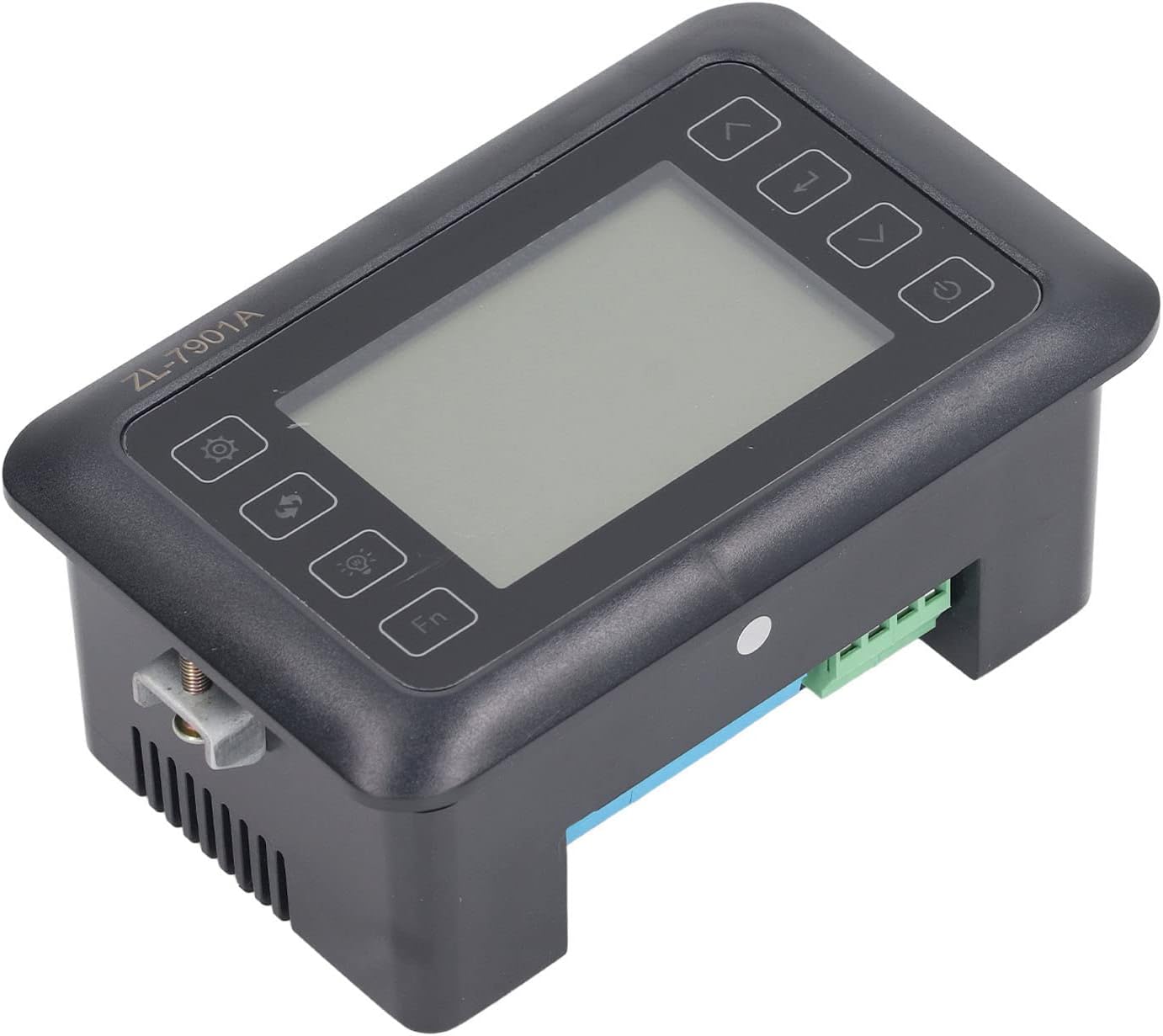
الشكل 4.3: بزاوية view highlighting the various connection points on the controller's side.
After all connections are made, double-check them for correctness before applying power.
5. تعليمات التشغيل
5.1 تشغيل/إيقاف التشغيل
اضغط على زر الطاقة to turn the controller on or off. The display will illuminate upon power-on. The power button is located on the right side of the controller's front panel.
5.2 عرض أكثرview
The main display shows the current temperature and humidity readings. Additional indicators may show the status of heating, humidifying, and turning functions.
5.3 إعداد المعلمات
- اضغط على زر الإعدادات (gear icon) to enter the parameter setting mode. This button is on the left side of the controller's front panel.
- استخدم Up (سهم لأعلى) و تحت (down arrow) buttons to navigate through different parameters (e.g., target temperature, target humidity, egg turning interval). These buttons are on the right side of the controller's front panel.
- اضغط على زر الدخول (return arrow icon) to select a parameter for editing. This button is on the right side of the controller's front panel.
- استخدم Up و تحت أزرار لضبط القيمة.
- اضغط على زر الدخول مرة أخرى لتأكيد القيمة الجديدة.
- Repeat for all desired parameters.
- الخروج من وضع الإعداد بالضغط على زر الإعدادات again or waiting for a timeout.
ملحوظة: Consult the full product manual (if provided separately) for a complete list of parameters and their functions.
5.4 أزرار الوظائف
- زر الضوء (light bulb icon): Controls the internal light of the incubator (if connected). This button is on the left side of the controller's front panel.
- زر الجبهة: Activates special functions or enters advanced settings. Refer to the detailed manual for specific Fn button operations. This button is on the left side of the controller's front panel.
6. الصيانة
6.1 التنظيف
- Ensure the controller is powered off and disconnected from the power source before cleaning.
- Wipe the exterior of the controller with a soft, dry cloth.
- لا تستخدم المنظفات الكاشطة أو المذيبات أو تغمر الوحدة في الماء.
- Keep the sensor probes clean and free from debris to ensure accurate readings.
6.2 العناية بالمستشعر
Handle the temperature and humidity sensors with care. Avoid bending or damaging the cables. If readings appear inaccurate, gently clean the sensor tips. Do not attempt to disassemble the sensors.
7. استكشاف الأخطاء وإصلاحها
| مشكلة | السبب المحتمل | حل |
|---|---|---|
| وحدة التحكم لا تعمل بالطاقة. | لا يوجد مصدر طاقة؛ وصلة مفكوكة؛ كابل طاقة معيب. | Check power outlet; ensure all connections are secure; test power cable. |
| قراءات غير دقيقة لدرجة الحرارة والرطوبة. | Sensor dirty or damaged; sensor not properly placed; calibration needed. | Clean sensor; reposition sensor away from direct airflow/heat; refer to advanced settings for calibration (if available). |
| Heater/Humidifier not activating. | Output device not connected; setpoint not reached; faulty output device. | Verify wiring connections; check setpoint values; test heater/humidifier independently. |
| تعرض الشاشة رمز الخطأ. | Sensor fault; internal error. | Note the error code and consult the full product manual or contact support. |
8. المواصفات
| ميزة | التفاصيل |
|---|---|
| نموذج | ZL-7901A |
| ماركة | Fydun |
| حجم الإدخالtage | 100 فولت-240 فولت تيار متردد |
| نوع التحكم | Fully Automatic Digital Temperature and Humidity Control |
| دقة | High precision for both temperature and humidity |
| طلب | Incubators for various poultry and bird eggs |
| التركيب | لوحة جبل |
9. الضمان والدعم
Fydun is committed to providing quality products and excellent customer service. If you encounter any issues or have questions regarding your ZL-7901A Incubator Controller, please contact our customer service team.
For support, please refer to the contact information provided with your purchase or visit the official Fydun store on Amazon: Fydun Amazon Store.
Our professional customer service team is ready to assist you promptly.