
مقدمة
شكرا لك على الشراءasing the Funistree Cell Phone Stand with Wireless Bluetooth Speaker. This device combines a versatile phone stand with a high-quality Bluetooth speaker and a white noise machine, designed to enhance your audio and viewing experience. Please read this manual carefully before use to ensure proper operation and to maximize the product's lifespan.
المنتج انتهىview
The Funistree H77 is a multi-functional device featuring a detachable phone stand and a wireless Bluetooth speaker. Its innovative design allows for independent use of the speaker and the stand, or combined for an integrated entertainment solution.
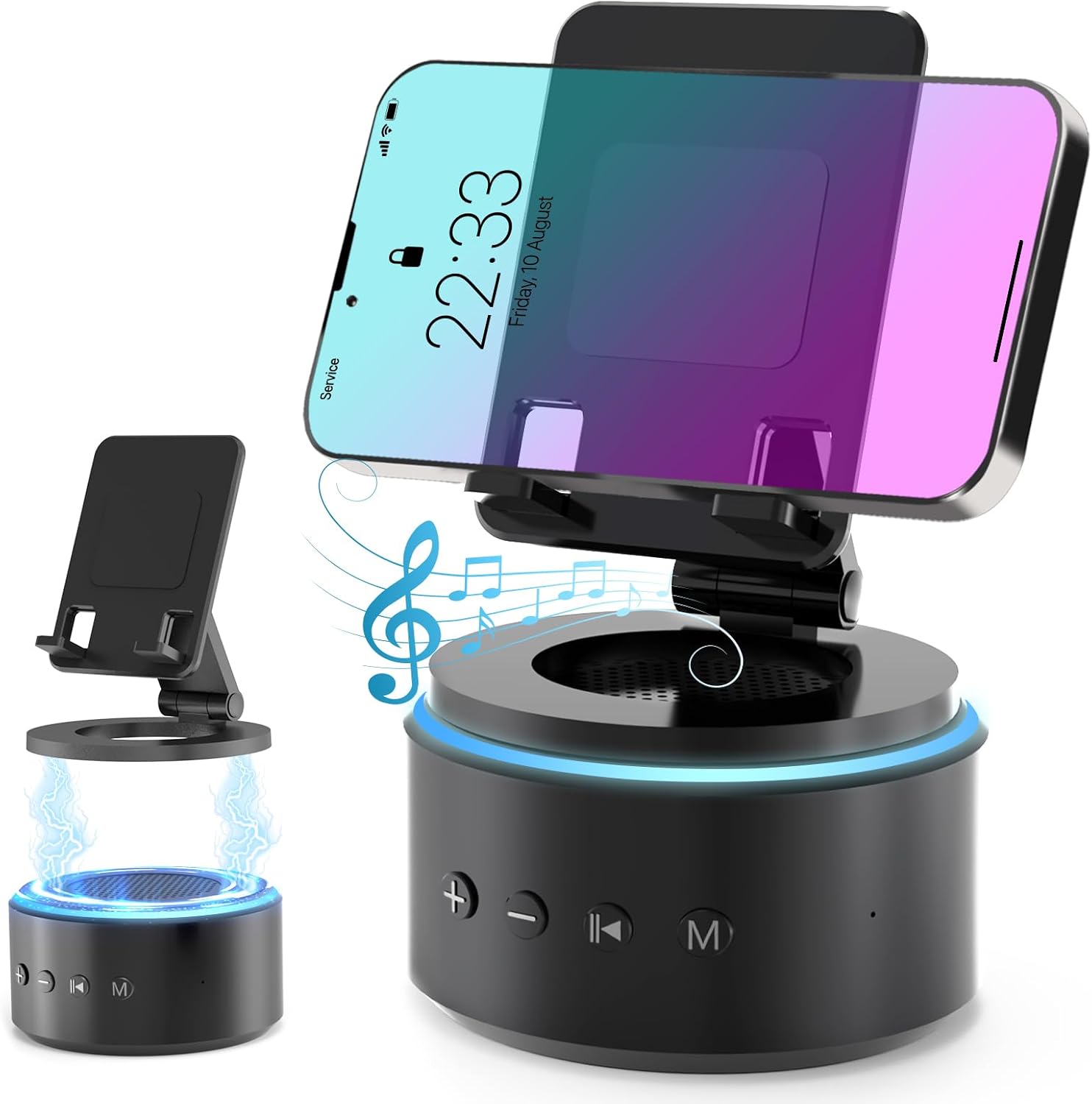
Image: The Funistree H77 device, illustrating its 2-in-1 design with the phone stand attached to the speaker base and also shown detached.
المميزات الرئيسية:
- 2-in-1 Detachable Design: The phone stand magnetically connects to the Bluetooth speaker, allowing for combined or separate use.
- Adjustable & Portable Stand: عروض متعددة viewing angles and includes a hanging design for easy portability.
- صوت ستيريو عالي الدقة: Equipped with a dual stereo system for enhanced bass, clear highs, and balanced midrange.
- جهاز الضوضاء البيضاء: Features 10 soothing white noise sounds with an auto-off timer (15, 30, or 60 minutes).
- قاعدة مستقرة: Anti-slip silicone pads ensure device stability.
- عمر بطارية طويل: Optimized 1800 mAh battery for extended use.
محتويات الحزمة
يرجى التحقق من الحزمة للعناصر التالية:
- Funistree Cell Phone Stand with Wireless Bluetooth Speaker (Model H77)
- كابل شحن USB
- دليل المستخدم
Note: Contents may vary slightly. If any items are missing or damaged, please contact customer support.
يثبت
شحن الجهاز:
- Locate the charging port on the speaker base.
- Connect the provided USB charging cable to the speaker.
- قم بتوصيل الطرف الآخر من كابل USB بمحول طاقة USB متوافق (غير متضمن) أو منفذ USB بالكمبيوتر.
- سيضيء مؤشر الشحن. بعد اكتمال الشحن، قد يتغير لونه أو ينطفئ.
Initial charge time is approximately 2-3 hours.
Assembling the Phone Stand and Speaker:
The phone stand and speaker connect magnetically.
- Align the magnetic base of the phone stand with the top surface of the speaker.
- The magnets will snap the two components together securely.
- To detach, simply pull the phone stand upwards from the speaker base.

الصورة: عن قرب view demonstrating the magnetic connection between the phone stand and the speaker base.
تعليمات التشغيل
تشغيل/إيقاف التشغيل:
- To power on, press and hold the Power button (usually marked with a power symbol) on the speaker base for a few seconds until you hear an audible prompt or see an indicator light.
- To power off, press and hold the Power button again for a few seconds.
الاقتران بلوتوث:
- Ensure the speaker is powered on and in pairing mode (indicated by a flashing LED light, usually blue). If not, briefly press the Bluetooth button (if available) or power cycle the device.
- على جهازك المحمول (الهاتف الذكي، الجهاز اللوحي، وما إلى ذلك)، انتقل إلى إعدادات البلوتوث.
- بحث عن available devices. The speaker will appear as "H77" or "Funistree H77".
- Select the speaker from the list to pair. Once paired, you will hear a confirmation sound, and the LED light will become solid.
- يمكنك الآن تشغيل الصوت من جهازك عبر مكبر الصوت.

Image: The Funistree H77 in use, with a smartphone mounted on the stand, playing music, and a laptop nearby, illustrating its versatile functionality.
White Noise Function:
The speaker includes 10 built-in white noise sounds to aid relaxation or concentration.
- Press the 'M' (Mode) button to cycle through the white noise sounds.
- To set a timer for the white noise, press the Timer button (if available) or refer to the specific button layout on your device. The available timer settings are 15, 30, or 60 minutes. The device will automatically turn off after the selected duration.

Image: Visual representation of the 10 white noise options (Ocean, Wind, Rain, Bird, Heartbeat, Campfire, Thunderstorm, Brook, Fan, Piano) and timer settings, with a person sleeping, indicating the relaxation benefits.
ضبط مستوى الصوت والتشغيل:
- رفع الصوت: اضغط على زر "+".
- اخفض الصوت: اضغط على زر '-'.
- تشغيل/إيقاف مؤقت: Press the Play/Pause button (usually marked with a triangle/two vertical bars).
- المسار التالي: Press the '>>|' button.
- المسار السابق: Press the '|<<' button.
استخدام حامل الهاتف:
The phone stand is adjustable to provide optimal viewزوايا متعددة.
- Place your smartphone or tablet securely on the stand's cradle.
- Adjust the angle of the stand by gently pushing or pulling the articulated arm to your desired viewموقف جيد.
- The stand features anti-slip silicone pads to prevent your device from sliding.

الصورة: مفصلة view highlighting the adjustable angle mechanism and the anti-slip silicone pads on the phone stand and base for secure device placement.
قابلية النقل:
The speaker can be carried easily using its integrated hanging design.

Image: A woman outdoors, holding the Funistree speaker by its hanging rope, demonstrating its portability for outdoor activities.
صيانة
- تنظيف: Use a soft, dry cloth to wipe the surface of the device. Do not use abrasive cleaners, alcohol, or chemical solvents, as these may damage the finish.
- تخزين: عند عدم استخدام الجهاز لفترات طويلة، قم بتخزينه في مكان بارد وجاف بعيدًا عن أشعة الشمس المباشرة ودرجات الحرارة القصوى.
- العناية بالبطارية: لإطالة عمر البطارية، تجنب تفريغها بالكامل بشكل متكرر. اشحن الجهاز بانتظام، حتى في حالة عدم استخدامه.
- تجنب الماء: This device is not waterproof. Keep it away from water, moisture, and excessive humidity.
- التعامل معها بحذر: تجنب إسقاط الجهاز أو تعريضه لصدمات قوية.
استكشاف الأخطاء وإصلاحها
| مشكلة | السبب المحتمل | حل |
|---|---|---|
| الجهاز لا يعمل. | بطارية منخفضة. | اشحن الجهاز بالكامل. |
| لا يمكن الاقتران عبر البلوتوث. | Speaker not in pairing mode; Bluetooth disabled on source device; device too far. | Ensure speaker is in pairing mode. Enable Bluetooth on your device. Move devices closer (within 10 meters). Forget previous pairings and try again. |
| لا يوجد صوت أو مستوى الصوت منخفض. | Volume too low on speaker or source device; device not properly paired. | Increase volume on both speaker and source device. Re-pair the device. |
| White noise function not working. | تم اختيار الوضع غير الصحيح. | Press the 'M' (Mode) button to cycle to the white noise function. |
| Phone stand is unstable. | Device not placed correctly; surface is uneven. | Ensure phone is centered on the cradle. Place the stand on a flat, stable surface. |
If the problem persists, please contact Funistree customer support.
تحديد
| رقم الموديل | ح77 |
| أبعاد المنتج | 4.53 × 4.13 × 4.37 بوصة |
| وزن العنصر | 15.8 أونصات |
| نوع البطارية | 1 بطارية ليثيوم أيون (مضمنة) |
| سعة البطارية | 1800 مللي أمبير |
| الاتصال | بلوتوث |
| أصوات الضوضاء البيضاء | 10 types (Ocean, Wind, Rain, Bird, Heartbeat, Campfire, Thunderstorm, Brook, Fan, Piano) |
| إعدادات المؤقت | 15 ، 30 ، 60 دقيقة |
| الأجهزة المتوافقة | Smartphones, Tablets (iPhone, Galaxy, LG, iPad, Samsung Tab, Sony, etc.) |
معلومات السلامة
- Do not disassemble, repair, or modify the device. This may cause damage, electric shock, or fire.
- Keep the device away from heat sources, direct sunlight, and high temperatures.
- لا تعرض الجهاز للماء أو السوائل الأخرى.
- لا تستخدم الجهاز في بيئات ذات تداخل كهرومغناطيسي قوي.
- يحفظ بعيدًا عن متناول الأطفال والحيوانات الأليفة.
- تخلص من الجهاز وبطاريته بطريقة مسؤولة وفقًا للوائح المحلية. لا تتخلص منه مع النفايات المنزلية.
الضمان والدعم
Funistree products are designed and manufactured to the highest quality standards. For warranty information and customer support, please refer to the warranty card included with your purchase or visit the official Funistree website. If you encounter any issues or have questions regarding your product, please contact our customer service team.
لمزيد من المساعدة، يرجى زيارة: Funistree Official Store on Amazon