
LS VISION LS-MS2
LS VISION 4K 180-Degree Ultra-Wide Angle 4G Solar-Powered Outdoor Security Camera
Model: LS-MS2
العلامة التجارية: LS VISION
1. المقدمة
This user manual provides detailed instructions for the installation, operation, and maintenance of your LS VISION 4K 180-Degree Ultra-Wide Angle 4G Solar-Powered Outdoor Security Camera. Please read this manual thoroughly before using the product to ensure proper functionality and safety.
2. انتهى المنتجview
2.1 الميزات الرئيسية
- 4K/8MP Resolution for clear video capture.
- 180-Degree Ultra-Wide Angle Dual Lens for comprehensive coverage without distortion.
- Integrated 4G Module for connectivity without Wi-Fi, ideal for remote locations.
- Solar-Powered with 6W solar panel and built-in 18000 mAh batteries for continuous operation. Supports integrated and separate solar panel installation.
- Two-Way Audio for real-time communication.
- Cloud Storage and local TF card storage (up to 128GB, TF card not included).
- بعيد Viewing and Playback via Niview app (Android/iOS).
- PIR + Human Detection with automatic human tracking, wake-up video recording, and push notifications.
- Multiple Recording Modes: 24-hour continuous recording, 24-hour + trigger recording, and three trigger recording modes.
- Dual Light Source Design: Full-color night vision up to 20 meters and infrared night vision up to 40 meters.
- IP66 Waterproof Rating for outdoor durability.
2.2 مخطط المنتج
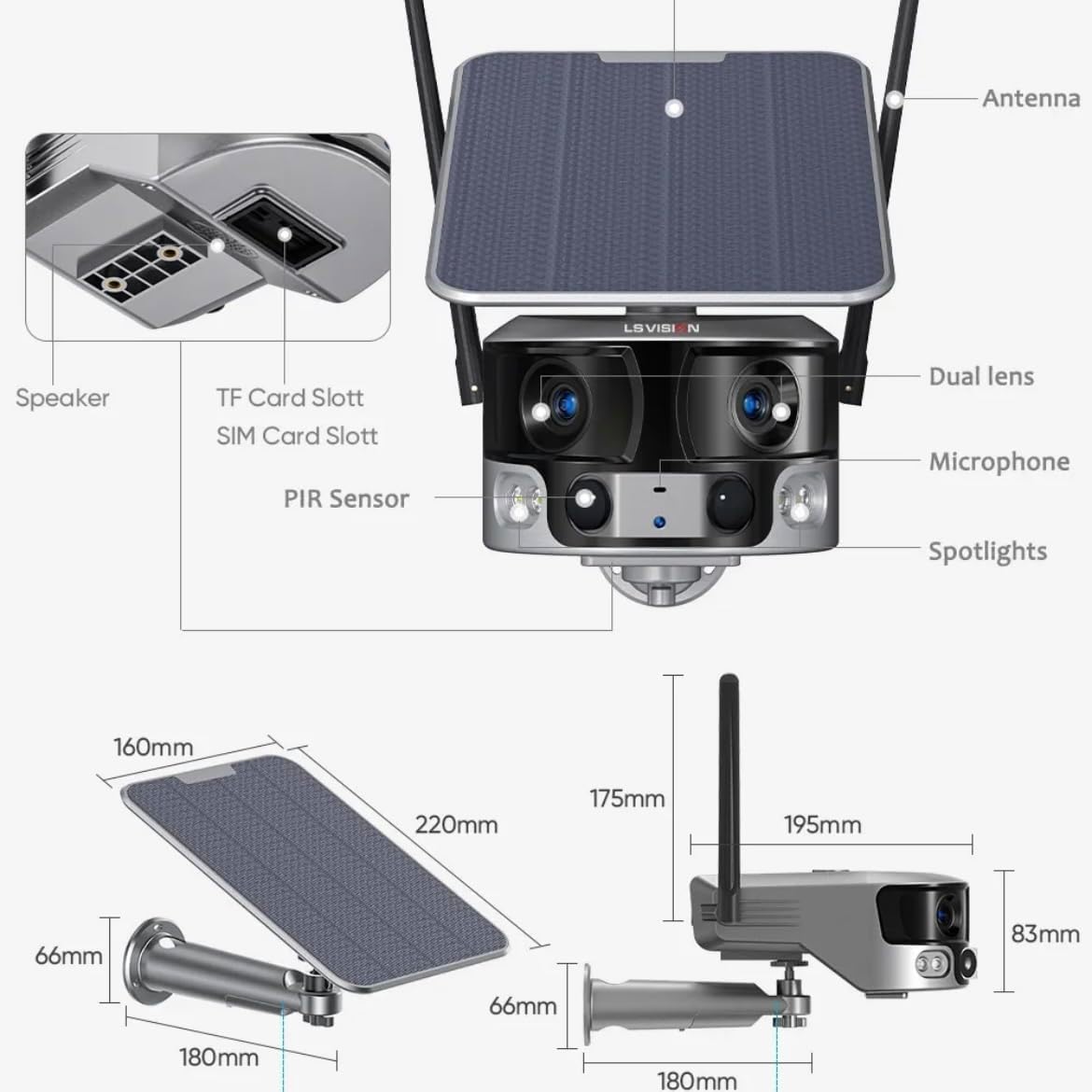
Figure 2.1: Product components and dimensions. Key parts include the solar panel, antennas, dual lens, microphone, spotlights, PIR sensor, speaker, TF card slot, and SIM card slot.
3. محتويات العبوة
يرجى التحقق من محتويات العبوة عند فتحها للتأكد من وجود جميع العناصر وعدم تلفها:
- 1 x LS VISION 4K 180-Degree Ultra-Wide Angle 4G Solar-Powered Outdoor Security Camera
- لوحة شمسية واحدة (6 واط)
- 1 × مجموعة من دعامات التثبيت
- 1 × هوائي 4G
- مجموعة واحدة من البراغي والمثبتات الجدارية
- 1 x 2-meter Extension Cable for Solar Panel
4. دليل الإعداد
4.1 الشحن الأولي
Although the camera is solar-powered, it is recommended to fully charge the built-in batteries before the first use. Connect the camera to a 5V/2A USB power adapter (not included) using a standard USB cable for initial charging. The charging indicator will show the status.
4.2 تركيب بطاقة SIM وبطاقة TF
Locate the SIM card slot and TF card slot on the camera (refer to Figure 2.1). Ensure the camera is powered off before inserting or removing cards.
- Open the protective cover of the card slots.
- Insert a standard 4G SIM card into the SIM card slot with the gold contacts facing down. Ensure it clicks into place.
- Insert a TF (microSD) card (up to 128GB, not included) into the TF card slot with the gold contacts facing down. Ensure it clicks into place.
- Close the protective cover firmly to maintain the IP66 waterproof rating.
4.3 تركيب الكاميرا
The camera is designed for wall mounting and outdoor use. Consider the following for optimal placement:
- اختر موقعًا به ampضوء الشمس المباشر للوحة الشمسية.
- تأكد من أن الكاميرا واضحة view للمنطقة التي ترغب في مراقبتها.
- Mount the camera at a height that provides good coverage and deters tampإرينغ.

Figure 4.1: The LS VISION camera shown with its solar panel and mounting bracket, ready for outdoor installation.

Figure 4.2: The camera operates on a 4G network, eliminating the need for a Wi-Fi router, making it suitable for locations without existing Wi-Fi infrastructure.
The solar panel can be installed integrated with the camera or separately using the 2-meter extension cable for optimal sun exposure.
4.4 تثبيت التطبيق والاتصال
To access and control your camera, download the Niview التطبيق متوفر في متجر تطبيقات هاتفك الذكي (متوفر لأجهزة أندرويد و iOS).
- بحث عن "Niview" in the App Store or Google Play Store and install it.
- قم بتسجيل حساب جديد أو قم بتسجيل الدخول إذا كان لديك حساب بالفعل.
- اتبع التعليمات الموجودة داخل التطبيق لإضافة الكاميرا. يتضمن ذلك عادةً مسح رمز الاستجابة السريعة (QR) الموجود على الكاميرا أو إدخال معرّفها يدويًا.
- بمجرد الاتصال ، يمكنك ذلك view يعيش فوtage, access recordings, and configure settings.
5. تعليمات التشغيل
5.1 مباشر View & تشغيل
Access the Niview app on your smartphone or tablet to view live video streams from your camera anytime, anywhere. The app also allows you to review تم تسجيل فوtage.

Figure 5.1: The Niview app interface demonstrating real-time monitoring and timeline playback, ensuring no moment is missed.
5.2 كشف الحركة والتنبيهات
The camera features advanced PIR and human detection capabilities. When motion or a human figure is detected, the camera will:
- Automatically begin recording a wake-up video.
- Send instant push notifications to your connected smartphone.
- Initiate automatic human tracking to follow the detected subject.

Figure 5.2: The camera's human tracking feature automatically follows detected individuals, ensuring continuous monitoring of their movement.
5.3 الرؤية الليلية
The camera is equipped with a dual light source design for enhanced night vision:
- رؤية ليلية كاملة الألوان: Provides clear, colored images up to 20 meters in low-light conditions when spotlights are activated.
- الرؤية الليلية بالأشعة تحت الحمراء (IR): Offers black and white vision up to 40 meters using infrared LEDs.
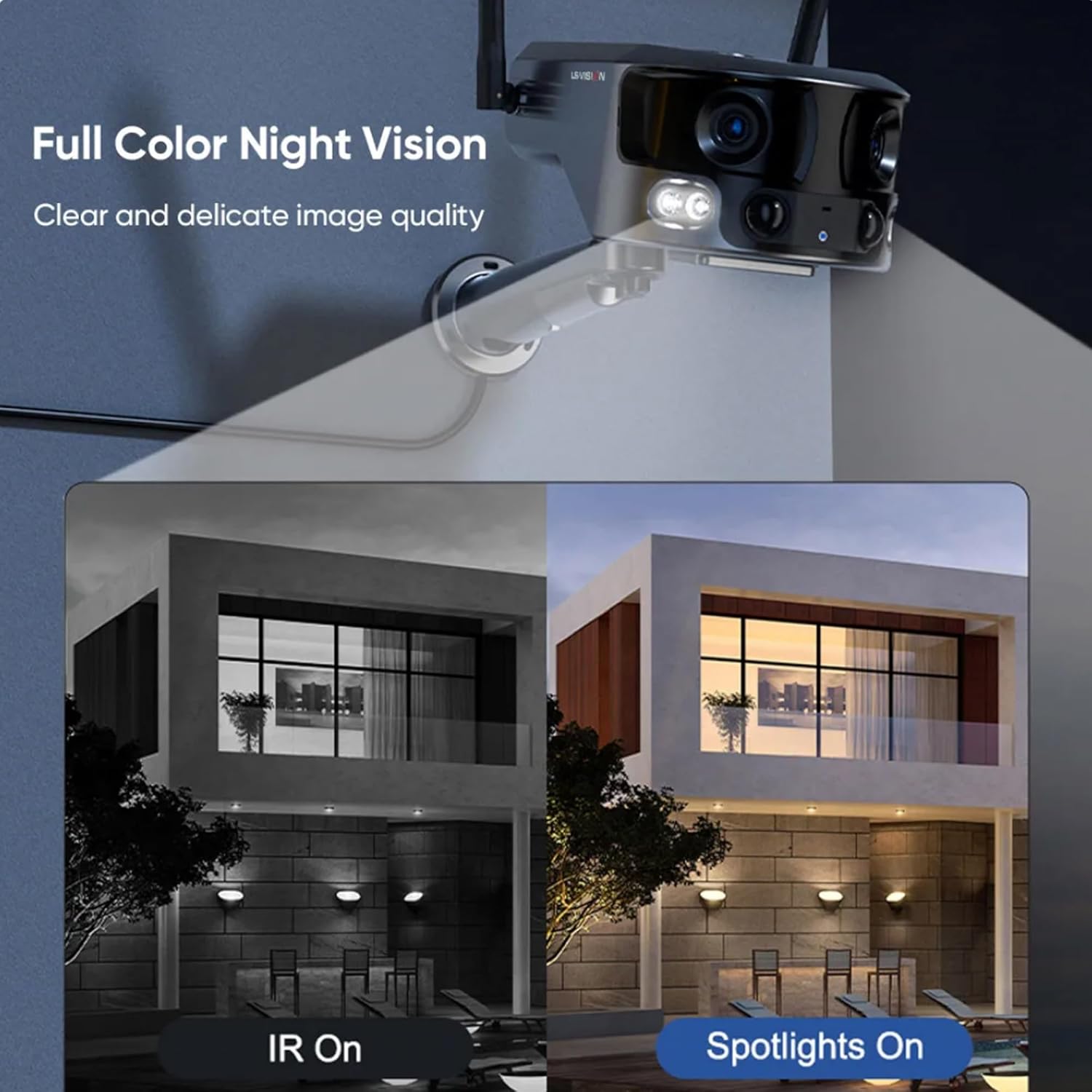
Figure 5.3: Comparison illustrating the difference between standard IR night vision and full-color night vision when the camera's spotlights are active.
5.4 الصوت ثنائي الاتجاه
Utilize the built-in microphone and speaker for two-way audio communication through the Niview app. This allows you to listen in on the camera's surroundings and speak through the camera.
5.5 أوضاع التسجيل
The camera supports various recording modes to suit your needs:
- 24-Hour Continuous Recording: Records continuously throughout the day.
- Trigger Recording: Records only when motion or human detection is triggered. This mode has three sub-options for customization.
6. الصيانة
تضمن الصيانة الدورية الأداء الأمثل وطول عمر الكاميرا:
- تنظيف: امسح عدسة الكاميرا واللوحة الشمسية بشكل دوري بقطعة قماش ناعمة.amp استخدم قطعة قماش لإزالة الغبار والشوائب. لا تستخدم مواد كيميائية قاسية.
- العناية بالبطارية: Ensure the solar panel is exposed to sufficient sunlight to keep the built-in batteries charged. In prolonged periods of low sunlight, consider manually charging the camera.
- تحديثات البرامج الثابتة: Check the Niview app regularly for firmware updates. Keeping the firmware updated ensures the latest features and security patches.
- حماية البيئة: While IP66 rated, avoid exposing the camera to extreme weather conditions beyond its specified operating range if possible.

Figure 6.1: The camera's IP66 industrial-grade waterproof design ensures reliable operation even in adverse outdoor weather conditions like rain.
7. استكشاف الأخطاء وإصلاحها
إذا واجهت مشكلات مع الكاميرا، فراجع المشكلات والحلول الشائعة التالية:
| مشكلة | السبب المحتمل | حل |
|---|---|---|
| الكاميرا غير متصل | No 4G signal; Low battery; SIM card issue. | Check 4G signal strength; Recharge battery; Reinsert SIM card or try a different one. |
| جودة الصورة رديئة | Dirty lens; Insufficient light; Network bandwidth. | Clean the lens; Ensure adequate lighting or enable night vision; Check 4G network speed. |
| كشف الحركة لا يعمل | Detection sensitivity too low; Incorrect settings; Obstructions. | Adjust sensitivity in app; Verify detection zone settings; Clear any obstructions. |
| البطارية لا تشحن | Insufficient sunlight; Dirty solar panel; Faulty connection. | Relocate solar panel to direct sunlight; Clean solar panel; Check cable connections. |
إذا استمرت المشكلة، يرجى الاتصال بدعم العملاء.
8. المواصفات
| ميزة | مواصفة |
|---|---|
| اسم الموديل | LS-MS2 |
| دقة التقاط الفيديو | 4K |
| Viewزاوية جي | 180 درجة (واسع للغاية) |
| تكنولوجيا الاتصال | 4G Cellular Network (also supports Wi-Fi) |
| مصدر الطاقة | يعمل بالطاقة الشمسية (لوحة شمسية بقدرة 6 واط) |
| سعة البطارية | 18000 مللي أمبير (مدمجة) |
| مدى الرؤية الليلية (ملون) | حتى 20 أمتار |
| مدى الرؤية الليلية (الأشعة تحت الحمراء) | حتى 40 أمتار |
| تخزين | Cloud Storage, TF Card (Max 128GB, not included) |
| تصنيف مقاومة الماء | IP66 |
| مادة | Acrylonitrile Butadiene Styrene (ABS) and Metal |
| نوع التثبيت | حامل الحائط |
| الأجهزة المتوافقة | Tablet, Smartphone (Android/iOS) |
| أبعاد المنتج | 18 × 18 × 15 سم |
| وزن العنصر | 1.25 كيلوغرام |
9. معلومات الضمان
This product comes with a standard manufacturer's warranty. For specific warranty terms, duration, and claim procedures, please refer to the warranty card included in your product packaging or contact the retailer/manufacturer directly. Keep your purchase receipt as proof of purchase.
10. دعم العملاء
For technical assistance, product inquiries, or troubleshooting beyond this manual, please contact LS VISION customer support. Contact details can typically be found on the product packaging, the manufacturer's official webالموقع، أو من خلال نقطة الشراء الخاصة بك.
Ask a question about this manual
Ask about setup, troubleshooting, compatibility, parts, safety, or missing instructions. Manuals+ will review the question and use this page’s manual context to help answer it.