
فيترو AL800
Vetroo AL800 Mid Tower ATX PC Computer Case
دليل التعليمات
مقدمة
This manual provides detailed instructions for the assembly, operation, and maintenance of your Vetroo AL800 Mid Tower ATX PC Computer Case. Please read this manual thoroughly before beginning installation to ensure proper setup and optimal performance.

Figure 1: Vetroo AL800 Mid Tower ATX PC Computer Case (Black)
معلومات السلامة
- افصل دائمًا مصدر الطاقة من مأخذ الحائط قبل تثبيت أو إزالة أي مكونات.
- تعامل مع المكونات بحرص لتجنب تلفها بسبب التفريغ الكهروستاتيكي. يُنصح باستخدام سوار معصم مضاد للكهرباء الساكنة.
- Keep the case and components away from liquids and excessive humidity.
- تأكد من التهوية المناسبة لمنع ارتفاع درجة الحرارة.
- لا تحاول تعديل الهيكل أو مكوناته، لأن ذلك قد يبطل الضمان الخاص بك ويشكل مخاطر على السلامة.
محتويات الحزمة
تأكد من وجود جميع العناصر في العبوة:
- Vetroo AL800 Mid Tower ATX PC Computer Case
- صندوق الملحقات (البراغي، الفواصل، روابط الكابلات)
- Pre-installed 1x 120mm PWM/ARGB Fan (rear)
- دليل المستخدم (هذا المستند)
الميزات الرئيسية
- ARGB LED Strip: Integrated LED lighting and ARGB case fans can be synchronized with compatible motherboards via a 5V 3-pin interface.
- Door Opening Design: Features a 4mm thick tempered glass side panel with a convenient door-opening mechanism for easy access to internal components.
- High Performance Airflow: A mesh front panel and strategically placed dust filters ensure optimal airflow and system cooling.
- التوافق الواسع: Supports ATX, M-ATX, and ITX motherboards. Accommodates GPUs up to 340mm in length and CPU coolers up to 165mm in height.
- دعم التبريد السائل: Front panel supports up to a 360mm liquid cooling radiator.
- دعم المشجعين: يدعم ما يصل إلى 8 مراوح بحجم 120 مم.
- إدارة بسيطة للكابلات: Includes two soft silicone cord grommets for organized cable routing.
- Powerful I/O Panel: Features 1x USB 3.2 Type-C port, 2x USB 3.0 ports, and a combined microphone/headphone jack.
الإعداد والتثبيت
1. التحضير العام
- ضع العلبة على سطح مستوٍ وثابت.
- Open the tempered glass side panel by gently pulling it open. It is hinged for easy access.
- Remove the tempered glass panel if necessary for easier installation by lifting it off its hinges once open.

Figure 2: Tempered Glass Door Opening Design
2. تركيب اللوحة الأم
- قم بتركيب غطاء الإدخال/الإخراج (إن وجد) في الفتحة الخلفية للهيكل.
- Align your ATX, M-ATX, or ITX motherboard with the pre-installed standoffs.
- قم بتثبيت اللوحة الأم باستخدام البراغي المرفقة من علبة الملحقات.
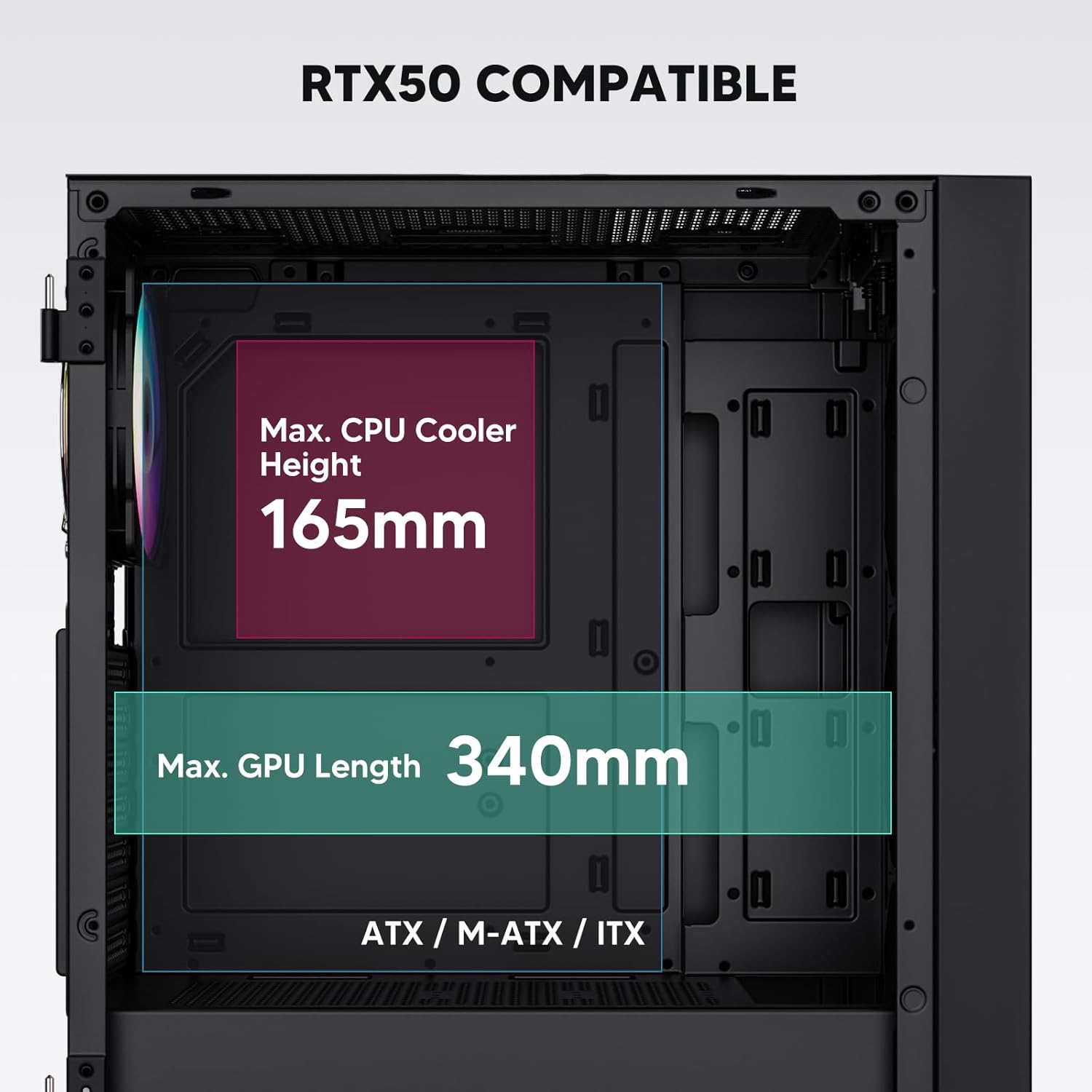
Figure 3: Motherboard and Component Clearance (Max CPU Cooler Height 165mm, Max GPU Length 340mm)
3. Storage Device Installation (HDD/SSD)
- Locate the dedicated mounting points for SSDs and HDDs.
- Install 2.5" SSDs onto the SSD trays or mounting brackets.
- قم بتركيب محركات الأقراص الصلبة مقاس 3.5 بوصة في قفص محركات الأقراص الموجود في الجزء السفلي من الهيكل.
- Secure all drives with the appropriate screws.

Figure 4: Internal Layout with Drive Bay Locations (SSD, HDD, Power Supply)
4. تركيب التيار الكهربائي
- Mount your power supply unit (PSU) in the dedicated compartment at the bottom rear of the case.
- Ensure the PSU fan faces downwards (if the case has a bottom vent) or upwards, depending on your cooling preference.
- Secure the PSU with screws from the rear of the case. The case supports PSUs up to 200mm in length.
5. تركيب بطاقة التوسعة (GPU)
- قم بإزالة أغطية فتحات PCI-E اللازمة من الجزء الخلفي من الهيكل.
- أدخل بطاقة الرسومات أو بطاقات التوسعة الأخرى في فتحات PCI-E الموجودة على اللوحة الأم.
- Secure the cards with screws. The case supports GPUs up to 340mm in length.
6. Cooling System Installation (Fans/Radiators)
- The case comes with one pre-installed 120mm PWM/ARGB fan at the rear.
- Additional fans (120mm or 140mm) can be installed at the front, top, and bottom.
- Liquid cooling radiators up to 360mm can be installed at the front, and up to 240mm at the top.
- Refer to the diagram for supported fan and radiator configurations.

Figure 5: Fan and Liquid Radiator Support Diagram
7. توصيلات اللوحة الأمامية
- Connect the front panel cables (Power, Reset, USB 3.0, USB Type-C, HD Audio) to the corresponding headers on your motherboard.
- Consult your motherboard manual for the exact pin layout of these headers.
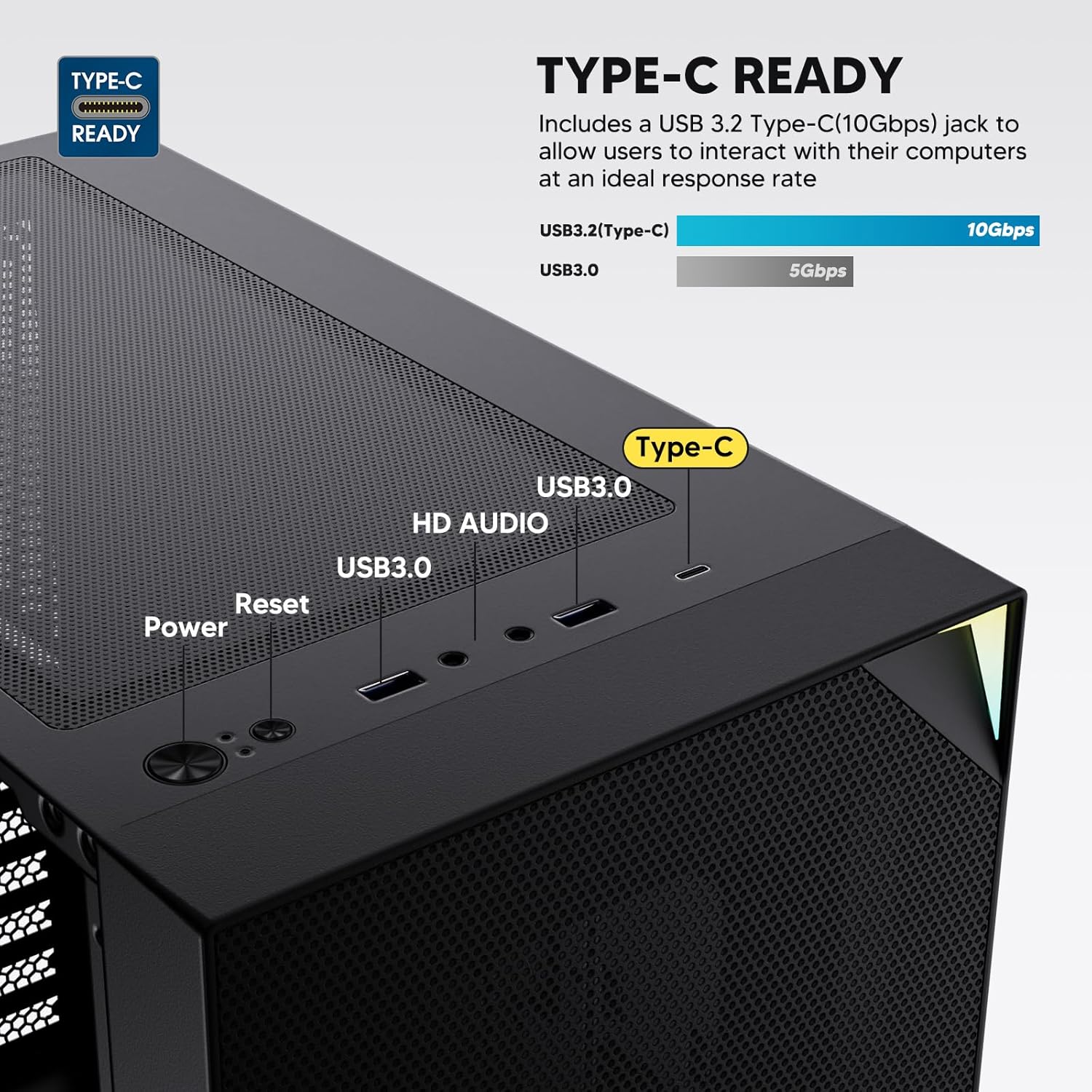
Figure 6: Top I/O Panel Connections
8. ARGB and PWM Connections
- The pre-installed fan and ARGB LED strip require connection to your motherboard.
- Connect the 4-pin PWM connector from the fan to a compatible fan header on your motherboard for speed control.
- Connect the 3-pin ARGB connector from the fan and LED strip to a 5V 3-pin ARGB header on your motherboard for lighting synchronization. لا تقم بالتوصيل بموصل RGB بجهد 12 فولت، لأن ذلك سيؤدي إلى تلف مصابيح LED.
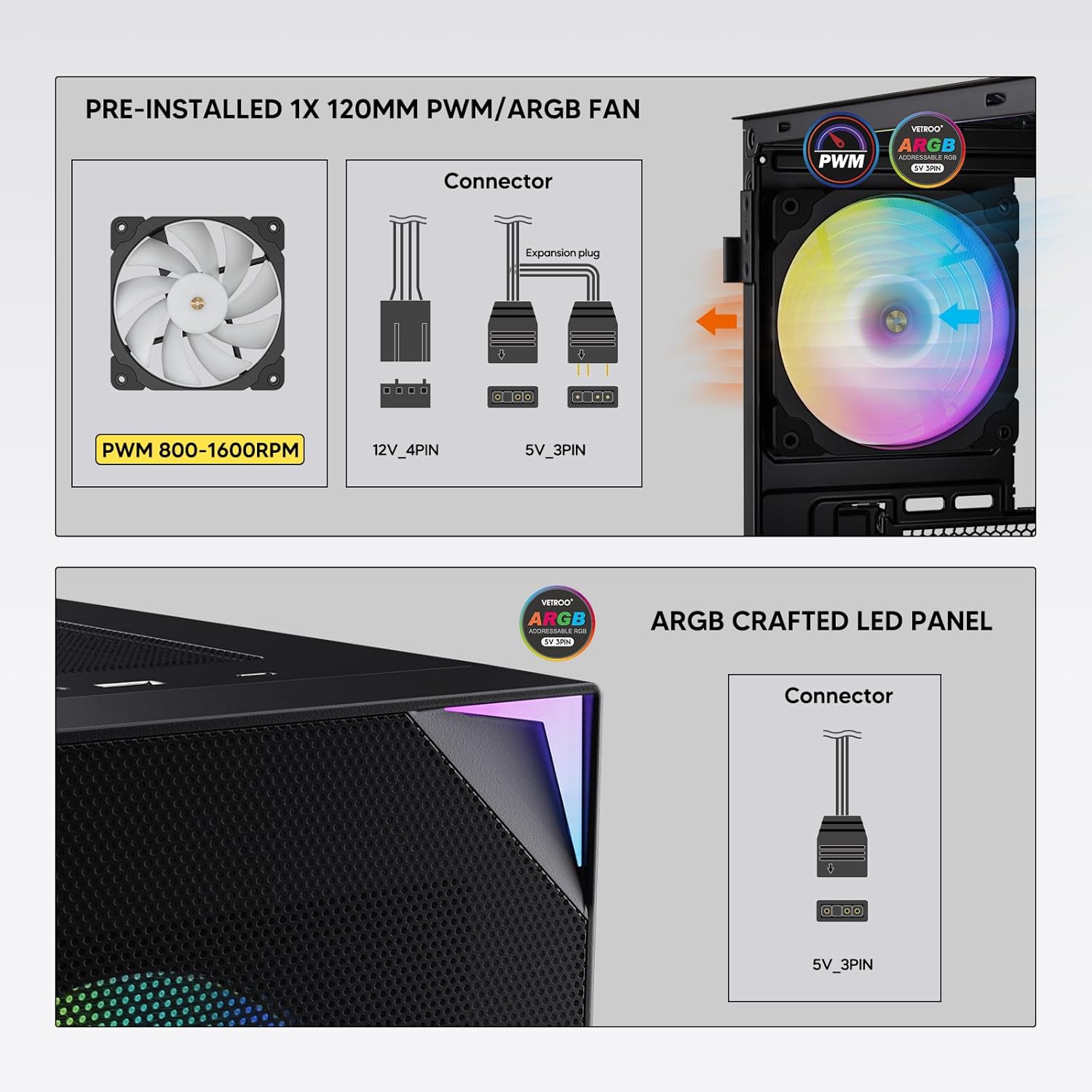
Figure 7: PWM and ARGB Connector Details
9. إدارة الكابلات
- Utilize the cable routing cutouts and tie-down points behind the motherboard tray to organize cables.
- The soft silicone grommets help protect cables and provide a clean look.
- Proper cable management improves airflow and aesthetics.
عملية
1. التشغيل الأولي
- After all components are securely installed and cables connected, close the tempered glass side panel.
- قم بتوصيل الشاشة ولوحة المفاتيح والماوس وكابل الطاقة بجهاز الكمبيوتر.
- قم بتحريك مفتاح الطاقة الموجود على وحدة تزويد الطاقة إلى وضع "التشغيل".
- Press the power button on the top I/O panel of the case to start your system.
2. التحكم في إضاءة ARGB
- If connected to a compatible motherboard's 5V 3-pin ARGB header, the lighting of the pre-installed fan and LED strip can be controlled via your motherboard's RGB software (e.g., ASUS Aura Sync, MSI Mystic Light Sync, Gigabyte RGB Fusion, ASRock Polychrome Sync).
- راجع دليل اللوحة الأم للحصول على تعليمات محددة حول استخدام برنامج التحكم ARGB الخاص بها.
3. إدارة تدفق الهواء
- The mesh front panel is designed for optimal air intake.
- Ensure that intake fans (typically front and bottom) and exhaust fans (typically rear and top) are configured to create positive or neutral air pressure for efficient cooling and dust prevention.

Figure 8: Airflow Diagram with Dust Filters
صيانة
1. تنظيف فلتر الغبار
- The case is equipped with dust filters on the top and bottom panels.
- Regularly check and clean these filters to maintain optimal airflow and prevent dust buildup inside the system.
- Gently remove the magnetic dust filters and clean them with compressed air or by rinsing with water (ensure they are completely dry before re-installation).
2. Tempered Glass Panel Care
- Clean the tempered glass panel with a soft, lint-free cloth and a non-abrasive glass cleaner.
- Avoid harsh chemicals or abrasive materials that could scratch or damage the glass.
استكشاف الأخطاء وإصلاحها
- النظام لا يعمل:
- تأكد من توصيل كابل الطاقة بشكل آمن بكل من وحدة تزويد الطاقة ومأخذ الحائط.
- تأكد من أن مفتاح PSU في وضع التشغيل.
- تأكد من توصيل كابل زر الطاقة في اللوحة الأمامية بشكل صحيح بموصل اللوحة الأم.
- Confirm all power cables (24-pin ATX, CPU, GPU) are properly seated in the motherboard and components.
- المراوح لا تدور / إضاءة ARGB لا تعمل:
- Check that the fan's PWM connector is securely plugged into a motherboard fan header.
- Verify the ARGB 3-pin connector is correctly attached to a 5V 3-pin ARGB header on the motherboard (not 12V RGB).
- تأكد من تثبيت برنامج ARGB الخاص بلوحة الأم وتكوينه بشكل صحيح.
- منافذ USB لا تعمل:
- Confirm the USB 3.0 and USB Type-C front panel cables are correctly connected to their respective motherboard headers.
- Check your motherboard manual for correct header locations.
- For other component-specific issues, refer to the instruction manuals for your motherboard, CPU, GPU, and other installed hardware.
تحديد
| ماركة | فيتروو |
| اسم الموديل | ال800 |
| رقم موديل العنصر | VT-CASE-AL800-BK (FBA) |
| نوع الحالة | البرج الاوسط |
| التوافق مع اللوحة الأم | ATX، M-ATX، ITX |
| لون | أسود |
| مادة | المعدن والزجاج المقسّى |
| وزن العنصر | 12.37 رطل (حوالي 5.61 كجم) |
| أبعاد المنتج (الطول × العرض × الارتفاع) | 18.4 × 8.6 × 17.9 بوصة (حوالي 46.7 × 21.8 × 45.5 سم) |
| أقصى طول GPU | 340 ملم |
| أقصى ارتفاع لمبرد وحدة المعالجة المركزية | 165 ملم |
| أقصى طول PSU | 200 ملم |
| منافذ الإدخال / الإخراج الأمامية | 1x USB 3.2 Type-C, 2x USB 3.0, HD Audio (Mic/Headphone), Power, Reset |
| دعم المشجعين | Front: 3x 120mm or 2x 140mm; Top: 2x 120mm or 2x 140mm; Rear: 1x 120mm; Bottom: 2x 120mm |
| دعم المبرد | Front: 120/140/240/280/360mm; Top: 120/140/240mm; Rear: 120mm |
| مراوح مثبتة مسبقًا | 1x 120mm PWM/ARGB (Rear) |
الضمان والدعم
For warranty information, technical support, or to inquire about replacement parts, please visit the official Vetroo webالموقع الإلكتروني أو تواصل مع خدمة العملاء مباشرةً. احتفظ بإثبات الشراء لطلبات الضمان.
Official Vetroo Store: Vetroo Amazon Store
Ask a question about this manual
Ask about setup, troubleshooting, compatibility, parts, safety, or missing instructions. Manuals+ will review the question and use this page’s manual context to help answer it.