
WEWATCH S3
دليل مستخدم جهاز العرض الذكي WEWATCH S3
الموديل: S3
العلامة التجارية: WEWATCH
1. المقدمة
Thank you for choosing the WEWATCH S3 Smart Projector. This projector integrates an Android operating system, offering a seamless entertainment experience with built-in streaming applications. It features 4K Ultra-HD resolution, 500 ANSI lumens brightness, 20000:1 contrast, electronic focus, 4-point keystone correction, and versatile connectivity options including dual-band WiFi and Bluetooth. This manual provides essential information for setting up, operating, maintaining, and troubleshooting your projector to ensure optimal performance and longevity.
2. معلومات السلامة
يرجى قراءة جميع تعليمات السلامة بعناية قبل استخدام جهاز العرض. احتفظ بهذا الدليل للرجوع إليه مستقبلاً.
- مزود الطاقة: استخدم محول الطاقة المرفق فقط. تأكد من أن مستوى الصوتtagيتوافق مع متطلبات جهاز العرض.
- تهوية: لا تسد فتحات التهوية. تأكد من وجود تدفق هواء كافٍ حول جهاز العرض لمنع ارتفاع درجة حرارته.
- التعرض السائل: Do not expose the projector to rain, moisture, or any liquids. Avoid placing objects filled with liquids, such as vases, on the projector.
- تنظيف: افصل جهاز العرض عن الكهرباء قبل التنظيف. استخدم قطعة قماش ناعمة وجافة. لا تستخدم المنظفات السائلة أو البخاخات.
- الموقع: ضع جهاز العرض على سطح مستوٍ وثابت. تجنب وضعه في ضوء الشمس المباشر، أو بالقرب من مصادر الحرارة، أو في بيئات بها غبار أو رطوبة زائدة.
- حماية العين: لا تنظر مباشرة إلى عدسة جهاز العرض عندما يكون الضوءamp يتم تشغيله، لأن الضوء الساطع يمكن أن يسبب تلفًا للعين.
- الخدمة: لا تحاول خدمة هذا المنتج بنفسك. قم بإحالة جميع أعمال الصيانة إلى أفراد الخدمة المؤهلين.
3. محتويات العبوة
يرجى التحقق من محتويات العبوة عند فتح الصندوق:
- WEWATCH S3 Smart Projector
- جهاز التحكم عن بعد
- محول الطاقة
- كابل HDMI
- دليل المستخدم
4. انتهى المنتجview
Familiarize yourself with the components and ports of your WEWATCH S3 projector.

أمام view of the WEWATCH S3 Smart Projector, showcasing the lens and sleek design.
منافذ التوصيل

مؤخرة view of the WEWATCH S3 Projector, highlighting the various input and output ports including LAN, USB, HDMI, AV, and headphone jack.
The projector is equipped with multiple ports for diverse connectivity:
- منفذ LAN (x1): للاتصال بالإنترنت السلكي.
- منافذ USB (x2): For connecting USB drives or other USB devices.
- منافذ HDMI (x2): For connecting devices like laptops, gaming consoles, or TV sticks.
- منفذ AV (x1): لتوصيل أجهزة الصوت/الفيديو القديمة.
- مقبس سماعة الرأس (3.5،XNUMX ملم): لتوصيل أجهزة الصوت الخارجية أو سماعات الرأس.
5. الإعداد
5.1 موضع الشاشة وحجمها
Position the projector on a stable surface. The projection distance determines the screen size. You can achieve a large screen size of up to 300 inches.
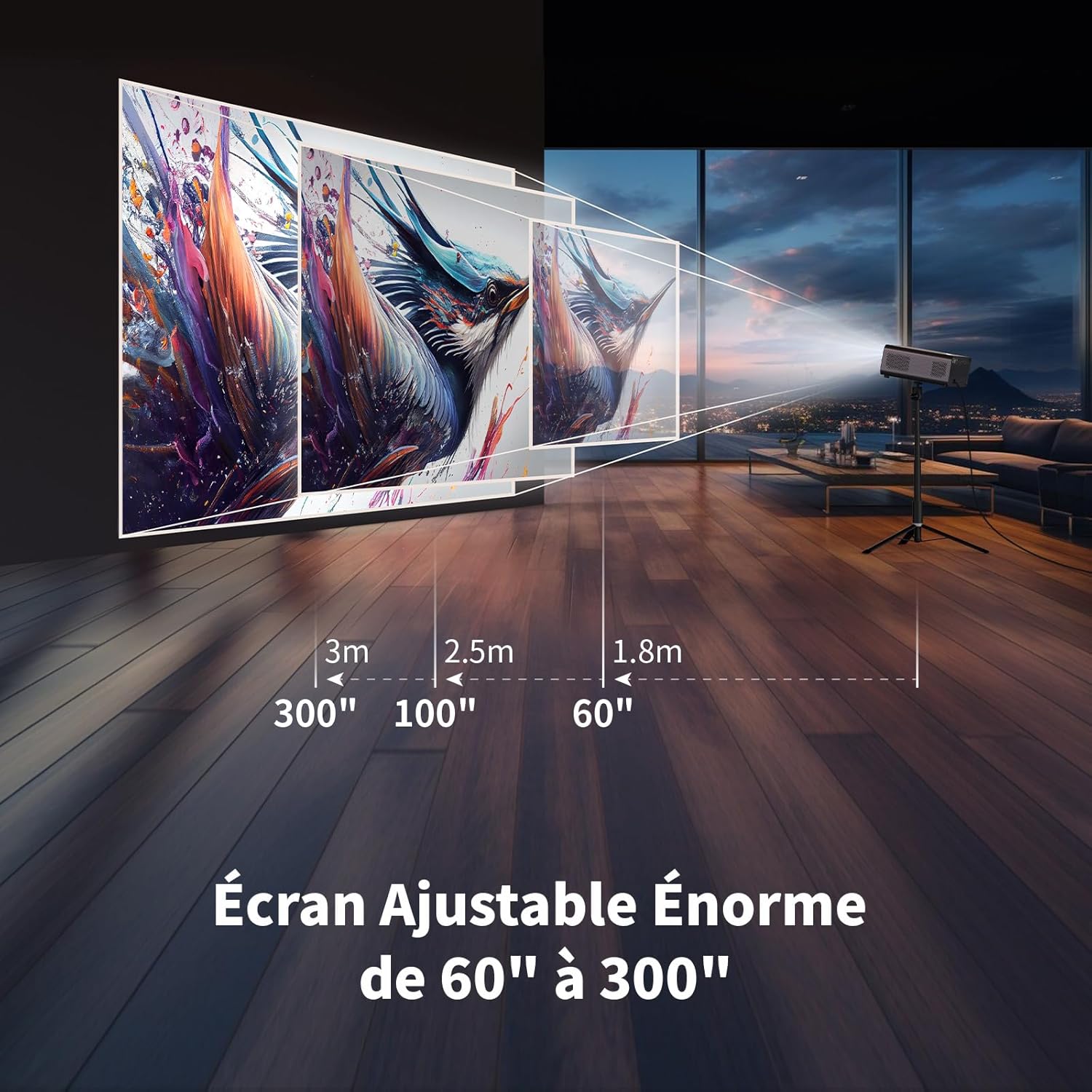
Illustration showing recommended projection distances for various screen sizes, from 60 inches at 1.8m to 300 inches at 3m.
5.2 توصيل الطاقة
Connect the power adapter to the projector's power input and then plug it into a wall outlet. Press the power button on the projector or remote control to turn it on.
5.3 التركيز الإلكتروني
Achieve a clear image quickly using the electronic focus function. Use the F+ and F- buttons on the remote control to adjust the focus until the image is sharp.

Image demonstrating the remote control's F+ and F- buttons for electronic focus adjustment, and the visual effect of keystone correction on the projected image.
5.4 تصحيح الانحراف
The projector supports 4-point keystone correction and automatic vertical correction to ensure a rectangular image, regardless of the projection angle. Adjust these settings in the projector's menu if needed.
5.5 وظيفة التكبير
The zoom function allows you to reduce the image size from 100% to 80% without moving the projector. This can be adjusted via the projector's settings menu.

Visual representation of the projector's zoom function, showing how the image size can be reduced from 100% to 50% without physically moving the projector.
6. التشغيل
6.1 Android OS and Built-in Applications
The WEWATCH S3 features an integrated Android operating system, providing direct access to popular streaming services like Netflix, YouTube, Prime Video, Disney+, and KODI. When using these applications, switch the remote control to mouse mode for optimal navigation. Remember to switch back to normal mode after use.

A user relaxing and watching content projected from the WEWATCH S3, showing the Android interface with icons for Netflix, YouTube, Prime Video, and other streaming applications.
6.2 الاتصال اللاسلكي (واي فاي وبلوتوث)
The projector supports dual-band 2.4G+5G WiFi for fast and stable connections with iOS, Android, and Windows devices. Bluetooth functionality allows you to connect external speakers for enhanced audio or Bluetooth headphones for private listening.

A person holding a smartphone, wirelessly mirroring its content to the WEWATCH S3 projector, demonstrating the 2.4/5G WiFi and Bluetooth capabilities for seamless content sharing.
6.3 توصيل الأجهزة الخارجية
Utilize the HDMI, USB, LAN, and AV ports to connect various external devices such as TV sticks, USB drives, laptops, gaming consoles, or older media players for diverse content playback.
6.4 وضع مكبر الصوت بتقنية البلوتوث
The projector can function as a standalone Bluetooth speaker. Connect your smartphone or other Bluetooth-enabled devices to the projector to play music, utilizing its built-in HiFi 5W speaker.
7. الصيانة
7.1 Dust Box Cleaning
The WEWATCH S3 features a hidden dust box designed to prevent dust from entering the projector. Regularly clean the dust box to maintain optimal performance and image quality.

مفصل view of the WEWATCH S3 Projector showing the hidden dust box compartment and the internal fan system, with arrows indicating airflow for cooling.
7.2 العناية العامة
- Keep the projector clean and free from dust.
- قم بتخزين جهاز العرض في مكان بارد وجاف عندما لا يكون قيد الاستخدام.
- Avoid touching the lens directly. Use a lens cleaning cloth if necessary.
8. استكشاف الأخطاء وإصلاحها
إذا واجهت مشكلات مع جهاز العرض الخاص بك، فراجع المشكلات والحلول الشائعة التالية:
| مشكلة | السبب المحتمل | حل |
|---|---|---|
| لم يتم عرض أي صورة | كابل الطاقة مفكوك؛ مصدر الإدخال غير صحيح؛ غطاء العدسة موجود. | تحقق من توصيل الطاقة؛ حدد مصدر الإدخال الصحيح (HDMI، USB، إلخ)؛ قم بإزالة غطاء العدسة. |
| صورة ضبابية | Focus not adjusted; Projector too far/close; Keystone not adjusted. | Adjust electronic focus (F+/F-); Adjust projection distance; Perform keystone correction. |
| لا يوجد صوت | Volume too low; Muted; External speaker not connected properly. | Increase volume; Unmute; Check external speaker connection or try built-in speaker. |
| مشاكل في اتصال الواي فاي/البلوتوث | كلمة مرور غير صحيحة؛ الجهاز خارج نطاق التغطية؛ تداخل. | Verify password; Move device closer; Reduce interference from other devices. |
| Apps not working correctly | Remote not in mouse mode; App needs update; Internet connection issue. | Switch remote to mouse mode; Check for app updates; Verify internet connection. |
9. المواصفات
Detailed technical specifications for the WEWATCH S3 Smart Projector:
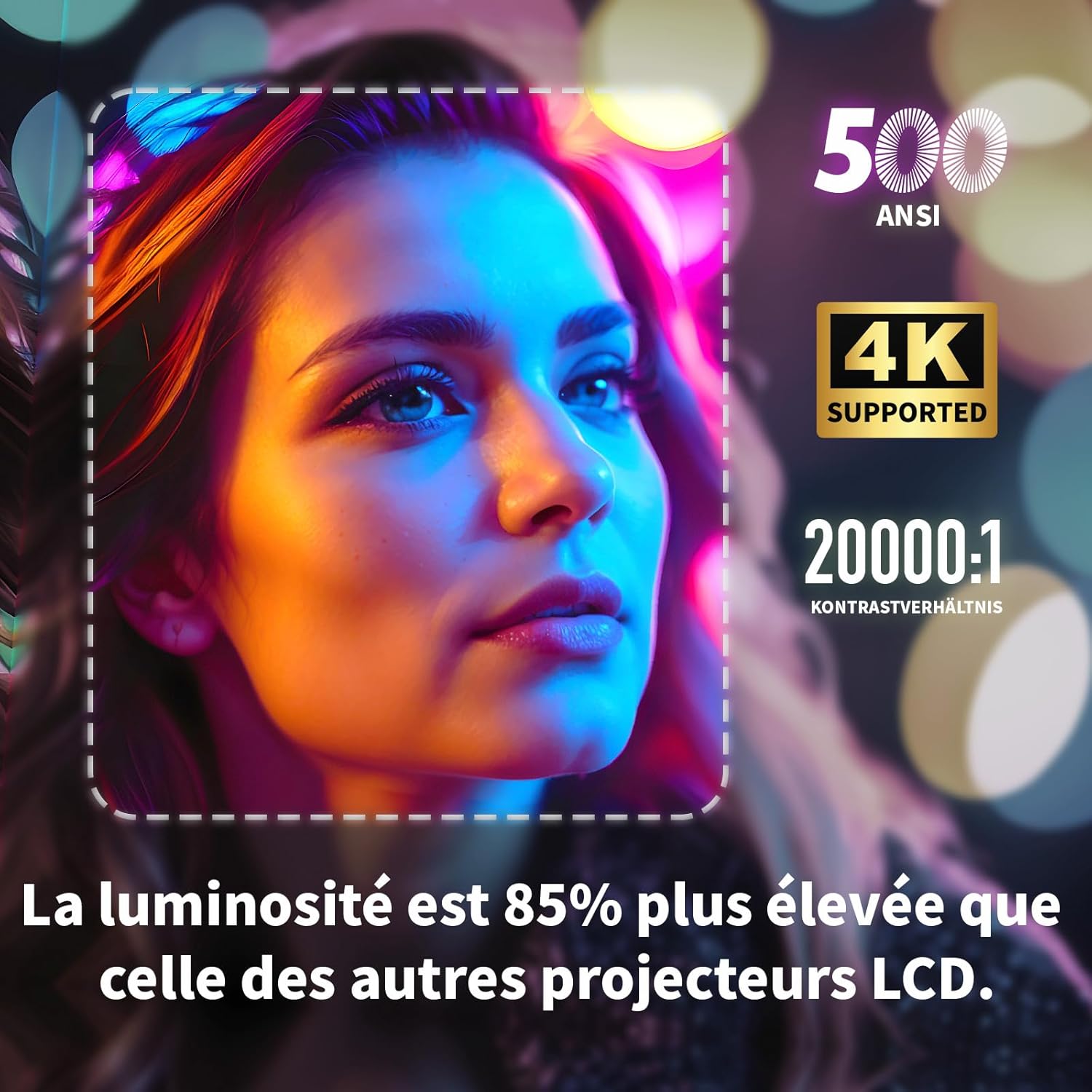
Visual highlighting key specifications: 500 ANSI lumens, 4K support, and 20000:1 contrast ratio, indicating 85% higher brightness than other LCD projectors.
| ميزة | مواصفة |
|---|---|
| ماركة | ساعة |
| رقم الموديل | S3 |
| لون | رمادي |
| دقة العرض | 3840 × 2160 (4K Ultra HD) |
| سطوع | شموم شمعة أنسي |
| نسبة التباين | 20000:1 |
| نظام التشغيل | Android OS (with built-in Netflix, YouTube, Prime Video, Disney+, KODI) |
| تكنولوجيا الاتصال | Bluetooth, Ethernet, HDMI, Wi-Fi (2.4G+5G dual-band) |
| المميزات الخاصة | Electronic Focus, 4-Point Keystone Correction, Automatic Vertical Correction, Zoom (80%-100%), Built-in Speakers, Dust-proof Design |
| حجم الشاشة | حتى 300 بوصة |
| صوتي | Integrated HiFi 5W Speaker, Bluetooth Speaker Mode |
| أبعاد | 24.3 لترًا × 24.9 عرضًا × 10.5 ارتفاعًا سم |
| منافذ USB | 2 |
10. الضمان والدعم
WEWATCH products come with a standard manufacturer's warranty. For detailed warranty information, technical support, or service inquiries, please refer to the warranty card included in your package or visit the official WEWATCH website. Please have your product model number (S3) and purchase information ready when contacting support.
Ask a question about this manual
Ask about setup, troubleshooting, compatibility, parts, safety, or missing instructions. Manuals+ will review the question and use this page’s manual context to help answer it.