
ISTOVO 00371819A2
ISTOVO TS18 Car Navigation System User Manual
Model: 00371819A2 | Brand: ISTOVO
1. انتهى المنتجview
The ISTOVO TS18 is an intelligent car navigation system designed to enhance your driving experience with advanced features and seamless connectivity. This unit integrates a 10.33-inch display, a powerful 8-core processor, and runs on Android 11.0, offering a comprehensive infotainment solution for your vehicle.

الصورة: الجبهة view of the ISTOVO TS18 car navigation system, displaying its sleek design and large screen when powered off.
2. الميزات الرئيسية
- نظام التشغيل: أندرويد 11.0
- المعالج: 9863 8-Core Processor
- تخزين الذاكرة: ذاكرة وصول عشوائي 4 جيجابايت + سعة تخزين داخلية 64 جيجابايت
- الاتصال: Full 4G Network Connection, Bluetooth 5.0, USB
- صوتي: 48-Segment Audio Processing, AM+FM+RDS Radio
- دقة العرض: 1280 × 720
- Reversing Camera Support: AHD/720P
- اندماج: Supports CARPLAY and Android Auto
- المميزات الخاصة: Text-to-Speech, Integration with third-party apps
3. المواصفات
| ميزة | مواصفة |
|---|---|
| الشركة المصنعة | ISTOVO |
| رقم الموديل | 00371819أ2 |
| أبعاد المنتج | 25 × 15 × 5 سم |
| نوع التركيب | جبل لوحة القيادة |
| تكنولوجيا الاتصال | USB |
| نوع الخريطة | شارع |
| وضع إخراج الصوت | ستيريو |
4. الإعداد
4.1 فك الصندوق والفحص الأولي
- افتح عبوة المنتج بعناية.
- Remove the ISTOVO TS18 host unit and all accessories.
- افحص جميع المكونات بحثًا عن أي علامات تلف أثناء النقل. في حال وجود أي تلف، يرجى الاتصال بخدمة العملاء فورًا.
- Verify that all listed components are present: 1 x Host unit, necessary cables (not explicitly listed but implied by installation).
4.2 التثبيت
Installation typically involves connecting the unit to your vehicle's power supply, audio system, and other relevant inputs. Professional installation is recommended for optimal performance and safety.

الصورة: الخلفية view of the ISTOVO TS18 unit, highlighting the various connection ports for power, antenna, GPS, and other peripherals.
- توصيل الطاقة: Connect the main power harness to the corresponding port on the back of the unit. Ensure correct polarity.
- اتصال الهوائي: Connect the GPS antenna to the dedicated GPS port and the radio antenna to the ANT port.
- USB/Auxiliary Connections: Connect any USB devices or auxiliary inputs as required.
- كاميرا الرجوع للخلف: If installing a reverse camera, connect its video output to the AHD/720P input port.
- التركيب: Securely mount the unit in your vehicle's dashboard using appropriate mounting hardware.
5. تعليمات التشغيل
5.1 التنقل الأساسي والشاشة الرئيسية
Upon powering on, the device will display the home screen with various application icons.

Image: The home screen of the ISTOVO TS18, displaying a grid of common application icons for quick access.
- واجهة شاشة تعمل باللمس: Navigate the system by tapping on icons and swiping across the screen.
- زر الصفحة الرئيسة: Tap the home icon (usually a house symbol) to return to the main home screen from any application.
- زر الرجوع: Use the back arrow to return to the previous screen or menu.
- التطبيقات الأخيرة: Access recently used applications through the multi-tasking button (often three horizontal lines or squares).
5.2 الاتصال بالشبكة
To utilize online features such as navigation maps, app downloads, or streaming, the device requires an internet connection.

Image: The navigation screen displaying a prompt to connect to the internet to download map data, indicating the need for network access.
- اتصال واي فاي: Go to Settings > Network & Internet > Wi-Fi. Select your desired Wi-Fi network and enter the password.
- 4G اتصال: Ensure your SIM card is correctly inserted (if applicable) and mobile data is enabled in Settings > Network & Internet > Mobile network.
5.3 استخدام التطبيقات
The system comes pre-installed with various applications and supports downloading more from the app market.
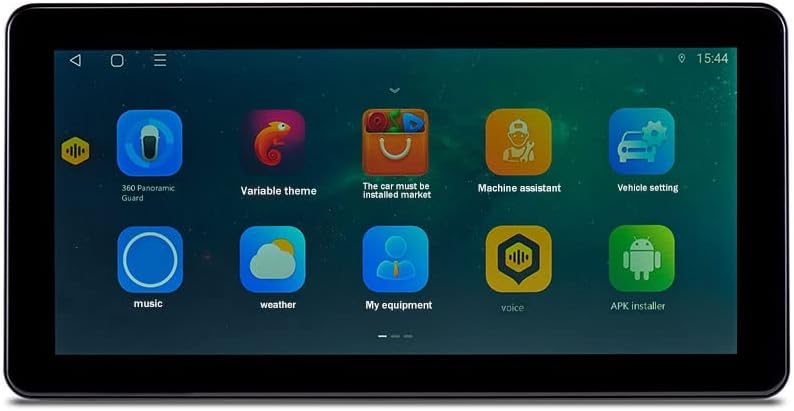
Image: A screen capture of the ISTOVO TS18 showing additional application icons, including utilities and customization options.
- تطبيقات الملاحة: Tap on the navigation app icon (e.g., Amap) to start route planning.
- تشغيل الوسائط: Use the 'Music' or 'Video' apps to play audio or video files from connected storage or streaming services.
- بلوتوث: Pair your smartphone via Bluetooth for hands-free calling and audio streaming. Go to Settings > Connected devices > Bluetooth.
أبدا الإعدادات المتقدمة
Access the system settings to customize various aspects of the device's operation.

Image: The screen displaying icons for advanced system tools and utilities, such as GPS testing and digital sound processing.
- إعدادات الصوت: Adjust equalizer, balance, and other audio parameters in the sound settings.
- اعدادات العرض: Modify brightness, wallpaper, and screen timeout.
- تحديثات النظام: Check for and install system software updates to ensure optimal performance and access to new features.
6. الصيانة
- تنظيف: استخدم قطعة قماش ناعمة وجافة لتنظيف الشاشة والجزء الخارجي. تجنب المنظفات أو المذيبات الكاشطة.
- تحديثات البرامج: Regularly check for and install system updates to ensure the device runs smoothly and securely.
- النسخ الاحتياطي للبيانات: Periodically back up important data or settings if the device allows for it.
- درجة حرارة: Avoid exposing the device to extreme temperatures, which can affect its performance and lifespan.
7. استكشاف الأخطاء وإصلاحها
| مشكلة | السبب المحتمل | حل |
|---|---|---|
| الجهاز لا يعمل | انقطاع التيار الكهربائي؛ توصيلات كهربائية خاطئة؛ احتراق الفيوز | Check vehicle's power supply; Verify wiring connections; Inspect and replace fuse if necessary. |
| لا يوجد إشارة GPS | GPS antenna not connected; Antenna obstructed; Poor satellite reception | Ensure GPS antenna is securely connected; Relocate antenna to a clear view of the sky; Move to an open area. |
| البلوتوث غير متصل | Bluetooth off; Device not in pairing mode; Interference | Ensure Bluetooth is enabled on both devices; Put the unit in pairing mode; Try pairing in a different location. |
| الشاشة لا تستجيب | Software glitch; System freeze | Perform a soft reset (refer to device manual for specific steps); If issue persists, contact support. |
8. الضمان والدعم
For warranty information, please refer to the documentation provided with your purchase or contact the seller directly. ISTOVO provides customer support for technical assistance and inquiries.
- الشركة المصنعة: ISTOVO
- ASIN: B0CK7973FZ
- أول تاريخ متاح: 18 أكتوبر 2023
For further assistance, please visit the official ISTOVO support webالموقع أو الاتصال بخدمة العملاء الخاصة بهم.
Ask a question about this manual
Ask about setup, troubleshooting, compatibility, parts, safety, or missing instructions. Manuals+ will review the question and use this page’s manual context to help answer it.