
1. المقدمة
This manual provides detailed instructions for the operation and maintenance of your FANGOR F-CD-143 Portable CD Player and Bluetooth Speaker. This device offers a versatile audio experience, functioning as a standalone portable CD player or combining with its detachable Bluetooth speaker base for enhanced sound. Please read this manual thoroughly before using the product to ensure proper function and longevity.
2. محتويات العبوة
Please check the package contents upon unboxing to ensure all items are present.
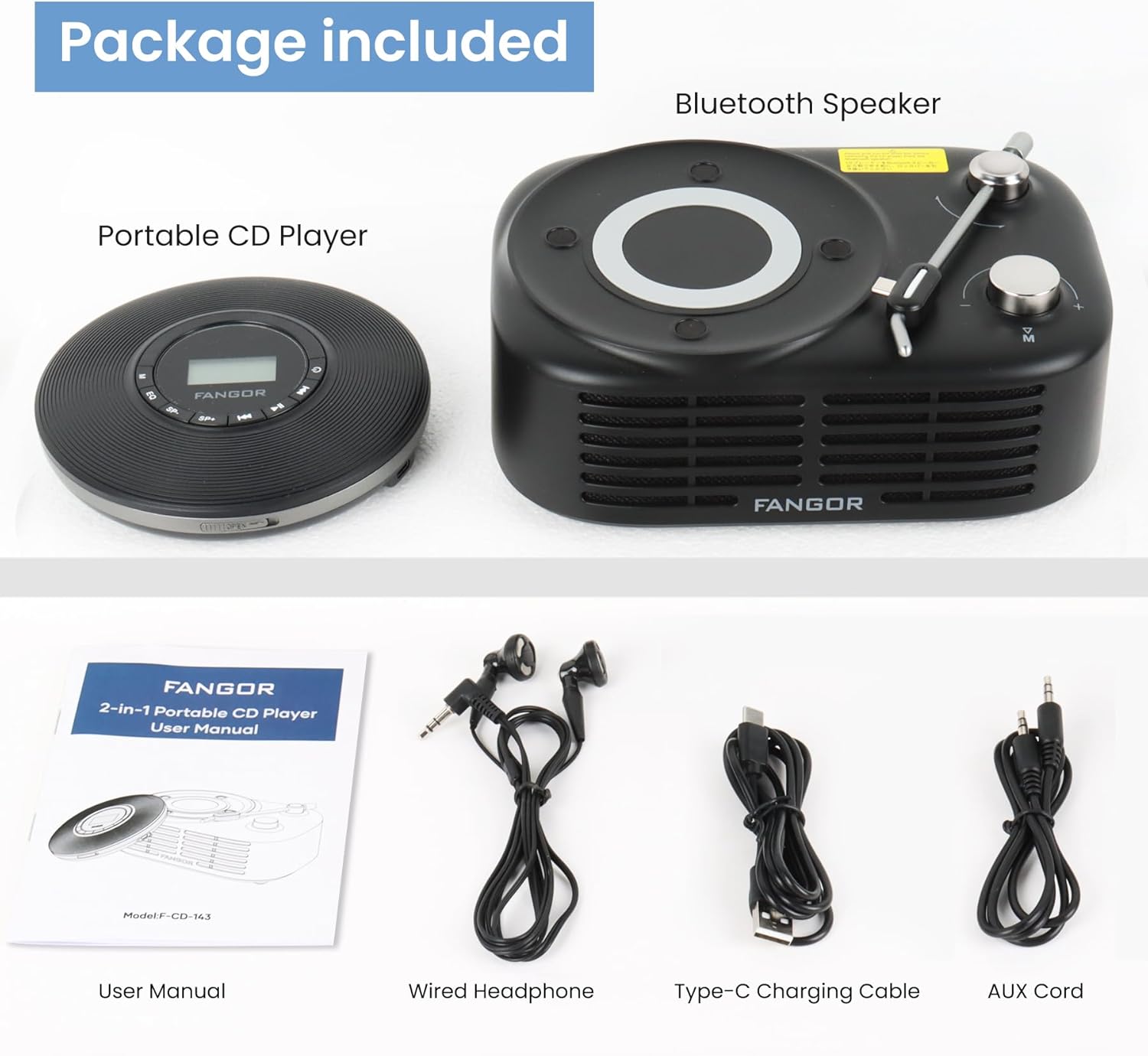
Figure 2.1: Package Contents. The image displays the portable CD player, the Bluetooth speaker base, a user manual, wired headphones, a Type-C charging cable, and an AUX cord.
- مشغل سي دي محمول
- قاعدة مكبر صوت بلوتوث
- دليل المستخدم (هذا المستند)
- سماعة سلكية
- كابل شحن من النوع C
- سلك AUX
3. انتهى المنتجview
The FANGOR F-CD-143 is a versatile audio device designed for both personal and shared listening experiences. It features a portable CD player that can be used independently with wired headphones or connected to the included Bluetooth speaker base.

Figure 3.1: 2-in-1 Portable CD Player & Bluetooth Speaker. The top half shows a person using the portable CD player with wired headphones. The bottom half shows the Bluetooth speaker base with 'Bluetooth 5.3' indicated.
3.1 الميزات الرئيسية
- تصميم قابل للفصل: Use the CD player independently or with the Bluetooth speaker base.
- توافق تنسيق واسع: Supports CD, MP3, CD-R, CD-RW, CD-DA, WMA (WAV must be below 128 bitrate) formats.
- تشغيل بطاقة TF: Supports TF cards up to 32GB for additional music options.
- حماية ضد التخطي: 60-second Electronic Skip Protection (ESP) system prevents playback interruptions.
- شاشة LCD بإضاءة خلفية: Allows clear viewing of information in various lighting conditions.
- أوضاع تشغيل متعددة: Includes A-B repeat, repeat all, and repeat single track.
- المؤثرات الصوتية: Features 5 sound effects: BBS, POP, JAZZ, ROCK, Original Sound.
- وظيفة الذاكرة الأخيرة: Resumes playback from the last stopped position.
- الاتصال: 3.5mm AUX output for wired headphones or external speakers. Bluetooth 5.3 for wireless connection to the speaker base or other Bluetooth devices.
- بطارية قابلة لإعادة الشحن مدمجة: Provides long-lasting playtime for portable use.
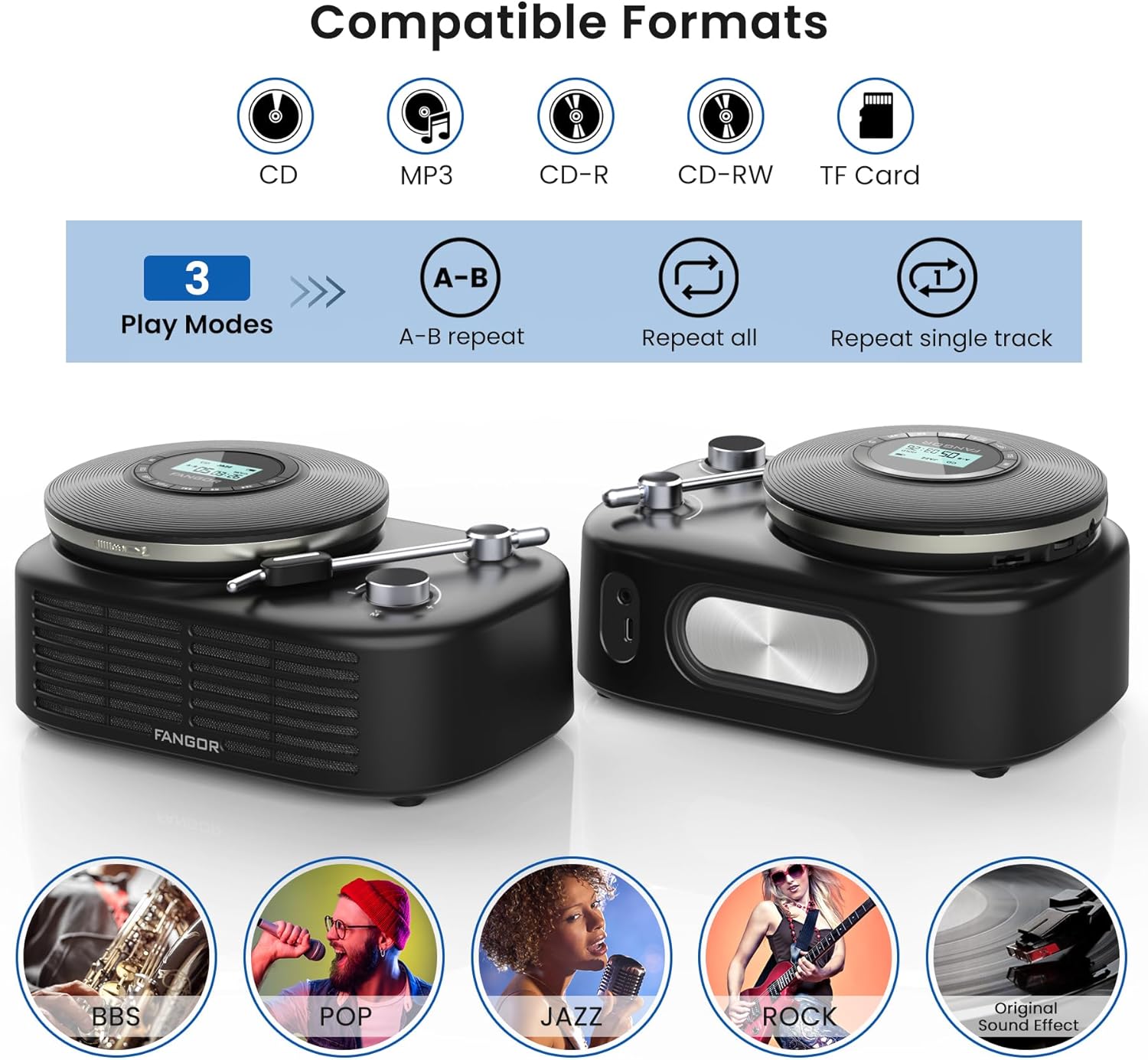
Figure 3.2: Compatible Formats, Play Modes, and Sound Effects. This image illustrates the various audio formats supported by the device, the available playback modes, and the different sound equalization options.

Figure 3.3: HIFI Stereo Sound and Connectivity. The image highlights the dual speakers of the Bluetooth base and its ability to connect via Bluetooth 5.3 or AUX to various devices like tablets, computers, and mobile phones.
4. الإعداد
4.1 شحن الجهاز
The portable CD player has a built-in rechargeable battery. Before first use, fully charge the device.
- Connect the provided Type-C charging cable to the charging port on the portable CD player.
- Connect the other end of the cable to a compatible USB power source (e.g., wall charger, power bank, computer USB port, car charger).
- سيضيء مؤشر الشحن أثناء الشحن وينطفئ عند اكتمال الشحن.

Figure 4.1: Built-in Rechargeable Battery and Charging Options. This image demonstrates the flexibility of charging the portable CD player using common USB power sources.
4.2 Assembling the CD Player with Bluetooth Speaker Base
To use the CD player with the Bluetooth speaker base, align the CD player with the designated slot on the speaker base and gently press until it clicks into place. Ensure a secure connection.
4.3 إدخال قرص مضغوط
- Open the CD compartment cover on the portable CD player.
- Carefully place the CD with the label side facing up onto the spindle.
- Gently press the center of the CD until it is securely seated on the spindle.
- أغلق غطاء حجرة الأقراص المدمجة بإحكام.
4.4 توصيل سماعات الرأس أو مكبرات الصوت الخارجية
- سماعات رأس سلكية: Plug the wired headphones into the 3.5mm AUX output jack on the portable CD player.
- External Speakers (Wired): Use the provided AUX cord to connect the 3.5mm AUX output jack of the CD player to the AUX input of an external speaker system.
- External Speakers (Bluetooth): The Bluetooth speaker base can connect to other Bluetooth devices. Refer to section 5.3 for Bluetooth pairing instructions.
5. تعليمات التشغيل
5.1 تشغيل الأقراص المدمجة الأساسي
- Ensure a CD is properly inserted and the device is powered on.
- اضغط على تشغيل/إيقاف مؤقت button to start playback. The track number and elapsed time will be shown on the LCD display.
- يضعط تشغيل/إيقاف مؤقت اضغط عليه مرة أخرى لإيقاف التشغيل مؤقتًا. اضغط عليه مرة أخرى لاستئناف التشغيل.
- اضغط على القفز إلى الأمام زر للانتقال إلى المسار التالي.
- اضغط على تخطي للخلف button to return to the beginning of the current track. Press it twice quickly to go to the previous track.
- اضغط على قف زر لإيقاف التشغيل.
5.2 التحكم في مستوى الصوت
اضبط مستوى الصوت باستخدام ملف المجلد+ و المجلد- buttons on the portable CD player. If using the Bluetooth speaker base, additional volume control may be available on the speaker itself or the connected Bluetooth device.
5.3 Bluetooth Pairing (Speaker Base)
The Bluetooth speaker base can be used independently as a Bluetooth speaker.
- Ensure the Bluetooth speaker base is powered on.
- قم بتفعيل البلوتوث على جهازك الخارجي (مثل الهاتف الذكي أو الجهاز اللوحي).
- بحث عن available Bluetooth devices. The speaker base will appear as "FANGOR Speaker" or similar.
- Select the speaker from the list to pair. Once paired, a confirmation sound may be heard.
5.4 تشغيل بطاقة TF
- Insert a TF card (up to 32GB) into the TF card slot on the portable CD player.
- The device should automatically switch to TF card mode. If not, press the وضع button to select TF card playback.
- استخدم تشغيل/إيقاف مؤقت و يتخطى أزرار للتحكم في التشغيل.
5.5 وظيفة التكرار AB
The A-B repeat function allows you to repeatedly play a specific segment of a track. This is particularly useful for language learning or musical practice.

Figure 5.1: Ideal for Language Learners and Audiobook Enthusiasts. This image demonstrates a practical application of the device's features, such as A-B repeat, for educational purposes.
- أثناء التشغيل، اضغط على أب button once to set the starting point (A).
- اضغط على أب button again to set the ending point (B). The segment between A and B will now repeat.
- اضغط على أب button a third time to cancel the A-B repeat function.
5.6 المؤثرات الصوتية (معادل الصوت)
اضغط على EQ button repeatedly to cycle through the available sound effects: BBS, POP, JAZZ, ROCK, Original Sound. Select the effect that best suits your listening preference.
5.7 وظيفة الذاكرة الأخيرة
The device automatically remembers the last playback position. When you power on the CD player again, it will resume from where it last stopped.
6. الصيانة
6.1 تنظيف الجهاز
- Always power off the device and disconnect it from any power source before cleaning.
- Use a soft, dry cloth to wipe the exterior surfaces. Do not use abrasive cleaners, waxes, or solvents.
- بالنسبة لعدسة القرص المضغوط، استخدم طقم تنظيف خاص بعدسات الأقراص المضغوطة. لا تلمس العدسة مباشرة.
6.2 العناية بالبطارية
- لإطالة عمر البطارية، تجنب تفريغ البطارية بالكامل بشكل متكرر.
- في حالة تخزين الجهاز لفترة طويلة، قم بشحنه إلى حوالي 50% كل بضعة أشهر.
- تجنب تعريض الجهاز لدرجات حرارة قصوى، لأن ذلك قد يؤدي إلى تدهور أداء البطارية.
6.3 التخزين
Store the device in a cool, dry place away from direct sunlight, dust, and moisture when not in use.
7. استكشاف الأخطاء وإصلاحها
If you encounter issues with your FANGOR F-CD-143, please refer to the following common problems and solutions.
| مشكلة | السبب المحتمل | حل |
|---|---|---|
| CD does not play / No sound | CD inserted incorrectly; CD is dirty or scratched; Headphones/speakers not connected; Volume too low; Device not powered on. | Ensure CD is inserted correctly (label side up); Clean or replace CD; Check headphone/speaker connection; Increase volume; Power on the device. |
| التخطي أثناء التشغيل | CD is scratched or dirty; Device is subjected to strong vibrations; ESP system malfunction. | Clean or replace CD; Use the device on a stable surface; Ensure ESP is active (60 seconds anti-skip protection). |
| Bluetooth speaker not pairing | Speaker not in pairing mode; Bluetooth disabled on external device; Speaker too far from external device. | Ensure speaker is powered on and in pairing mode; Enable Bluetooth on your external device; Move speaker closer to the external device (within 10 meters). |
| بطاقة TF غير معترف بها | TF card inserted incorrectly; TF card corrupted; Unsupported file format on TF card. | Reinsert TF card correctly; Try a different TF card; Ensure music files are in supported formats (MP3, WMA). |
| الجهاز لا يعمل | تم استنزاف البطارية؛ لم يتم الضغط على زر الطاقة بشكل صحيح. | اشحن الجهاز بالكامل؛ اضغط مع الاستمرار على زر التشغيل لبضع ثوانٍ. |
8. المواصفات
| ميزة | مواصفة |
|---|---|
| ماركة | فانجور |
| رقم الموديل | F-CD-143 |
| تكنولوجيا الاتصال | Auxiliary, Bluetooth 5.3 |
| المميزات الخاصة | Portable, Detachable Bluetooth Speaker Base, Anti-Skip Protection, Backlit LCD Display, A-B Repeat, Last Memory |
| تنسيقات الصوت المدعومة | CD, MP3, CD-R, CD-RW, CD-DA, WMA (WAV below 128 bitrate) |
| نوع تنسيق الوسائط | CD-R |
| دعم بطاقة TF | الحد الأقصى 32 جيجابايت |
| نوع الموصل | 3.5mm Jack (AUX output), Type-C (Charging) |
| عدد الأقراص | 1 |
| الأجهزة المتوافقة | Headphone, Speaker, Phones, Tablets, Smart TVs (via Bluetooth speaker base) |
| الوسائط المدمجة | مشغل أقراص ليزرية |
9. الضمان والدعم
FANGOR is committed to providing high-quality products and services. Your FANGOR F-CD-143 Portable CD Player and Bluetooth Speaker comes with:
- 365-Day No-Reason Replacement: If you encounter any issues within 365 days of purchase, you are eligible for a replacement.
- الدعم الفني مدى الحياة: Our professional after-sales team is available to provide technical assistance for the lifetime of the product.
For any inquiries or support needs, please contact our customer service team. We aim to handle all issues properly within 24 hours.