
ATOMSTACK OMTA24PRO
دليل مستخدم جهاز النقش والقطع بالليزر ATOMSTACK A24 Pro
Model: OMTA24PRO
1. المقدمة
This manual provides essential information for the safe and efficient operation of your ATOMSTACK A24 Pro Laser Engraver and Cutter. Please read this manual thoroughly before operating the machine and keep it for future reference.
The ATOMSTACK A24 Pro is a high-power 20W laser engraving and cutting machine, featuring a 0.06 x 0.06 mm ultra-fine laser focus area. It is designed for precise engraving and efficient cutting of various materials, including wood, acrylic, and certain metals, with cutting capabilities comparable to a 300W CO₂ laser engraving machine.
2. احتياطات السلامة
Operating a laser machine requires strict adherence to safety guidelines to prevent injury and damage. Always prioritize safety.
- حماية العين: The laser module includes a protective cover to shield the user's eyes. However, it is highly recommended to wear additional certified laser safety goggles during operation.
- تهوية: تأكد من وجود تهوية كافية في منطقة العمل لتبديد الأبخرة والدخان الناتج أثناء النقش والقطع.
- سلامة المواد: Only engrave or cut materials specified as safe for laser processing. Avoid materials that produce toxic fumes or are highly flammable.
- خطر الحريق: Keep a fire extinguisher nearby. Never leave the machine unattended during operation.
- الأطفال والحيوانات الأليفة: Keep children and pets away from the machine during operation. The laser protective cover helps prevent accidental contact with the laser point.
- مزود الطاقة: Use only the provided power adapter. Ensure the power supply meets the machine's requirements (AC 100-240 V, 50/60 Hz, Output: 24 V, 5 A).
- التوقف في حالات الطوارئ: تعرّف على موقع ووظيفة زر التوقف الطارئ.
3. مكونات المنتج
The ATOMSTACK A24 Pro comes with the following components:
- 1 x ATOMSTACK A24 Pro Laser Engraving Machine Frame
- 1 x Laser Module
- 1 x Cable Chain
- 1 × برغي التثبيت
- 1 × مجموعة أدوات
- 1 x Fixed Focus Film
- 3 x Acrylic Plates
- 3 x Wood Chips
- شنومكس x العلاقات الكابل
- 1 × مجفف
- شنومكس x فرشاة
- 1 x Dust-free Cloth
- 1 × محول الطاقة
- 1 × دليل المستخدم (هذه الوثيقة)
- 1 × كابل بيانات (USB)

الصورة: أكثر منview of the accessories and components included with the ATOMSTACK A24 Pro.
4. دليل الإعداد
The ATOMSTACK A24 Pro features a unibody aluminum alloy casting, requiring no complex installation. It is designed for immediate use.
- فك التعبئة: قم بإزالة جميع المكونات من العبوة بعناية. افحصها بحثًا عن أي تلف حدث أثناء النقل.
- الموقع: Place the machine on a stable, level, and heat-resistant surface in a well-ventilated area. Ensure sufficient space around the machine for operation and material handling.
- توصيل الطاقة: Connect the provided power adapter to the machine's power input and then to a suitable electrical outlet.
- اتصال USB: Connect the machine to your computer using the supplied USB data cable.
- تثبيت البرنامج: Install the recommended operating software (LaserGRBL or LightBurn) on your computer. The machine supports Win XP/Win 7/Win 8/XP/Win 10 systems. Refer to the software's documentation for installation and setup.
- Fixed Focus Adjustment: The laser module features a fixed-focus design, eliminating the need for manual focus adjustment. For initial setup or specific material thickness, use the provided fixed focus film to ensure optimal laser performance.

Image: The ATOMSTACK A24 Pro laser engraver, ready for operation.
5. تعليمات التشغيل
This section outlines the general steps for operating your ATOMSTACK A24 Pro.
- إعداد التصميم الخاص بك: Create or import your design using your chosen software (LaserGRBL, LightBurn). Supported file formats include NC, BMP, JPG, PNG, DXF.
- وضع المواد: Place the material to be engraved or cut onto the working area of the machine. Ensure it is flat and securely positioned.
- التمركز: Utilize the cross-positioning system for precise and horizontal engraving. This system aids in visual edge finding and object alignment.
- إعدادات البرنامج: Adjust laser power, speed, and passes in your software based on the material type and desired effect. The A24 Pro offers high precision (0.02 mm) and high-speed operation (up to 36000 mm/min).
- بدء العملية: Once all settings are confirmed and safety precautions are in place, initiate the engraving or cutting process from your software.
- يراقب: Continuously monitor the machine during operation. Be prepared to use the emergency stop if any issues arise.
- انتهاء: After the process is complete, allow the material to cool if necessary before handling. Disconnect the machine from power when not in use.

Image: Cross positioning system for accurate material placement.

Image: High-speed engraving capability of the ATOMSTACK A24 Pro.
5.1. Engraving and Cutting Capabilities
The ATOMSTACK A24 Pro is equipped with a 24W optical power laser module, utilizing second-generation fiber compression packaging technology for an ultra-fine laser spot of 0.06 x 0.06 mm. This allows for powerful cutting and fine engraving.
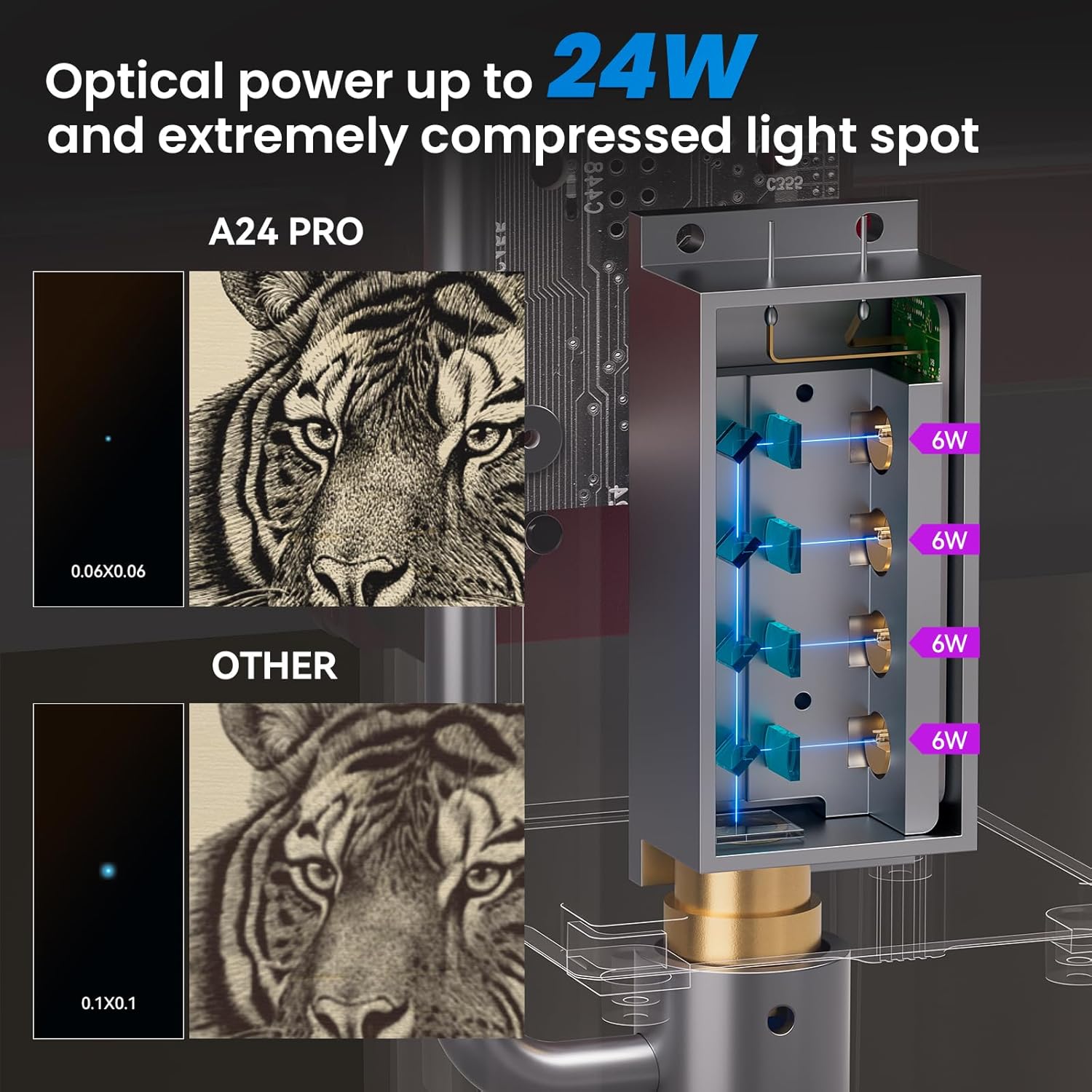
Image: Comparison of laser spot size, highlighting the A24 Pro's precision.

Image: Demonstration of the A24 Pro's high precision engraving.
المواد القابلة للنقش:
- Wood, Bamboo, Cardboard, Plastic, Leather, PCB, Aluminum Oxide, Non-reflective Electroplated and Painted Metal, 304 Mirror Stainless Steel, Glass, Ceramic, Cotton Cloth, Slate.
Cuttable Materials:
- Cardboard, Non-woven Fabrics, Wood Boards, Plywood (up to 20mm), Acrylic (transparent acrylic needs to be painted black, up to 30mm black acrylic), Some Thin Plastic Boards, Sponges, Aluminum and Stainless Steel (up to 0.05mm thick), and other metal sheets.

الصورة: السابقamples of maximum cutting thickness for various materials.

Image: Illustration of the long beam waist laser for enhanced deep cutting.

Image: Close-up of the Second Generation Packaged Blue Laser module.
6. الصيانة
Regular maintenance ensures the longevity and optimal performance of your ATOMSTACK A24 Pro.
- تنظيف العدسة: The laser module features a dual-layer wind cover design to prevent the lens from being blocked or soiled. However, periodic inspection and gentle cleaning of the laser lens with the provided dust-free cloth are recommended to maintain laser efficiency.
- إزالة الغبار: Regularly clean dust and debris from the machine's frame and moving parts using the provided brush or compressed air. Accumulation of dust can affect performance and lead to wear.
- تشحيم السكك الحديدية: Periodically check the X-axis guide rail for smooth movement. If necessary, apply a small amount of appropriate lubricant to ensure frictionless operation.
- تحديثات البرامج الثابتة: Check the official ATOMSTACK website for any available firmware updates for the 32-bit motherboard to ensure you have the latest features and performance enhancements.
7. استكشاف الأخطاء وإصلاحها
يتناول هذا القسم المشكلات الشائعة التي قد تواجهها والحلول المحتملة لها.
| مشكلة | السبب المحتمل | حل |
|---|---|---|
| الآلة لا تعمل. | توصيل الطاقة غير محكم، محول الطاقة معيب، مشكلة في مأخذ الطاقة. | Check all power connections. Try a different power outlet. Ensure the power adapter is functioning correctly. |
| الليزر لا يعمل أو أن إشارته ضعيفة. | Dirty laser lens, incorrect focus, low power setting in software, laser module issue. | Clean the laser lens. Verify focus using the fixed focus film. Increase laser power in software. Contact support if the issue persists. |
| Engraving/cutting results are inconsistent or inaccurate. | Material not flat/secure, incorrect speed/power settings, loose belts/components, software error. | Ensure material is flat and secured. Adjust speed and power settings. Check for any loose mechanical parts. Restart software and machine. |
| Software not connecting to the machine. | USB cable issue, driver not installed, incorrect COM port selected, software conflict. | Try a different USB port or cable. Ensure USB drivers are installed. Select the correct COM port in software. Close other applications. |
8. المواصفات الفنية
| ميزة | مواصفة |
|---|---|
| نموذج المنتج | ATOMSTACK A24 Pro |
| Engraving Dimensions | 370 × 310 ملم |
| قوة الآلة | 120 واط |
| Laser Optical Output Power | 24 واط |
| طول موجة الليزر | 455 ± 5 نانومتر |
| دقة النقش | 0.02 ملم |
| طريقة التركيز | Fixed focus laser, no focus adjustment needed |
| Laser Protection Cover | Yes, integrated cover to protect eyes |
| برنامج التشغيل | ليزر GRBL، لايت بيرن |
| أنظمة التشغيل المدعومة | Win XP/Win 7/Win 8/XP/Win 10 |
| مدعوم File التنسيقات | NC، BMP، JPG، PNG، DXF |
| طريقة نقل البيانات | اتصال USB |
| مزود الطاقة | International Standard Input: AC 100-240 V, 50/60 Hz; Output: 24 V, 5 A |
| الشهادات | CE، FCC، RoHS، FDA، PSE |
| أبعاد المنتج (الطول × العرض × الارتفاع) | 64 × 35 × 13 سم |
| وزن المنتج | 8.12 كجم |
9. معلومات الضمان
ATOMSTACK products are manufactured to high-quality standards. For information regarding warranty coverage and terms, please refer to the warranty card included with your product or visit the official ATOMSTACK website. Typically, products are eligible for a refund or replacement within 30 days of purchase, subject to the seller's return policy.
10. دعم العملاء
If you encounter any issues or have questions not covered in this manual, please contact ATOMSTACK customer support. Refer to the contact information provided on the product packaging or the official ATOMSTACK webالموقع للحصول على قنوات الدعم الأحدث.
When contacting support, please have your product model (ATOMSTACK A24 Pro) and serial number (if applicable) ready.
Ask a question about this manual
Ask about setup, troubleshooting, compatibility, parts, safety, or missing instructions. Manuals+ will review the question and use this page’s manual context to help answer it.