
1. المقدمة
This manual provides detailed instructions for the installation, operation, and maintenance of the DEWIN G2R 63A 2P Automatic Transfer Switch (ATS). This device is designed to automatically switch between two power sources, ensuring continuous power supply to your load.
The DEWIN G2R 63A 2P ATS features a compact structure, small size, and supports 35mm DIN rail installation, making it suitable for household distribution boxes. It offers extremely fast switching speed, resolving power outage issues efficiently.
2. معلومات السلامة
تحذير: خطر التعرض لصدمة كهربائية. يُنصح بإجراء التركيب والصيانة بواسطة فنيين مؤهلين فقط.
- Always disconnect power before installing or servicing the ATS.
- تأكد من أن جميع توصيلات الأسلاك آمنة وتتوافق مع القوانين الكهربائية المحلية.
- Do not operate the device if it is damaged or appears to be malfunctioning.
- The operating environment temperature range is -5°C to +40°C.
- The installation altitude must be below 2000 meters.
- The enclosure protection class of the ATS is IP30.
3. انتهى المنتجview
3.1 الميزات الرئيسية
- الأداء العالي: Electromagnetically driven for extremely fast switching, less than 50ms conversion time.
- جودة عالية: Flame-retardant shell for resistance to extreme environments, strong adaptability, and reliable operation.
- النقل التلقائي: Designed with common power supply, backup power supply, load power-on indicator, and clear switch status.
- Arc Extinction System: Internal arc extinction system for rapid cooling and arc suppression.
- سهل الاستخدام: Modular structure, same-side wire entry for convenient wiring, compact size, supports 35mm DIN rail installation.
3.2 Product Components and Dimensions
The DEWIN G2R 63A 2P ATS is a compact unit designed for efficient power management.

الشكل 1: الجبهة view of the DEWIN G2R 63A 2P Automatic Transfer Switch.

Figure 2: Dimensions of the DEWIN G2R 63A 2P Automatic Transfer Switch. The device measures approximately 45mm wide, 70mm high, and 105mm deep, with a 35mm DIN rail mounting width.
3.3 Panel Analysis
Understanding the control panel is crucial for proper operation.

Figure 3: Panel analysis showing common power supply indicator light (I), standby power indicator light (II), common power hand/automatic switch, commonly used power supply closing mechanical indication, operating handle, backup power closing mechanical indication, and load power indicator light.
3.4 المواصفات
| مواصفة | قيمة |
|---|---|
| وضع التشغيل | على-على |
| التيار المقدر | 63 أ |
| حجم التشغيلtage | 220 فولت |
| نوع الاتصال | مفتوح عادة |
| نوع الموصل | التجعيد |
| نوع المفتاح | مفتاح التحويل التلقائي |
| نوع المحطة الطرفية | أفسد |
| مادة | Polycarbonate and Copper |
| نوع الدائرة | 2-pole common circuit and auxiliary compatible |
| نوع التركيب | جبل السكك الحديدية DIN |
| نوع المحرك | المغناطيس الكهربائي |
| عدد الوظائف | 2 |
| درجة الحرارة القصوى المقدرة | 40 درجة مئوية |
| Control Device Type | زر ميكانيكي |
| طريقة التحكم | يلمس |
| بروتوكول الاتصال | دين |
| قوة | 13.86 واط |
| الأجهزة المتوافقة | Household electrical appliances, electronic equipment, 220V AC powered devices |
| تصنيف الحماية الدولية | IP30 |
| المواصفات المتوافقة | CCC, IEC 60669-2-1:2002 |
| وزن العنصر | 380 جرام |
4. الإعداد والتثبيت
4.1 التركيب
The ATS is designed for 35mm DIN rail mounting. Ensure the DIN rail is securely fastened within your distribution box or electrical panel.

Figure 4: The image illustrates the 35mm DIN rail installation method and the robust terminals for wiring.
4.2 مخطط الأسلاك
Proper wiring is essential for safe and correct operation. Refer to the diagram below for connecting the common power (I), backup power (II), and load output.
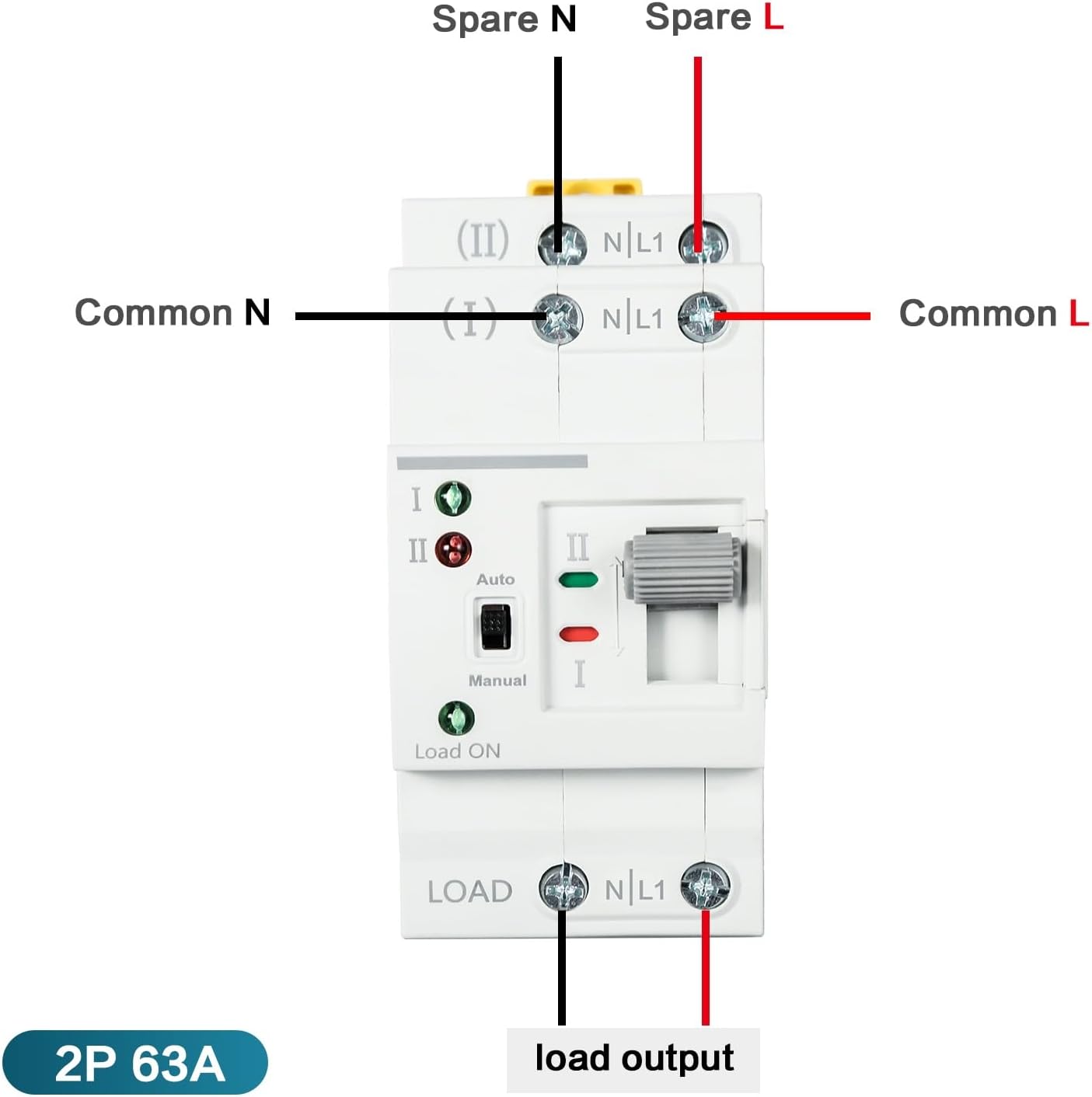
Figure 5: Wiring diagram showing connections for Common N, Common L, Spare N, Spare L, and Load Output. Ensure the input power supply is connected in the correct phase sequence.
5. تعليمات التشغيل
The DEWIN G2R 63A 2P ATS supports both automatic and manual operation modes.
5.1 الوضع التلقائي
In automatic mode, the switch will detect the presence of the common power supply (I) and the backup power supply (II). If the common power fails, the switch will automatically transfer the load to the backup power supply. When common power is restored, it will switch back.
- Set the 'Auto/Manual' switch to 'Auto'.
- The indicator lights (I and II) will show which power source is active.
- The 'Load ON' indicator will illuminate when power is supplied to the load.
5.2 الوضع اليدوي
To manually switch between power sources:
- Set the 'Auto/Manual' switch to 'Manual'.
- Use the operating handle to physically switch between position I (Common Power) and position II (Backup Power).
- Ensure the desired power source is selected and the corresponding indicator light is on.
6. الصيانة
The DEWIN G2R 63A 2P ATS is designed for reliable operation with minimal maintenance. However, periodic checks are recommended:
- التفتيش البصري: Regularly inspect the device for any signs of physical damage, loose connections, or overheating.
- تنظيف: Keep the device free from dust and debris. Use a dry, soft cloth for cleaning. Do not use liquids or abrasive cleaners.
- فحص الجهاز الطرفي: Periodically verify that all terminal screws are tight to prevent arcing and ensure good electrical contact.
افصل الطاقة دائمًا قبل إجراء أي صيانة.
7. استكشاف الأخطاء وإصلاحها
If you encounter issues with your ATS, consider the following common problems and solutions:
- لا يوجد طاقة للتحميل:
- Check if both common and backup power sources are active.
- Verify the 'Load ON' indicator is illuminated.
- Ensure the ATS is in 'Auto' mode or manually switched to an active power source. - Failure to Transfer Automatically:
- Confirm the 'Auto/Manual' switch is set to 'Auto'.
- Check the status of both power sources using their respective indicator lights.
- If the issue persists, consult a qualified electrician. - Overheating or Unusual Noises:
- Immediately disconnect power.
- This could indicate a serious electrical fault. Do not attempt to repair it yourself. Contact a qualified electrician.
8. الضمان والدعم
For warranty information and technical support, please refer to the product packaging or contact your retailer. Keep your purchase receipt as proof of purchase.