
ATOMSTACK A6 Pro
دليل المستخدم لآلة النقش بالليزر ATOMSTACK A6 Pro
Model: A6 Pro | Brand: ATOMSTACK
1. المقدمة
The ATOMSTACK A6 Pro is a high-performance laser engraving and cutting machine designed for precision and ease of use.Featuring a 6W ultra-high performance laser module and advanced blue-ray laser point compression technology,it offers exceptional cutting ability and fine engraving detail. Its integrated design ensures quick setup,making it suitable for various creative and professional applications.

الشكل 1.1: The ATOMSTACK A6 Pro Laser Engraving Machine, showcasinبفضل تصميمه المدمج والمتكامل.
2. معلومات السلامة والتحذيرات
تحذير: Laser engraving machines emit powerful laser radiation. Improper use can cause serious injury, including eye damage and skin burns.Always adhere to the following safety guidelines:
- حماية العين: Always wear appropriate laser safety goggles when operating the machine. Never look directly into the laser beam or its reflection.
- تهوية: Operate the machine in a well-ventilated area to dissipate fumes and smoke produced during engraving and cutting. Consider an exhaust system.
- خطر الحريق: Laser processing can ignite flammable materials. Do not leave the machine unattended during operation. Keep a fire extinguisher nearby.
- التوافق المادي: Only engrave or cut materials specified as safe for laser processing. Avoid materials that produce toxic fumes or can easily ignite.
- الأطفال والحيوانات الأليفة: أبقِ الأطفال والحيوانات الأليفة بعيدًا عن الجهاز أثناء التشغيل.
- مزود الطاقة: Use only the specified power adapter (AC 24V 5A) for the machine.
- التوقف في حالات الطوارئ: تعرف على موقع وطريقة تشغيل زر التوقف في حالات الطوارئ.

الشكل 2.1: Product information label including critical safety warnings regarding direct or scattered radiation.
3. الإعداد والتثبيت
The ATOMSTACK A6 Pro is designed for minimal setup, allowing you to start working quickly.
3.1 فك التعبئة
- قم بإزالة الجهاز وجميع المكونات من العبوة بعناية.
- Verify that all parts are present according to the packing list (refer to your product's specific packing list).

الشكل 3.1: The ATOMSTACK A6 Pro is designed for immediate use upon unboxing, requiring no complex assembly.
3.2 الوضع الأولي والتوصيل
- ضع الجهاز على سطح ثابت ومستوٍ وغير قابل للاشتعال. تأكد من وجود مساحة كافية حول الجهاز للتهوية والتشغيل.
- قم بتوصيل محول الطاقة بالجهاز، ثم بمأخذ الطاقة المناسب.
- Ensure the laser module is securely seated and the tank chain bundling for cables is properly aligned to prevent tangling.

الشكل 3.2: The tank chain bundling system ensures smooth and tangle-free cable operation, enhancing machine longevity.
4. تعليمات التشغيل
The ATOMSTACK A6 Pro offers versatile engraving and cutting capabilities.
4.1 تثبيت البرنامج والاتصال
The ATOMSTACK A6 Pro is compatible with Atomstack's self-developed PC software and supports various control methods.
- Download and install the latest version of Atomstack's PC software from the official website or use the provided mobile application.
- Connect the machine to your computer via USB or Wi-Fi (if supported by your model). For mobile app control, connect your device to the machine's hotspot.
- Ensure the software recognizes the machine before proceeding.
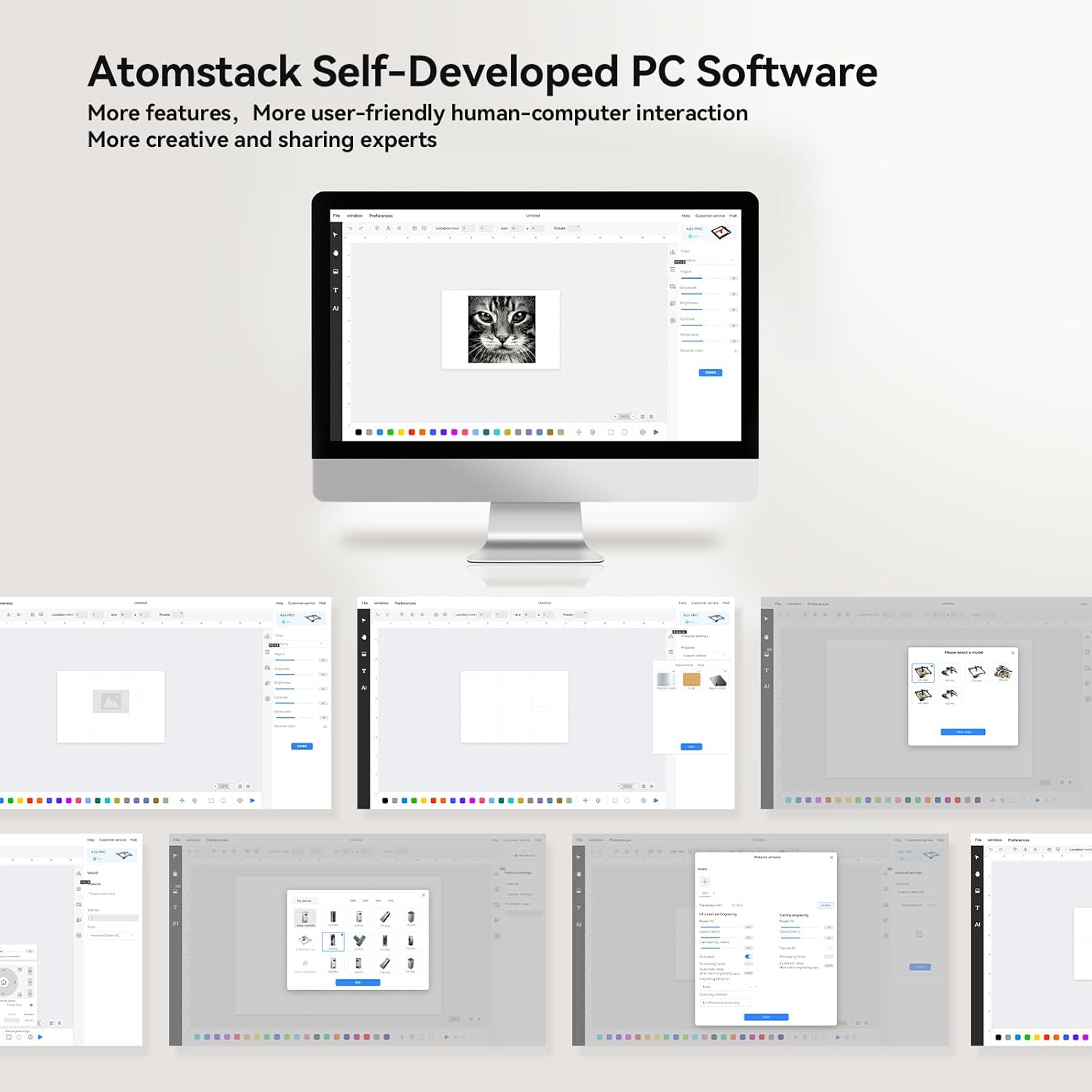
الشكل 4.1: زيادةview of the Atomstack self-developed PC software, designed for user-friendly interaction and creative projects.
4.2 تركيز الليزر
The A6 Pro features a fixed focusing design for quick and accurate focusing.
- Place your material on the engraving bed.
- Adjust the laser module height according to the material thickness until the laser spot is at its smallest and sharpest point. This typically takes less than 10 seconds.
- For precise positioning, utilize the cross-positioning system for visual edge finding and object alignment.

الشكل 4.2: The cross-positioning system aids in precise and horizontal engraving, allowing for quick and accurate focusing.
4.3 Engraving and Cutting
The A6 Pro is capable of engraving and cutting various materials with high precision.
- إعداد المواد: Ensure your material is clean and securely placed on the engraving bed.
- استيراد التصميم: قم باستيراد أو إنشاء تصميمك داخل البرنامج.
- إعدادات المعلمة: Adjust laser power, speed, and passes based on the material type and desired outcome. The 6W laser can cut through 3mm poplar wood, 3mm black acrylic, 3mm poplar plywood, and laser vinyl.
- بدء العملية: Initiate the engraving or cutting process from the software. Monitor the machine closely during operation.

الشكل 4.3: The ATOMSTACK A6 Pro is suitable for engraving and cutting a variety of materials including basswood, acrylic, pine wood, paulownia, bamboo, and leather.

الشكل 4.4: The A6 Pro demonstrates significantly faster engraving speeds compared to traditional frame machines, enhancing work efficiency.
5. الصيانة
Regular maintenance ensures the longevity and optimal performance of your ATOMSTACK A6 Pro.
- Laser Module Cleaning: The non-clogging laser module is designed to resist lens pollution. However, periodic inspection and gentle cleaning of the laser lens with a suitable optical cleaner and lint-free cloth are recommended to maintain optimal laser performance.
- تنظيف السكك الحديدية: Keep the X-axis metal double guide rails clean and free of dust and debris to ensure smooth and precise movement.
- النظافة العامة: Wipe down the machine's exterior with a soft, dry cloth. Avoid using abrasive cleaners or solvents.
- فحص الكابلات: Periodically check the tank chain bundled cables for any signs of wear or damage.
6. استكشاف الأخطاء وإصلاحها
This section addresses common issues you might encounter with your ATOMSTACK A6 Pro.
| مشكلة | السبب المحتمل | حل |
|---|---|---|
| الآلة لا تعمل. | Power cable not connected; faulty power adapter; power switch off. | Ensure power cable is securely connected. Check power outlet. Verify power switch is in the ON position. |
| الليزر لا يطلق النار أو ضعيف. | Laser module not properly focused; dirty lens; incorrect software settings; laser module malfunction. | Re-focus the laser. Clean the laser lens. Check laser power settings in software. Contact support if issue persists. |
| Engraving/cutting results are inaccurate or distorted. | Loose belts/rails; material not flat; incorrect software settings; vibrations. | Check for any loose components or debris on the guide rails. Ensure material is flat and secured. Verify design and parameter settings in software. Minimize external vibrations. |
| Software not connecting to machine. | Incorrect USB port; driver issues; Wi-Fi connection problems. | Try a different USB port. Reinstall drivers. For Wi-Fi, ensure you are connected to the machine's hotspot. Restart both machine and computer/device. |
7. المواصفات
| ميزة | التفاصيل |
|---|---|
| نموذج | ايه 6 برو |
| ماركة | أتومستاك |
| قوة الليزر | 6W (Optical Output) |
| حجم بقعة الليزر | 0.05 x 0.05 mm (Ultra-fine) |
| منطقة النقش | 370 × 310 ملم |
| الدقة الميكانيكية | حتى 0.02 ملم |
| أقصى سرعة للنقش | 600 مم/ثانية |
| مدخلات الطاقة | تيار متردد 24 فولت 5 أمبير |
| أبعاد المنتج | 60 × 60 × 17 سم |
| وزن العنصر | 8.26 كجم |
| اللوحة الأم | Self-developed 32-bit ESP32 motherboard |
| Supported Materials (Cutting) | 3mm Poplar Wood, 3mm Black Acrylic, 3mm Poplar Plywood, Laser Vinyl |
| Supported Materials (Engraving) | Basswood, Acrylic, Pine wood, Paulownia, Bamboo, Leather, etc. |

الشكل 7.1: The ATOMSTACK A6 Pro features an upgraded self-developed 32-bit motherboard for faster data processing.
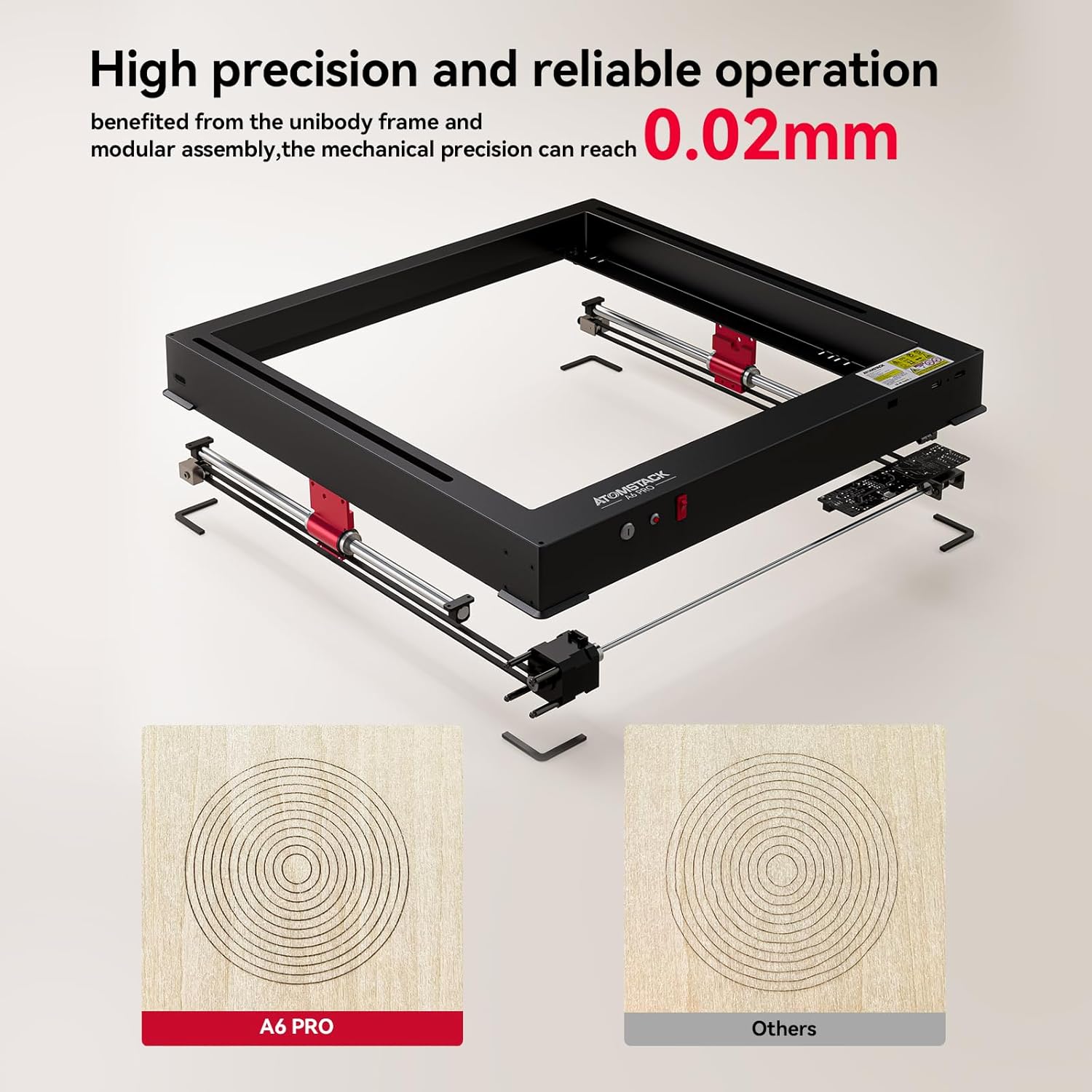
الشكل 7.2: The unibody frame and modular assembly contribute to a mechanical precision of up to 0.02mm.
8. الضمان والدعم
ATOMSTACK provides customer support and warranty services for its products.
- معلومات الضمان: Please refer to the warranty card included with your product or visit the official ATOMSTACK webالموقع للحصول على شروط وأحكام الضمان التفصيلية.
- الدعم الفني: For technical assistance, troubleshooting beyond this manual, or spare parts inquiries, please contact ATOMSTACK customer support.
- البريد الإلكتروني للتواصل: support@atomstack.com
- الشركة المصنعة: Shenzhen Atomstack Technologies Co., Ltd.
- عنوان: 17th Floor, Building 3A, Phase II, Intelligent Park, No.76.Baohe Avenue, Baolong Street, Longgang Dist., Shenzhen, 518172China.
Ask a question about this manual
Ask about setup, troubleshooting, compatibility, parts, safety, or missing instructions. Manuals+ will review the question and use this page’s manual context to help answer it.