
1. انتهى المنتجview
The AOPUTTRIVER AP-5000A is a professional digital light meter designed for accurate measurement of illumination in various environments. It supports measurement of fluorescent, incandescent, and LED lamps up to 400,000 Lux (40,000 FC). Key features include a 270-degree rotatable detector, data logging capabilities, and connectivity for real-time monitoring.

Figure 1: AOPUTTRIVER AP-5000A Digital Light Meter highlighting its main features.
2. محتويات العبوة
يرجى التأكد من وجود جميع العناصر المذكورة أدناه وأنها بحالة جيدة عند فتح العبوة. في حال وجود أي عناصر مفقودة أو تالفة، يرجى التواصل مع خدمة العملاء.
- AP-5000A Light Meter x 1
- حقيبة حمل × 1
- بطاريات AAA × 2
- مفك البراغي x 1
- دليل المستخدم × 1

Figure 2: All items included in the AP-5000A package.
3. مكونات المنتج
Familiarize yourself with the different parts of your AP-5000A Digital Light Meter:
- كاشف الصور: Sensor for light measurement.
- شاشة الكريستال السائل (LCD): Displays measurement readings and settings.
- زر التشغيل/الإيقاف: يقوم بتشغيل الجهاز أو إيقاف تشغيله.
- زر الأنتظار: تجميد القياس الحالي على الشاشة.
- زر MEM: Accesses data logging memory.
- زر LUX / FC: Toggles between Lux and Foot-Candle measurement units.
- زر MAX / MIN: Displays maximum or minimum recorded values.
- Backlight Switch Button: Activates or deactivates the LCD backlight.

Figure 3: Labeled components of the AP-5000A Digital Light Meter.
4. الإعداد
4.1 تركيب البطارية
- حدد مكان حجرة البطارية في الجزء الخلفي من الجهاز.
- استخدم المفك المرفق لفتح غطاء حجرة البطارية.
- قم بإدخال بطاريتين AAA، مع التأكد من القطبية الصحيحة (+/-).
- استبدل غطاء حجرة البطارية وثبته بالمسمار.
4.2 التشغيل المبدئي
اضغط على تشغيل/إيقاف button to power on the device. The LCD will illuminate and display the current light and temperature readings.
5. تعليمات التشغيل
5.1 أخذ القياسات
Remove the protective cap from the photodetector. Point the photodetector towards the light source you wish to measure. The current light intensity will be displayed on the LCD.
5.2 اختيار الوحدة (لوكس/FC)
اضغط على لوكس/إف سي button to switch between Lux and Foot-Candle measurement units. The selected unit will be indicated on the LCD.
5.3 اختيار وحدة درجة الحرارة (°مئوية/°فهرنهايت)
The device also measures temperature. Refer to the manual for specific button combinations to switch between Celsius (°C) and Fahrenheit (°F) temperature units.
5.4 عقد البيانات
اضغط على يمسك button to freeze the current reading on the display. Press it again to release and resume live measurement.
5.5 قياس الحد الأقصى/الأدنى
اضغط على الحد الأقصى/الحد الأدنى button to cycle through maximum, minimum, and real-time values recorded during a measurement session. This helps identify peak and lowest light levels.
5.6 عملية الإضاءة الخلفية
اضغط على مفتاح الإضاءة الخلفية button to turn the LCD backlight on or off, improving readability in low-light conditions.
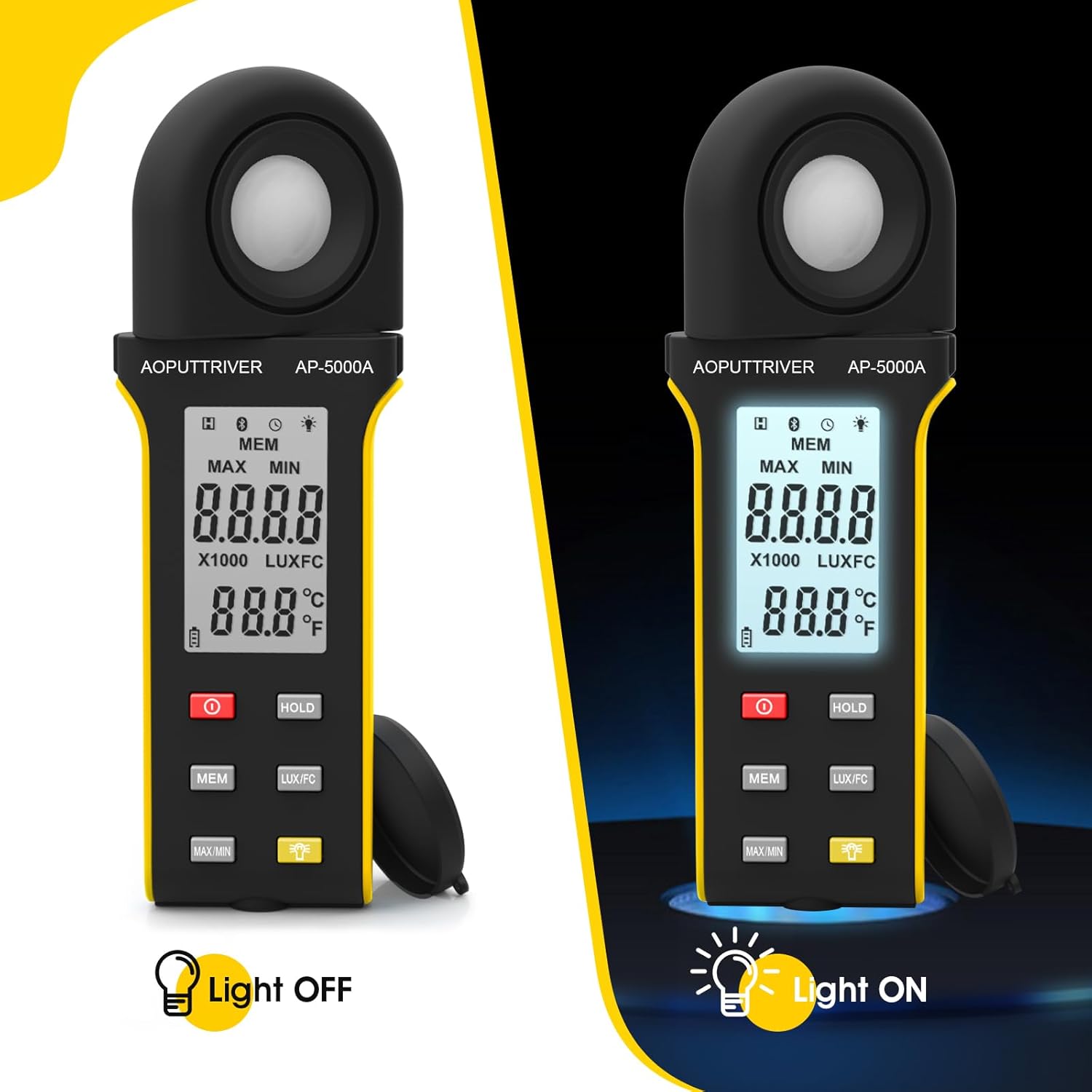
Figure 4: Comparison of the AP-5000A with backlight off and on.
6. Rotatable Detector
The AP-5000A features a 270-degree rotatable silicon filter diode sensor. This design allows you to measure photometric intensity from various angles without needing to reposition the entire meter. Simply rotate the sensor to face the light source while keeping the display visible for easy reading.
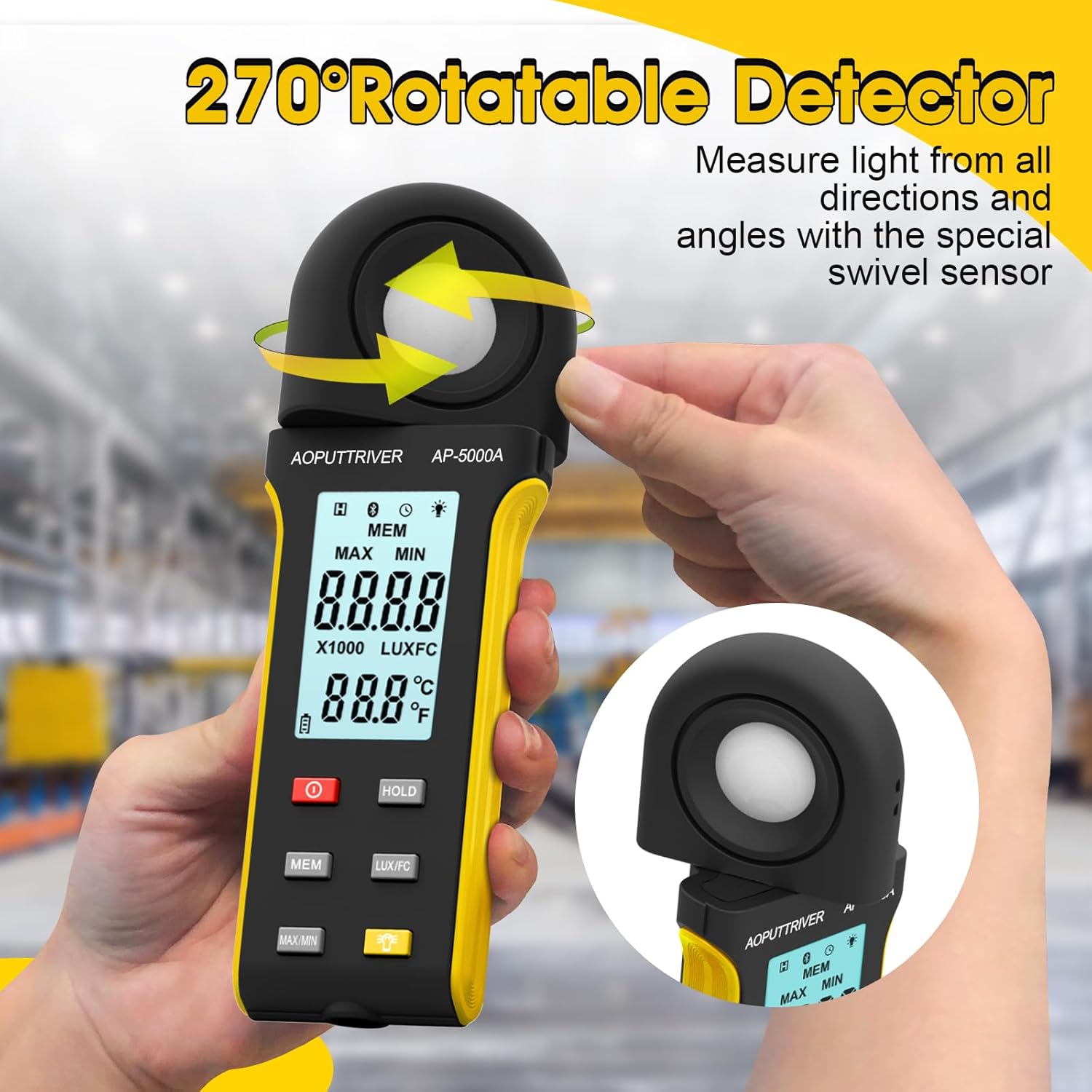
Figure 5: The 270-degree rotatable detector for flexible measurement.
7. تسجيل البيانات
The meter supports data logging for up to 30 groups of measurements. This feature allows you to record and review light level data over time, which is useful for monitoring changes in lighting conditions for applications like plant growth or aquarium environments. Refer to the detailed instructions in the full user manual for specific steps on how to initiate, save, and recall data logs using the ميم زر.
8. اتصال التطبيق
The AP-5000A can connect to a smartphone application via Bluetooth. This allows for real-time tracking of data, remote control of certain functions, and advanced data analysis. Download the official AOPUTTRIVER app from your device's app store and follow the in-app instructions to pair your light meter.
9. التطبيقات
The AOPUTTRIVER AP-5000A is a versatile tool suitable for a wide range of applications requiring precise light measurement:
- Indoor Plant Growing: Optimizing light levels for various plant species.
- أحواض السمك: Ensuring appropriate lighting for aquatic life.
- التصوير الفوتوغرافي والفيديو: Setting up ideal lighting conditions.
- Workplace and School Environments: Assessing illumination for comfort and productivity.
- الأماكن العامة: Measuring light in libraries, stages, and street lighting.
- الإعدادات الصناعية: Monitoring lighting in factories and warehouses.

Figure 6: Diverse applications of the AP-5000A Light Meter.
10. الصيانة والعناية
- تنظيف: Use a soft, dry cloth to clean the device. Do not use abrasive cleaners or solvents. Ensure the photodetector is kept clean and free of dust for accurate readings.
- تخزين: When not in use, store the meter in its carrying bag with the protective cap on the photodetector. Store in a cool, dry place away from direct sunlight and extreme temperatures.
- استبدال البطارية: Replace batteries when the low battery indicator appears on the LCD to ensure continuous accurate operation.
- إطفاء ذاتي: يتميز الجهاز بوظيفة إيقاف التشغيل التلقائي بعد 15 دقيقة من عدم النشاط للحفاظ على عمر البطارية.
11. استكشاف الأخطاء وإصلاحها
- لا يوجد عرض/لا يعمل الجهاز: تحقق من تركيب البطارية وتأكد من عدم نفاذ شحنها. استبدلها إذا لزم الأمر.
- قراءات غير دقيقة: Ensure the photodetector is clean and unobstructed. Verify that the correct measurement unit (Lux/FC) is selected. Avoid measuring in rapidly changing light conditions.
- مشكلات اتصال التطبيق: Ensure Bluetooth is enabled on your smartphone and the meter. Restart both the app and the meter. Check that the app is up to date.
- شاشة "OL": Indicates an overload, meaning the measured light intensity exceeds the meter's maximum range.
12. المواصفات
| ميزة | مواصفة |
|---|---|
| رقم الموديل | AP-5000A |
| مدى القياس | 0.1 ~ 400,000 Lux (0.1 ~ 40,000 FC) |
| دقة | 0.1 LUX/FC |
| دقة | ≤10000Lux: +/-4% rgd+/-1.0% f.s. ≥10,000Lux: ±5% rgd+/-1.5% f.s ≥200,000Lux: +/-8% rdg+/-2.0%f.s |
| Detector Rotation | 270 درجة |
| سعة تسجيل البيانات | ما يصل إلى 30 مجموعات |
| الإغلاق التلقائي | بعد 15 دقيقة من عدم النشاط |
| عرض | HD Backlight LCD |
| مصدر الطاقة | 2 بطاريات AAA |
| وزن العنصر | 7.8 أونصات |
| أبعاد الحزمة | 7.99 × 3.43 × 1.93 بوصة |
13. الضمان والدعم
AOPUTTRIVER products are manufactured to high-quality standards. For warranty information, technical support, or service inquiries, please refer to the contact details provided on the product packaging or visit the official AOPUTTRIVER webالموقع. احتفظ بإيصال الشراء الخاص بك كإثبات للشراء في حالة مطالبات الضمان.