
1. المقدمة
The SMARTGEN HAT600PBI Series Dual Power Synchronous ATS Controller is an advanced, intelligent module designed for automatic transfer systems. It integrates programmable functions, automatic measurement, an LCD display, and digital communication capabilities. This controller combines digitalization, intelligence, and networking to provide reliable and precise dual power transfer, minimizing operational errors. It is suitable for various power supply configurations including Mains-Mains, Mains-Gen, Gen-Gen, and supports PC, CB, and CC class ATS applications, ensuring synchronous transfer between two power sources. Its compact design, sophisticated circuitry, straightforward wiring, and high reliability make it ideal for diverse applications in sectors such as electric power, telecommunications, petroleum, and intelligent buildings.
2. الميزات الرئيسية
- LCD 132x64 pixel display with backlight, supporting multiple languages (Simplified Chinese, English, Other), operated via push buttons.
- Configurable system types: Mains (1#) & Mains (2#), Mains (1#) & Generator (2#), Generator (1#) & Mains (2#), Generator (1#) & Generator (2#).
- Master power source selection (S1 or S2) with options for Auto Transfer Auto Recover and Auto Transfer Non Recover.
- Measures and displays 2-way 3-phase Voltage, Frequency, and Phase Sequence Status.
- Collects and displays load active power, reactive power, apparent power, power factor, and current.
3. انتهى المنتجview
The HAT600PBI controller features a user-friendly interface for monitoring and control.
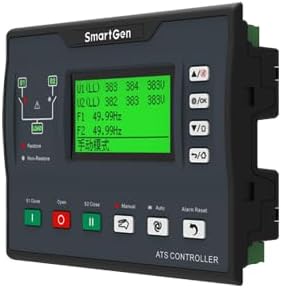
الشكل 3.1: الجبهة View of HAT600PBI Controller. This image displays the front panel of the HAT600PBI controller, featuring an LCD screen that shows voltage and frequency readings, along with various control buttons for operation and navigation. The buttons include 'Close', 'Open', 'Manual', 'Auto', and 'Alarm Reset'.
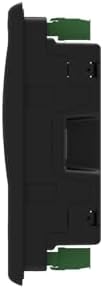
الشكل 3.2: الجانب View of HAT600PBI Controller. هذه الصورة توضح الجانب الاحترافيfile of the HAT600PBI controller, highlighting its compact design and mounting features.

الشكل 3.3: خلفي View of HAT600PBI Controller. This image shows the rear panel of the HAT600PBI controller, detailing the numerous connection terminals for inputs, outputs, power supply, current monitoring, as well as USB and Ethernet communication ports.
4. الإعداد والتثبيت
Installation of the HAT600PBI controller should be performed by qualified personnel. Ensure all local electrical codes and safety regulations are followed.
4.1 التركيب
Mount the controller in a suitable enclosure, ensuring adequate ventilation and protection from environmental factors. Refer to the physical dimensions for proper panel cutout.
عدد 4.2 توصيلات كهربائية
Connect the following to the appropriate terminals on the rear of the controller (refer to Figure 3.3 and Section 6 for detailed wiring diagrams):
- مزود الطاقة: Connect the DC and AC power inputs.
- المجلدtagالمدخلات الإلكترونية: Connect the 2-way 3-phase voltage inputs for S1 and S2.
- المدخلات الحالية: Connect current transformers (CTs) for load current monitoring.
- مخرجات التحكم: Connect to the ATS switching mechanisms (e.g., circuit breakers, contactors).
- المدخلات/المخرجات المساعدة: Connect any required auxiliary signals.
- منافذ الاتصالات: Connect RS485, USB, or Ethernet cables for remote monitoring and configuration.
Ensure all connections are secure and correctly polarized. Incorrect wiring can damage the unit or connected equipment.
5. تعليمات التشغيل
The HAT600PBI controller is designed for intuitive operation via its front panel LCD and push buttons.
5.1 التشغيل
Once all electrical connections are complete and verified, apply power to the controller. The LCD will illuminate and display the initial startup screen, followed by real-time system status.
5.2 التنقل عبر القائمة
Use the navigation buttons (typically Up/Down arrows and OK/Enter) to scroll through menus and confirm selections. The LCD provides clear prompts for various settings and monitoring screens.
5.3 تكوين النظام
Access the system settings menu to configure parameters such as:
- نوع النظام: Select between Mains-Mains, Mains-Gen, Gen-Mains, or Gen-Gen based on your power sources.
- Master Power Source: Designate S1 or S2 as the primary power source.
- وضع النقل: Choose between Auto Transfer Auto Recover (ATAR) or Auto Transfer Non Recover (ATNR) based on desired behavior after power restoration.
- لغة: Select the preferred display language.
Save all changes before exiting the configuration menu.
5.4 معايير المراقبة
The controller continuously monitors and displays critical parameters:
- المجلدtage (L-L, L-N) for both S1 and S2.
- Frequency for both S1 and S2.
- Phase Sequence Status.
- Load Active Power, Reactive Power, Apparent Power, Power Factor, and Current.
Regularly check these values to ensure stable operation.
5.5 Manual Operation and Alarm Reset
Use the 'Manual' button to switch to manual control mode, allowing direct control of the transfer switches via 'Close' and 'Open' buttons. The 'Alarm Reset' button clears any active alarms displayed on the LCD.
6. مخططات الأسلاك
Proper wiring is crucial for the safe and correct operation of the HAT600PBI controller. The following diagram illustrates typical application wiring. Always consult this diagram and any specific project documentation during installation.

Figure 6.1: Typical Application Wiring Diagrams. This comprehensive image provides multiple wiring diagrams for the HAT600PBI controller, detailing connections for different ATS configurations including SGG-N, SGG-M, Feiteng, Contactor, and Breaker applications. It shows connections for S1 and S2 power inputs, load, current inputs, and communication (RS485).
7. الصيانة
Regular maintenance ensures the longevity and reliable operation of your HAT600PBI controller.
7.1 التفتيش الروتيني
- Periodically inspect the controller for any visible damage, loose connections, or signs of overheating.
- Ensure the mounting is secure and free from excessive vibration.
- Check for dust accumulation, especially around ventilation openings.
7.2 التنظيف
Use a soft, dry cloth to clean the exterior of the controller. Do not use abrasive cleaners or solvents. For internal cleaning, if necessary, disconnect power and use compressed air to remove dust.
7.3 تحديثات البرامج الثابتة
Check the SMARTGEN official website periodically for any available firmware updates. Follow the provided instructions carefully for any update procedures.
8. استكشاف الأخطاء وإصلاحها
يُقدّم هذا القسم خطوات أساسية لحلّ المشكلات الشائعة. أما بالنسبة للمشكلات المعقدة، فيُرجى الاتصال بالدعم الفني.
8.1 انقطاع الطاقة عن وحدة التحكم
- Verify the DC and AC power supply connections are secure and providing the correct voltage.
- Check any external fuses or circuit breakers in the power supply circuit.
8.2 Incorrect Readings on LCD
- تأكد من الحجمtage and current transformer (CT) connections are correct and securely fastened.
- Verify the CT ratios are correctly configured in the controller's settings.
- التحقق من مستوى الصوت المدخلtage and frequency directly with a multimeter to compare against controller readings.
8.3 Automatic Transfer Failure
- Check the status of both power sources (S1 and S2) to ensure they are within acceptable parameters.
- Verify the system type and transfer mode settings are correctly configured.
- Inspect the control outputs and the connected ATS switching mechanisms for proper operation.
- Check for any active alarms that might be preventing transfer.
9. المواصفات
| المعلمة | قيمة |
|---|---|
| ماركة | سمارتجين |
| مادة | معدن |
| وزن العنصر | 0.8 كيلوغرام |
| نوع العرض | شاشة الكريستال السائل |
| درجة حرارة التشغيل | 20 درجة مئوية |
10. الضمان والدعم
For warranty information, technical support, or service inquiries, please contact your authorized SMARTGEN dealer or visit the official SMARTGEN website. Ensure you have your product model number (HAT600PBI) and purchase details available when seeking support.