
PONNOR AL929
PONNOR AL929 Money Counter Machine User Manual
الموديل: AL929
1. المقدمة
This manual provides detailed instructions for the safe and efficient operation of your PONNOR AL929 Money Counter Machine. The AL929 is designed for mixed denomination counting, serial number reading, and multi-currency counterfeit detection, suitable for various business environments.
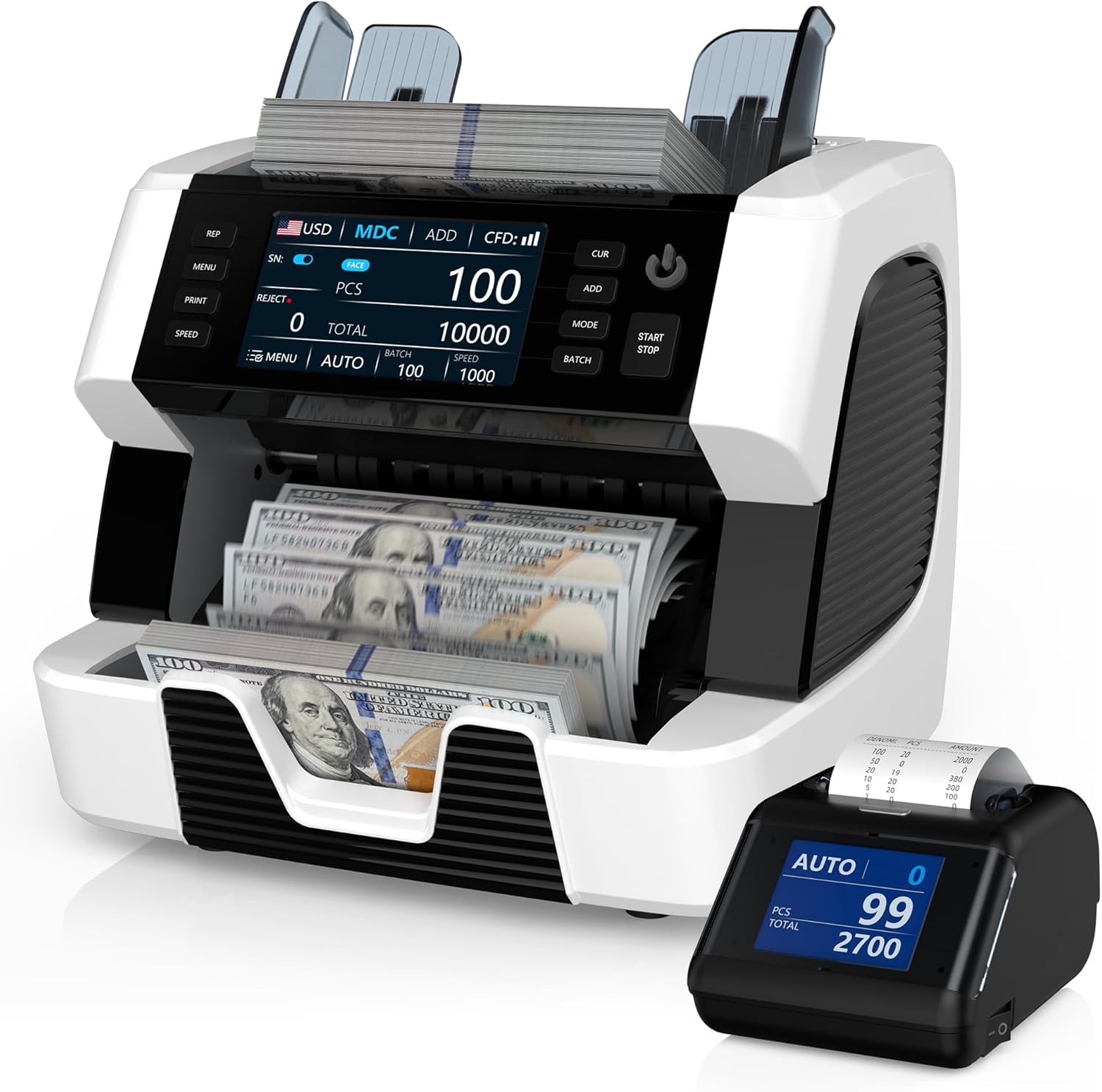
Figure 1: PONNOR AL929 Money Counter Machine with external display and counted bills.
2. محتويات العبوة
تأكد من وجود جميع العناصر في العبوة:
- PONNOR AL929 Banknote Counter
- شاشة خارجية
- كابل الطاقة
- External Monitor Data Cable
- دليل المستخدم
- فرشاة نايلون للتنظيف
- ورق معايرة CIS
- فتيل
- قماش تنظيف ناعم

Figure 2: Package contents of the PONNOR AL929 Money Counter Machine.
3. الإعداد
3.1 التركيب الأولي وتوصيل الطاقة
- ضع الآلة على سطح ثابت ومستو.
- Connect the power cable to the machine's power socket and then to a suitable power outlet.
- Turn on the machine using the power switch located on the rear panel.
3.2 Connecting the External Display and Printer
- العرض الخارجي: Connect the external monitor data cable from the machine's "External Display Port" to the external display unit.
- الطابعة: Connect the data cable from the machine's "RS232 Printer Port" to the external thermal printer. Ensure the printer has a paper roll installed.

Figure 3: Rear panel connections for power, external display, and printer.
4. التشغيل
The AL929 features a 4.5-inch touch screen and button keypad for intuitive control.

الشكل 4: لوحة التحكمview with key functions labeled.
4.1 Basic Counting Modes
- AUTO/MANUAL Counting: Select the desired mode on the control panel. In AUTO mode, counting begins automatically when bills are placed in the hopper.
- Mixed Denomination Counting (MDC): This mode counts mixed bills and provides a total value, quantity, and value breakdown by denomination.
- إضافة وظيفة: Accumulates the count of multiple batches.
- BATCH Function: Counts bills into preset batches (e.g., 100 bills).
- تعديل السرعة: Adjust the counting speed (e.g., 800-1200 pieces/min) as needed.
4.2 Multi-Currency Support
The AL929 supports over 120 currencies. The default recognizable currencies include USD, EUR, GBP, CAD, and MXN. For other currencies, contact support to obtain the necessary update files.

Figure 5: Multi-currency and mixed denomination counting display.
4.3 Serial Number Reading
The machine can read and record serial numbers of counted bills. This feature is accessible via the control panel.
4.4 اكتشاف التزييف
The AL929 is equipped with multiple detection methods for bank-level anti-counterfeiting:
- UV (Ultraviolet Detection): يكشف عن خصائص الأشعة فوق البنفسجية على الأوراق النقدية.
- MG (Magnetic Ink Detection): Checks for magnetic ink patterns.
- IR (Infrared Sensor): Verifies infrared security features.
- 2CIS (Contact Image Sensor): Provides image recognition for detailed analysis.
- NT (Note Thickness) & SN (Serial Number) Recognition: Additional security checks.
If a counterfeit note is detected, the machine will issue a red warning and an audible alert.

Figure 6: Bank-grade counterfeit detection features.
4.5 Printing Results
After connecting the external printer, press the 'PRINT' button on the machine to generate a detailed report. The report includes currency type, total amount, serial numbers, and the number of notes counted.

Figure 7: External thermal printer in operation, showing a sampالنسخة المطبوعة.
5. الصيانة
5.1 تنظيف الماكينة
Regular cleaning ensures optimal performance and longevity.
- CIS Sensors: Open the back cover and use the provided nylon brush or soft cleaning cloth to gently clean the CIS sensors.
- General Dust: Use the nylon brush or soft cleaning cloth to remove dust from the hopper, stacker, and other accessible areas.
5.2 Adjusting Feeding Gap
If bills are jamming frequently or feeding improperly, the feeding gap may need adjustment. Locate the adjustable screw and turn it slightly to optimize the gap. Refer to the manual for precise adjustment instructions.

الشكل 8: داخلي view highlighting the banknote processing wheel and adjustable screw.
6. استكشاف الأخطاء وإصلاحها
| مشكلة | السبب المحتمل | حل |
|---|---|---|
| Red warning/Audible alert | Counterfeit, half bills, or very worn bills detected. Incorrect function setting (e.g., FACE/ORI, ADD, BATCH, SN). Counting mode error (MDC mode only effective for multi-currency). | Remove the suspect note from the stacker. Check and adjust function settings. Refer to the manual for specific mode requirements. Press RESTART to continue. |
| بيل جامينج | Bills are wrinkled or damaged. Feeding gap is too tight or too loose. CIS sensors are dirty. | Remove the jammed bill. Adjust the feeding gap using the adjustable screw. Clean the CIS sensors as described in the Maintenance section. |
| Cannot count specific currency | Currency not pre-installed or firmware is outdated. | Contact PONNOR support to obtain the necessary currency installation packages and update the machine via the USB port. |
7. المواصفات
- نموذج: ال929
- أبعاد: 7.1 × 13.1 × 11.4 بوصة
- وزن السلعة: 19.05 رطل
- سرعة العد: 800-1200 pieces/min
- طرق الكشف: 2CIS, UV, MG, IR, NT, SN
- دعم العملة: 120+ currencies (default: USD, EUR, GBP, CAD, MXN)
- عرض: 4.5 بوصة تعمل باللمس
- الاتصال: USB for updates, RS232 for printer, External Display Port
8. الضمان والدعم
PONNOR is committed to providing high-quality products and customer satisfaction. For warranty information, technical support, or currency updates, please contact PONNOR customer service. We provide more than 120 currencies for you to update; you can contact us to get the file.
معلومات الاتصال: Refer to the contact details provided on the official PONNOR webالموقع أو وثائق الشراء الخاصة بك.
المستندات ذات الصلة - ال929
 |
دليل مستخدم عداد الأوراق النقدية MUNBYN IMC01 دليل استخدام جهاز عدّ الأوراق النقدية MUNBYN IMC01، يشرح بالتفصيل ميزاته، وتشغيله، وتركيبه، وصيانته، ومواصفاته الفنية. تعلّم كيفية عدّ وإدارة الأوراق النقدية بكفاءة باستخدام هذا الجهاز المتطور. |
 |
دليل مستخدم عداد الأوراق النقدية MUNBYN IMC01 دليل استخدام جهاز عدّاد الأوراق النقدية MUNBYN IMC01، يشرح بالتفصيل ميزاته، وتشغيله، وتركيبه، وصيانته، ومواصفاته الفنية. تعلّم كيفية عدّ الأوراق النقدية، واستخدام أوضاع مختلفة، وحلّ المشاكل الشائعة. |
 |
DETECK DT600C Money Counter User Manual: Operation, Features, and Troubleshooting Comprehensive user manual for the DETECK DT600C Money Counter. Learn about its features, operation modes, counterfeit detection, technical specifications, maintenance, troubleshooting, and warranty. |
 |
Kolibri KBR-1500 One-Pocket Mixed Denomination Money Counter User Manual User manual for the Kolibri KBR-1500, a one-pocket mixed denomination money counter. Provides detailed instructions on operation, safety, maintenance, troubleshooting, and warranty information. |
 |
DETECK DT500 Mix Denomination Multi-Currency Money Counter User Manual User manual for the DETECK DT500, a multi-currency money counter. Provides detailed information on features, specifications, operation, calibration, maintenance, and safety instructions. |
 |
عداد الأوراق النقدية MUNBYN IMC01: الأسئلة الشائعة ودليل استكشاف الأخطاء وإصلاحها دليل شامل للأسئلة الشائعة واستكشاف الأخطاء وإصلاحها لجهاز عد الأوراق النقدية MUNBYN IMC01، يغطي الإمكانيات ورموز الخطأ والتنظيف والمعايرة والإعدادات. |
Ask a question about this manual
Ask about setup, troubleshooting, compatibility, parts, safety, or missing instructions. Manuals+ will review the question and use this page’s manual context to help answer it.