
Star Micronics MCL32CBI
Star Micronics mC-Label3 MCL32CBI Direct Thermal Printer User Manual
Model: MCL32CBI
مقدمة
This manual provides essential information for the setup, operation, maintenance, and troubleshooting of your Star Micronics mC-Label3 MCL32CBI Direct Thermal Printer. Please read this manual thoroughly before using the printer to ensure proper and safe operation.
محتويات الحزمة
تأكد من تضمين جميع العناصر المدرجة أدناه في الحزمة الخاصة بك:
- mC-Label3 Multifunctional Printer
- محول التيار المتردد
- كابل الطاقة
- USB Cables (C-C 1.0m and C-A 1.8m)
- كابل LAN (1 م)
- Simple Setup Sheet Safety Guide

الصورة: الجبهة view of the Star Micronics mC-Label3 printer, showcasing its compact design and label output slot.
يثبت
1. توصيل الطابعة
The mC-Label3 MCL32CBI printer offers multiple connectivity options:
- يو اس بي سي: Connect the printer directly to your PC, Android, or iOS device using the provided USB-C to USB-C or USB-C to USB-A cables.
- إيثرنت (LAN): For network connectivity, connect the printer to your router or network switch using the supplied LAN cable.
- بلوتوث: The MCL32CBI model supports Bluetooth connectivity for iOS and Android devices. Ensure Bluetooth is enabled on your device and pair with the printer.

الصورة: الخلفية view of the mC-Label3 printer, highlighting the LAN, USB, and power ports for various connection types.
2. تحميل الوسائط
The printer supports various media types, including linerless labels, die-cut labels, continuous labels, and thermal receipt paper.
- Open the top cover of the printer by lifting the latch.
- Place the media roll into the media compartment, ensuring the leading edge feeds out from the top.
- Pull a small amount of media past the print head and close the top cover securely.
- Ensure the media is properly aligned within the guides.

الصورة: من أعلى إلى أسفل view of the mC-Label3 printer with its cover open, illustrating the internal mechanism for loading thermal paper or label rolls.
تعليمات التشغيل
1. تشغيل / إيقاف التشغيل
Connect the power cable to the printer and a power outlet. Press the power button located on the front of the printer to turn it on. The status indicator light will illuminate.
2. Printing Labels and Receipts
The mC-Label3 MCL32CBI printer is designed for efficient label and receipt printing. It supports various applications and cloud services.
- توافق البرامج: Works seamlessly with PC, Android, and iOS applications.
- خدمات سحابية: Utilize Star Micronics Cloud Services to design and manage labels.
- One Touch Label: This feature allows storing pre-made receipts and labels for quick and easy printing directly from the printer.
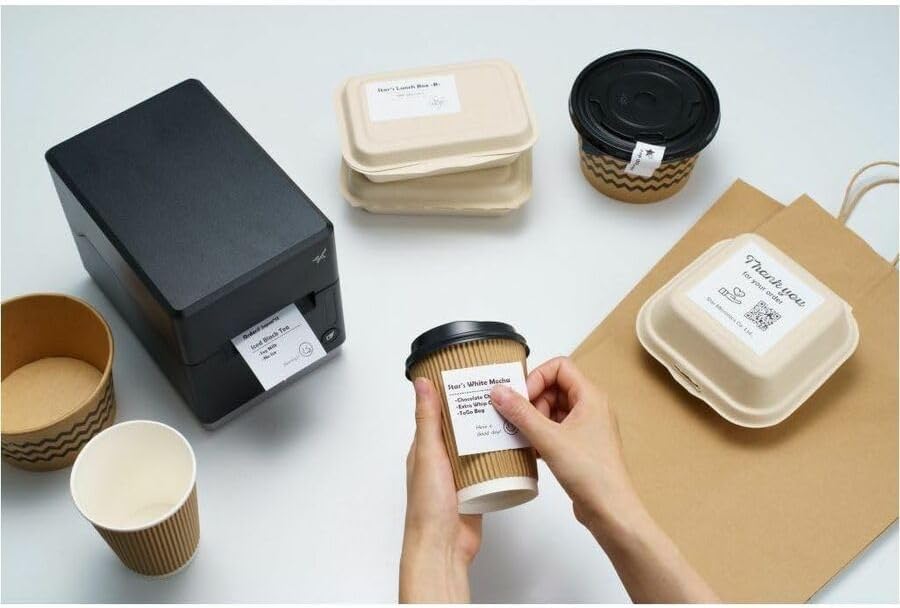
Image: A hand pressing the feed button on the mC-Label3 printer, demonstrating the printing of a 'Thank you' label.

Image: The mC-Label3 printer shown in a practical setting, printing labels for food containers and coffee cups, illustrating its versatility.
صيانة
1. تنظيف الطابعة
Regular cleaning ensures optimal performance and extends the life of your printer.
- استخدم قطعة قماش ناعمة وخالية من الوبر دampتم تنظيف رأس الطباعة باستخدام الكحول الأيزوبروبيلي.
- Wipe down the exterior of the printer with a soft, dry cloth.
- تجنب استخدام المنظفات الكاشطة أو المذيبات.
2. Replacing Media
When the media roll is depleted, follow the media loading instructions in the Setup section to replace it.
3. Effortless Repairs
The mC-Label3 is designed for effortless, no-tools-required repairs with minimal upkeep, simplifying any necessary component replacements.
استكشاف الأخطاء وإصلاحها
يوفر هذا القسم حلولاً للمشكلات الشائعة التي قد تواجهها.
| مشكلة | السبب المحتمل | حل |
|---|---|---|
| الطابعة لا تعمل | كابل الطاقة غير موصول؛ مشكلة في مأخذ الطاقة | تأكد من توصيل كابل الطاقة بإحكام؛ جرب منفذ طاقة مختلف. |
| لا يوجد مخرج طباعة | Out of media; Media loaded incorrectly; Driver issue | Load new media; Re-load media correctly; Reinstall printer drivers. |
| جودة طباعة رديئة | Dirty print head; Low quality media | Clean the print head; Use recommended thermal media. |
| مشاكل الاتصال | Incorrect cable connection; Bluetooth not paired; Network configuration | Check USB/Ethernet cables; Re-pair Bluetooth; Verify network settings. |
تحديد
| ميزة | التفاصيل |
|---|---|
| اسم الموديل | علامة mC3 |
| رقم موديل العنصر | MCL32CBI |
| تكنولوجيا الطباعة | حراري مباشر |
| مخرجات الطابعة | أحادي اللون |
| أقصى سرعة طباعة أحادية اللون | 23 جزء في المليون |
| أقصى دقة طباعة بالأبيض والأسود | 203 نقطة في البوصة (203 × 203 نقطة في البوصة) |
| وسائل الإعلام المطبوعة | Labels (Linerless, Die-Cut, Continuous), Thermal Receipt |
| تكنولوجيا الاتصال | Bluetooth, Wired (USB, Ethernet) |
| واجهة الأجهزة | USB ، إيثرنت |
| الأجهزة المتوافقة | PC, Android, iOS |
| نوع وحدة التحكم | اي او اس، اندرويد |
| أبعاد المنتج | 6.7 بوصة عمق × 5.6 بوصة عرض × 8.3 بوصة ارتفاع (17.0 × 14.2 × 21.1 سم) |
| وزن العنصر | 7.2 رطل (3.27 كجم) |
| سعة تخزين الذاكرة | 64 ميجا بايت |
| لون | أسود |
| الشركة المصنعة | STAR MICRONICS |
| بلد المنشأ | الصين |
معلومات الضمان
The Star Micronics mC-Label3 MCL32CBI printer comes with a manufacturer's warranty. For specific terms and conditions, please refer to the warranty card included in your package or visit the official Star Micronics webموقع.
نوع الضمان: الشركة المصنعة
يدعم
For further assistance, technical support, or to download the latest drivers and firmware, please visit the official Star Micronics support webالموقع أو الاتصال بخدمة العملاء الخاصة بهم.
Star Micronics Official Webموقع: www.starmicronics.com
رابط الدعم: www.starmicronics.com/support
Ask a question about this manual
Ask about setup, troubleshooting, compatibility, parts, safety, or missing instructions. Manuals+ will review the question and use this page’s manual context to help answer it.