
1. انتهى المنتجview
This FINTIE Keyboard Case is designed to enhance your tablet experience by providing both protection and functionality. It features a magnetically detachable wireless Bluetooth keyboard, multiple viewing angles, and durable construction, transforming your tablet into a versatile laptop-like device.
2. التوافق
This keyboard case is specifically designed for the following Samsung Galaxy Tab models:
- Samsung Galaxy Tab A11+ / A11 Plus 11 Inch Model (SM-X230/X236/X238) 2025 Release
- Samsung Galaxy Tab A9+ / A9 Plus 11 Inch Model (SM-X210/X216/X218) 2023 Release
It is not compatible with any other tablet models. To verify your tablet model, navigate to Settings > About tablet > Model name على جهازك.

Figure 2.1: Compatible tablet models and instructions for finding your tablet's model name.
3. محتويات العبوة
تتضمن الحزمة:
- 1 x FINTIE Keyboard Case
- 1 × لوحة مفاتيح بلوتوث لاسلكية
- 1 × كابل شحن ميكرو USB
- 1 × دليل المستخدم
4. الإعداد والتثبيت
4.1 Inserting Your Tablet into the Case
- Align your Samsung Galaxy Tab with the hard shell back cover of the case.
- Gently press the tablet into the case, ensuring all corners and edges are securely fitted.
- Confirm that all ports, buttons, and cameras are accessible and unobstructed.
4.2 تركيب وفصل لوحة المفاتيح
The keyboard is magnetically detachable, allowing for flexible use.
- للربط: Place the keyboard onto the magnetic strip inside the case. It will snap into place.
- ليفصل: Gently pull the keyboard away from the magnetic strip.

Figure 4.1: Magnetic attachment of the keyboard to the case.
4.3 تعليمات الاقتران عبر البلوتوث
- Ensure the keyboard is charged (refer to Section 5).
- Slide the keyboard's تشغيل/إيقاف التبديل إلى ON position. The power indicator light will illuminate briefly.
- اضغط على 'يتصل' button on the keyboard. The Bluetooth indicator light will start blinking, indicating it's in pairing mode.
- On your Samsung Galaxy Tab, go to الإعدادات > الأجهزة المتصلة > البلوتوث and turn Bluetooth ON.
- Your tablet will search for available devices. Select 'FINTIE Keyboard' (أو اسم مشابه) من القائمة.
- اتبع التعليمات التي تظهر على الشاشة لإكمال عملية الاقتران. بمجرد الاقتران، سيتوقف ضوء مؤشر البلوتوث الموجود على لوحة المفاتيح عن الوميض.
Video 4.1: A demonstration of the FINTIE Keyboard Case, including tablet insertion, keyboard attachment, and Bluetooth pairing. This video is provided by the seller.
5. تعليمات الشحن
The keyboard features a built-in rechargeable battery.
- Connect the provided Micro USB charging cable to the keyboard's charging port.
- قم بتوصيل الطرف الآخر من الكابل بمحول طاقة USB (غير متضمن) أو بمنفذ USB الخاص بالكمبيوتر.
- The 'Charge' indicator light on the keyboard will illuminate during charging.
- A full charge typically takes approximately 2 hours. The 'Charge' indicator light will turn off or change color when charging is complete.
The keyboard automatically enters an energy-saving mode after 10 minutes of inactivity to extend battery life.
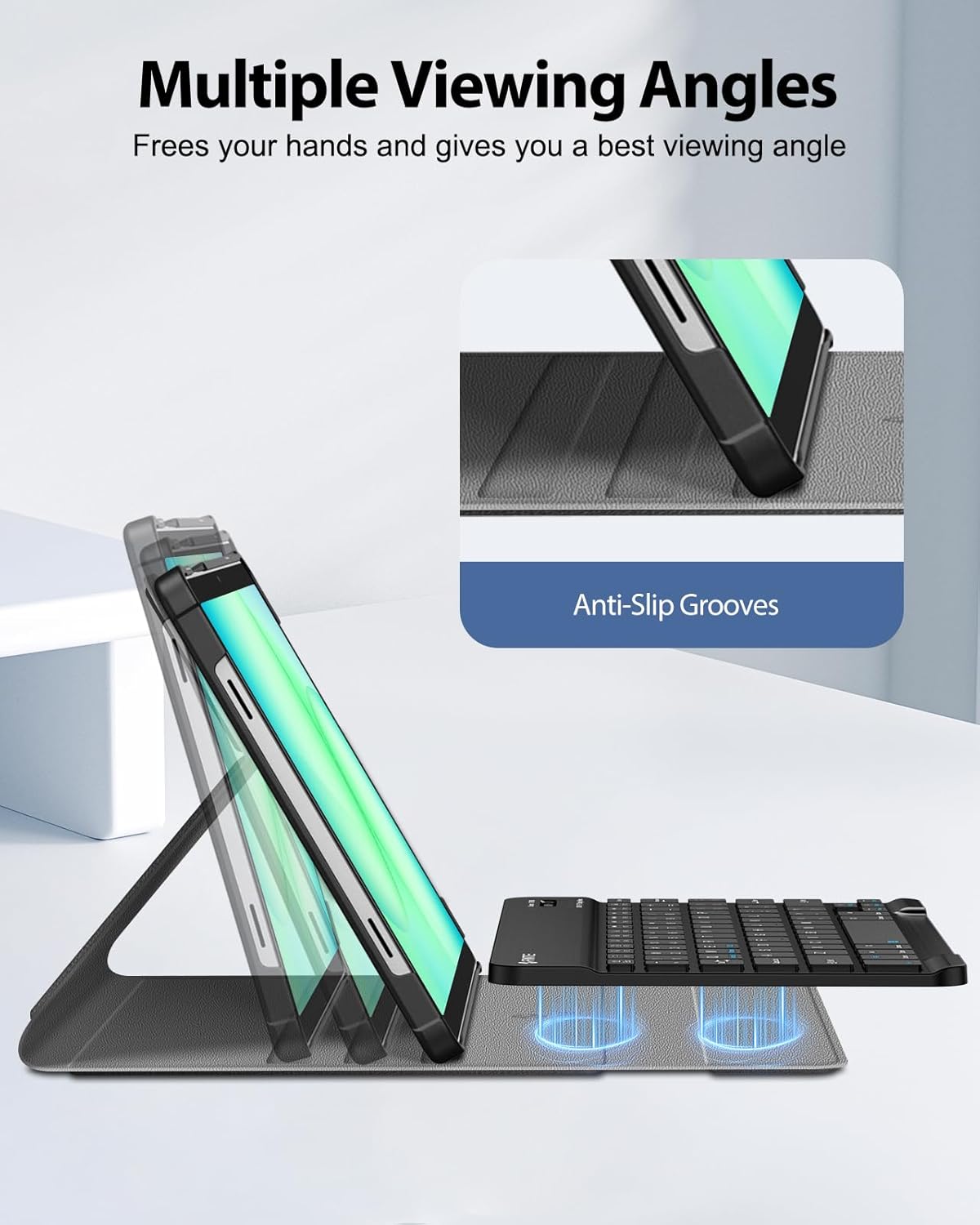
Figure 5.1: Keyboard charging port and indicator lights.
6. تعليمات التشغيل
6.1 استخدام لوحة المفاتيح
Once paired, the keyboard functions like a standard computer keyboard. It is compatible with both iOS and Android operating systems, allowing for seamless switching between devices if needed.

Figure 6.1: User typing on the FINTIE keyboard case.
6.2 تعديل Viewزوايا جي
تقدم القضية العديد من المزايا viewing angles for comfortable use. The removable keyboard can be positioned to support the tablet. Adjust the keyboard's position along the case cover to achieve your preferred viewing angle. Built-in anti-slip grooves help secure the tablet in place.

الشكل 6.2: متعدد viewing angles supported by the case.
7. الميزات الرئيسية
- Magnetically Detachable Keyboard: The super slim 7mm lightweight Bluetooth keyboard can be easily attached or detached, offering flexibility for typing or tablet-only use. It has a 10-meter operating range.
- Ergonomic Scissor-Switch Keys: Designed for a smoother, quieter typing experience with tactile feedback, reducing noise and providing comfort during extended use.
- الحماية المزدوجة: Constructed with a durable PU leather cover, anti-slip rubber-lined interior, and a premium polycarbonate shell. This design provides comprehensive protection against drops and bumps while maintaining a slim profile. The case supports auto sleep/wake function when the keyboard is detached.

Figure 7.1: Scissor-switch keyboard mechanism.

Figure 7.2: Case material and craftsmanship for dual protection.
8. المواصفات
| ماركة | فينتي |
| رقم الموديل | CSBJ002 |
| الأجهزة المتوافقة | Samsung Galaxy Tab A11 Plus 11'' 2025 (SM-X230/X236/X238), Samsung Galaxy Tab A9 Plus 11'' 2023 (SM-X210/X216/X218) |
| تكنولوجيا الاتصال | بلوتوث |
| وصف لوحة المفاتيح | لوحة مفاتيح مريحة |
| ميزة خاصة | Magnetically Removable Keyboard, Multiple Viewزوايا جي |
| لون | أسود |
| أبعاد المنتج | 11.42 بوصة طول × 8.07 بوصة عرض × 1.57 بوصة ارتفاع |
| مادة | PU Leather, Anti-Slip Rubber, Polycarbonate |
| عدد البطاريات المطلوبة | 1 |
| مصدر الطاقة | تعمل بالبطارية |
| تخطيط لوحة المفاتيح | لوحة مفاتيح كويرتي |
| عدد المفاتيح | 78 |
| Minimum Required Operating System Version | أندرويد 13.0 |
| رمز المنتج الموحد | 840173964354 |
9. الصيانة
To ensure the longevity and optimal performance of your FINTIE Keyboard Case, follow these maintenance guidelines:
- تنظيف العلبة: امسح الجزء الخارجي من العلبة بقطعة قماش ناعمة و...amp القماش. تجنب المواد الكيميائية القاسية أو المنظفات الكاشطة.
- تنظيف لوحة المفاتيح: Use a soft, dry cloth to clean the keyboard. For dust between keys, use compressed air. Do not immerse the keyboard in water or any liquids.
- تخزين: When not in use for extended periods, store the keyboard case in a cool, dry place. Ensure the keyboard is turned off to preserve battery life.
- تجنب درجات الحرارة القصوى: Do not expose the product to extreme heat or cold, as this can damage the battery and electronic components.
10. استكشاف الأخطاء وإصلاحها
If you encounter issues with your FINTIE Keyboard Case, please refer to the following common solutions:
- لوحة المفاتيح غير متصلة:
- Ensure the keyboard is turned ON ومشحونة بالكامل.
- Verify that Bluetooth is enabled on your tablet.
- Make sure the keyboard is in pairing mode (Bluetooth indicator blinking).
- قم بانسي الجهاز من إعدادات البلوتوث الخاصة بالكمبيوتر اللوحي وحاول إعادة الاقتران.
- أعد تشغيل كل من جهازك اللوحي ولوحة المفاتيح.
- المفاتيح لا تستجيب:
- تأكد من أن لوحة المفاتيح متصلة عبر البلوتوث.
- تأكد من أن بطارية لوحة المفاتيح ليست فارغة.
- If specific keys are not working, try cleaning around them.
- Tablet Not Entering Sleep/Wake Mode:
- Ensure the case cover is properly aligned and closed.
- Note that the auto sleep/wake function typically works in 'CASE ONLY' mode, meaning the keyboard might need to be detached or positioned correctly for optimal function.
11. الضمان والدعم
FINTIE stands behind its products. This product is covered by a 90-day warranty from the initial purchase date. For any questions or support regarding your purchase, please contact FINTIE customer service.
For more information, you may visit the official FINTIE store: FINTIE Store on Amazon