
1. المقدمة
This manual provides essential information for the safe and efficient use of your TCL 32L5AG 32-inch Full HD Smart Google TV. Please read these instructions thoroughly before operating the device and retain them for future reference. This television combines a Full HD display with Google TV functionality, offering a wide range of entertainment options and smart features.
2. معلومات السلامة
Always adhere to the following safety precautions to prevent electric shock, fire, or damage to the product:
- لا تعرض التلفزيون للمطر أو الرطوبة.
- تأكد من التهوية المناسبة؛ ولا تسد فتحات التهوية.
- استخدم فقط سلك الطاقة المرفق مع التلفزيون.
- لا تفتح التلفازasinج؛ إحالة جميع الخدمات إلى الموظفين المؤهلين.
- احتفظ بالتلفزيون بعيدًا عن أشعة الشمس المباشرة ومصادر الحرارة والمجالات المغناطيسية القوية.
- Place the TV on a stable, level surface or mount it securely to a wall using a VESA-compliant bracket.
3. انتهى المنتجview
The TCL 32L5AG is a 32-inch Full HD Smart Google TV designed for an immersive viewing experience. It features a sleek, bezel-less design and integrates advanced image processing technologies.

الصورة: الجبهة view of the TCL 32L5AG 32-inch Full HD Smart Google TV.
4. الإعداد
4.1 فك التعبئة
أخرج التلفاز وجميع ملحقاته من العبوة بحرص. تأكد من وجود جميع المكونات.
- TCL 32L5AG TV unit
- جهاز التحكم عن بعد
- سلك الطاقة
- TV stand components and screws
- دليل المستخدم (هذه الوثيقة)
4.2 تركيب الحامل
لتثبيت حامل التلفزيون:
- ضع التلفزيون على سطح ناعم ومسطح بحيث يكون وجهه لأسفل لمنع تلف الشاشة.
- قم بمحاذاة قواعد الحامل مع الفتحات المقابلة في الجزء السفلي من التلفزيون.
- قم بتأمين الحوامل باستخدام البراغي المتوفرة.

Image: Diagram showing the TV dimensions and how the stand attaches to the base of the television.
4.3 توصيل الكابلات
Connect necessary cables to the TV's rear ports:
- قوة: قم بتوصيل سلك الطاقة بالتلفزيون وبمقبس الحائط.
- الهوائي: Connect your terrestrial or satellite antenna cable to the ANTENNA INPUT port.
- HDMI: For external devices like Blu-ray players or game consoles, use the HDMI INPUT 1 or 2 ports.
- LAN: للاتصال بالإنترنت سلكيًا، قم بتوصيل كابل Ethernet بمنفذ LAN.
- USB: For external storage (e.g., HDD for recording), use the USB port.
- مخرج الصوت الرقمي البصري: للتوصيل بجهاز الصوت أو نظام المسرح المنزلي.
- مخرج سماعة الرأس: لتوصيل سماعات الرأس.
- مدخلات الفيديو: للأجهزة القديمة التي تستخدم الفيديو المركب.
- miniB-CAS Card Slot: Insert your miniB-CAS card for digital broadcast reception (required for digital broadcasting in Japan).
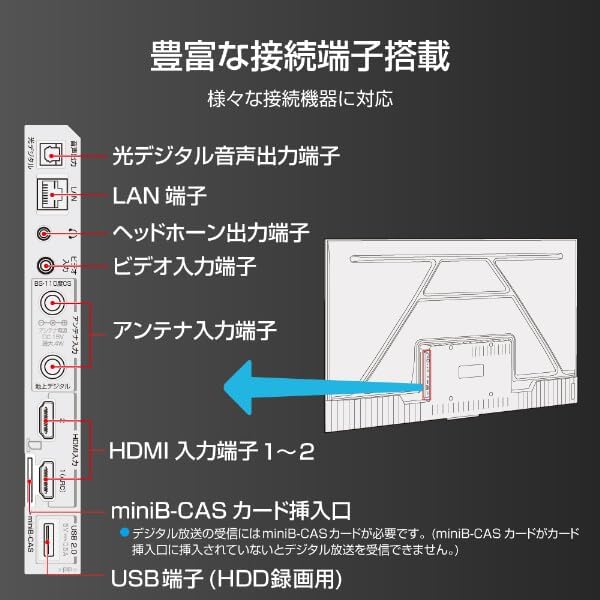
Image: Diagram illustrating the various input and output ports on the back of the TCL 32L5AG TV, including HDMI, USB, LAN, antenna, and audio outputs.
4.4 الإعداد الأولي
After connecting all cables and powering on the TV for the first time, follow the on-screen instructions to complete the initial setup, which includes:
- اختيار اللغة.
- اتصال الشبكة (Wi-Fi أو شبكة LAN سلكية).
- Google account login for Google TV features.
- مسح القنوات للبث التلفزيوني.
5. تعليمات التشغيل
5.1 التشغيل الأساسي للتلفزيون
- تشغيل/إيقاف التشغيل: اضغط على زر الطاقة في جهاز التحكم عن بعد.
- اختيار الإدخال: Use the 'Input' button on the remote to switch between HDMI, TV, and other sources.
- التحكم في مستوى الصوت: استخدم أزرار رفع/خفض الصوت.
- تغيير القناة: Use the 'Channel Up/Down' buttons for broadcast TV.
5.2 ميزات Google TV
Your TCL 32L5AG comes with Google TV, providing a personalized and integrated entertainment experience.
- تصفح المحتوى: The home screen displays recommended content based on your viewing history and preferences from various streaming services.
- Voice Search (OK Google): Press the Google Assistant button on your remote and speak into the microphone to search for movies, shows, or control your TV.
- تطبيقات البث: Access popular services like Netflix, YouTube, Amazon Prime Video, Disney+, Hulu, and more directly from the TV.

Image: Screenshot of the Google TV home screen displaying various streaming applications and content recommendations.
5.3 جهاز Chromecast المدمج
The TV includes Chromecast built-in, allowing you to cast content from your smartphone, tablet, or computer directly to the TV screen.
- تأكد من أن جهازك المحمول والتلفزيون متصلان بنفس شبكة الواي فاي.
- Open a Chromecast-enabled app (e.g., YouTube, Netflix) on your mobile device.
- اضغط على أيقونة الإرسال (
 ) داخل التطبيق.
 - Select your TCL TV from the list of devices to start casting.

Image: A smartphone displaying a video, with an arrow indicating it is casting to the larger TCL TV screen.
6. المميزات
6.1 Algo Engine Lite
The Algo Engine Lite utilizes an advanced image analysis algorithm to enhance picture quality for both broadcast TV and streaming services, delivering a high-quality visual experience.

Image: A close-up of a microchip labeled "Algo Engine Lite" on a circuit board, representing the TV's image processing unit.
6.1.1 Detail Restoration
The Algo Engine effectively suppresses noise around text and edges, as well as wave-like noise in flat image areas. It also intelligently upscales HD and 2K images to 4K resolution, reproducing high-definition visuals.

Image: A split image showing a cityscape. The 'Before' side appears less sharp with more noise, while the 'After' side, processed by Algo Engine, shows improved detail and reduced noise.
6.1.2 Superior Contrast (Micro Dimming)
Equipped with a "Micro Dimming" function, the Algo Engine analyzes image information in detail for each zone. By clearly distinguishing brightness and darkness down to fine details, it renders landscapes with a more realistic sense of depth.

Image: A split image of a night city scene. The 'Without Micro Dimming' side shows less defined lights and shadows, while the 'With Micro Dimming' side exhibits enhanced contrast and clearer details in both bright and dark areas.
6.1.3 Precise Color Management
With 3D color management, the Algo Engine suppresses color gamut loss during color transitions, accurately reproducing tones and colors from dark to bright areas.

Image: A split image showing various food bowls. The 'Before' side has muted or inaccurate colors, while the 'After' side, processed by Algo Engine, displays vibrant and accurate colors with a wider color spectrum indicated by a gradient bar.
6.1.4 Enhanced HDR Expression
The Algo Engine analyzes High Dynamic Range (HDR) images without omission, flexibly adapting to a wide range of brightness levels. It faithfully reproduces the bright and dark areas of the image, supporting HDR10 and HLG formats (1080p only).

Image: A split image of a sunset landscape. The 'Before' side shows less dynamic range, while the 'After' side, processed by Algo Engine, reveals richer colors, brighter highlights, and deeper shadows, enhancing the HDR effect.
6.2 Full HD LCD Display
The TV features a Full HD LCD panel with direct-lit LED backlighting, providing bright and high-quality images across the entire screen. The panel resolution is twice that of standard HD, allowing for detailed visuals and rich content expression.

Image: A split image comparing an HD display to a Full HD display, showing the difference in pixel density and clarity, particularly visible in magnified sections of the image.
6.3 صوت دولبي
Experience clear and powerful sound with Dolby Audio support, enhancing your overall entertainment experience.

Image: A visual representation of sound waves emanating from a waterfall, illustrating the immersive audio experience provided by Dolby Audio.
6.4 Bezel-less Design
The TV features a metal bezel-less frame, maximizing the screen area and enhancing the aesthetic presence in your living space.

صورة: ثلاث لقطات مقرّبة views of the TCL TV, highlighting its thin metal frame and minimal bezels, showcasing the bezel-less design from different angles.
7. المواصفات
| ميزة | وصف |
|---|---|
| ماركة | تي سي إل |
| اسم الموديل | 32L5AG |
| تكنولوجيا العرض | شاشة الكريستال السائل |
| دقة | دقة كاملة عالية (1920 × 1080) |
| معدل التحديث | 120 هرتز |
| نسبة العرض إلى الارتفاع | 1.78:1 |
| نسبة التباين | 4000:1 |
| دعم HDR | النطاق الديناميكي العالي 10 |
| Motion Enhancement Technology | Algo Engine Lite |
| Image Quality Enhancement Technology | Algo Engine |
| تكنولوجيا الاتصال | بلوتوث ، واي فاي |
| Recommended Internet Services | YouTube, Netflix |
| مدخل الصوت | RCA ، بلوتوث |
| تنسيق الإشارة | Composite, HDMI |
| منافذ HDMI | 2 |
| منافذ USB 3.0 | 1 |
| أبعاد المنتج (العمق × العرض × الارتفاع) | 18 × 71.6 × 46.8 سم |
| وزن المنتج | 5 كجم |
| مميزات مكبر الصوت | مكبرات صوت بقوة 10 وات |
| Speaker Channel Configuration | 2.0 |
| واتtage | 65 واط |
| استهلاك الطاقة | 64 كيلو وات ساعة/سنة |
| طريقة التحكم | بعيد |
| تنسيق ترميز الفيديو | H.264, H.265 (HEVC) |
| Release Year / Model Year | 2021 |
| معيار حامل VESA | 100×100 ملم |
8. الصيانة
لضمان طول عمر جهاز التلفزيون الخاص بك وأدائه الأمثل، اتبع إرشادات الصيانة التالية:
- تنظيف الشاشة: امسح الشاشة برفق بقطعة قماش ناعمة وخالية من الوبر. لإزالة البقع الصعبة، امسحها برفق.ampبلّل قطعة القماش بالماء أو بمنظف شاشات متخصص. لا ترش السائل مباشرة على الشاشة.
- تنظيف Casing: استخدم قطعة قماش ناعمة وجافة لمسح شاشة التلفزيونasinز. تجنب استخدام المنظفات أو المذيبات الكاشطة.
- تهوية: Ensure the ventilation openings on the back of the TV are not blocked by dust or objects. Regularly clean any dust accumulation.
- سلك الطاقة: Periodically check the power cord for any damage. If damaged, contact customer support for a replacement.
9. استكشاف الأخطاء وإصلاحها
إذا واجهت مشكلات مع التلفزيون الخاص بك، فراجع المشكلات والحلول الشائعة التالية:
| مشكلة | الحل المحتمل |
|---|---|
| لا يوجد طاقة | تأكد من توصيل سلك الطاقة بإحكام بالتلفزيون ومقبس الكهرباء. جرّب مقبسًا آخر. |
| لا توجد صورة، ولكن الصوت موجود | تأكد من اختيار مصدر الإدخال الصحيح. تحقق من توصيلات الكابلات بالأجهزة الخارجية. |
| لا يوجد صوت ولكن الصورة موجودة | Check volume level and mute settings. Ensure external audio systems are correctly connected and powered on. |
| جهاز التحكم عن بعد لا يعمل | استبدل البطاريات. تأكد من عدم وجود عوائق بين جهاز التحكم عن بُعد ومستشعر الأشعة تحت الحمراء الخاص بالتلفزيون. |
| لا يمكن الاتصال بشبكة Wi-Fi | تحقق من جهاز التوجيه (الراوتر) والمودم. أعد إدخال كلمة مرور الواي فاي. حاول إعادة تشغيل التلفزيون وجهاز التوجيه. |
| Google TV features not working | Ensure you are logged into your Google account and have an active internet connection. |
إذا استمرت المشكلة بعد تجربة هذه الحلول، فيرجى الاتصال بدعم العملاء.
10. الضمان والدعم
Your TCL 32L5AG TV comes with a limited warranty. Please refer to the warranty card included in your product packaging for specific terms and conditions. For technical support, service, or warranty claims, please contact TCL customer service through their official webالموقع أو معلومات الاتصال المقدمة في وثائق الضمان الخاصة بك.
For the latest information and support, visit the official TCL webموقع: www.tcl.com