
Bumpboxx Remixx
Bumpboxx Remixx Retro Bluetooth Boombox
دليل المستخدم
Model: Remixx | Brand: Bumpboxx
مقدمة
Thank you for choosing the Bumpboxx Remixx Retro Bluetooth Boombox. This portable cassette-style speaker combines vintage aesthetics with modern audio technology, offering high-fidelity sound, wireless connectivity, and a range of features for an enhanced listening experience. This manual provides essential information for setting up, operating, maintaining, and troubleshooting your device.
محتويات الحزمة
يرجى التأكد من وجود جميع العناصر في الحزمة الخاصة بك:
- Bumpboxx Remixx Bluetooth Boombox
- ميكروفون لاسلكي
- Carrying Shoulder Strap
- محول الطاقة (للشحن)
- كابل 3.5 مم
- جهاز التحكم عن بعد
المنتج انتهىview
Familiarize yourself with the main components and controls of your Bumpboxx Remixx.
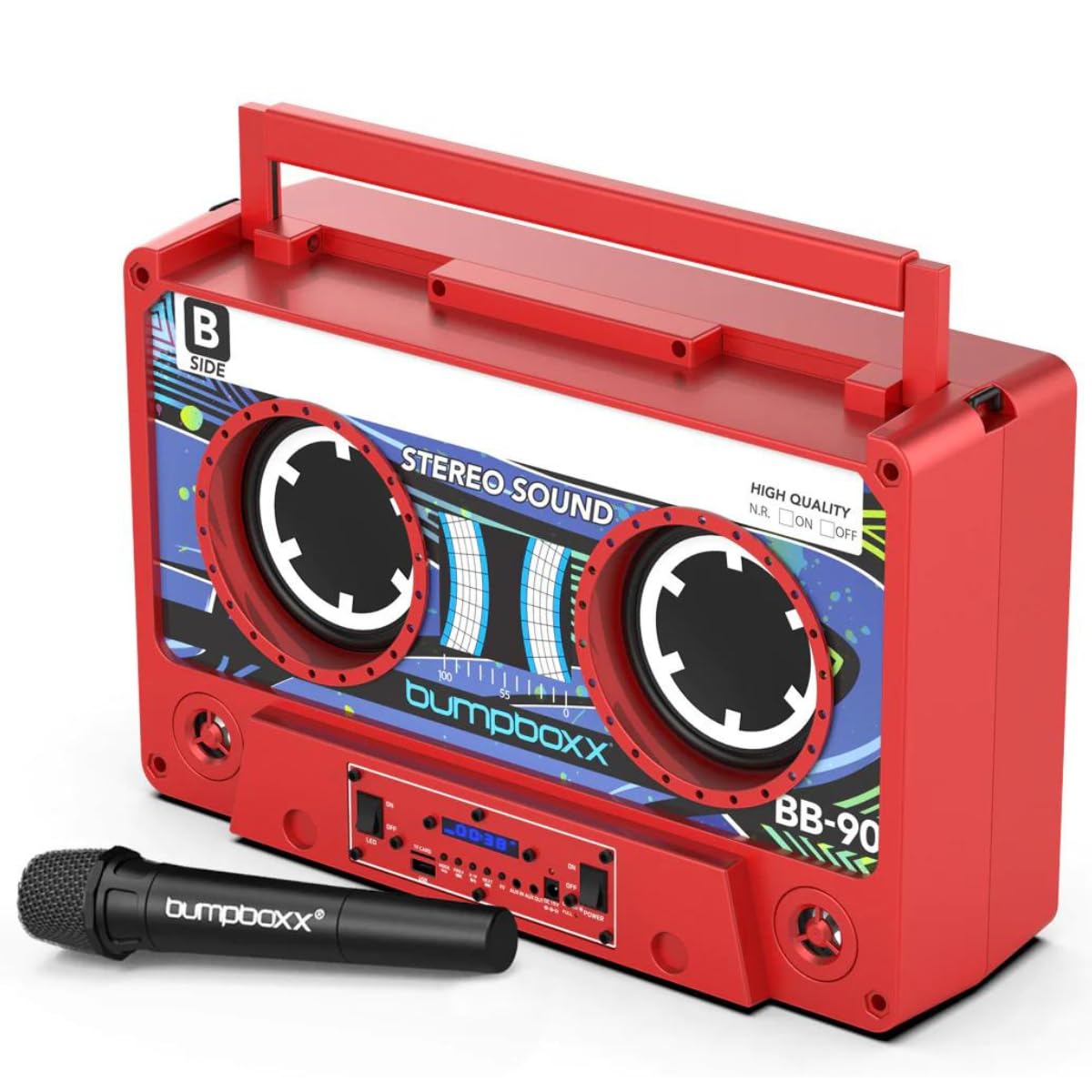
الشكل 1: الجبهة view of the Bumpboxx Remixx Boombox.

Figure 2: Side control panel with various ports and switches.
الضوابط والمنافذ:
- مقبض الصوت: يضبط مستوى إخراج الصوت الإجمالي.
- مقبض الجهير: يضبط مستويات الصوت منخفضة التردد.
- مقبض ثلاثي: يضبط مستويات الصوت عالية التردد.
- مفتاح التشغيل: يقوم بتشغيل/إيقاف تشغيل الجهاز.
- مفتاح LED: Turns the LED lights On/Off.
- منفذ USB: لتشغيل ملفات MP3 files from a USB drive or charging external devices.
- فتحة بطاقة TF: لتشغيل ملفات MP3 files from a TF (MicroSD) card.
- زر الوضع: Switches between input modes (Bluetooth, USB, TF Card, Aux In).
- الأزرار السابقة/التالي: Navigates tracks during playback.
- زر التشغيل/الإيقاف المؤقت: يتحكم في تشغيل الوسائط.
- زر EQ: Cycles through 5 preset equalizer settings.
- مدخل مساعد (3.5 مم): قم بتوصيل أجهزة الصوت الخارجية.
- Aux Out (3.5mm): Connect to other audio systems.
- مدخلات DC 15V: توصيل محول الطاقة للشحن.
- Charge/Full LED Indicators: يعرض حالة شحن البطارية.
يثبت
1. شحن البطارية:
- Connect the provided power adapter to the DC 15V input port on the side of the boombox.
- قم بتوصيل المحول بمأخذ حائط قياسي.
- The 'Charge' indicator LED will illuminate during charging. Once fully charged, the 'Full' indicator LED will light up.
- تتيح لك الشحنة الكاملة الحصول على ما يقارب 12 ساعة من وقت اللعب.
2. تشغيل / إيقاف التشغيل:
- To power on the boombox, slide the قوة التبديل إلى وضع التشغيل.
- لإيقاف التشغيل، قم بتحريك قوة التبديل إلى وضع "إيقاف التشغيل".
تعليمات التشغيل
1. الاقتران بالبلوتوث:
- Power on the Bumpboxx Remixx. The device will automatically enter Bluetooth pairing mode, indicated by a flashing Bluetooth icon on the display.
- على جهازك المحمول (الهاتف الذكي، الجهاز اللوحي، وما إلى ذلك)، قم بتمكين البلوتوث وابحث عن الأجهزة المتاحة.
- Select "Bumpboxx Remixx" from the list of devices.
- Once connected, the Bluetooth icon will stop flashing, and a confirmation tone may sound.
- You can now play audio from your device through the boombox.
2. Auxiliary Input (AUX In):
- Connect one end of the 3.5mm Aux cable to the Aux In port on the boombox.
- قم بتوصيل الطرف الآخر بمقبس سماعة الرأس أو مخرج الصوت الخاص بجهاز الصوت الخارجي.
- اضغط على وضع button on the boombox until "AUX" is displayed.
- التحكم في التشغيل ومستوى الصوت من جهازك الخارجي.
3. USB/TF Card Playback:
- Insert a USB drive into the USB port or a TF (MicroSD) card into the TF Card slot.
- The boombox will automatically switch to USB or TF Card mode and begin playing compatible MP3 fileإذا لم ينجح ذلك، فاضغط على وضع زر لاختيار الإدخال الصحيح.
- استخدم السابق/التالي و تشغيل/إيقاف مؤقت أزرار للتحكم في التشغيل.
4. Wireless Microphone Usage:
- Ensure the wireless microphone is powered on and within range of the boombox.
- The microphone will automatically connect to the boombox.
- Adjust the microphone volume using the dedicated control on the microphone or the boombox (if available).
5. EQ Settings:
- اضغط على EQ button to cycle through the 5 preset equalizer settings (e.g., Pop, Rock, Jazz, Classic, Flat).
- Select the setting that best suits your audio preference.
6. إقران TWS (ستيريو لاسلكي حقيقي):
The Bumpboxx Remixx supports TWS pairing, allowing two Remixx units to connect wirelessly for a stereo sound experience.
- Ensure both Bumpboxx Remixx units are powered on and in Bluetooth mode, but not connected to any other device.
- On one unit (this will be the primary unit), press and hold the وضع اضغط على الزر لعدة ثوانٍ حتى تسمع نغمة الاقتران.
- The two units will automatically connect to each other. A confirmation tone will sound once connected.
- Now, connect your mobile device to the primary Bumpboxx Remixx via Bluetooth as described in step 1.
- Audio will now play in stereo across both units.
Video 1: Demonstrating the Bumpboxx Remixx in action, showcasinج- تصميمه وميزاته.
Video 2: A closer look at the Bumpboxx Remixx speaker, highlighting its audio capabilities.
صيانة
1. التنظيف:
- Wipe the exterior of the boombox with a soft, dry cloth.
- لا تستخدم المنظفات الكاشطة أو الشمع أو المذيبات لأنها قد تؤدي إلى إتلاف الطبقة النهائية.
- حافظ على المنافذ خالية من الغبار والحطام.
2. التخزين:
- Store the boombox in a cool, dry place away from direct sunlight and extreme temperatures.
- في حالة التخزين لفترة طويلة، تأكد من شحن البطارية جزئيًا (حوالي 50٪) لإطالة عمرها الافتراضي.
استكشاف الأخطاء وإصلاحها
لا يوجد طاقة:
- Ensure the power adapter is securely connected to both the boombox and a working power outlet.
- Check if the battery is charged. If not, charge the device for several hours.
- Verify the Power switch is in the 'ON' position.
لا يوجد صوت:
- Increase the volume on both the boombox and your connected audio device.
- Ensure the correct input mode (Bluetooth, AUX, USB, TF Card) is selected.
- إذا كنت تستخدم البلوتوث، فتأكد من إقران الجهاز وتوصيله بشكل صحيح.
- If using AUX, check the cable connection and ensure it is fully inserted.
البلوتوث غير متصل:
- Ensure the boombox is in Bluetooth pairing mode (flashing Bluetooth icon).
- Make sure your mobile device's Bluetooth is enabled and searching for devices.
- Move your mobile device closer to the boombox.
- Try forgetting the device from your mobile device's Bluetooth settings and re-pairing.
- Ensure no other devices are currently connected to the boombox.
تحديد
- اسم الموديل: Remixx
- ماركة: بامب بوكس
- نوع السماعة: مدمج
- تقنية الاتصال: بلوتوث
- وضع إخراج الصوت: ستيريو
- مصدر الطاقة: تعمل بالبطارية (بطارية ليثيوم أيون واحدة متضمنة)
- عمر البطارية: حتى 12 ساعة (قابلة لإعادة الشحن)
- أبعاد المنتج: 17.5 بوصة (طول) × 6.25 بوصة (عرض) × 11.5 بوصة (ارتفاع)
- وزن السلعة: 12.5 رطل
- المميزات الخاصة: Wireless Microphone, 5 EQ Settings, TWS Wireless Pairing, USB/TF MP3 Player, 3.5mm Line In/Line Out
- لون: Electric Red
- مادة: بلاستيك
- طريقة التحكم: اللمس، جهاز تحكم عن بعد
الضمان والدعم
The Bumpboxx Remixx Retro Bluetooth Boombox comes with a ضمان الشركة المصنعة لمدة عامين تغطية عيوب المواد والصناعة.
For warranty claims, technical support, or any questions regarding your product, please contact Bumpboxx customer service through their official webالموقع الإلكتروني أو المتجر الذي تم شراء المنتج منه. يرجى الاحتفاظ بإثبات الشراء للتحقق من صحة الضمان.
Ask a question about this manual
Ask about setup, troubleshooting, compatibility, parts, safety, or missing instructions. Manuals+ will review the question and use this page’s manual context to help answer it.